



Filter
Our members also liked:
4.0/5(28 reviews)
43 %
29 %
18 %
7 %
4 %
Write a user review
Users reviews
 Rapfan
A sound card that does its job!
Published on 01/30/14 at 09:30 (This content has been automatically translated from French)Technical characteristics that have motivated my choice were the two XLR inputs, the headphone input 6.5 in the rear and normal to the front!
But especially the fact that it is a USB sound card! Obviously and 48v phantom power
I use it with my microphone and my computer just!
I have a really normal computer, I have not anything to boast about!
Windows 7 64bit / 4GB RAM / Cpu 2.1GHz
UTILIZATION
I use Cubase and Audacity.
"How many tracks you get record / playback simultaneously? ..."
yet I never had to use it much because I have not really great project to use it!
PLUS drivers are updated!
I have a very good input latency and output latency normal!
GETTING S…Read moreTechnical characteristics that have motivated my choice were the two XLR inputs, the headphone input 6.5 in the rear and normal to the front!
But especially the fact that it is a USB sound card! Obviously and 48v phantom power
I use it with my microphone and my computer just!
I have a really normal computer, I have not anything to boast about!
Windows 7 64bit / 4GB RAM / Cpu 2.1GHz
UTILIZATION
I use Cubase and Audacity.
"How many tracks you get record / playback simultaneously? ..."
yet I never had to use it much because I have not really great project to use it!
PLUS drivers are updated!
I have a very good input latency and output latency normal!
GETTING STARTED
The installation is done with lots and lots of problems especially on Windows 7 64 bit!
It's really a lot of work to succeed in finding the right drivers!
Those who expect to buy it, I warn you: YOU WILL galleys.
"The general configuration is easy?"
Yes, normal!
Have you experienced any incompatibilities?
Yes!
"The manual is clear and sufficient? ..."
It explains 70% say things to know.
OVERALL OPINION
"How long have you use it?"
Since I bought it!
"Have you tried many other models before buying it?"
No!
"What is so special that you like most and least?" "
Cons: difficult to install
The +: Quality and ease of use after installing
With experience:
I do not know if I have enough money to pay me another, so I will not repeat!See less11- stompboxjon
great
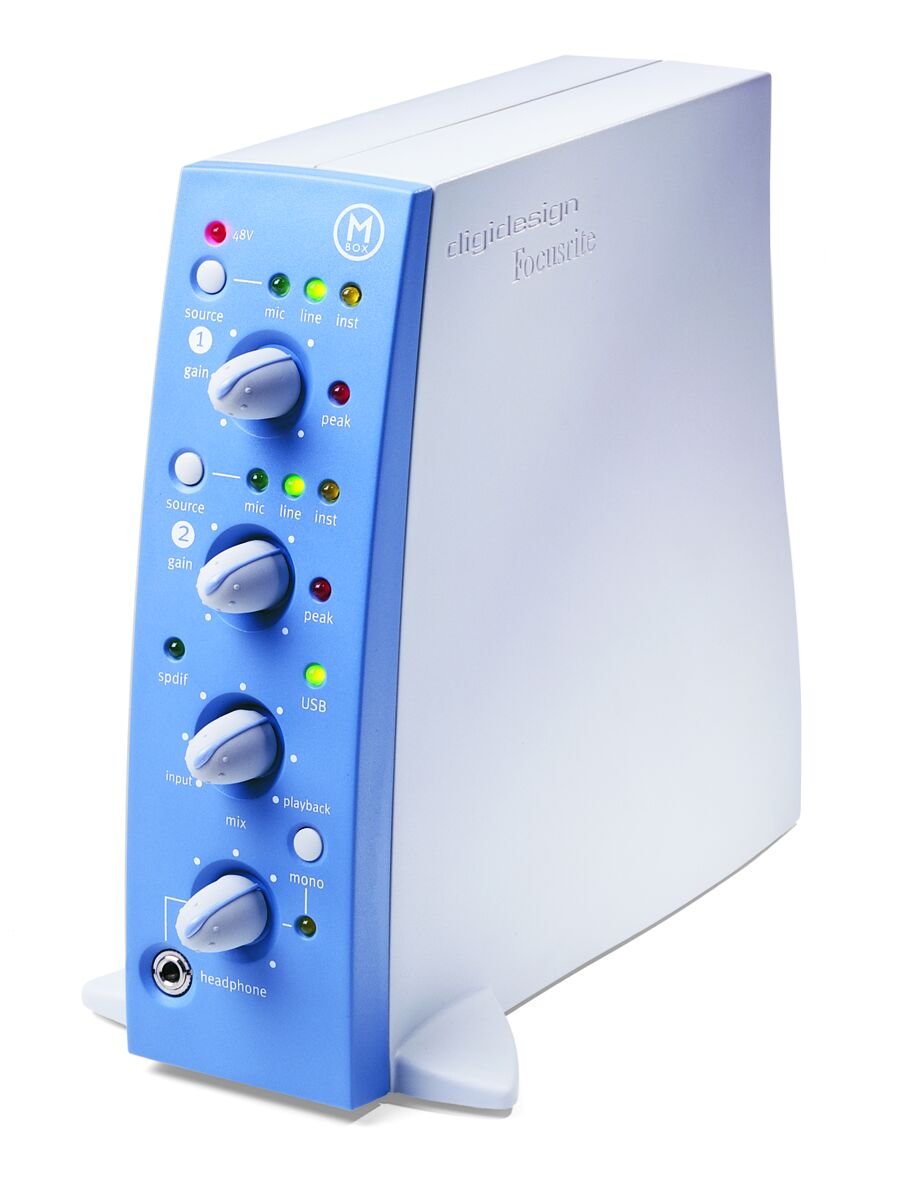
Published on 06/17/12 at 01:11The good thing about the original Mbox is that you can still buy it online now and get it for really cheap since they have came out with the Mbox 2 many years ago. It seems like when they came out with the Mbox 2 everyone got rid of the original Mbox which made the price of it go way down. But its still a great interface and I still use it from time to time. I came remember which pro tools that it came with but I have upgraded pro tools so many times it still continues to work. Even when used in cubase and fl studio you can just use it in about any type of daw that you use.
UTILIZATION
Drivers are very stable and everything works great with it, it plugs into my laptop with a USB…Read moreThe good thing about the original Mbox is that you can still buy it online now and get it for really cheap since they have came out with the Mbox 2 many years ago. It seems like when they came out with the Mbox 2 everyone got rid of the original Mbox which made the price of it go way down. But its still a great interface and I still use it from time to time. I came remember which pro tools that it came with but I have upgraded pro tools so many times it still continues to work. Even when used in cubase and fl studio you can just use it in about any type of daw that you use.
UTILIZATION
Drivers are very stable and everything works great with it, it plugs into my laptop with a USB chord just like the Mbox 2, difference is that the MBOX2 is more of a hassle and cost over twice as much. If you are thinking of getting the Mbox 2 I say you downgrade and save yourself a couple hundred dollars and get the original Mbox and just get a newer version of pro tools and you will save money and be happier in the end.
GETTING STARTED
Setting it up is very easy and is hassle free. There are no issues when running it at all and its very sturdy and wont break on you. I even pack mine up and take it with me a lot of places, I am actually on my second one because the first one got misplaced when I was on a trip, I think I just left in a hotel in the middle of Oklahoma somewhere. This is a very simple interface that can take on some complex jobs I highly recommend it especially with the price that they sell for online now is so low.
OVERALL OPINION
It’s a great interface and I stand by it. Like I said im on my second one and I will get another if I need to. Why not, they cost so little and provide such great quality.
See less00 - MaaxPublished on 10/28/02 at 13:50 (This content has been automatically translated from French)Frankly, the M Box is the best way to get Pro Tools on XP for not too expensive .... around 500.
In addition, it is team of pr-amp Focusrite, which gives it its value.
Otherwise, it is also THE FIRST card digidesign dmonstration that I see on a PC with XP, which is fairly thundering from Digidesign.
It is on that one is faster rev limit and that you want to rev quickly switch to the Digi 002 (very good map which is also a control surface).
Finally, the main default is that the USB connection is reliable and not rev my gard .... contairement the digi 002 in FireWire! (C qd mm but 2000).
UTILIZATION
Finally, a stable system of windows and in. .... too much ....
GETTIN…Read moreFrankly, the M Box is the best way to get Pro Tools on XP for not too expensive .... around 500.
In addition, it is team of pr-amp Focusrite, which gives it its value.
Otherwise, it is also THE FIRST card digidesign dmonstration that I see on a PC with XP, which is fairly thundering from Digidesign.
It is on that one is faster rev limit and that you want to rev quickly switch to the Digi 002 (very good map which is also a control surface).
Finally, the main default is that the USB connection is reliable and not rev my gard .... contairement the digi 002 in FireWire! (C qd mm but 2000).
UTILIZATION
Finally, a stable system of windows and in. .... too much ....
GETTING STARTED
Previous ... see part
OVERALL OPINION
Previous ... see partSee less00 - SoulPedroPublished on 02/09/03 at 06:09 (This content has been automatically translated from French)I must go back a little weird bass notes AWARDED BY THE Previous notice (and unexplained)
CHARACTERISTICS 2 audio I / O, insert effect on each entry, I / O numrique, headphone jack with the possibility of monitoring. Connexin USB to PC
No conexion MIDI
Focusrite Pramplis
The quality converters and pramplis is excellent and the limitation of your system will therefore only quantitative if you want to record more than 2 tracks simultanment.
UTILIZATION
No pb, English software
GETTING STARTED
Trs good stability under XP. The Digidesign website and forum are excellent. A large intertidal ds is the MBox sr it comes with ProTools LE.
The number of EOPS essentially …Read moreI must go back a little weird bass notes AWARDED BY THE Previous notice (and unexplained)
CHARACTERISTICS 2 audio I / O, insert effect on each entry, I / O numrique, headphone jack with the possibility of monitoring. Connexin USB to PC
No conexion MIDI
Focusrite Pramplis
The quality converters and pramplis is excellent and the limitation of your system will therefore only quantitative if you want to record more than 2 tracks simultanment.
UTILIZATION
No pb, English software
GETTING STARTED
Trs good stability under XP. The Digidesign website and forum are excellent. A large intertidal ds is the MBox sr it comes with ProTools LE.
The number of EOPS essentially depends on the configuration, as the max of 32 audio tracks.
OVERALL OPINION
I use it recently (1 month) but I find it perfectly fits my needs (and my budget ...). The report quality is exceptional prices (600 for the card and software ...), space and USB connectivity allow me to use it with my laptop to record the outside.See less00  jplesaintPublished on 06/13/03 at 09:39 (This content has been automatically translated from French)IBook G3 700Mhz with OS 9.2 with 384 RAM, 60 GB HDD FW 7200 rev / min, Pro Tools LE, mbox, table mix 14/2/2, prampli 2 channel lights, compressors, mic: Rode NT2 Sennheiser 745, msp 5, engraver and tsouintsouin tralala.
I used to take her scratching electric, acoustic, and voice. I Ramna sessions since I registered for the School of rework my mixes.
I took it because it made the Focusrite pramplis (in fact, only the micro prampli seems it ...), because USB as well as the price of gear for a drisoire quality inputs and outputs for symtriques mias ESPECIALLY for Pro Tools LE comes with. The mbox ensures trs well as pro tools, despite minor problems when logging in pro tools. regret not be…Read moreIBook G3 700Mhz with OS 9.2 with 384 RAM, 60 GB HDD FW 7200 rev / min, Pro Tools LE, mbox, table mix 14/2/2, prampli 2 channel lights, compressors, mic: Rode NT2 Sennheiser 745, msp 5, engraver and tsouintsouin tralala.
I used to take her scratching electric, acoustic, and voice. I Ramna sessions since I registered for the School of rework my mixes.
I took it because it made the Focusrite pramplis (in fact, only the micro prampli seems it ...), because USB as well as the price of gear for a drisoire quality inputs and outputs for symtriques mias ESPECIALLY for Pro Tools LE comes with. The mbox ensures trs well as pro tools, despite minor problems when logging in pro tools. regret not being able untiliser simultanment analog inputs and outputs and numriques, which would have four inputs and outputs simultaneously but are not too quirk (gnagnagna. ..)
UTILIZATION
Installation without problem on just properly configure the mac (or pc, nose hair) for pro tools.
only minor problems when connecting the sub pro tools mbox who do recognize that the second or troisime attempt. Manuel knows well enough if pro tools with walking track for configuring the computer for "profane" Pro Tools (gasp !!!), must get hold leg (mouse ...), but the 500 pages in English. pdf will may be the case ...
GETTING STARTED
Ultra-stable drivers and put on free days by downloading digidesign.com. We get buffers sizes ranging from 256 (for decision) 1024 (for miskageux.) I have not had the opportunity to read simultanment more than a dozen songs, but, with all his there, the problem would come from the computer it even more than the mbox (ah, the faitelle boujoux is powered via USB power cable.).
OVERALL OPINION
I have been using no longer trs, ie three or four months, but it seems stable trs, trs convert the sound quality good and I do not use the circuit to insert a table with of mix. I recommend all who do or will not catch ncessitant multiple entries (such as drummers, all Manir, they are boring drummers, they have to always twenty-six miles microphones! !) or those looking for a pro card for CHRE not mix, for example.
after three months of use, I can not possibly be trs be objective, but compared to other cards in the same range, I would do the same choice, although that it may not be effective with another editor (Cubase, Logic, etc ...) and is dpourvue port noon, but € 600 new, the quality is more important than quantity ...See less00- virgule noeufPublished on 09/08/03 at 00:11 (This content has been automatically translated from French)I bought it for the fame of pro tools
I use it for uses simple
I use a imac
I return microphones, audio apareils any guitar or jenre
UTILIZATION
I had a huge problem on the mac since i version does not work.
and the more I falu buy a new version because the manufacturer would not give me the correct version falait it I buy it and so the manufacturer has a big head!
GETTING STARTED
If not for the rest of the operation is normal but I was not impressed more than that.
OVERALL OPINION
I use it for 9 months but less and less as a result I changed the story and thus the OFTWARE interface.
I use in my job because we all work on pro tools.
in terms of p…Read moreI bought it for the fame of pro tools
I use it for uses simple
I use a imac
I return microphones, audio apareils any guitar or jenre
UTILIZATION
I had a huge problem on the mac since i version does not work.
and the more I falu buy a new version because the manufacturer would not give me the correct version falait it I buy it and so the manufacturer has a big head!
GETTING STARTED
If not for the rest of the operation is normal but I was not impressed more than that.
OVERALL OPINION
I use it for 9 months but less and less as a result I changed the story and thus the OFTWARE interface.
I use in my job because we all work on pro tools.
in terms of price rappoert Calita I find therefore that the flies
and I never remake this purchaseSee less00  Anonymous Published on 09/02/03 at 07:41 (This content has been automatically translated from French)I use the M-Box with an I-book G3 800mhz, I took it because the only c'tait Systm pro tools can prs affordable (less than 1500) and running on How much is portable 48khz limit (the limits of USB?).
UTILIZATION
From memory, I have not had the problem with the installation, mac, it must be said that the digidesign hardware works fine under Apple, on the other hand I tried to make it work on my pc (AMD 1700 +, motherboard via ,...), I want that this is not a config trs advice but once it works once a plant, I limit prf that a re not working at all! Ct manual, it is better to know pro tools, in fact the manual is almost non-existent, even when it's a shame ....
GETTING STARTED[/…Read moreI use the M-Box with an I-book G3 800mhz, I took it because the only c'tait Systm pro tools can prs affordable (less than 1500) and running on How much is portable 48khz limit (the limits of USB?).
UTILIZATION
From memory, I have not had the problem with the installation, mac, it must be said that the digidesign hardware works fine under Apple, on the other hand I tried to make it work on my pc (AMD 1700 +, motherboard via ,...), I want that this is not a config trs advice but once it works once a plant, I limit prf that a re not working at all! Ct manual, it is better to know pro tools, in fact the manual is almost non-existent, even when it's a shame ....
GETTING STARTED
I use the M-Box for virtually everything, recording orchestra, band, trs is "strong" in acoustic recording, thanks to pramps Focusrite trs that sound good. In fact it'll rev much as we need no more than two tracks for recording, the sound is really supper (at least much better than the sound of that team Honntech my PC, even when running 96khz) and I must admit that to a band directly into the computer with a small bag of hardware is better than the DAT, with pramps above, besides the concert should not last more than 120min ... (It has the advantage of DTD!). He may be accused of being occasionally unstable (for connection, for example) but when you taste the incessant crashes of Windows, we find that it's nothing. And then pro tools, I think there is nothing better in audio.
OVERALL OPINION
I have been using a can less than a year, and I think has worth for those who only audio and not using more than two tracks for recording. A choice I reselect the M-Box without hsiter, except may be for Digi 002, but it is more expensive.See less00- LowranPublished on 10/07/03 at 03:04 (This content has been automatically translated from French)I bought it for Protools and 2 pramp Focusrite.
Use of fixed station and a portable PC and Mac, recording and edition, this card transportrer and very practical. USB connectivity does not make proper rere cause latency.
UTILIZATION
Trs simple install, I had no problem on PC and Mac users.
GETTING STARTED
The big problem of this card comes from its USB connection, which causes latency in audble rere. Of course there is the option zero latency, but the direct left and right protools is not a solution Grable. Dsagrments the only soft cot come from Digidesign that provides the service with minimum their LE version: trs bad plugin, mp3 and OMF export in trial, all home pa…Read moreI bought it for Protools and 2 pramp Focusrite.
Use of fixed station and a portable PC and Mac, recording and edition, this card transportrer and very practical. USB connectivity does not make proper rere cause latency.
UTILIZATION
Trs simple install, I had no problem on PC and Mac users.
GETTING STARTED
The big problem of this card comes from its USB connection, which causes latency in audble rere. Of course there is the option zero latency, but the direct left and right protools is not a solution Grable. Dsagrments the only soft cot come from Digidesign that provides the service with minimum their LE version: trs bad plugin, mp3 and OMF export in trial, all home pay.
OVERALL OPINION
was a year that I use and I think I have done the trick. is a card with a good value quality price trs but remains limited in its use. it is perfect if you want a card that does not take place and allows you to store your ideas in any situation but n'esprer rsultat not get a pro.See less00 - GetaurelPublished on 11/20/04 at 13:46 (This content has been automatically translated from French)I bought it was late to work with me on pro tools sessions recorded in the studio ... The value for money has convinced me ...
I use a Power PC G5 dual processor 1.8 GHz Apple (MAC OS X )....
This is the first time I met any problems with MIDI sync my MPC 3000 ... The M box does not work when plugged into my USB hub BELKIN ... I absolutely connect it to a USB my Mac ...
UTILIZATION
No worries to install ....
PLUG & PLAY!
GETTING STARTED
Protools works very well ....
Noted that the version of Reason comes with the m box demos are inadequate for serious work ...
You can not create multiple tracks of the same plug, you will find a full version of Reason. IMPORTA…Read moreI bought it was late to work with me on pro tools sessions recorded in the studio ... The value for money has convinced me ...
I use a Power PC G5 dual processor 1.8 GHz Apple (MAC OS X )....
This is the first time I met any problems with MIDI sync my MPC 3000 ... The M box does not work when plugged into my USB hub BELKIN ... I absolutely connect it to a USB my Mac ...
UTILIZATION
No worries to install ....
PLUG & PLAY!
GETTING STARTED
Protools works very well ....
Noted that the version of Reason comes with the m box demos are inadequate for serious work ...
You can not create multiple tracks of the same plug, you will find a full version of Reason. IMPORTANT REASON has no real interest without RECYCLE!
OVERALL OPINION
I use at home to make arrangements for sessions recorded on other Pro Tools more efficient ... The return of the transfer is largely satisfactory ...
As against the physical mixing amateurs are quickly lost ... They are just a stereo output meters on the Box is a shame!
I think it really sucks that digidesign does not sell out for an extension of a traditional mix ...
Since I am very conscientious about the mix, it is difficult to envisage a final mix at home except on prods minimal electro ...See less00 - djamyxxPublished on 02/08/05 at 09:53 (This content has been automatically translated from French)I chose one for protools mbox, because it is an opportunity not to be too expensive, and that I falait protools order to work in teams with colegues who have already protools. The mbox has between 2 and ca me more than enough for my little home studio. I am a bass player so the Focusrite preamp, and AmpliTube was the welcome.
My machine: a PC with Win XP. Proc 3.4GHz P4, 1GB RAM, 400 GB hard drive, msi motherboard with intel 915P chipset (does not work! I would talk later.)
UTILIZATION
Installation of departure is made without problems, until the error 6086. Two months after it is perceived that the Intel 915P chipset was not compatible, so that when I buy the product this was …Read moreI chose one for protools mbox, because it is an opportunity not to be too expensive, and that I falait protools order to work in teams with colegues who have already protools. The mbox has between 2 and ca me more than enough for my little home studio. I am a bass player so the Focusrite preamp, and AmpliTube was the welcome.
My machine: a PC with Win XP. Proc 3.4GHz P4, 1GB RAM, 400 GB hard drive, msi motherboard with intel 915P chipset (does not work! I would talk later.)
UTILIZATION
Installation of departure is made without problems, until the error 6086. Two months after it is perceived that the Intel 915P chipset was not compatible, so that when I buy the product this was mentioned nowhere! The other person is bcp problems with error 9128, 9129, etc ...
Digidesign is a great brand and it is regrettable they have not n'entisipe technology has come.
The manual is sufficient qd it works the first time. the installation is not all rest, when to disable stuff ds bios it starts to get a big installs and anyone who can not not do it!
GETTING STARTED
My mbox almost works correctly from a USB 2.0 hub is located between it and my computer. Tjs I await the update for the Intel 915P chipset, it's been almost 5 months I have this problem.
ASIO is quite convenient.
Latency is huge if the buffer is a 1024, and 128 I do not record anything that is inaudible. The hub must be free to sth because I get a record normally j'usqu'a my famous 6086 error.
I often use ProTools and Reason.
The plug-in book with protools like AmpliTube, and the other is annoying tendency to send parasites when you are not registered, or demo. A vieu background noise is constantly suggested due to USB 1.0.
OVERALL OPINION
I've had it 5 months, I do it is portable and compact, the all in one, the preamps.
The least is that I have already said previously.
I had a maxi studio isis with logic audio pro before that worked 100 times better now in capture and playback, ca does not worth on the mbox in technology. I try one time a digi 001, which is one of the best stuff from Digidesign.
Quality price ratio, qd nothing to say it works, if not a bit expensive!
With the experience I do not refer all of this choice, but it would be more expensive!See less00  blacksunrisePublished on 03/20/05 at 05:05 (This content has been automatically translated from French)Well I will not go back on CHARACTERISTICS.
I zicos in several groups and very practical for me mbox work of prprod, ideas, and mixes in short, I m'clate.
good, contrary to what is being said everywhere I config a PC that works to hell
I brought up a PC to a expr
P4 2.8 512 RAM + 80 + 1HDD partitioned 20 GB for the operating system and 60 GB for audio, small motherboard MSI, ASIO driver, I use it with the PT version 6.1. Super stable, crash o No need to stick three hard disks !!!!!!
UTILIZATION
Installation very easy, even when I made the bios by rgl friend that I mount the pc, because you have to follow the recommendation of digi if we want all this to be stable.
No …Read moreWell I will not go back on CHARACTERISTICS.
I zicos in several groups and very practical for me mbox work of prprod, ideas, and mixes in short, I m'clate.
good, contrary to what is being said everywhere I config a PC that works to hell
I brought up a PC to a expr
P4 2.8 512 RAM + 80 + 1HDD partitioned 20 GB for the operating system and 60 GB for audio, small motherboard MSI, ASIO driver, I use it with the PT version 6.1. Super stable, crash o No need to stick three hard disks !!!!!!
UTILIZATION
Installation very easy, even when I made the bios by rgl friend that I mount the pc, because you have to follow the recommendation of digi if we want all this to be stable.
No incompatibility of the components I chose fairly simple to make body ATI 9200 SE (no games vidos so!) MSI 848P Neo, Maxtor 80 GB IDE 2MB buffer, samsung 3200 ram , etc ...
no pb config
GETTING STARTED
Driver super stable, it's been a year since I have and I never made any update or pro tools or asio, it works well and trs is sufficient for me.
I use 6.1 with Plug Pt waves gold bundle, tracks and AmpliTube
thanks to the latency is 0 knob trs is doing well, no difficulty in making a guitar with a rhythm all is audible (cl'essentiel) and its fate if it directly what knob RULES.
I record two tracks that simultanment normal for that mbox has 2 entries, I read 24 runs against carefree with lots of waves plug (bcp C4, tracks, L1, super tap, rverb, etc. ) and I only have 512 of ram, what will it be when I have 1GB!
OVERALL OPINION
For a little less than a year.
I love this card and Pro Tools is a software for all homes rve studio owners. I love the simplicity of handling, the quality.
What I like least are the pramps who are poor in micro, so I will add a double tube type pramp bluetubde DP and everything will be nickel.
I have not tried before, I fell in love with Ptools a friend who had the digi 001.
The report price is reasonable quality especially with the software provided with the card Ptools.
I exprience with the remake that choice plutt a 2 X!!
Mac users do not have a tre Envision, if all his stuff well orgle PC has run really well!
jer is September 1 of acause pramps who boast of Focusrite be, but have nothing imprssionant.See less00- j_pi_rPublished on 05/11/05 at 07:26 (This content has been automatically translated from French)I use the mbox with a Power Mac G4 dual processor and 768 ram. I use it primarily for recording vocals and guitars. I chose the hardware for pro tools with which I had the opportunity to work. has seemed to be the solution intermdiaire my home studio. a good sound card with a software pro.
UTILIZATION
Very easy installation, the user manual supplied with trs is clear. The mbox is easy to configure via pro tools but I never tried to use it with other software. until the no incompatibility with the machine.
GETTING STARTED
Virtually no latency with Pro Tools. I record two tracks with no problem simultaneously.
OVERALL OPINION
In short, a good buy for anyone wh…Read moreI use the mbox with a Power Mac G4 dual processor and 768 ram. I use it primarily for recording vocals and guitars. I chose the hardware for pro tools with which I had the opportunity to work. has seemed to be the solution intermdiaire my home studio. a good sound card with a software pro.
UTILIZATION
Very easy installation, the user manual supplied with trs is clear. The mbox is easy to configure via pro tools but I never tried to use it with other software. until the no incompatibility with the machine.
GETTING STARTED
Virtually no latency with Pro Tools. I record two tracks with no problem simultaneously.
OVERALL OPINION
In short, a good buy for anyone who wants to have a good audio interface and at the same time work on a software pro (only Pro Tools LE but runs really well when same).See less00 - mr_matthieuPublished on 06/04/05 at 08:46 (This content has been automatically translated from French)This is the Focusrite pre-amp that have motivated my choice, with a rack of machines external effect, it is a caret with his pre-amp. I work on an AMD Athlon 3000 + 1GB ram and cubase sx2.0.
UTILIZATION
Installation without problem except that Windows XP does not recognize the entries in the Control Panel but after the driver install that ASIO am cubase or pro-tool, a work so ...
For the manual, a translation in French would be welcome but hey who says Home Studio also said including English!.
GETTING STARTED
Lgrement latency is longer than on cubase pro-tool (normal pro-tool is Digidesign).
Otherwise the driver is stable and the update ....
I use cubase sx2.0 I…Read moreThis is the Focusrite pre-amp that have motivated my choice, with a rack of machines external effect, it is a caret with his pre-amp. I work on an AMD Athlon 3000 + 1GB ram and cubase sx2.0.
UTILIZATION
Installation without problem except that Windows XP does not recognize the entries in the Control Panel but after the driver install that ASIO am cubase or pro-tool, a work so ...
For the manual, a translation in French would be welcome but hey who says Home Studio also said including English!.
GETTING STARTED
Lgrement latency is longer than on cubase pro-tool (normal pro-tool is Digidesign).
Otherwise the driver is stable and the update ....
I use cubase sx2.0 I find more suited to the Home Studio.
OVERALL OPINION
I use it for a week, I like the interface, I plug in a pci prfr which quickly overload the USB ports.
Yes, I tried two other models dj.
Report quality I find quite competitive prices.
With exprience, I think I Achteras plutt than buying directly from the small stuff and have resell each time.See less00 - _PuresoundPublished on 08/16/05 at 06:34 (This content has been automatically translated from French)-From the pc 0404 emu and I wanted to pass to the next level in terms of quality and simplicit.De more I needed a mobile system.
I use an iBook G4 with 1.33 GHz and 1.5 GB RAM
I use it with a guitar, microphone and parralele nova with a midi keyboard and Reason 3 for all that is rhythmic and the slick
UTILIZATION
No-bp is especially sice not forget to install the upgrade 6.9.2cs3 in addition to the update of version 6.9.2. Otherwise its output pb with Tiger 10.4.2
-No
C-walk to work on the above simple, effective and no configuration pb
-The manual is downloadable in English but in french on the Digidesign website
GETTING STARTED
Drivers stable and updat…Read more-From the pc 0404 emu and I wanted to pass to the next level in terms of quality and simplicit.De more I needed a mobile system.
I use an iBook G4 with 1.33 GHz and 1.5 GB RAM
I use it with a guitar, microphone and parralele nova with a midi keyboard and Reason 3 for all that is rhythmic and the slick
UTILIZATION
No-bp is especially sice not forget to install the upgrade 6.9.2cs3 in addition to the update of version 6.9.2. Otherwise its output pb with Tiger 10.4.2
-No
C-walk to work on the above simple, effective and no configuration pb
-The manual is downloadable in English but in french on the Digidesign website
GETTING STARTED
Drivers stable and updated often. Stability copy.
-Used with Protools 6.9
Zero-latency
The nb-track depends on your config and the number of plug-in used simultaneously (these are real-time RTAS plugin)
OVERALL OPINION
I use it for 1 week no problems except that it should be a little thinner.
Trs good quality-price ratio (new 400)See less00 - Pape armandPublished on 11/29/05 at 14:23 (This content has been automatically translated from French)Frankly .... ca fast breaks that foo.c is not robust.
The thing is made of plastic or something quoi.Le USB port is very fragile.
The peti headphone hole is super fragile and break very quickly if utiliseee;
No sound is not bad as a lot of sound card, it does not receive what you give.
If the sound of the guitar is good, it prend.Si the sound is awful, c left for the gallery.
UTILIZATION
The installation depends on chance you have.
In mac or windows, consider running a Norton antivirus off.Sinon ....... guaranteed crash ...
GETTING STARTED
In c mac is ok ... no drivers and no latency
OVERALL OPINION
I used the last 6 months. I find it expensive ...…Read moreFrankly .... ca fast breaks that foo.c is not robust.
The thing is made of plastic or something quoi.Le USB port is very fragile.
The peti headphone hole is super fragile and break very quickly if utiliseee;
No sound is not bad as a lot of sound card, it does not receive what you give.
If the sound of the guitar is good, it prend.Si the sound is awful, c left for the gallery.
UTILIZATION
The installation depends on chance you have.
In mac or windows, consider running a Norton antivirus off.Sinon ....... guaranteed crash ...
GETTING STARTED
In c mac is ok ... no drivers and no latency
OVERALL OPINION
I used the last 6 months. I find it expensive .....See less00
- 1
- 2