• Options
All Studio: Home & Pro Computer Music Guitar & Bass Drums Electronic Instruments DJ Gear PA & Live Sound Lighting

Product Go to the parent category BIAS Peak Pro 6

Category:
Digital Audio Editors
Brand:
BIAS View website
Distributor:
N/A See all
Public price :
N/A
Avg used price: Learn more...
N/A
 
  • Products
  • News items
  • Media files
  • Tests
  • Articles
  • Tutorials
  • FAQ & Tips
  • User reviews
  • Prices
  • Classifieds
  • Forums
  • ^
Click on one of the icons above to access the different content & services related to the product BIAS Peak Pro 6.

News items list BIAS Peak Pro 6

BIAS Updates Peak & SoundSoap
By kon-tiki on 11/20/2008
BIAS has updated Peak (Pro & LE) to v6.0.4 and SoundSoap Pro to v1.2.1.
Issues resolved in Peak Pro v6.0.4:

  • Add support for transferring recordings from iProRecorder via WiFi.
  • Fixed a problem where CD-TEXT in a DDP fileset containing accented characters could have those characters missing on discs produced from that DDP fileset.
  • Fixed a problem in which Playlist output could contain a burst of noise (i.e., in bounced files or burned audio CDs).
  • Fixed a problem in which saving Broadcast WAV dual mono assets could hang Peak.
  • Fixed a problem where Peak could hang after clicking the Continue button when dismissing an FTP transfer error during podcast publishing.
  • Fixed a problem where Peak could get stuck in a loop when simultaneously auditioning in the Playlist and double-clicking in the Audio Document Overview.
  • Fixed a problem where choosing certain ImpulseVerb Impulses could result in an error dialog being displayed.
  • Fixed a problem in the Playlist, where reordering Regions that contain cross-fades could result in break point envelopes not being reset properly, and Pauses being inserted between reordered events.
  • Fixed a problem where Peak could crash while trying to create a new Playlist.
  • Fixed a problem where files selected in Finder's column view and also open in Peak cannot be saved.
  • Fixed a problem in the Japanese localized version of Peak, where the Auto-Adjust Bounce for Latency Item was missing from the Options menu.
  • Fixed a problem where scrubbing would not loop properly if output volume was lowered.


New in SoundSoap Pro v1.2.1:

  • Scroll-wheel mouse control of knobs, sliders, and numerical fields.

Fixes in SoundSoap Pro v1.2.1:

    * Improved efficiency for better general performance.
  • Knobs are now rotated using a vertical gesture instead of circular.
  • Fixed a spectogram redraw problem in the RTAS version.
  • Improved rendering times in Vegas 5.
  • Fixed a problem where clicking could occur upon audio playback when used in Vegas 5.0.
  • Improved default broadband noise learning characteristics.
  • Fixed a problem where graphic redraws in Wavelab could be very slow on a low-end PC.
  • Fixed a problem where SoundSoap Pro's user interface activity could stop when the mouse button was held down on the user interface of the host program.
  • Fixed a graphics problem that could occur when other floating interface windows moved over the SoundSoap Pro user interface.
  • Fixed a problem where Broadband Threshold sliders are not clickable after learning noise on a silent section of an audio asset.
  • Fixed a problem where latency was not being compensated in Nuendo 2.
  • Fixed a problem where SoundSoap Pro would only learn noise from the left channel.
  • Fixed a problem in the RTAS/AS edition, where loading SoundSoap Pro after the HASP authorization key has been removed and reinserted could cause a crash.
  • Fixed a problem in the VST edition, where controls would not respond in some hosts.
  • Fixed a problem where SoundSoap Pro could cause Master Perfection Suite plug-ins to fail scan on some hosts.
  • Fixed a problem where SoundSoap Pro would not install on Windows XP 64 Edition.
  • Clarified error messages that are presented when a SoundSoap Pro process fails.
  • Enhanced edit field behavior – double clicking in editable fields now selects entire field.
  • Fixed a problem in the RTAS/AS edition where the CPU could spike when playback is stopped.
  • Fixed a problem where hiding and showing SoundSoap Pro would show the Launch Tab – instead of the last tab selected.
  • Improved granularity of movement on knobs and Broadband noise reduction sliders when controlled with a mouse wheel.
  • Fixed a problem where "Saving As" in SoundForge 9 could display an error message.
  • Fixed a problem where non-admin users could Authorize and Deauthorize SoundSoap Pro (and other BIAS products).

Associated item(s)
Share content

Read more

[Musikmesse] BIAS shipping Peak Pro 6
By kon-tiki on 03/12/2008
At Musikmesse, BIAS has announced that it has begun shipping Peak Pro 6 - a major new upgrade to the pro audio editing, processing, mastering and delivery software for Mac OS X.
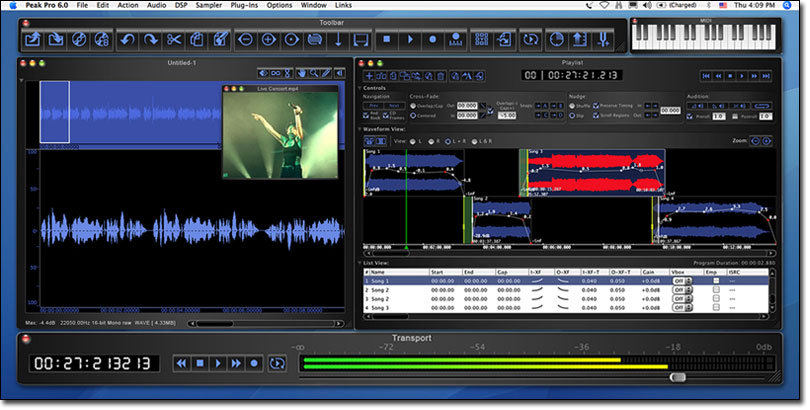
BIAS says, Peak Pro 6Peak Pro 6 offers many new features, including an enhanced playlist with advanced functionality including new cross-fade options and volume envelopes, new DSP sound design features, editing and delivery enhancements, user interface improvements and more.

Jason E. Davies, VP Sales & Marketing for BIAS said, "We're thrilled to release version 6 of Peak Pro. Both existing Peak users and new customers will agree that adding Peak Pro 6 to their digital audio toolset offers even more features and benefits than ever before. Whether you need to record and master audio directly to CD, design sounds, sample libraries and loops, or save time processing and delivering high quality audio, Peak Pro 6 is a must-have companion for anyone working with digital audio on a Mac."

New Features in Peak Pro 6

Playlist Editing & Mastering

  • Mastering & "Classical Editing" cross-fade modes: Overlap/Gap & Centered cross-fades.
  • Volume envelopes: edit volumes across entire regions, fades & cross-fades.
  • Custom default x-fades: create, save & automatically apply your favorite x-fade shapes.
  • New controls: pre/post roll audition, insert new event at play-head, edit sync between source document and region & more.
  • Playlist waveform zooming tools: zoom to sample level, auto-zoom to cross-fade, zoom out all the way.

Editing, Processing & Sound Design Power

  • Cache in RAM: RAM-based editing.
  • Perpetual Looper DSP: designed to ensure "beat-free" sustained loops on monophonic sources

libraries.
  • Voiceover Ducking DSP: dynamically lowers music level during voice over.
  • Change Pitch & Convolve Envelope: apply dynamic changes over time.
  • Change Duration options: algorithmic selection for optimizing results with vocals or musical content.
  • Vbox cross-synthesis link: mix, convolve, vocode, modulate & magnitude multiply virtual instruments, audio, effects & live input for creative sound design.
  • Advanced dither modeling system: emulation of most popular dithering technologies


User Interface Enhancements

  • new user interface - includes global contrast control, magnetic windows and more
  • Vbox MIDI channel mapping, enhanced preset control & more.
  • Custom playlist user interface: hide/show cross-fade controls & more.
  • High-resolution meters: logarithmic metering with user configurable standard calibrations.
  • Support for Frontier Design's Tranzport wireless remote controller (contact BIAS for additional control surface compatibility info)


Multiple Delivery Tools

  • PQ sheet/text export: custom playlist reports with durations, index points, CD-TEXT info, notes, & more. Print, save to PDF, or export as a tab-delimited file.
  • export audio documents or playlists directly to iTunes.
  • Drag & drop audio between iTunes & Peak playlists.
  • Metadata support: read and write "tags" (artist, album, etc.) for major file types.
  • Author & upload audio podcasts directly from Peak (.Mac/FTP).
  • Default Save As: set preferred file type, bit depth & compression.
  • Save as MP2 & FLAC file formats.


Also includes the Peak Pro Production Pack (over $300 value)

  • BIAS Reveal LE: suite of 7 audio analysis tools.
  • BIAS SoundSoap LE: audio cleaning solution.
  • BIAS Freq-4: 4 band paragraphic EQ.
  • BIAS Sqweez-1: compressor/limiter/expander.
  • BIAS Vbox 3: plug-in routing matrix.
  • WireTap Pro: capture Internet and system audio with no loss of quality or additional cable connections.
  • SFX Machine LT: real-time VST plug-in with 21 effects.
  • 32 VST effects (delay, limiter, vocoder, de-ess, tone generator, and more) from Maxim Digital Audio.
  • Hundreds of top quality audio loops from PowerFX.
  • 100+ sound effects from Hollywood Edge.
  • 1 year free membership from Broadjam.com - online promotional tools for musicians.
  • AMG's "ONE" sample player: real time sample playback instrument featuring a limited selection of loop content.
  • 100 production elements from Sound Ideas.


Pricing and Availability

  • Peak Pro 6 is available now for $599 (MSRP) through authorized BIAS resellers and distributors worldwide and directly from BIAS.
  • Peak Pro XT 6 (includes Peak Pro 6, SoundSoap & SoundSoap Pro, Master Perfection Suite plus DDP 2.0 Export (new), will be available for $1199 (MSRP).
Associated item(s)
Share content

Read more

  • Page: 1