All Studio: Home & Pro Computer Music Guitar & Bass Drums Electronic Instruments DJ Gear PA & Live Sound Lighting

Digidesign Return to the list of brands View website

  • Products
  • News items
  • Media files
  • Tests
  • Articles
  • Tutorials
  • FAQ & Tips
  • User reviews
  • Prices
  • Classifieds
  • Forums
  • ^
Click on one of the icons above to access the different content & services related to the brand Digidesign.

List of user reviews Digidesign

Write a user review
Product Digidesign Reverb One By moosers on 11/16/2009 Music is my profession
> Getting Started 9/10
I didn't have any problems of any type while installing Digidesign's Reverb One.  The whole process didn't take long as the steps were the same that are seen while installing most plug-ins.  There weren't any compatibility issues between this plug-in and my system and the interface of the software is also easy to understand.  The plug-in has a slew of sections including ones for master mix, chorus, dynamics, reverb, and early reflections.  Of course the reverb section is the most in depth and has the most parameters.  The plug-in also has metering for EQ, color, and contour.  I haven't seen the manual for this plug-in so I can't say if it would be of help or not to have it around.
> Suitability/Performance 9/10
While the Digidesign Reverb One plug-in will take up some processing power, I've never had a problem running it on my system at all.  I run the plug-in on a Mac Book Pro that has a 2.2 Ghz Intel Core 2 Duo processor and 4 GB of RAM and run the plug-in in Pro Tools LE 7.4 that runs with a Digi 002R audio interface.  Being that I am able to run this plug-in pretty well on a Pro Tools LE system, I can't imagine that most will have trouble running it.
> Overall Opinion 8/10
I've been using Digidesign's Reverb One for a few years and while it isn't my number one reverb plug-in, I do like the way it sounds and what it has to offer.  I like that it has sections beyond for only reverb as it makes the plug-in extremely versatile and makes it useful in a number of different situation.  The sound quality is very good overall, but my only complaint is that sometimes it sounds too digital and stale for my taste - I could use a bit more warmth.  The price of the plug-in is probably a bit too much in my opinion, but if you are looking for a versatile reverb plug-in, Reverb One should definitely be in the conversation.
Share content
Product Digidesign Velvet By moosers on 10/18/2009 Music is my profession
> Getting Started 9/10
Digidesign Velvet is a virtual electric piano designed to get sounds like a Fender Rhodes.  The installation process of Digidesign Velvet wasn't too hard at all as it only took a few minutes and was a pain free experience.  I didn't have any compatibility problems and other issues and since installing the software I have been able to use it without any problems.  The interface of the software is easy to figure out even though there are a lot of features and parameters to get used to.  I love having so many different parameters because it makes it possible to get just about any type of electric piano sound that I am looking for.  I haven't looked much at the manual, so I can't say if it would be helpful or not. 
> Suitability/Performance 9/10
I am currently running Digidesign Velvet on a Mac Book Pro that has a 2.2 Ghz Intel Core Duo processor and 4 GB of RAM.  I run the software in Apple Logic most of the time and will sometimes rout it to Pro Tools LE 7.4 if I so desire.  I am able to run the software smoothly and stably within this configuration and have never had any problems in this category at all.  As long as you have an adequate system to run your sequencer on, I can't imagine that you would have much trouble running Digidesign Velvet, but it really depends on what you are running...
> Overall Opinion 9/10
I've been using Digidesign Velvet for a few months and it has become one of my new favorite electronic piano virtual instruments.  It has a very sweet sound and sounds very similar to the real thing.  I like the fact that you get so many different parameters to work with as it really extends the palette of sounds that this software has to offer.  The price is very reasonable, so if you are looking for a great sounding and versatile virtual instrument when it comes to the electronic piano, Digidesign Velvet is a must have.
Share content
Product Digidesign Solid TDM By moosers on 10/04/2009 Music is my profession
> Getting Started 9/10
I can't speak too much about the installation process with the Digidesign Solid TDM virtual synth, because the one that I have used was already installed on the system.  However, since I have been using it I haven't encountered any problems relating to installation or compatibility and haven't heard about any issues whatsoever really.  The interface of the software isn't hard to follow, but it does offer a lot of different parameters and sections, so it will take a bit to get used to everything going on.  I don't think that a manual is necessary for this software unless you are a beginner with virtual synths.
> Suitability/Performance 9/10
I have been running the Digidesign Solid TDM on a Pro Tools HD system that runs with a Digidesign 192 I/O and an Apple G5 computer.  This is the only set up that I have experience with the software, but I can say that on this system it has run quite well and without issues.  I can't say how well an RTAS version of this software would work with, but as long as you have the proper system to run your sequencer on, I think that you'll be in good shape and Digidesign software usually runs pretty well.
> Overall Opinion 9/10
Overall, the Digidesign Solid TDM is a very nice sounding virtual synth.  It provides a ton of options that make it possible to get all sorts of synth sounds.  The presets are pretty cool and of course you can make and save your own as well.  I can't say that I have any real complaints about the Digidesign Solid TDM as it is an easy to use synth that sounds great.  It isn't all that expensive and is definitely a synth that should at least be tried out if you are looking to add virtual synth to your set up.
Share content
Product Digidesign Hybrid By moosers on 09/19/2009 Music is my profession
> Getting Started 9/10
Digidesign Hybrid is a virtual synth with a wide variety of sections and parameters.  Installing it was pretty easy as it didn't take too long and I didn't experience any compatibility issues or other problems like that.  The interface of the virtual synth has a lot going on and it did take me a little while to figure out everything that is going, but it is laid out nicely with all the basic functions easily found and labeled.  The synth has sections for three different osccilators, a few different types of envelopes, an LFO, an amp and a few different filters.  There are also a variety of effects and other features, but it would take too long to go over everything as it has a lot going on.  While I haven't seen a manual to this, but for  those with little experience with synths it might be helpful.
> Suitability/Performance 8/10
While Digidesign Hybrid does take up a good amount of processing power, I usually only have one going up at a time so I never have had any problems running this synth.  I am currently running it on a Mac Book Pro that has a 2.2 Ghz Intel Core 2 Duo processor and 4 GB of RAM.  I run it routed into Pro Tools LE 7.4 that runs with a Digi 002R audio interface or a Digidesign Micro Box or with Apple Logic.  With this recording set up I'm able to run this software well, but it does take up a lot of processing power so make sure that you have an adequate system to run this before buying it.
> Overall Opinion 9/10
I've been using Digidesign Hybrid for about a year and it is definitely a good sounding synth by my account.  I like how much control you have over your sound and the fact that it is possible to get a wide array of different synth sounds with it.  It isn't all that hard to use, but it will take a little bit to get used to everything because there are so many features.  The price of is pretty reasonable as this is a nice piece of software with a lot of capabilities.  I'd definitely recommend at least trying this software out if you are looking into a virtual synth.
Share content
Product Digidesign Reel Tape Suite By moosers on 09/06/2009 Music is my profession
> Getting Started 9/10
Installing the three plug-ins in the Digidesign Reel Tape Suite wasn't hard at all as you can install all three at the same time.  It was as easy as installing any other plug-in, especially if you decide to buy it online as you can download it and have it up and running within minutes.  The interface of the three plug-ins is pretty user friendly as there isn't too much going on, but there is definitely enough there to get a good amount of differing sounds.  I haven't seen the manual for this plug-in suite, so I can't say how helpful it would be, but they are easy enough to install and figure out on your own that I don't think that one is necessary.
> Suitability/Performance 9/10
No matter which of the three plug-in that I am running with the Digidesign Reel Tape Suite, they always seems to run pretty smoothly.  I've had them all up at the same time without issues as well, but it really depends on what type of system you are running them on.  I am running these plugs on a Mac Book Pro that has a 2.2 Ghz Intel Core 2 Duo processor and 4 GB of RAM.  I usually run them in Pro Tools LE 7.4 that runs with a Digi 002R audio interface, but I have also run them on a Pro Tools HD system.  While they of course run a bit better on the HD system, they run fine on the LE system as long as I don't go to crazy with them.
> Overall Opinion 9/10
The Digidesign Reel Tape Suite is a really powerful set of plug-ins.  Within the suite comes the following plug-ins: a reel tape delay, a reel tape flanger, and a reel tape saturation.  My favorite is probably the reel tape delay as I find this to be the most useful for what I am trying to do and has the most realistic sound.  I like the other ones a lot as well, but I don't use flanging too often and while the reel tape saturation does a good job, I don't tend to use it all that often.  This is a reasonably priced plug-in suite and if you are looking for a trio of plug-ins with a surprisingly warm sound, the Digidesign Reel Tape Suite is worth checking out.
Share content
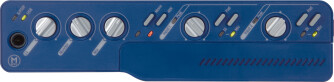
Product Digidesign Mbox By moosers on 08/07/2009 Music is my profession
> Characteristics 9/10
The original Digidesign Mbox will still get the job done even with all of the new interfaces that Digidesign has put out in the last few years.  To me, this is just as good as some of the newer interfaces that are comparable in make up and will cost you less if you get it used (as these are no longer being made).  This audio interface will allow you to run any version of Pro Tools LE and runs via USB to your computer.  It has the capabilities to record two tracks at once as it has two microphone preamps with both XLR and 1/4 inch connections.  It has phantom power as well as RCA connections and an output on both the front and the back for headphones.  It also has 1/4 inch outputs so you can send this to monitors and also has SPDIF capabilities (which I haven't used). 
> Utilization 9/10
Setting up the Digidesign Mbox is really easy and will only take a few minutes.  You can only use this interface with Pro Tools LE, but I'm assuming that if you are looking into a Digidesign interface that you are doing so for the reason that you can indeed use it with Pro Tools.  Simply plug in this interface via USB to your computer and it will guide you into how to get everything going.  It is very easy and will only take a little bit of time to get everything going.  Like I said before, you can only record two tracks at once but that is usually enough for home studio owners looking to just get down some ideas or do some basic recording.  I don't get too much latency with this, but that really depends on your machine.
> Getting Started 9/10
Everything about the Digidesign Mbox is really straight forward and even if you don't have experience with Pro Tools or audio interfaces, the Mbox makes it as easy as possible to learn and figure it out.  The Pro Tools software is the best feature about getting the Mbox as it allows you to have the same software used by the pros and gives you the ability to switch between your home LE rig and HD systems in professional studios if you so chose to.  The manual for the Digidesign Mbox is put together pretty well and will definitely outline everything you'd need to know, but it isn't necessary if you don't have one.
> Overall Opinion 9/10
I first used the Digidesign Mbox a number of years ago and don't use it anymore because I have another Digidesign audio interface that I use, but this will still get the job doing for doing basic recording or for simply running Pro Tools.  While the preamps really don't sound all that great, but if you are doing demos or just getting down some ideas which is what I would imagine most people are using this for, it is fine.  The best part is that you can get this fairly cheap now that it is an older model and you can run Pro Tools on the cheap!
Share content
Product Digidesign Pro Tools 8 By moosers on 07/22/2009 Music is my profession
> Getting Started 9/10
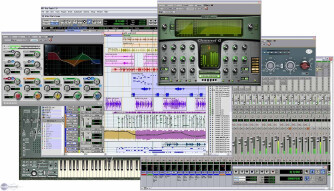
Digidesign Pro Tools 8 was a quick install after downloading the upgrade up from Pro Tools 7.4 from Digidesign's website.  It only took a short while and had it up and running rather quickly.  I haven't had any compatibility issues at all and can't think of any problems whatsoever that I've had with Pro Tools 8 in the short time that I've had it.  The interface of the software is quite different than the previous versions of Pro Tools, but users of previous versions will be able to adapt quickly because even though there are a lot of new features, the old functions and features are still there and are the same.  The interface looks more like Logic than it ever has before, probably because of all of the new MIDI features and Digidesign's desire to cater to that audience a little bit more.  The manual is pretty complex and while I haven't used it much, it definitely seems like there is a lot there and that there is a lot explanations available.

> Suitability/Performance 9/10
So far I haven't had any problems at all running Digidesign Pro Tools 8 as it has run smoothly and stably.  It seems to run a little bit better than Pro Tools 7.4, even if the difference is subtle.  I am currently running the software on a Pro Tools LE system using a Digi 002R audio interface and a Mac Book Pro that has a 2.2 Ghz Intel Core 2 Duo processor and 4 GB of RAM.  I have also used Digidesign Pro Tools 8 on a Pro Tools HD system, on which it runs much better than in LE, which is to be expected always no matter what version of Pro Tools you are running.  I've only been running Pro Tools 8 for about a month as this is quite new software.

> Overall Opinion 9/10
While it took a little bit of getting used to, I must say that I now really enjoy using Digidesign Pro Tools 8.  It was a little bit weird at first simply because the interface is so different than the previous version and I was skeptical of making the switch at first, but I'm glad that I did because Pro Tools 8 has the same great user friendly features that they are famous for, with a whole bunch of new added features including extended MIDI capabilities and music notation features.  The plug-ins that it comes with are also upgraded and they now include SansAmp which is a really cool plug-in that previously did not come with Pro Tools.  The price of the upgrade from earlier versions of Pro Tools is pretty reasonable and since that is what I did I'm not sure about the price of it new.  I would highly recommend checking out Digidesign Pro Tools 8 for all Pro Tools users as they have taken it to the next level!

Share content
Product Digidesign Sound Replacer By moosers on 06/07/2009 Music is my profession
> Getting Started
Digidesign Sound Replacer was easy to install as I had no compatibility issues or other problems at all. I had the plug-in up and running very quickly and since it is a Digidesign made plug-in and I run it in Digidesign Pro Tools LE, it has perfect compatibility and has always running pretty smoothly for me. The interface of the software isn't incredibly hard to figure out as everything is easy to access and is put in terms that anyone can figure out. I don't have the manual for this plug-in but unless you are new with digital audio it isn't a necessity as it is easy to figure out.
> Suitability/Performance
I've never had any problems running and using Digidesign Sound Replacer as it has always run stably with my configuration. I'm currently running the plug-in on a Mac Book Pro that has a 2.2 Ghz Intel Core 2 Duo processor and 4 GB of RAM. I run the plug-in in Pro Tools LE 7.4 that runs off of a Digi 002R audio interface. I never really run more than one of these plug-ins at a time because of the nature of this plug-in, so I can't speak to how well it would run if you wanted to run a few of them at once but I can't see why you would really need to do that anyway.
> Overall Opinion
I've had Digidesign Sound Replacer for about two years and while it is possible to do what this plug-in does without this particular piece of software, having it makes the process a whole lot easier. I use it when I feel that the drum sound I have isn't all that great and maybe some of the drums need an extra boost. Unless you are doing this frequently though, I wouldn't recommend this plug-in simply because you can do this without using this plug-in. Overall, a very useful piece of software that won't break the bank.
Share content
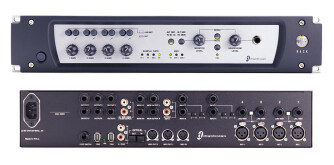
Product Digidesign 002 Rack By mooseherman on 06/06/2009 Music is my profession
> Characteristics
I only use this interface with ProTools LE, simply because I prefer that program. I use it with my MacBook Pro and it works well. Since I mostly record with it at home it serves every purpose I've ever needed. If I need to use a lot of mics I prefer to go to a studio. I tend to stick to guitars and vocals, as well as rough demos for my band. For these ends, it's great. The interface isn't great but it works fine. It is capable of running up to 16 tracks simultaneously. There are four built-in preamps that are pretty solid.
> Utilization
This interface works pretty well. It's compatible with Pro Tools and it doesn't cause my computer any problems. Everything tends to be pretty stable. The only problem occurs with the Pro Tools software, not this interface. The manual is pretty easy to read, too, in case it's too confusing, though it shouldn't be.
> Getting Started
There haven't been any compatibility issues for me, but then again my setup for it isn't particularly exhaustive. I only have ProTools on my Mac. I can't speak to how well it works with a PC, but from what I hear, anything and everything is more difficult to use with a PC when you're dealing with ProTools, so I doubt this would be any different. Every function that the interface can handle is accessible and easy to use. They are also identified pretty easily, which is good for me since I use larger boards in a studio.
> Overall Opinion
The sound of this interface is pretty good. It's not incredible, but not many of its kind are. The price of this interface is really fair and reasonable. I have slowly upgraded my interfaces, and haven't tried any that are around this price range other than this one. However, at this point, this model more than serves my purposes.
Share content
Product Digidesign RM1 By moosers on 05/21/2009 Music is my profession
> Characteristics 10/10
The Digidesign RM1s are a pair of high quality studio monitors. They are active monitors, so an external power amplifier is not necessary. They are pretty big in size but aren't too big where you couldn't transport them if you want to. They are just about the perfect size for studio monitors in my opinion as they are easy to move but still have enough power to bust out that low end.
> Sounds 10/10
The sound of the Digidesign RM1s is absolutely awesome. It has an extremely full sound that makes these monitors great for uses of all types including mixing and monitoring. It definitely gives you an accurate read on what you play through them and they cover the entire frequency spectrum precisely and accurately. While they are very full bodied sounding, they aren't unrealistic and I find that things that I mix on these monitors will transfer over to other listening devices very well. It definitely has good dynamics overall and also have more than a satisfactory stereo imaging. Overall, the Digidesign RM1s have a nice low end presence as well as crisp mid range and high end.
> Overall Opinion 10/10
I first used the Digidesign RM1s a few years ago and they are some of my favorite monitors out there. Since they are designed for professional engineers, the price isn't at all cheap but if you are a professional looking to get a top notch pair of studio monitors, this is the price you must pay. I love these monitors for any sort of application, but where they really excel is during mixing as the mixes will transfer over very well in my opinion. While I didn't expect a pair of monitors made by Digidesign to be all that great, I was pleasantly surprised with the results I found. If you are looking for a nice set of studio monitors that you can get accurate mixes on, the Digidesign RM1s are more than worthy of a try.
Share content