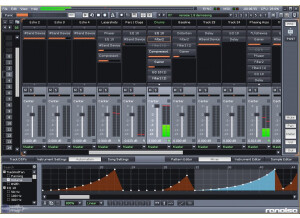
Renoise is available for Windows, OS X, and Linux. Installation is a snap, with no dongles or online authentication license managers. After installation, configuration is straightforward--You setup your plugin folders, and ASIO/MIDI devices in the preferences menu and then you’re ready to go. It’s important to note that Renoise only allows you to have 2 folders designated for your plugins which can be a problem if you don’t have all of your plugins installed in only 2 folders. Learning Renoise couldn’t be easier. Not only does the website have a fully documented wiki that covers every function, there’s also a free official tutorial video series that walks you through the creation of a song. Furthermore, the community has a heritage of sharing their song project files, which you can play back inside Renoise and see everything that was done to produce the song. SUITABILITY/PERFORMANCE I’ve owned Renoise for over 2 years and it’s been my sequencer of choice for that duration. Before that, I used trackers like Buzz for a decade as well as more traditional DAWs such as Reaper on occasion. Like Buzz, Renoise is a tracker. In a tracker, you place notes vertically to create patterns and then arrange these patterns to create your song, somewhat similar to Ableton Live’s Session View. Trackers also rely heavily on computer keyboard shortcuts and while at first glance it seems daunting, trackers have an extremely intuitive workflow for sequencing MIDI and sample-oriented music once you're accustomed to the interface. It’s almost like using a hardware sequencer as you quickly input notes by using the arrow keys to go to the line you want and then use your computer or MIDI keyboard to place notes on that line. I find this to be far less tedious than dragging, copying, and tweaking tiny midi blocks on a piano roll. That said, the tracker interface is not ideal for every kind of song. Because Renoise doesn’t have audio tracks or a linear sequencer, it’s difficult to sequence long audio clips together like multiple live instrument parts. Furthermore, it doesn’t have multitrack recording in any capacity, so recording bands, ensembles, or live drums isn’t possible. Renoise does support ReWire, however, so it is possible to use Renoise for sequencing your soft synths or samples and then rewire Renoise with another DAW that is more suited towards handling recording. The sample editor in Renoise is fairly robust. You can place markers on drum breaks to slice them, set loop points, record samples through your audio interface, and set key zones to create layered sample based instruments. You can even draw your own waveforms, process them with effects, resample, and then use that as an instrument, essentially creating a completely unique synthesized sound from scratch. There’s built-in capability for modulating sample parameters and there’s a beat sync feature that will automatically transpose and fine tune your samples so that their length syncs to the current BPM, making it easy to achieve that classic pitched up jungle drum sound. Renoise is capable of loading 3rd party plugins (VST/AU) and has a built-in 32-bit to 64-bit plugin bridge for handling those older plugins. Also included is a standard suite of processing effects, the usual array of EQs, reverbs, compressors and delays. These are all very usable and the cabinet simulator in particular is a favorite of mine. It features 17 emulations of well known guitar amp cabinets and adds some really nice dirt to synths and drums. The program itself is very responsive. Nothing is bloated or sluggish and I haven’t encountered any CPU spikes or instability. The interface remains snappy, even inside large projects. CPU usage will be dictated by which and how many plugins you use, Renoise doesn't utilize more than 3% on my Intel i5 2500k @ 4.5ghz while idle. A large project featuring 25 tracks and assorted effects might climb up to around 20% while playing, but again, this will vary heavily depending on the plugins you use in your song. One of the greatest assets for Renoise is the community. They’re active and helpful, even creating powerful free tools with the official scripting language. These tools range from things like arpeggiators and step sequencers to the incredibly useful “Guru,” a tool for programming hardware synths and saving patches (even for synths that don’t have patch memory!) inside Renoise. Another thing to note is that the developers are very fair when it comes to releasing updates for Renoise. Between Renoise 2.0 and 3.0, the developers released many significant updates for free over the course of 4 years. These updates included things like an Ableton Live style Grid/Pattern Matrix, an official scripting language for user made tools, new effect plugins, and full 64-bit support. OVERALL OPINION While it may not come with all of the pack-in synths or gigabytes of sample content that many DAWs boast these days, Renoise is a powerful, stable, and fast sequencer with a great community and a spectacular price at around $90 USD. It's a specialized sequencer with a focus on midi sequencing and small samples, so it's not the kind of program you'd use for every song you might want to produce, but if you’re not satisfied with your current DAW workflow or if you want to try something completely different from the usual big name sequencers, you should definitely give it a try. Pros: + Fast, intuitive tracker-style sequencing + Clean interface + Bloat-free + No dongles or online license managers, you can install it on all of your computers hassle-free + Fantastic price + Great community that provides useful tools for free + Developers are active on the official forums and release multiple substantial free updates Cons: - Can only set 2 plugin folders - Isn't ideal for sequencing numerous long audio clips. - Doesn't have multitrack recording
This is the only model that I have tried by Renoise and I can say it will be the last studio bundle that I will get from them. It didn’t work well for me, not saying that I couldn’t get it to record or anything like that. Im just talking about the sheer quality . I got an awful sound while trying to record, like it’s the worst quality that I have ever gotten in all of my years trying to record from home. It was a whole package that I purchased and it was at a very low price, so maybe that’s why it was so crappy. But the guy at the music store said it was probably my best option for the money that I was going to spend and needing everything that I needed. At first glance it all seemed great, and it worked fine. But once I sent the song that I just spent so long working on and recording and writing out to some friends and family they all instantly said the exact same thing that the quality was poor. So I went to a friends house who didn’t have a good set up either and actually his was about the same price as this and I recorded there and I sounded so much better and I could tell the difference. So I didn’t make a return very fast and took the Renoise package back to the store and probably wont purchase from them again. If you are really tight on money and need a recording package there are some really good ones that you can get. Don’t make the mistake and get talked into purchasing this one because you will be taking it back within 3 days or so. Look into some of M Audio’s recording packages , they have some cheap good ones.
This is the best tracker I have come across (and my favourite piece of music software). The sample files supported include: wav, MP3, aiff and ogg. There is full VST 2.0 support and several native effects included. These features are well incorporated into the tracking environment which makes for very quick usage and easy application. The downside or largest lack in this software I feel is the lack of a decent arranger. The current one is quite fiddly (although usable) and can get quite confusing if you need to cut + paste large sequences. However a new full screen arranger is planned for the next release (1.3) which I think will give the best of both worlds: The speed and ease of a tracker and the convenience of a cubase style overview for large edits to a whole song. There is no line in recording yet but this can be done through VST (explanation on renoise forum). This though is also planned for a future release. Other upcoming features include: Piano roll Improved look Mid import (v1.3) Improved resolution (v1.3) + others (see web site for details: www.renoise.com) With the improvements planned this will become even better to what for me is a great piece of software already. $45 The interface is the main selling point for this type of software with the easiest method for composing I have found in a music application. You basically enter the notes you want in individual tracks via the computer keyboard or a MIDI keyboard. These are then shown in each track as the letter of the note and the octave that note is in i.e. Track 1 Track 2 Track 3 -> (Up to: Track 64) 00 C-3 D#4 G-5 01 --- --- --- 02 G-4 --- B-2 03 --- G-3 --- 04 --- --- D-4 The screen unlike conventional mid editors scrolls downwards. This allows maximum tracks to be shown at one time and makes sense here for the way the notes are represented. The song is diveided into patterns of length defined by the user (default 64 lines) Not everyone likes this sort of interface but after a little practice it becomes second nature. There are some demo songs included which will speed up the learning process considerably. SUITABILITY/PERFORMANCE The sound quality is professional and as good as the samples or VSTs that you use. The native effects are good but anything you feel the need for improvement on then VSTs can be used for. I would recommend though for mastering that another program is used ( a program made for this purpose) There have been some small stability issues with renoise in the past but these have been and are getting ironed out at the moment. It is worth checking in the forum for details and for current users using it live. The support is excellent at renoise. I once had to contact the developers over a song I had that I couldn`t reload and was e-mailed back the same evening by the main developer. Bug reports in the forum are regularly responded to by the developers so any problems you have will be addressed. The best thing about the support is the ability to suggest and vote for (the latter if you are registered) new features which again the developers + users actively discuss on the forum. OVERALL OPINION Anyone who loves tracking will love this prog. I have been tracking for about 8 years on an Amiga and was put off modern computer music making by the complexity of doing things in an hour that would take me five minutes in a tracker. Renoise got me back making music with the modern sound quality that PCs and advancements like VST offers with the usability of programs like OctaMED on the amiga. There is a demo on the site you can download, only wav rendering and ASIO are disabled in the demo version. It is possible to save songs. Again @ www.renoise.com Happy tracking Originally posted on FutureProducers.com Posted by: Unknown (January 1-, 2003)