Log in
EN
FR

SeriesBehringer B-Control

6 products found

Filter
Sort by
Evaluation
  • Reviewed or not
  • Editor’s award
  • Reviewed by Audiofanzine
Availability
  • Available or not
  • Sold new or used
  • Sold new
  • Sold used
Must-have products
  • All products
  • Flagship products
  • Best rated products
  • Hot products
  • Popular products
Price
  • Freeware
€
Clear
Sort by
  • Popularity
  • User ratings
  • Price - low to high
  • Price - high to low
  • Used price, increasing
  • Used price, decreasing
  • Name (from A to Z)
  • Name (from Z to A)
  • Added on
Sort results
  • Popularity
  • User ratings
  • Price - low to high
  • Price - high to low
  • Used price, increasing
  • Used price, decreasing
  • Name (from A to Z)
  • Name (from Z to A)
  • Added on
Filter results 6 results found
Evaluation
Availability
Must-have products
Price
  • Freeware
Show results

The best Behringer B-Control reviews

The reviews Audiofanzine members found the most helpful.
  • « fully customizable »

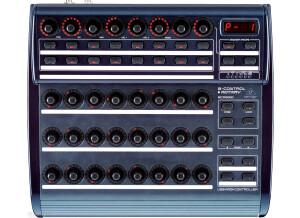
    I have been using the B Control Rotary BCR2000 in Cubase and even in Logic on my Mac for a long time now. The control surface of the BCR2000 gave me complete control over all of my virtual synths that I was using. This unit is so well made it actually feels like knobs that are on some expensive Motif or Fantom keyboards. You can have 4 groups and 32 presets with each group. It can be connected to your computer through USB or through standard MIDI connections. Using the BCR2000 will change the way your workflow is without a problem. It will take some time to fully remember how you have everything set up if you choose to save it as a preset, because there really are not any labels or any places to put labels so you can remember. There are blank spaces so you can write in your own labels that you may want but I just don’t like that because it can get sloppy if you want to move things around or change things up after time using a pen then having to scratch out words and write more. The unit has a good weight to it, it does not feel cheap or plastic like. It does also come with a power connection to a wall outlet. Using it with Reason was probably the easiest to set it up with and start using it. Cubase took a little more work and so did Logic. It also runs great in Ableton Live and Sonar. It is very versatile and can be used to control anything you want. As long as you are using Windows XP or higher then it will work with your system. If you do need some new drivers you can easily download them from Behringer’s website and you can also get all of the support you need. This unit is also backed by a factory warranty as long as the damage is not your fault they will fix it or give you a new one.

  • « Behringer BCF2000 »

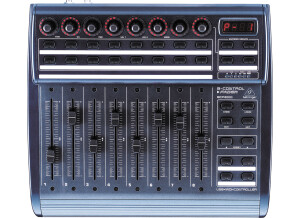
    The BCF is a usb powered motorized 8 fader control surface retailing for under $200. It has 2 buttons per channel along wit a endless rotary knobs. The BCF2000 comes logic, mackie, and hui control built in and can be programmed to control and midi capable feature in your selected software. I wanted a control surface to help control Logic and Pro Tools and 8 motorized faders for under $200 is hard not to look at. I purchased this control from Musiciansfriend for $179. After doing some research this control surface got pretty good reviews. This control surface is really bang for your buck. Motorized fader for under $200 you will not find anywhere else. Expect to pay at least $900 one. Fader responsiveness is good enough to use. Once set up it will take some time to learn since functions aren't listed on the controller, but once you learn them this can speed up your work flow. The size of this controller is good. its 13x11 so it won't take up a lot of room on your desk. Other control surfaces like the mackie and alesis I find rather large. My biggest complaint is there in no led screens to see which track you have selected in pro tools, in logic this is not a problem because one of the buttons highlights to show selected track. Also this was an absolute pain to get working with Pro Tools. Had to do a lot of downloading extra software and configuring. Once it was set up it was fine though. My biggest second complaint is that the faders are rather noisy. Hearing the motor move the faders is annoying, especially when playing back a mix. Buttons are not labeled so you have to memorize or print out the layout of what buttons do what in what DAW. Buttons are a little too clicky for me. While recording my podcast I always have to go back and edit out the clearly audible click the control surface makes when I'm punching in. If your recording someone not in the same room with you than you will be ok. Behringer is not known for their build quality but the build quality on the BCF2000 is better than it seems. At appearance it looks all plastic but holding it in person it has some weight and mass to it. All buttons are hard plastic. Despite the buttons being loud and clicky, loud motorized faders, no led screen showing tracks, and no button layout on the control surface, I still have to give this product a perfect 5. Reason is all those cons can be overlooked because of the price point. Again 8 motorized faders for $179 is a unbeatable deal. If this cost the price of normal 8 fader control surfaces I never would of even considered it. so if you are looking for an inexpensive control surface with 8 motorized faders your only option is the BCF2000, and its not a bad option to be stuck with. This review was originally published on http://www.musicgearreview.com

  • Audiofanzine FR's review

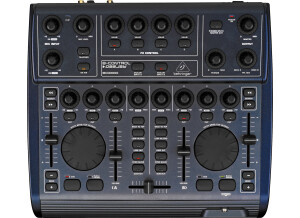
    I've been using the BCD2000 for two years. I wouldn't give it away except for a BCD3000. The handling is not easy for beginners, but once you get control of it, your mixes will become more interesting. The BCD allows you to create your own personal sound world. Both rear analog inputs make it more versatile and allow you to make almost anything. Pros & cons: + Easy to use, short learning curve + Compact size, light weight, easily transportable + Traktor support + DirectX plugins + Integration of external gear - Quality of the controls - BDJ software is not reliable and requires too much RAM - Is it easy to make settings? Yes - Is the user's manual clear and comprehensive? No, I didn't read it. - Is it easy to access the main functions? Yes - Does it generate noise? No - Recording quality? WAV files are freely editable! - How long have you been using it? Already two years - How would you rate its value for money? OK. The only limit is your imagination, regardless of the product you buy - Based on your experience, would you buy this product again? Yes, or a BCD3000. Originally written by beebux on Audiofanzine FR.

  • Audiofanzine FR's review

    (Originally written by Madmike/translated from Audiofanzine FR) Which technical specifications motivated your choice? I used a BCD2000 two years. But I updated my computer to a Macbook with Mac OS X and only the 3000 is compatible with it. What do you use it for? I use it for mixing in parties (indoor and outdoor, lounge and deep house ambiance). What's your setup (motherboard, CPU, RAM, hard drive,...)? Black 2.4 Macbook with Mac OS X - Do you use it with other instruments or systems (mixing console, preamp, DtD, ...) and what's your setup? With the professional sound system of the place (sometimes the sound technician is also provided LOL) or directly connected to active P.A. speakers. UTILIZATION - Did you have any problems during the installation? No, it was much simpler than with the 2000 (see my tutorial ( http://www.mcdsound.com/2007-07/bcd2000-and-traktor-tutorial/ )) - Did you have any incompatibility problems? No but you have to download the update before installing. - How complicated is the overall configuration? The overall configuration is easy but it's better if you already know Traktor. - Is the user's manual clear and comprehensive? User's manual? Never read it =) GETTING STARTED Is the driver stable? Yes but I disable the wi-fi function of my Mac since it sometimes slows down the audio streaming. I guess its due to the Mac's hardware architecture. I never had this problem with the 2000 and a PC but I did disable the anti-virus when mixing. It works pretty smoothly when the wi-fi is disabled. - Which software do you use? Tracktor 3 - What's the latency of your system? Few ms. You can adjust it but you won't feel it anymore under 10 ms. - How many tracks can you record/playback simultaneously? Traktor 3 is conceived for 4+1 tracks (4 playback sources + 1 HDD recording track). But I have only tested it with 3 playback sources or 2 sources + recording. It works great, perhaps a bit slower only (especially the pre-listening function) OVERALL OPINION I got it a few days ago and it works perfectly with my Macbook. But I had to return the first one I got because the right jog was faulty. Considering that I haven't found a real competitor product on the market I would definitely choose this one again.

  • Audiofanzine FR's review

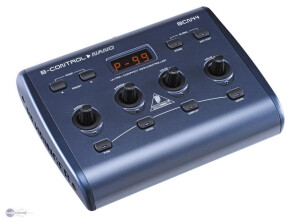
    (Originally written by fabamarie/translated from Audiofanzine FR) I've owned it for nearly two years. In the beginning, I didn't understand a thing about Midi but one day I discovered its huge possibilities. It allows you to control virtually everything depending on the software sequencer you use. With Cubase SX3 it's great. The fact that you can control the zoom function manually allows you to work fast and be more precise, even though you need two controllers to zoom in and out. But considering the large number of possibilities this unit provides, that's not a problem. The knobs are push knobs so you also get eight buttons for each configuration: play, stop, record, 1 or 2 markers, scissors and eraser tools, full zoom out... Everything can be freely configurable and it's a true pleasure. This sturdy and compact battery or PSU operated unit is really versatile. I don't regret this purchase. I always carry it with me or have it in my drawer with my keyboard. Editing takes a long time, the user's manual is very bad and I've never been able to use the learn function successfully.