Log in
EN
FR

Dell

50 products found

Categories
Filter
Sort by
Evaluation
  • Reviewed or not
  • Editor’s award
  • Reviewed by Audiofanzine
Availability
  • Available or not
  • Sold new or used
  • Sold new
  • Sold used
Must-have products
  • All products
  • Flagship products
  • Best rated products
  • Hot products
  • Popular products
Price
  • Freeware
€
Clear
Sort by
  • Popularity
  • User ratings
  • Price - low to high
  • Price - high to low
  • Used price, increasing
  • Used price, decreasing
  • Name (from A to Z)
  • Name (from Z to A)
  • Added on
Choose a category
Sort results
  • Popularity
  • User ratings
  • Price - low to high
  • Price - high to low
  • Used price, increasing
  • Used price, decreasing
  • Name (from A to Z)
  • Name (from Z to A)
  • Added on
Filter results 50 results found
Evaluation
Availability
Must-have products
Price
  • Freeware
Show results

The best Dell reviews

The reviews Audiofanzine members found the most helpful.
  • « Alienware m17 »

    Intro This is an extremely powerful laptop designed to run quietly under light graphics load. Although it is primarily a gaming laptop, the powerful processor multiple M.2 slots, a standard SATA drive port, and Thunderbolt 3 port makes it an ideal candidate for a mobile audio workstation. Power The entry-level model with an 8th gen i7 8gb of DDR4 RAM is FAR more than enough processing power to handle extremely complex compositions as well as, ultra-low latency live synth and VSTi performance. Ultra-low latency, in this case, is 3-6ms The Small Things The lighted keyboard means that when working in the backseat of your band's van or switching settings in between songs at a live performance will be effortless. The 17-inch screen and while that does take a larger amount of mobile real-estate it also means that working with a DAW will be a breeze. The reason the Thunderbolt 3 port is important. Thunderbolt 3 is one of the few ports that will allow backward compatibility to Firewire 400 Audio Devices. Using either a Startech Thunderbolt 3 to PCI-E breakout box and a Firewire PCI-E card. or an Apple thunderbolt 3-Thunderbolt 2 to a Thunderbolt 2 to Firewire 800 and a firewire 800 to Firewire 400 Cable. Some Final Notes Most when looking at mobile workstations go for MACs and while there are a great number of good reasons to do so, most notably asynchronous data transfer over synchronous data transfer. If you need a great Windows-based workstation and don't want to get slowed down with the small stuff, but also might want something that will let you game as well during downtime, this is a fantastic laptop. The High price and VERY high-end graphics card do make it rather price prohibitive for those that might be looking for a more budget-minded machine and DON'T have an interest in gaming. With that said given the above caveat I can definitely recommend this product.

  • « A standard Dell mouse »

    The Dell M-UVDEL1 is a wired optical mouse that is commonly shipped with many Dell computer systems. It features a standard two-button function, a clickable middle wheel, and an ambidextrous hand design. It uses the standard red optical laser for tracking on the bottom, which works pretty well on all the surfaces that I have tried the mouse with. The mouse also has gliders on the bottom, so it slides on the surfaces pretty well, and it doesn't feel rough or rubbing against anything. The right and left click buttons are totally separate and individual, which is not always the case with modern computer mice these days. That means, dust and other debris can get stuck between and under the click button panels, and it requires frequent cleaning. The gliders on the bottom can occasionally get dirty as well, and sometimes the gliders will fade over time, and fall out. This is a wired mouse, which has it's advantages and disadvantages. You don't have to worry about replacing batteries, and if total reliability is needed, this can be a neccessary feature. This is especially the case with precision mouse work (which may be required with certain DAW applications). When battery life gets low on wireless mice, they may still function, but the response can be slow or glitchy, and that can lead to click and move errors. With the wired mouse, you get much better reliability. The downside, is that the wire can limit the positioning of the mouse, and if you are not careful on how the wire is run, it may get stuck or jammed as you move the mouse, which can also cause significant click and drag errors. Overall, this is a fine mouse, that will work great with most computer applications, including audio and DAW applications. If you happen to own this mouse, there is no need to buy another!

  • « A multimedia keyboard »

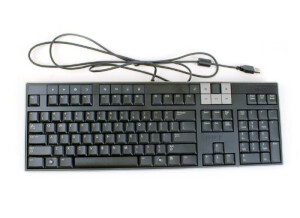
    The Dell Y-U0003-DEL5 is a multimedia keyboard that is professional, sturdy, and great for various computer typing needs. It features a slim design, standard black color, 104 keys, standard usb interface, fold out feet, and it even has two additional usb ports on the top of the keyboard, where you can plug in various devices, such as flash drives. The fold out feet are also nice, and necessity for whenever I am typing. The keyboard feels very professional, and it has a good amount of weight to it, so it doen't seem cheap at all. The keys work fine, and the layout of the keys are standard and simple. There are additional function buttons above the first f-buttons across the top, which include 4 browsing controls (back, forward, stop, refresh), and four general operating system controls (home, emai, my computer, and calculator). These are nice that they are separate; on some keyboards, they are the same buttons as the f-buttons, and it can be confusing how to switch between the two buttons (often utilizing an "fn" key across the bottom, which is certainly not present here). There is also a multimedia section of the keyboard above the insert, home, and page up keys. These controls include media player open, mute/unmute, stop, forward, backwards, and pause/play. There is also a very interesting volume control, which is a wheel on the keyboard, that you can spin forward or backwards to adjust the overall computer system volume. It is a non-terminating control, so moving the wheel adjusts the volume, and doesn't set it in an absolute fasion, which is pretty cool; you don't see this sort of control in audio too often. However, for most professional audio setups, there is usually a hard-knob volume control on the hardware, and we usually use that to control the system volume, and not the built-in windows mixer. On my system, the windows mixer volume is always set to max, so this control is not particularly useful for me on my audio desktop; but it does work great on my non-audio desktops at my other computers.

  • « Even the cheapest keyboards work! »

    The Dell L100 is a standard desktop computer usb-style keyboard that came shipped with my new Dell computer. It features 104 keys, 17.5 inches width, 5.5 inches depth, and 1.25 inches height. The height, like many standard computer keyboards, is adjustable with two kickstands in the back, and it can be adjusted from flat on the table, to slightly angled, which is what I prefer (when I'm typing on a non-laptop keyboard). The default language of this keyboard is standard English. At the top of the keyboard, above the direction keys and home/end section, there are three lights that illuminate when caps lock, scroll lock, or num lock are turned on. This is one of the few great features that can separate standard keyboards from each other, and it's nice to have on this Dell keyboard. Otherwise, you would have to use your windows software to track and tell you if the caps lock is on, which is more of a nuisance. The keys are very high, and they move a good amount of distance, and they click very well, so they're easy to use, especially if you are used to older styles of computer keyboards. Some of the more modern keyboard's action have smaller, thinner keys, and although they look very sleek and nice, functionally, they are sometimes not as easy to type on, and it is sometimes harder to find the keys without looking. The Dell L100 is very compact, and these is very little excess plastic or other material around the edges of the keys. It is not rectangular, because the casing hugs the keys tightly, therefore making it smaller than a standard rectangular case. Overall, this is a perfectly fine keyboard for most typing applications, and it came standard and free with my new computer. It's great to know that even the cheapest keyboards out there perform just fine.