Log in
EN
FR

Fxpansion

Series

83 products found

Categories
Series
Filter
Sort by
Evaluation
  • Reviewed or not
  • Editor’s award
  • Reviewed by Audiofanzine
Availability
  • Available or not
  • Sold new or used
  • Sold new
  • Sold used
Must-have products
  • All products
  • Flagship products
  • Best rated products
  • Hot products
  • Popular products
Price
  • Freeware
€
Clear
Sort by
  • Popularity
  • User ratings
  • Price - low to high
  • Price - high to low
  • Used price, increasing
  • Used price, decreasing
  • Name (from A to Z)
  • Name (from Z to A)
  • Added on
Choose a series
Sort results
  • Popularity
  • User ratings
  • Price - low to high
  • Price - high to low
  • Used price, increasing
  • Used price, decreasing
  • Name (from A to Z)
  • Name (from Z to A)
  • Added on
Filter results 83 results found
Evaluation
Availability
Must-have products
Price
  • Freeware
Show results

The best Fxpansion reviews

The reviews Audiofanzine members found the most helpful.
  • « Most Versatile Drum Software »

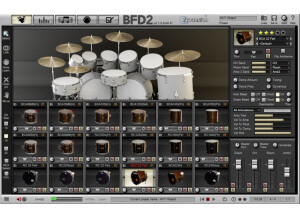
    BFD2 is a drum-sample playback engine that can be used in stand-alone or as a plug-in in a DAW. I purchased BFD2 as an upgrade to BFD1. There were some decent drums sounds in BFD1 (vistalite, ayotte), and the interface was simple to understand. BFD2 was a huge improvement in every aspect of the software. The interface is pretty complicated, but after you play around with it for a couple sessions, you will get the hang of it. Installation takes a while as the package comes on a bunch of DVDs. It is recommended to install the samples on a separate harddrive than the drive you use for tracking in your DAW. This is supposed to improve playback. I didn't follow this recommendation when I first bought the software and installed everything on the internal harddrive of my laptop. It wasn't the best idea, but it worked. Eventually, I got around to storing the samples on an external drive. SUITABILITY/PERFORMANCE Big F'ing Drums 2 lives up to its name. The samples can sound massive if you bring up the room mics and add some compression (the library comes with john bonham's drums, what would you expect). But, what I really like about this library compared to other libraries (SSD4, Superior Drum 2, etc.) is the versatility. The massive drum sound can easily be scaled down for a more intimate drum sound, if desired, by picking the right sampled instruments. I can't really say the same is true for SSD4 (to each his own). Fxpansion did a great job of picking different drums that complement each other in the library. I am also convinced that the drummer hit the drums a little bit differently to get different sounds depending on the style of music/playing that would typically be used for each kit piece. It seemed like some snares the drummer really pounded during record, while other snares don't really give me the same impression. This is actually a really good thing - it gives more variety to the stock library. Toontrack SDX's offer this same kind of playing variety, but then you have to make additional purchases to get the same thing as BFD2. I really like the cymbals in particular in BFD2. Even if I am going to use the drums from a different software library (because they fit my song better), I almost always substitute the BFD2 cymbals. I definitely give the stock cymbals a strong recommendation, but the Zildjian Digital Vault cymbals that can be used inside BFD2 are also awesome. BFD2 offers a pretty advanced mixer and internal effects. However, I also recommend with any drum library to utilize the 'multi-out' functionality, and use plug-ins in your DAW to process individual drums. This is probably the most important way to achieve realistic drum performances with sampler software. Never use internal effects! They simply can't compare to the EQs/Compressors from WAVES/UAD/etc. OVERALL OPINION The best part of BFD2 is the fact that the stock libary is awesome. There are 'expansion packs' available, but my opinion is that the stock library is sufficient on its own. Superior Drummer 2 is good, but you really need to buy expansion packs to make it versatile. I also recommend layering BFD2 samples with other drum libraries. There are a lot of drums in BFD2 that have a great sustain/ringing that I don't find in other libraries. I can't wait for BFD3, I hope it is just around the corner.

  • « Has been replaced with Geist »

    FXPansion Guru has been replaced by Geist years ago but if you can still get your hands on it I recommend getting it right away. Guru has some really good features and is packed with beat boxes and loop machines/samples that you can tweak very easily right in your DAW. If you choose you can use it as a stand alone unit, but in Cubase it worked perfectly and never crashed or slowed down my system at all. Even though it is discontinued I still have it installed on my laptop and use it frequently. SUITABILITY/PERFORMANCE There are some high quality built in effects that I really did enjoy working with like the delays and bit crusher effects and resonant filters. There is just about any type of effect you could ever need right in this VST. Guru was very easy to install only taking a few moments and it is very CPU friendly as well as user friendly. The interface was not confusing and it was simple to understand. There is also a manual that came with it that thoroughly explains everything or can be used as a reference manual. OVERALL OPINION The sounds are all high quality, but I like to experiment with Guru and run different drums through different filters to create some cool stuff. I even run some of the patches/drums through external filters in my FX rack to see what kind of new sound that I can get. Guru has been a joy to work with but since it has been replaced you will not be able to find much support or tutorials for it online anymore. Geist is also very good and it is worth the purchase if you don’t want to get Guru and just get the upgrade. FXPansion’s Guru is worth the money spent because of the features and capabilities that it has. I recommend installing it on a Windows system because it has been known to have some issues with OS X systems.

  • « presets from Armin Van Burren is a plus! »

    FXspansion Geist is a virtual drum machine plug in that can be used on either Mac or PC. The step sequencer in Geist has really stepped up since previous models. The ability to create a full song and layout a song in Geist is as easy as it gets. It is almost like the virtual version of Akai’s MPC line of drum machines. If you have a good hardware drum pad you can even feel like you are working on an MPC. This is a must have VST for any of your software or DAW that you use to create music if you are really need some crisper drum applications with a better workflow. Using the drum programs that already come pre loaded in your software has nothing on FXspansion Geist. SUITABILITY/PERFORMANCE The workflow of Geist is the best asset of it, you can do your pattern sequencing and jump right song mode extremely fast. It has 30 different effects ready to be used and it supports MIDI and Audio Export directly from Geist. If you plan to use it on a Mac you need to be using OS 10.5.8 or higher with 2GB RAM and on PC you can use it for XP SP2 and Windows 7. They never did release an update for Vista though, which was a bummer because I wanted to use it on my PC that runs Vista. OVERALL OPINION FX spansion has some pretty good pre loaded samples and presets that are from Armin Van Burren which I love. Using this VST has really added a more creative side to my drum process in the digital world. My drum patterns are getting more in depth now instead of boring and dry. Geist is a great addition to anyone’s workflow. I am not sure if you can use it as a stand alone but it will work with any of your software that support VST’s and its great with Pro Tools.

  • moosers's review

    The FXpansion VST to RTAS plug-in wrapper was quick and easy to install without any problems whatsoever. I had no compatibility issues with my set up and it has always run smoothly and effectively for me. The whole process of using the FXpansion VST to RTAS plug-in wrapper is straightforward, so while I don't have the manual for this, I never really needed one as it is easy enough to use. SUITABILITY/PERFORMANCE I am currently running the FXpansion VST to RTAS plug-in wrapper on a Mac Book Pro that has a 2.2 Ghz Intel Core 2 Duo processor and 4 GB of RAM. I use it to convert VST plug-ins to RTAS so I can run VST plug-ins in Pro Tools LE 7.4 that I run with a Digi 002R audio interface. Within this configuration, I've never had a problem running the FXpansion VST to RTAS plug-in wrapper effectively and smoothly. OVERALL OPINION I've been using the FXpansion VST to RTAS plug-in wrapper for about a year and can't say enough about how useful I have found it. It allows me to run the vast amount of free VST plug-ins out there in Pro Tools, which otherwise would not be possible. The price is only $100 USD, and is well worth it considering how many free VST plug-ins out there that you can't run in Pro Tools without this wrapper. When comparing the amount of VST plug-ins out there to RTAS, it doesn't even come close in terms of how many more VST plug-ins that are out there. To me, the price of this wrapper is worth it because of the amount of new plug-ins you can now use in your Pro Tools rig. If you don't run Pro Tools, this probably isn't necessary, but for those of us that want to use the vast amount of VST plug-ins out there in Pro Tools, the FXpansion VST to RTAS plug-in wrapper is a great piece of software.

  • Audiofanzine FR's review

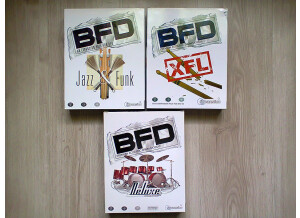
    (Originally written by S.y.s/translated from Audiofanzine FR) No installation problems No incompatibility problems No problems with the overall setup User's manual is ok. SUITABILITY/PERFORMANCE My PC: Gigabyte DS2R Intel Duel Core E8200 2048 MB RAM BFD works perfectly with Cubase SX3. Super stable. I use normally six VSTi for my projects (Halion, NI Elektric Piano or B4, Arturia Moog and various virtual synths), two or three Guitar Rig 3, four SIR 2 sessions, ten Waves Api and SSL, ten URS plug-ins, etc. and everything works perfectly. OVERALL OPINION I've been using BFD since 2005 with the XFL add-on. Pro: lots of acoustic drum sounds. You have to process each BFD channel (EQ, compressor, reverb) during the mix otherwise they will sound poor and "out of the mix". In other words, don't think you'll get an ultra authentic sound with BFD alone. You will have to adjust the velocity and process each BFD channel... It requires time, patience and some knowledge of drum playing. Con: It would be great if BFD would sound good in every mix but it's impossible. Actually it's pretty much the same work as with real drums... But that's normal, I mean you won't be able play like a guitar god just because you bought a very expensive guitar! With a real instrument you have to learn how to play it and it's the same thing with a DAW. It's not enough to buy 500 GB of samples... You'll have to process all signals and to mix them. Reasonable value for money. Based on my experience I would buy it again 1000 times because if you can't get a good drummer with a good drum kit in a good studio, you can still get very good drum tracks with BFD if you spend some time editing and mixing. As a summary, like every good VSTi with a large sound bank you'll have to edit and process the sound otherwise you won't get good results.