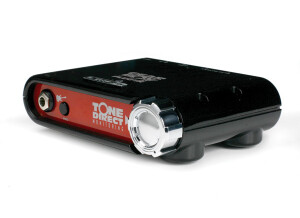
Line 6's Toneport UX-1 is one of the first USB-audio interfaces that the company has created, and one of the first to use their brand new Gearbox software. For inputs, it had a single XLR mic preamp input with trim knob, a single 1/4 inch instrument input, two 1/4 inch stereo line inputs, and a 1/4 inch stereo monitor input. For outputs, it had an S/PDIF stereo output (RCA type), 1/4 inch balanced line outputs (controlled by the master volume knob), and a 1/4 inch stereo headphone output. The box was compact, but a fully-functional usb-audio interface, and it comes with Line 6's Gearbox software, which includes multiple guitar and bass amps, vocal preamps, compressors, effects, and much much more. It's what you would expect form Line 6. UTILIZATION One of the unique features of the UX-1 (and other Line 6 audio interfaces) is the use of direct monitoring of the wet, processed guitar signal. Normally, monitoring an input signal requires the signal to pass through the computer software, which usually results in a lag or delay from anywhere to 10ms to a couple seconds. When playing guitar and hearing the sound right back, even the smallest lag (as small as 30ms) can be noticeable, and it can effect your playing, when doing serious recordings. However, with the Line 6 interface, the monitoring of the wet, processed guitar signal is instantaneous, and it does not use significant cpu usage either. This is perfect for recording guitar, as you can use this software and hardware with even mediocre and slow computers, with high latencies. GETTING STARTED The Line 6 UX-1 is very simple to set up. You need to register the hardware and software through Line 6's website, but there are no serial keys, challenge/response, or any other protections necessary. You just need to have the hardware plugged in, the software recognizes it, and it automatically activates everything. Very convenient! OVERALL OPINION Overall, the UX-1 is a wonderful product, and it can be used as an introductory usb-audio interface for many guitarists, who are looking to get into the recording world.
The Line 6 Toneport KB37 is a usb recording interface that does it all! It features 37 midi keys with pitch and mod wheels, expression and footswitch controls, transport controls, mic inputs with phantom power, stereo line level inputs, guitar input with pad, headphone and main outs, and that's just the hardware. I use my KB37 for various recording, songwriting, and production projects, and with this piece of hardware, I can recording and work with pretty much any instrument except drums. It also features great Line 6 software, with includes their signature guitar amp models, bass models, and vocal preamp models. Also included are guitar pedal effects and studio effects, and additional models can be purchased as well. Best of all, there is zero latency monitoring when using the models. which is perfect for recording guitar. Under normal recording circumstances with guitar amp emulation, there is a slight lag, which can definitely affect the recording performance on faster material, such as guitar solos. UTILIZATION Generally, Line 6 hardware is very easy to setup, and it especially works well on Windows systems, which isn't always the case when it comes to usb audio interfaces. Notably, I've always had driver problems with Tascam audio interfaces working with Windows, when it seems their main support is for Mac OS. But I've never had driver problems with Line 6 hardware. Line 6 has their own update software (Monkey), which helps detect and properly register all Line 6 devices, authorize purchases, and download the newest drivers and software. It is very centralized, very well supported, and Line 6 puts out new software updates with new features on a regular basis. The KB37, specifically, is an older device that has been succeeded by the POD Studio KB37 (which, feature wise, is almost identical), but I would expect Line 6 to create new drivers if, for example, Windows 8 comes out. OVERALL OPINION Overall, the Line 6 KB37 is one of the few pieces of musical hardware that I use every single day, and I would recommend it to anyone who has a smaller, personal studio setup. It is one of the most versatile usb audio interfaces I have ever owned, and I would easily pay double than what I paid for this hardware. It even sits perfectly on the middle of my desk, between my monitor and my computer keyboard. And with all the various equipment and computer changes that I've been through, the KB37 has never moved from it's spot on my desk.
This is an entry level recording interface with two XLR inputs, two quarter inch instrument inputs, and two quarter inch line in's. It has a head phone jack, also quarter inch. It has two analog quarter inch outs and a Spdif digital out. There are two footswitch controls and a stereo monitor in. It connects via USB, and supplies phantom power. The interface comes with Pod Farm software which is a modeling plug in. It also comes with Ableton Live Lite, and Reason Adapted. I bought this unit from an ebay store for $189. I shopped for many different units but I felt this was the best thing for a beginner to learn to record on. It came with everything I needed, software and all, to get started and learning the basics. It is very easy to use. All you have to do is plug in, make sure you have the right input selected and record. The setup was easy as well. If you are using the Ableton software that was included, it guides you through to get the interface set up. If you have your latency settings set right, the interface has very small latency even when you are recording a processed signal. The Pod Farm plugin has some neat sounding presets and you can get some decent sound by tweaking EQ. The controls are very easy to use as well. Both of the mics have a gain control and there is a headphone level and an output level. The phantom power button is clearly labeled. Once you figure out how to use reason, it is also a powerful program. Each program is only a trial version but they all are very usable to start out. I wish you could select the input you are recording with on the interface itself and not in a program. It also needs to be able to record inputs simultaneously. This isn't really a complaint for the interface, but they could have included a tutorial on how to use Reason with Albeton. It seems to be built very well. I haven't had any trouble with it yet. There isn't much else to say here. I think this is the best little package you can get for $200 or less. It has everything you need to get started and is fairly easy to use. You certainly wont end up with Pro Tools professional recording but it is a great way to learn. This review was originally published on http://www.musicgearreview.com