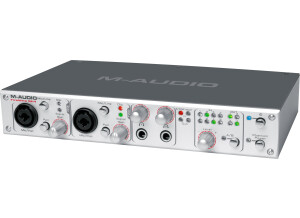
The M Audio FireWire 18/14 was an interface that I used on several occasions back around 2008. It was well built and it came with a pretty good software that I didn’t expect to have any use with but ended up mixing some really good stuff with it. (I cant remember exactly which software it was although). The Fire Wire 18/14 has all the connections you need to get your mics and instruments or almost any sound sources audio to your laptop or desktop computer. The Latency on this interface is very low, probably almost a 0 latency from the time that I had with it and it was amazing. You can also use your ASIO drivers with it to make the latency even lower. ASIO for all is a free tool you can use with almost any interface and with any system and software. Another key feature of the Fire Wire 18/14 is how great it is in a live setting. You wont need to use some of the interfaces that are already at venues if you are a live performer , you can just use your interface ( the 18/14) something you stand by and that you know works. The M Audio Fire Wire 18/14 Builds confident s because you know its going to work for your every time you use it. UTILIZATION It has 8x4 24 bit I/O and 18 in and 14 out fire-wire Audio and Midi connections. It is a very user friendly interface that has pretty much everything right on the face of the unit including Output, input and Axillary send monitoring right on the front of the Fire Wire 18/14. Latency is low in Cubase LE and the drivers are very stable as with most M Audio’s products are. GETTING STARTED I don’t remember a manual for this interface, and I don’t think I every saw one. But since it’s a M Audio interface there is no doubt in my mind that it was easy to understand and use. OVERALL OPINION The quality of the sound you will get with the Fire Wire 18/14 is very good, its second to none. I am very happy to have the honor to use this unit while our group had it. I though about purchasing one for my self but I already had two interfaces at the time. But I do love all M Audio’s interfaces. They are well built and worth the money.
I purchased the M-Audio FW410 from Sam Ash (12/29/03) for $384 pre-tax to record my girlfriend's audition CD. I'm using the FW 410 with an iBook G4 and Behringer B1 microphones. For recording software, I use felt tip's Sound Studio 2.11 ($50). At $400 or less, the FW410 is one of the cheapest Firewire audio recording interfaces. It supports 24 bit / 96 kHz audio playback/recording. It has two XLR microphone inputs and eight channel line level outputs. I also like the fact that the unit can be powered from the Firewire bus alone (though it's probably not a good idea if you are driving two condenser microphones off the Firewire bus). Although I haven't had the chance to test the SPIF audio stuff it's good to know that it's there when I needed. Finally, it has MIDI in/out for those who need it. The bottom line is that it has the speed and feature to serve the need of most home recording studios and pro's on the road. Because this is my first computer audio recording interface (skipped USB completely), I have nothing to compare the quality of the audio with so I'll have to get back to the discussion of audio quality after using the unit for a while. The startup is just a little flaky sometimes. There were a few times that I turn on the unit and my iBook G4 doesn't see anything connect through Firewire. It might a problem with Mac OS X though. Restarting the computer would fix the problem. (Remember to disconnect any firewire device when restarting your computer, doesn't matter what is connected!) All the inputs/outputs are UNBALANCED. I wish they are balanced I/O but at given that the unit is targeted primarily for high end consumers, not professionals, it's really not a big deal. The FW410 is meant to be used with a computer so it can't be used without a computer unlike the MOTO 828 MKII, if you desire computer independent operation, this is not what you want. Solid construction, have only had it for a few days so can't say much about reliability yet. It feels good though. The M-Audio Firewire 410 is an amazingly well conceived and executed product targeted at musicians and audiophiles desiring Firewire audio without the associated high price tag. It's ideal for stereo recording in a home studio setup and to take with on the road. Highly recommended! I would give it 4.5/5 because it's almost perfect. I might write a follow-up review once I have used it for a while. This review was originally published on http://www.musicgearreview.com
(Originally written by elco7/translated from Audiofanzine FR) Instrument and mic source signals. SPDIF in/out, headphone out, 1/4" line out 48v phantom power Very sturdy die-cast housing Firewire UTILIZATION During installation Windows will warn you that the software is unsigned. Click on accept. Shut down your computer, connect the Firewire cable and try to configure the Asio driver. System crash. Try again. The update was not compatible with Windows XP in September 2008... I don't know why! Three system crashes within one year, two successful updates and one update I didn't understand.... GETTING STARTED Firewire is perfect when you don't want to share a USB port already in use. I use it at home: good sound quality, easy-to-use interface, sturdy housing... It makes a good impression on other musicians. I've recorded tons of short demos with it. I loved it in the beginning and had no compatibility nor driver problems. Notice: the clock is sometimes synchronized with synch software like palm or dictaphone... and then you can't make music anymore. OVERALL OPINION Mine is one year old. I did a full cleanup of my computer and I never touched this device again. It works, I just have to reinstall it along with Cubase but I don't feel like doing it!
Id like to see some 1/4 I/O, a phono preamp, and maybe some line in ports. That would have been nice. price paid: $200 UTILIZATION Its easy to use but my only issue is that the software always has had bugs in it. the knobs dont always work actually more often then not they dont but u can do what u need to in the control panel with ur mouse. GETTING STARTED Ive had a few issues with it in the 2 years Ive had it. Mainly with the knobs and I dont think M Audio plans to fix this. OVERALL OPINION Good quality. Not the best for the price but it definetly gets the job done. I am happy with this card. I'm happy with the card it gets the job done and it works with Pro Tools but if I had to do it again I would have bought the firewire 410. Originally posted on FutureProducers.com Posted by: Xabiton ( 4-, 2006)