Log in
EN
FR

SeriesWaves Maserati

11 products found

Filter
Sort by
Evaluation
  • Reviewed or not
  • Editor’s award
  • Reviewed by Audiofanzine
Availability
  • Available or not
  • Sold new or used
  • Sold new
  • Sold used
Must-have products
  • All products
  • Flagship products
  • Best rated products
  • Hot products
  • Popular products
Price
  • Freeware
€
Clear
Sort by
  • Popularity
  • User ratings
  • Price - low to high
  • Price - high to low
  • Used price, increasing
  • Used price, decreasing
  • Name (from A to Z)
  • Name (from Z to A)
  • Added on
Sort results
  • Popularity
  • User ratings
  • Price - low to high
  • Price - high to low
  • Used price, increasing
  • Used price, decreasing
  • Name (from A to Z)
  • Name (from Z to A)
  • Added on
Filter results 11 results found
Evaluation
Availability
Must-have products
Price
  • Freeware
Show results

The best Waves Maserati reviews

The reviews Audiofanzine members found the most helpful.
  • « A few great processing 'gems' »

    The Waves Maserati Signature Series is a suite of effects processing plug-ins to be used in a DAW. Installation is done by downloading the software from the Waves website. Authorization can be done for v9 plug-ins using a USB stick as a dongle, or over the internet using the Waves authorization manager application if your computer is online. The Signature Series plug-ins are all really easy to get started with, and were specifically designed to make a difference on your tracks just by inserting the plug-in. There are separate plug-ins for different instruments - drums, guitars, bass, etc. After opening the plug-in, there are only a few knobs to tweak to change your sound. The advanced processing takes place behind the scenes of the plug-in. SUITABILITY/PERFORMANCE Comparing the Maserati plug-ins to the other signature series options (Kramer, CLA, JJP), there are some significant differences. Tony Maserati is known for his mixing of music in styles ranging from hip-hop/rap to pop. The Maserati Series is your best option if you are considering any of the signature series suites and you mix this kind of music. The CLA plug-ins are great from modern rock with over-the-top processing, the Kramer suite is great for vintage sounds (tape echo, old-school compression/eq), and JJP is great for music styles that go from pop to rock. One thing that I actually like about the Maserati series is that it doesn't count on the super-heavy compression and extreme eq curves (that the other packages use) to get a good sound. The effects are more subtle, but very musical nonetheless. In practice, I also find the Maserati plug-ins to be the least CPU intensive of all the other signature series plug-ins. This makes it easier to call up more and more of these plug-ins across all my tracks. OVERALL OPINION The Maserati Signature Series Bundle includes some unique processors that aren't available in the other packages (Kramer, CLA, JJP). The Acoustic Guitar processor is probably my favorite in the entire bundle. I have always had a problem with an acoustic guitar getting buried in a mix after I add a few more instruments. With this plug-in I can get an acoustic guitar to sit perfectly in a mix with almost no work. It seems magical. I also really like the 'Mix Bus' plug-in which offers processing for a Drum Bus, Guitar Bus, Vocal Bus, etc. In each case, the processing really helps the mix to gel together by adding some compression and reverb. To me, these two plug-ins are the best part about the Maserati series.

  • « Perfect Introduction to Bus Processing »

    This plug-in is about as simple as it gets. Insert it on your tracks and its going to make a big difference right away. I mainly use if for the 'Drums Live' and "Drums Prog' settings. Right away, these settings make your drums loud, punchy, and help them cut through a mix. Speaking of mix, the 'Master' setting is a super simple processing chain to make your overall mixes really loud. The controls are simple to use. There are 'input' and 'output' dials to control the volume of the signal coming into the plug-in and the volume of the signal leaving the plug-in. There are 3 'eq' dials to adjust the frequency response of the plug-in. The 'eq' curves definitely change depending on the 'Type' selection (BGV, STRINGS, GUITARS, DRUMS, etc.) but they are selected to be appropriate for the specific application. Installation and authorization is a breeze, as with all Waves plug-ins. SUITABILITY/PERFORMANCE It is a little bit difficult to know exactly what kind of processing is going on inside the plug-in, given the limited amounts of controls. For instance, it is impossible to know what kind of compressor settings (ratio, attack, release, threshold, etc) are being used. Also, I get the impression that there is some kind of 'reverb' or 'ambiance' being added in some of the settings. There aren't even controls for this if you want to turn it up or down. It just adds a little 'space' to the drums or your mix so that everything sounds like it is coming from the same place. I guess it just reflects the way that Tony Maserati mixes. Apart from watching him work through his mixes, these plug-ins provide some good clues on how he likes to mix. I definitely changed the way that I mix just by using this plug-in. I started busing out my drums, and using a limiter to make sure they don't clip, even if I am not using the Maserati GRP plug-in. OVERALL OPINION The Waves Maserati GRP plug-in is meant to be used as a 'bus' processor. Of all the Signature Series Bundles (Maserati, CLA, JJP, Kramer), this plug-in is the only one specifically for 'group' processing. To me, this unique processor and the 'Acoustic' processor set the Maserati bundle apart from the rest. If your mixes don't use a lot of 'bus' processing, or you aren't entirely sure how to process your overall mix, then you should definitely consider this plug-in. If you have drums, you should definitely 'bus' them all to the same track. Then you can use this plug-in to do things like compress the sub-mix and also eq. The same thing goes for your final mix. Unless you are going to pay for someone else to 'Master' your mix, then you really need some kind of processing to make your tracks loud enough to compare with the other music that is out there. This plug-in is an 'all-in-one' solution for 'mastering'. It has simple, easy to use controls of 'eq' and 'compression'. The 'compression' setting is actually a combination of 'limiting' and 'compression'.

  • « My Favorite Signature Series Plug-in »

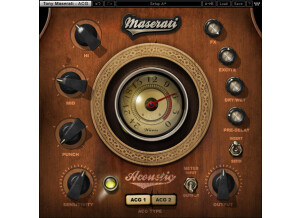
    The Waves Signature Series plug-ins are designed to be simple to use. They are simple to install and simple to authorize. They are almost 'dummy-proof' in the sense that as soon as you load them up in your session, your mix will mix will improve. There aren't a lot of controls to worry about, which is a good thing. There are plenty of other plug-ins on the market with a lot of controls. I like having option to pull up a plug-in and not have to worry about parameters. I own all the signature series plug-in bundles (Maserati, CLA, JJP, Kramer). Of all the individual plug-ins in all the bundles, I think this particular plug-in is the most useful and most unique. I would recommend the Maserati bundle just for this plug-in alone. SUITABILITY/PERFORMANCE The plug-in has one main function: make an acoustic guitar sound better. It does this in three ways. First, it adds an eq filter curve tuned for an acoustic guitar. To my ears, the plug-in rolls off the low-end booming of an acoustic guitar. This really helps when the acoustic guitar is in a mix with other instruments like drums and bass guitar. The plug-in also adds some nice top-end frequencies to help the instrument cut through. The 'eq' controls are simple and are set up for appropriate frequency ranges. Second, the plug-in controls the dynamics of the acoustic guitar signal. I assume it does this with some kind of compression that works well for an acoustic guitar. Whatever it is, it makes the acoustic guitar loud, and make it cut through a mix. Third, the plug-in has some great sounding reverb/delay to add to the signal. This adds some tasteful effects to help an acoustic guitar fill a 'perceptual' space. OVERALL OPINION The Waves Maserati Signature Series Acoustic plug-in is part of the Maserati bundle. As the name suggests, it is fine-tuned for processing the recordings of an acoustic guitar. This plug-in is very unique in the sense that none of the other signature series plug-ins have a specific 'acoustic' guitar plug-in. Although, there are no other 'acoustic specific' plug-ins to compare it to, the Maserati Acoustic plug-in stands out as an exceptional processor. It really makes the recording of an acoustic guitar sound better, and also sit well in a mix. There are just enough controls to make the plug-in flexible, but not too many controls to make the plug-in confusing and complicated. In fact, this plug-in is almost like to separate acoustic guitar processors in one. The 'ACG1' and 'ACG2' settings sound noticeably different, which increases the usefulness of the plug-in for different sounding guitars and different sounding sounds.

  • « Solid vocal enhancer »

    Tony Maserati's music mostly focuses on things like vocals, and this plugin is a great plugin to show off how he approaches things. The plugin itself has knobs for sensitivity, bass, compress, treble, output, fx, delay, delay mix, decay and vrb tone. The plugin also has different button settings for contour 1, contour 2 and contour 3. I've never read the manual, so I can't comment as to how well it's written. However, the plugin itself is laid out in a fairly easy to use manner, so there shouldn't be any real need to read it. If in doubt, start moving the knobs. To use this, simply enable it on your vocal buss, and you're good to go. SUITABILITY/PERFORMANCE Waves is really one of the best companies out there when it comes to implementing solid plugins with no real fuss. These plugins are always rock solid and super stable; this plugin is really no different. I've never experienced a single crash or hiccup while using this plugin. The plugin is also cross platform compatible, so Windows and OS X users alike can use these without any problems. There is one issue that I always gripe about, however. These plugins are 32 bit for OS X. Right now, I'm using a 64 bit DAW, and for me to utilize these plugins, it needs to launch a special bridge application. I'm not a huge fan of the way my DAW utilizes these, so I'm hoping they update these in the future. I've been using the Waves Mercury bundle for the past six or so months, and it's been a very enlightening experience to say the least. OVERALL OPINION For power metal vocals, this has helped quite a bit. It's also helped out with some rock mixes that I do in my spare time. However, I'm mainly a death metal guitarist, and using this on screams and growls isn't exactly the best thing in the world. It's style dependent, but it should work for most people.

  • « Very nice on the master buss »

    Harmonic generators can be a true godsend to certain mixes. They can really add some cool depth and life to something that would otherwise sound a touch dull. Tony Maserati has been a long time master at putting out quality mixes, and this plugin helps represent his philosophy on mixing. This plugin is really meant to be added to the master buss, but you can use it on whatever you want. It's super simple to use, so there's no real need to read the manual. The plugin has knobs for sensitivity, size, amount, spread, output, fx and wet. There are also different switches you can utilize to change the overall sound. SUITABILITY/PERFORMANCE When it comes to things like stability and overall performance, Waves tends to be at the top of the totem pole. I've never experienced a single crash, freeze or hiccup while using any Waves plugin, let alone this one. They all seem to be super stable, which is a huge plus for something as critical as a recording environment. The plugin itself is cross platform compatible, so there is no issue when it comes to using this with either an Apple or Windows based computer. The biggest problem I experienced simply has to do with the recently technological evolution of OSes. My DAW and OS are now 64 bit. However, these plugins are still 32 bit. For Logic Pro to fully utilize this plugin, it needs to run a bridge application, unless I want to gimp down my DAW. It's a bit of a pain, but it works. I'm hoping they update these to 64 bit in the future. I've been using the Mercury bundle for the past half a year or so, and it's been working out great. OVERALL OPINION I've used this plugin fairly successfully in various mixes that I've done. It can really help make a mix stand out, but be sure not to use too much of it. Once you start overusing it, it tends to make everything sound overly processed. Definitely give it a try; it should work with most styles of music.

  • « Solid, but I prefer other methods »

    Tony Maserati mainly deals with stuff in the R&B field, so it was interesting to see him help co-design a plugin where guitars aren't the prominent instrument. Because of this, I feel our philosophy as to what a good guitar tone is differs a bit. Keep that in mind while reading this review. The plugin is meant to help shape various guitar tones. It has knobs for sensitivity, presence, tame, output, fx, delay, width, vibrato and chorus. There are also switches to select between clean, clean chorus, heavy, thick rhythm and soft flange. The plugin itself is very easy to use, and there's no real need to read the manual. I personally never read it, so I can't comment on that. SUITABILITY/PERFORMANCE Waves rules for audio plugins. For one, they're always rock solid and super stable. I've never had a single crash while using any Waves plugin, and the same goes for this. The plugin itself doesn't take up much RAM or processing power, which is a big plus for those who tend to have tons of plugins going on inside of their DAWs. The plugin is also cross platform compatible, so just about anybody can use this without any issues at all. There is one issue that I did experience, and that has to do with the actual coding of the plugin and today's recent OSes/DAWs. The plugin is a 32 bit plugin. However, my DAW and OS are 64 bit OSes. For Logic Pro, my go-to DAW, to utilize this, it needs to run a special bridge application. However, I'm not a huge fan of the way Logic implements that feature. I'm hoping that Waves updates these to 64 bit in the future. I've been using the Waves Mercury bundle for the past half a year or so, and it's been absolutely killer. OVERALL OPINION I'm predominantly a metal guitarist, so I'm always trying to look for a saturated, yet clear sounding distorted tone that can cut through the mix without sounding overly thin. This plugin is geared more towards clean and lighter distorted guitars. I found that it doesn't really work too well with my rhythm guitars, but it can do some decent lead tones.

  • « Got some cool tones out of this »

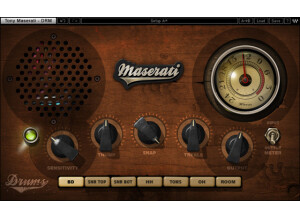
    Tony Maserati is mostly known as an R&B style producer, so my approach to drums and his approach are a bit different. This plugin is meant for those more acoustic sounding kinds of drums instead of the heavily sampled ones that I tend to utilize. The plugin has knobs for sensitivity, thump, snap, treble and output. There are also a ton of buttons at the bottom to select what you're adjusting -- bass drum, snare top, snare bottom, toms, hi-hats, room, overhead, etc. There's also a meter selection switch on this which helps with monitoring. The plugin is super easy to use; simply enable it on whatever drum busses you need and start adjusting. SUITABILITY/PERFORMANCE Waves rules when it comes to things like performance and stability. I've never had a crash while using this plugin, and that goes for all of the Waves plugins I've used. They all seem super rock stable, and in something as mission critical as a recording environment, that's a huge plus. The plugin works on both Windows and OS X, so nearly anybody can use it without a hassle. The plugin itself doesn't take up much RAM or processing power which is another plus. There is one issue I have with it, but it's a somewhat minor complaint. The plugin itself is a 32 bit plugin inside of OS X. For my DAW, Logic Pro, to fully utilize this, it needs to run a special bridge application. Performance is still the same, but it's just a pain with the way Logic implements that bridge application because the plugin doesn't remain visible in the background. I've been using the Mercury bundle for the past six or so months, and it's been a wonderful experience. OVERALL OPINION Considering that I play and record metal most of the time, this plugin had a more limited usage for me. On my more rock productions, it did a fairly solid job, and I believe the sounds I was getting out of this is what Tony was thinking of when he helped co-design this. However, considering that most of my drums are triggered, it didn't seem to give me the tone I was going for.

  • « Works great for that low end thump »

    Tony Maserati is one of the kings when it comes to things like R&B and pop music. He's helped produce and engineer stuff from Destiny's Child to Tupac, and he knows this genre inside and out. Considering how famous he is, it's no wonder he got his own signature plugins. This one is for the bass buss. To use this, simply enable it on your bass buss inside of your DAW, and you're good to go. The plugin itself is laid out in a very easy to utilize manner, so there should be no issues when it comes time to use this. The plugin has knobs for sensitivity, bass, treble, output, fx, tone and fx out. There are also buttons to select between different settings and whatnot. SUITABILITY/PERFORMANCE Waves is, by far, one of the best software companies out there when it comes to things like performance and stability. First of all, this plugin is cross platform compatible. That means that nearly anybody can use this without any issues. As a Mac user, that's a huge plus for me. The plugin itself is rock solid, and I've never experienced a single crash directly related to utilizing this plugin inside of my DAW. There is one one issue that I did experience, and it's why I rated it a 9 instead of a 10. This plugin is a 32 bit plugin inside of OS X. Today, we're mostly living in a 64 bit world. For Logic Pro to utilize this plugin, it needs to run a special bridge application so I can have my higher RAM limit inside the actual DAW. I realize that the plugin is kinda old, but I'm hoping Waves will update this for 64 bit operation in future updates. I've been using the Mercury bundle for the past half a year or so, and it's been a wonderful experience. OVERALL OPINION Bass doesn't usually need a ton of attention compared to, say, drums. However, it's very easy for bass to totally destroy a mix if you don't know what you're doing. I find that a heavy hi-pass and lo-pass filter to solidify where the bass will sit tends to work the best. This plugin has helped me in a few ways for rock productions, but I wouldn't really use this on a metal mix. Worth checking out for sure, though.