Log in
EN
FR

db Audioware

16 products found

Categories
Filter
Sort by
Evaluation
  • Reviewed or not
  • Editor’s award
  • Reviewed by Audiofanzine
Availability
  • Available or not
  • Sold new or used
  • Sold new
  • Sold used
Must-have products
  • All products
  • Flagship products
  • Best rated products
  • Hot products
  • Popular products
Price
  • Freeware
€
Clear
Sort by
  • Popularity
  • User ratings
  • Price - low to high
  • Price - high to low
  • Used price, increasing
  • Used price, decreasing
  • Name (from A to Z)
  • Name (from Z to A)
  • Added on
Choose a category
Sort results
  • Popularity
  • User ratings
  • Price - low to high
  • Price - high to low
  • Used price, increasing
  • Used price, decreasing
  • Name (from A to Z)
  • Name (from Z to A)
  • Added on
Filter results 16 results found
Evaluation
Availability
Must-have products
Price
  • Freeware
Show results

The best db Audioware reviews

The reviews Audiofanzine members found the most helpful.
  • « Unique and inexpensive »

    Flying Haggis is a virtual guitar amp that I recently purchased for around 30 dollars. That was probably the only reason that I purchased it, because if it had been much more I would not have been interested because of all of the amps that I already own. But at this price I had to give it a shot! This amp sounds great for this price! It works with just about any DAW or software that is on the market and it takes up little CPU. The interface is very easy to work with and user friendly but it is not that easy on the eye. The graphics of the interface are very boring and dull. SUITABILITY/PERFORMANCE Installing it took no time at all and it can run as a VST/AU plug in as well as a stand alone. You can download this as a demo first to know how it will work and it if is something that you will want to invest in. But I guarantee that after hearing it you will purchase it for this price. It is also easy to use the MIDI learn function to sync up the knobs with external controllers. Not all amps allow this so it was great that an amp plug in that cost this amount will let that option work. This amp is also good for live use as well because of the low latency, it is very responsive. OVERALL OPINION The sound of the Flying Haggis is very unique, normal when amps (plug ins) don’t cost a lot it is usually because they are a cookie cutter style amp meaning they sound very similar to a lot of other amps that have already been made. That is not the case with the Flying Haggis. It has a unique, clean sound with amazing tones that any producer or guitarist (live) would love to use.

  • moosers's review

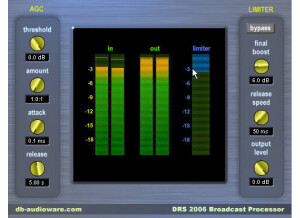
    Db Audioware's DRS2006 Broadcast Processors STD is a plug-in designed specifically for broadcasting and touch up purposes. There is a Pro version of this plug-in, but this one is cheaper and less in depth. You can purchase and download the plug-in straight from Db Audioware's website. Unfortunately it's only available for Windows based systems and won't even run on Vista. Obviously, those who can use it will be fairly limited but I believe the Pro version at least has more compatibility options. Using the plug-in itself isn't too tough as it's got a really easy to use interface. The parameters given here include knobs for threshold, amount (ratio), attack, release, final boost, release speed, and output level. It's essentially an extended limiter great for throwing on a podcast or something similar. I don't know if there's a manual for this one. SUITABILITY/PERFORMANCE I'm not currently able to run this on my current system, but used to run the Db Audioware DRS2006 Broadcast Processors STD plug-in on my own one. I had it running in Cubase SX which I ran on a Hewlett Packard Pavilion dv8000 Notebook that had a 3.0 Ghz processor and 2 GB of RAM. This was enough for me to run this plug-in without any issues at all, I think you could get away with running it on just about any system, especially if you're only using it sparingly. OVERALL OPINION The Db Audioware DRS2006 Broadcast Processors STD is one of the cheapest ways to get a plug-in of this nature. I'd also recommend checking out the Pro version of this plug-in, which offers up a lot more control and is overall clearly a better plug-in. This one can definitely get the job done, but it's more limited in what it can achieve. It's really cheap to buy, but only a handful of DAW users will be able to run it due to it's limited compatibility. However, there might be a good amount of people who could benefit from something like this, so deifnitely check it out if you think you might have a need.

  • moosers's review

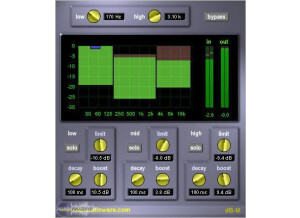
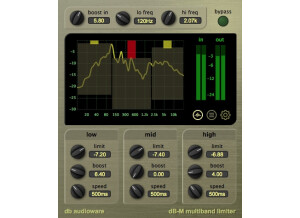
    The DB Audioware DB-M Multiband Limiter is an inexpensive plug-in that is available only in Direct X form for PC systems. I'm not sure why it's only available in this format, but it certainly seems like they are limiting themselves with these older plug-ins by not having them in other formats. I honestly don't remember much about downloading and installing this plug-in, as I'm no longer running it since I don't have a compatible system anymore and it has been a few years since I did. Even when I didn't know as much as I do now, the plug-in was pretty simple to use, as it splits up your dynamic processing into three separate bands for ultimate dynamic control. Each band has parameters for limit, decay, and boost, along with a solo button for listening just to that band. It also has a low and high pass filter with the ability to set the frequency desired to cut at. Lastly, it has graph meter that shows you your levels and gain reduction for each band and your levels for your overall stereo outputs. SUITABILITY/PERFORMANCE As I stated earlier, I'm not running the DB Audioware DB-M Multiband Limiter plug-in any longer, but when I did it was in Cubase SX 2.0 and later in SX 3. The computer that I ran everything on was a Hewlett Packard dv8000 lap top with 2 GB of RAM and a single 3.0 Ghz processor. I can't say that I recall ever having a performance issue with this plug-in, but at the same time I also don't remember ever using more than one or two of them at a time... OVERALL OPINION While the DB Audioware DB-M Multiband Limiter is an okay enough plug-in to use and have around, not too many people will be able to use it since it's only available as a Direct X plug-in for Windows. I haven't used it since I made the switch over to Pro Tools a number of years ago, and couldn't transfer it over since it isn't compatible. I remember the plug-in sounding decent enough to use on the master bus, but my perception of what's good has certainly been altered a bit since then. This plug-in is incredibly cheap, so it's worth checking out if you have a compatible system. It's even cheaper if you go with the bundle, but unfortunately not too many of you out there will even have the chance to try it...

  • moosers's review

    The DB Audioware Sidechain Compressor is a VST and Audio Units plug-ins that can be used either on Mac or PC systems. The process of downloading and installing the plug-in was simple enough, as it didn't take too long before I had the plug-in up and running. The interface of the plug-in has a good amount going on, with a lot of control over your sound, which is something that I always welcome. The compressor section itself has parameters for threshold, ratio, attack, release, knee, and gain, as well as switch for auto gain make up. The sidechain section has parameters for low cut, hi cut, shape, and bypass. There is VU metering for the sidechain and as well for the compression's gain reduction. This is an easy enough plug-in to use that I don't believe users will need a manual. SUITABILITY/PERFORMANCE I'm currently running the DB Audioware Sidechain Compressor plug-in on a Mac Book Pro that has a 2.2 Ghz Intel Core 2 Duo processor and 4 GB of RAM. While you can't normally run this plug-in in Pro Tools since it only comes in VST and AU plug-in formats, if you've got the Fxpansion VST to RTAS converter like I do, it is possible to run it in Pro Tools without issues. I'm able to run a number of these at a time within my system without issues, but I'd encourage those interested to check out the demo to get a gauge of how well it will run on your own system. OVERALL OPINION While not free like many of the DB Audioware plug-ins, the Sidechain Compressor is definitely a step above the free bees. It's got a good amount of control and has a full bodied sound that is easily adaptable to many different situations. The sound of it reminds me somewhat of Digidesign's Smack plug-in, but not as high quality or full bodied. The price of this plug-in is more than reasonable, as you will find with many of the DB Audioware plug-ins. I don't think that I'd recommend this as your first compression plug-in, but if you wanted to add another color to your palette for a very cheap price, the Sidechain Compressor is something that I'd check out for sure.

  • moosers's review

    DB Audioware's Vocal Intensifier is a plug-in that is available in VST and Audio Unit formats for both Windows and Mac systems. You can buy and download it directly from DB Audioware's website, which I believe is the only place it can be purchased. It only took me a few minutes to complete the whole process as I didn't encounter any compatibility problems or other issues. The Vocal Intensifier is basically a compressor that uses a parallel compression technique. Parallel compression is when you blend together both a dry and compressed signal together, so this basically has this built in for you when you use the 'mix' parameter available here. It also has parameters for EQ (tone), compression, and de-ess in addition to the mix parameter. Lastly it has as meter so you can visualize your output level. I never needed to look at the manual for this plug-in. SUITABILITY/PERFORMANCE Right now I'm running the DB Audioware Vocal Intensifier on a Mac Book Pro that has a 2.2 Ghz Intel Core 2 Duo processor and 4 GB of RAM. I run the plug-in in Pro Tools LE 8, although since it only comes in VST and AU format and not RTAS, you'll need the Fxpansion VST to RTAS converter if you want to use this in Pro Tools as I am. This plug-in consumes a very small amount of processing power, so as long as you have a system where you can currently run your plug-ins adequately, I don't believe that this will give you any performance problems. OVERALL OPINION The DB Audioware Vocal Intensifier is definitely my favorite plug-in that DB Audioware has to offer. It's got the most 'modern' kind of sound when compared to the other plug-ins that I've used made by DB Audioware. While I'll generally just do parallel compression manually, it's definitely cool to have a plug-in where you can quickly get some going. Even though the name is the 'Vocal Intensifier,' I've tried the plug-in out for other applications and I felt that it added a good amount of punch no matter where you use it. Of course this plug-in does cost a bit more than DB Audioware's other plug-ins, but being that it is all relative, this plug-in is still pretty inexpensive. I'd definitley recommend at least trying out the demo version for this plug-in if you have a compatible DAW.

  • moosers's review

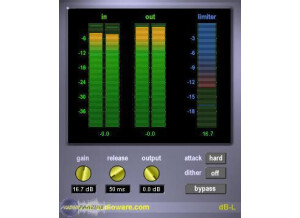
    DB Audioware's DB-L Mastering Limiter is an inexpensive plug-in that can be used as a Direct X plug-in on Windows based systems. I'm no longer running this plug-in since I'm now running Pro Tools LE on a Mac, and when I was running this plug-in it was in Cubase SX on a PC. The process of downloading and installing this plug-in should be pain free as long as you have a properly compatible system to run it on. Figuring out how to use the plug-in should only take a minute for experienced users, and even those without much experience with limiters shouldn't have too hard a time with this. It's only got the bare bones in terms of parameters, which is really what you want to see when it comes to a mastering limiter. It's got control for gain, release, and output, as well as dither and a few different attack modes to choose from. It also has metering for stereo input and stereo output levels, as well as how much your limiting the sound. No manual is necessary to use this plug-in. SUITABILITY/PERFORMANCE When I was running the DB Audioware DB-L Mastering Limiter plug-in, it was on a Hewlett Packard Pavilion dv8000 lap top that had a 3.0 Ghz processor and 2 GB of RAM. I ran it in Cubase SX 2.0 and later in Cubase SX 3, and ran everything through a MOTU 896 HD audio interface. I don't ever recall having issues running this plug-in, as I only ever had a need to run one of them at a time within a session, as this is indeed a mastering plug-in. Even if you wanted to run a few instances of this plug-in within a session, I don't think that you'd have a problem as long as you have a pretty stable system to work with. OVERALL OPINION While inexpensive enough for most DAW owners to afford, I'm not sure that it is worth it for the DB Audioware DB-L Mastering Limiter. While it's an okay enough plug-in that is extremely cheap, I wouldn't recommend doing anything but quick mastering jobs with this. It won't give you any sort of instant mastering, which you shouldn't expect from any plug-in like this. However, I do think that it lacks the fullness that other mastering limiter plug-ins bring to the table like the Massey Plug-ins L2007, which in my opinion is the best bang for your buck that you can get. I guess it does depend on what kind of platform you have, as most users won't be able to run this plug-in anyway. While I guess I'd say that those interested should try the demo, I'd still recommend going with the Massey L2007 over this as it doesn't cost too much more and has a sound on another level.

  • moosers's review

    DB Audioware's DB-S De-esser is a Direct X plug-in for Windows that I've used with Cubase SX. I haven't used the plug-in in a few years since I made the switch from Cubase SX on a PC to Pro Tools LE on a Mac. It should be a quick and easy process to download and install the plug-in; just follow the step by step instructions as you would with any sort of installation and you should be good to go. The make up of the plug-in is sort of unique for a de-esser plug-in, or at least I feel that it gives you more control than your average de-essing plug-in. It has two sections for 'detect' and 'reduce.' The detect section allows you to zoom in on the frequency section where you'd like to reduce sibilance with parameters for frequency and width, as well as a monitor button to check it. The reduce section has control over your frequency, width, and amount, with buttons for bypass and narrowband. All of this is tied together nicely with a graph that shows it all and makes sense of it all for you. It's overall pretty self explanatory, even though it does take some practice to get used to, but I don't think you need a manual. SUITABILITY/PERFORMANCE I'm no longer running the DB Audioware DB-S De-esser plug-in since I don't run on a PC anymore, but when I did it was on a Hewlett Packard Pavilion dv8000 lap top that had a 3.0 Ghz processor and 2 GB of RAM. De-essing plug-ins aren't the type where you need to have many of them up at a time, but this plug-in doesn't take up much processing power anyway so I think you could run a lot of them at a time if you wanted to. Everyone's system has a different make up, so how well it will react really depends on your personal system. OVERALL OPINION While maybe not the most realistic sounding de-esser plug-in that I've used before, the DB Audioware DB-S De-esser has an interesting make up that sets it apart from other de-ssing plug-ins. It's easy to use once you get the hang of it, and it really makes it easy to zero in on what you'd like done. It's a better make up than your traditional parameters in my opinion, which usually don't leave space for specific frequency input. I wish that they would update this plug-in, as plug-in technology has come a long way since this plug-in was made. It is still worth looking into at this low price, or at least try out the demo...

  • moosers's review

    DB Audioware's DB-T Tempo Delay is a plug-in that has been around for quite some time, at least for a plug-in. It is available as a free download, or at least it was when I had it a number of years ago. I either had it as a VST or a Direct X plug-in - to be honest I don't remember which it was since it was a while ago. I was running this in Cubase SX, but now that I'm running Pro Tools I don't have this plug-in anymore. As far as the interface, it's actually pretty in depth for a free plug-in. Each channel (if you're using it as a stereo plug-in) has sliders for delay, feedback, and level, as well as knobs for high and low pass filters and panning. It then has general parameters for BPM, units (meter), and wet/dry (mix). I don't think that a manual is necessary for this plug-in, nor do I think that you'd have an easy time finding one. SUITABILITY/PERFORMANCE When I was running the DB Audioware DB-T Tempo Delay plug-in, it was in Cubase SX 2.0 on a Hewlett Packard Pavilion dv8000 lap top with a 3.0 Ghz processor and 2 GB of RAM. I ran everything through a MOTU 896 HD audio interface. I don't remember ever having a problem running this plug-in, as it doesn't take up too much processing power. Being that it is free, I'd recommend trying it out for yourself to see how well it will run on your own system. OVERALL OPINION While it's hard to say bad things about a free plug-in, the DB Audioware DB-T Tempo Delay isn't really out of date at this point. It's got to be one of the earliest free plug-ins out there, so while it was good for the time, plug-in quality has come a long way. If you have a system where you're running VST and/or Direct X plug-ins, I'd still recommend downloading it for yourself to decide.

  • moosers's review

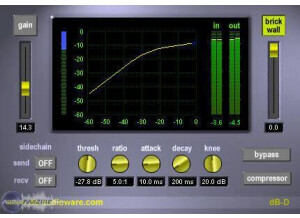
    The DB Audioware DB-D Dynamics Processor is a Direct X plug-in that is basically a compressor with a limiter built in as well. From what I can recall, installing this plug-in was fairly quick and easy. I would have remembered if there was a problem, as most of the time I don't ever have a problem with installing plug-ins. As far as the interface of the DB-D Dynamics Processor goes, it's fairly standard. It's got knobs for threshold, attack, ratio, decay, and knee, as well as sliders for gain control and a brick wall limiter. It also has buttons for sending and returning a side chain and for bypassing the plug as a whole and bypassing the compressor only. One of it's best features is that it has a graph to show your compression and your input and output levels. A manual isn't necessary, and I haven't seen one anyway. SUITABILITY/PERFORMANCE When I ran the DB Audioware DB-D Dynamics Processor, I did so in Cubase SX 2.0 and 3. I ran it on a Hewlett Packard Pavilion dv8000 lap top that had a 3.0 Ghz processor and 2 GB of RAM. I no longer run this plug-in or this rig as I've been running Pro Tools LE now for four or five years and this isn't compatible with Pro Tools. It only comes as a Direct X plug-in. When I did run this plug-in though I didn't do so in excess, so I can't only speak to how well it ran when running only a few instances within a single session at a time, and I can't say that I ever had a problem doing so. OVERALL OPINION The DB Audioware DB-D Dynamics Processor overall isn't my favorite plug-in. I got the plug-in when I was running Cubase because it was and still is incredibly cheap. While it was okay at the time, plug-ins have come a long way in the last few years, making this plug-in look pretty bad. While it will do an okay job for demos or just to mess around with, I wouldn't use it on any serious project. It just doesn't have the proper clarity and transparency that I would want in a dynamics processor. Those who can get this plug-in will be limited since there isn't a VST or RTAS version that I'm aware of. Even if you do run Direct X plug-ins and are looking for a dirt cheap compressor/limiter, I'd still recommend looking elsewhere.