Log in
EN
FR

FabFilter

38 products found

Categories
Filter
Sort by
Evaluation
  • Reviewed or not
  • Editor’s award
  • Reviewed by Audiofanzine
Availability
  • Available or not
  • Sold new or used
  • Sold new
  • Sold used
Must-have products
  • All products
  • Flagship products
  • Best rated products
  • Hot products
  • Popular products
Price
  • Freeware
€
Clear
Sort by
  • Popularity
  • User ratings
  • Price - low to high
  • Price - high to low
  • Used price, increasing
  • Used price, decreasing
  • Name (from A to Z)
  • Name (from Z to A)
  • Added on
Sort results
  • Popularity
  • User ratings
  • Price - low to high
  • Price - high to low
  • Used price, increasing
  • Used price, decreasing
  • Name (from A to Z)
  • Name (from Z to A)
  • Added on
Filter results 38 results found
Evaluation
Availability
Must-have products
Price
  • Freeware
Show results

The best FabFilter reviews

The reviews Audiofanzine members found the most helpful.
  • moosers's review

    The FabFilter Simplon is a basic two band filter plug-in that is essentially a simplified version of FabFilter's Volcano 2 filter plug-in. I'm not the owner of the version of this plug-in that I've used, rather a producer who I'm an assistant to has most of the FabFilter plug-ins at his home studio and I've used them all there. He uses their plug-ins on almost everything, so it was kind of mandatory that I learn them as well, and boy I'm glad I did as they are really some great plug-ins! The Simplon in particular is really easy to use, with each of the two bands giving you control over the frequency and peak, as well as three different modes for each. Each band also gives you to option to set the db range to either 12, 24, or 48, as well as using each as either a band pass, low pass, or high pass. There are also input, output, and mix levelers included here. Since this is a somewhat unique make up, if you're new to filters and EQ's it might be a good thing to have the manual around just in case. SUITABILITY/PERFORMANCE The only system that I've ran the FabFilter Simplon plug-in on has been a Pro Tools HD one. I don't know all of the specs on the specific system, but I think it's enough to say that it's HD and that it's enough to run almost any amount of plug-ins comfortably. I can't say how well this might run on an LE system or something similar... OVERALL OPINION The FabFilter Simplon presents what this company does best, and that's making high quality, versatile and flexible filter plug-ins for your DAW. The Simplon has a unique make up to a degree, but this only furthers what is possible with the plug-in. In fact, FabFilter advertises that there are 27 different combination types available here depending on the modes you're using, which is really something considering it's only two bands to begin with. The sound, like all FabFilter plug-ins, is outstanding through and through as this is as clean of a filter as you'll find in the plug-in world. If you don't have the money to drop on the full Volcano 2 of which this is a simplified version of, the Simplon is a fine substitute for any DAW.

  • « Sibilance be gone »

    De-esser's are very common these days, it seems every audio company under the sun have their own version of a De-esser plugin. They all do pretty much the same thing - eliminate sibilant 'esss' and 'efff' sounds of vocal recordings that are normally found in the high frequencies (around 5khz to 11khz normally) and the volume and frequency of these sounds is very dependant on the vocalist, microphone used and their gender. So with all these de-esser plugins from different companies doing the same thing, you would imagine they would all sound the same too? Well not quite. Some do better than others at first off eliminating the sibilance itself, and then secondly the effect or colour they have on the audio itself when not de-essing - which is normally a slight loss (or a big loss) in presence in the vocal and sometimes a lisping effect if overdone. In my experience there is no such thing as a perfect De-esser plugin, but there are ones that come closer than others. Enter FabFilter's Pro-DS. Used in Logic Pro 9 on a macbook with OSX 10.6.4 and 4GB of RAM, the pro-DS runs smoothly and fairly efficiently. The setup and configuration are straight forward as the installation and registration prompts are all there so that even the most computer illiterate of people can get started. FabFilter are always top class at providing helpful tips and pop-up menus to guide users through not only the installation but for the use of the plugin itself. SUITABILITY/PERFORMANCE The stability of the Pro-DS is rock solid. FabFilter have done a fantastic job coding this plugin to work on all systems and has never crashed a session i have worked on in the year-and-a-bit i have been using it. As a rough figure i would say you could easily run 10 instances of this plugin without any problems, although you would probably never need to run this many at a time anyway. There is an option in the Pro-DS to turn oversampling on for x2 and x4 which will in turn use up a lot more processing power so just bear that in mind. OVERALL OPINION In practise, the Pro-DS works exceptionally well. It doesn't come cheap but you definitely get your money's worth if you are serious about audio mixing quality. For a start the GUI is beautiful, the controls are large, clearly labelled, easy to read and the colour scheme is attractive to the eye - not that any of this contributes to the sound but it does make you feel comfortable using it and helps with the workflow of your session. It features controls for threshold and range which are 2 of the main parts of a De-esser plugin as this dictates when the de-essing begins (threshold) and how many decibels it takes off the offending frequencies. The threshold features an extremely useful 'listen in' button attached the side of it which let's you hear every 'ssss' reduced and the red meter to the right hand side will let you know how much gain is being reduced off of each one. The yellow horizontal bar is the frequency range where you can set the scope of the frequencies you wish to De-ess, underneath that is an 'audition' button which lets you hear the selected frequencies you have chosen to de-ess or if using the wideband mode - the sidechain area that triggers off the pro-DS into gain reduction. With the mode section, Pro DS has a choice of 'single vocal' and 'all round' which as you can probably guess is suited to be used on single vocals and group vocals depending on the track you are using it on. Below that is a choice of 'wideband' and 'split band', Pro DS recommends 'wideband' for vocal tracks on their own and 'split band' for full mixes to hone in on a very particular frequency. Split band also introduces latency so this can mess with the timing of vocal tracks if not careful, so i personally use wideband mode for single vocal tracks as it is the most subtle mode for this purpose and only drops the volume of 'Sss' sounds when triggered as opposed to just taking away 1 frequency (because sometimes sibilance can occur at more than 1 frequency within the track depending on the vocalist) The waveform display can be turned on or off at the users preference and there are lookahead and stereo link controls for added precision. The colour added to the overall audio by the Pro-DS is manageable with a little EQ after the insert, or if time is not an issue - by automating the plugins threshold or bypass so that it is only on when you know an 'ess' or 'eff' sound is coming up. The final result on the sibilance is super smooth sounding gain reduction, the best i've ever heard and if you have the processing power available then turn the oversampling on as well. Just be cautious that as with many other de-essers, there is gain reduction in action even before it starts to show on the meters so listen out carefully for that. A little bit of look ahead is recommended in any case. I have tried at least a dozen or so de-essers by different plugin companies, both free and paid, but FabFilter's sits at the top of the pile for me. This will always feature on my lead vocal tracks, or if editing dialogue or narration then the main narrator/voice over artists track. You will never need another de-esser plugin if you purchase the Pro-DS. Compare it to something like Logic's own de-esser and the difference is night and day. If you want a second opinion, ask top mixing engineer Mick Guzauski who recently mixed Daft Punk's latest album 'Random Access Memories'. When interviewed about his favourite De-esser plugin, he name dropped the FabFilter Pro-DS. See the full interview at this link - https://www.youtube.com/watch?v=aKmvfgCILHg So basically if Daft Punk's mix engineer gives something the thumbs up, then it's definitely worth a look and then some. The FabFilter Pro-DS is in my opinion the finest De-esser plugin available as of November 2014, so do yourself a favour and get rid of sibilance properly with the help of this incredible mixing tool.

  • moosers's review

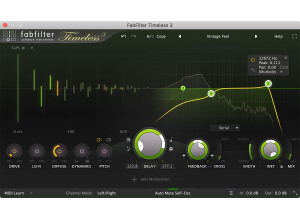
    The FabFilter Timeless 2 plug-in is a piece of unique and versatile delay software for DAW’s of all types. FabFilter has a little known but very nice collection of plug-ins for all applications, with this one being one of the only delay plug-ins they have. I’m assuming that there is an original Timeless plug-in since this is named Timeless 2, but I’ve only used this version of it. I don’t currently own this plug-in so I can’t speak much about the process of installing it. However, learning how to use it basically shouldn’t take too long, although there’s definitely a nice amount of control and a few features you won’t find in too many other delay plug-ins. The interface gives you independent control of it’s parameters in both the left and right channels, which is definitely unique and quite awesome! Both the left and right channels have knobs for controls for feedback and cross feedback, as well as delay time and delay panning. Each also has it’s own filters which can be used either in series, in parallel, or per channel, so you’ve really got all of the bases covered there. However you decided to use the filters, which are FabFilter’s specialty, you’ve got frequency, panning, peak, and mode control, as well as the ability to use them in either high, low, or band pass modes. They also have a number of tone modes to choose from, further adding to the possibilities here. Lastly, there is control over the dry and wet mix levels. This is pretty in depth, so those new to delay and plug-ins should definitely consider looking at the manual. SUITABILITY/PERFORMANCE I’ve been using the FabFilter Timeless 2 plug-in over at a producer’s studio that I’m an assistant for. He’s got all of the FabFilter plug-ins and really can’t get enough of them, and I don’t blame him. It’s a Pro Tools HD system that we’re running it on, so we rarely have problems at all when it comes to performance, but I wouldn’t be too surprised if a not very well equipped system had trouble running more than one at a time… OVERALL OPINION To go along with the FabFilter Timeless 2’s endless amount of control comes a super clean and realistic sound as well. It’s not the warmest sounding delay I’ve heard, but if I’m looking for warm, generally I won’t look in a plug-in anyway. What this is great for is getting all sorts of clean digital delay sounds, and when I say all sorts, I mean every sort! The amount that can be altered here is simply superb as you’re not going to find this amount of control within many plug-ins, but that’s what makes FabFilter so great! Do yourself a big favor and check out Timeless 2 and the other awesome FabFilter plugs.

  • moosers's review

    The FabFilter Pro-Q is an in depth equalizer/filter plug-in. It's available for both Mac and PC operating systems and in VST, AU, or RTAS formats. I don't own this plug-in, so I wasn't the one to install it. I work as an assistant engineer for a producer on a freelance basis and he's got this plug-in at his home studio, which he swears by and has really turned me on to it. I love the interface of the Pro-Q as beyond just looking awesome it's super easy to use and provides as much or more control over what you can do as any EQ plug-in out there. The graph is extremely helpful to plot your points, and you can have up to 24 bands of EQ, so you're never going to run out of options here. It also has a zero latency mode, which is always nice. I wouldn't say that it's necessarily hard to use this plug-in, but there's a ton that you can do with it and it certainly took me a number of uses to learn everything about it, and I'm still learning little things here and there. A manual or a general overview of the plug-in would be a good idea for a new user. SUITABILITY/PERFORMANCE The system that I've used the FabFilter Pro-Q on is Pro Tools HD based. I don't know all the specs for the system that he's running, but it's an Apple G5 computer and Pro Tools HD, so not too many plug-ins are going to lag here. Even while this may take up more processing power than most EQ's out there, you still should be able to run a good amount of them once if you're currently able to run plug-ins without issues. OVERALL OPINION The FabFilter Pro-Q is probably my favorite EQ plug-in. It's just so in depth that it trumps most other EQ's out there based on flexibility alone. It also has a number of features like zero latency monitoring that you're just not going to find on most EQ's. However, the crystal clear sound of the Pro-Q makes it what it is. This is the perfect one stop shop for equalization and filtering, whether you're looking to remove a certain frequency or bring out certain colors in your sound. The price of the Pro-Q isn't too bad considering what you're getting here. If you're looking for something really cheap to get started with, the Micro plug-in is a one band EQ and is good place to start. If you're looking for a top of the line EQ, the FabFilter Pro-Q is the one I'd recommend.

  • « Very Versatile Compressor »

    This is used mainly on a Mac Pro Duo running Snow Leopard. If you are familiar with compression than you will not need a manual. This plugin has the standard compression components including hard/soft knee and the ability to toggle between Clean, Opto and Classic (which sounds like FET to me). The boys over at FabFilter really do a great job making an inviting interface. This is still quite a busy interface especially with the Analyzer window dancing around, but it remains easy to look at with big writing and large knobs and graphs. All functions are easily located directly from the face of the plugin. SUITABILITY/PERFORMANCE The Pro-C is very solid and accurate. No crashes or glitches of any sort. As for performance, this is a great utility compressor. Both the Opto and the "Classic" add some character but the Clean channel is really my favorite, as it is quite clean and great for electronica. Sidechaining is a breeze thanks to Logic's built in GUI Header. You must select "EXT" in the expert menu on the Pro C first. Overall this plugin has been used a lot lately whenever we need compression that doesn't add much character. OVERALL OPINION This is a overall great plugin but the thing that stands out for me the most is something very simple....Undo/Redo buttons! Thank god some people still realize how valuable those are, especially if you have the parameters midi mapped and you accidentally bump one or have your midi controller force the plugins to match the hardware. Thank you FabFilter, I hope the rest of the Developers realize the importance of that little extra help. Not much to dislike about this plugin. It's relatively simple and does a good job. Everything about what FabFilter does is precise. The knobs are very fluid and everything flows. Kind of like migrating to Mac from PC. I have used many compressor plugins. My favorites are the Waves for character and before this plugin, I used the built in Logic compressor for most of my utilitarian stuff. Pretty expensive for the whole lot but these are solid plugins. I would recommend.

  • « Very smooth for a digital filter »

    We use this on a Mac Pro duo with snow leopard, Logic 9 and Ableton 8. There has been no issues to date. You will not need a manual for this plugin if you are familiar with a basic lowpass/highpass filter. It's a simple but solid plugin. The interface is quite pleasing too look at actually and very easy to read and navigate. All the functions are on the face with the exception of the "buttons" on the bottom (input/ouput and Midi Learn). Clicking on these makes the knobs for these parameters fade in. SUITABILITY/PERFORMANCE The software works perfectly fine in our setup. It loads quickly and no crashes or glitches whatsoever. This plugin is a very well tuned machine. The filter is very smooth especially for a digital one and has brought me back to believing that digital filters can sound good. I have been using this for 5 months extensively OVERALL OPINION What I like most about this filter is it brings a good name to digital filters. I started using the lowpass plugins that were built in Logic and Ableton respectively. Both were pretty bad with the ableton one being the worst. The big problem was when quickly swiping the filter, it was filled with all sorts of gaps and even little noise artifacts. Basically not smooth at all and therefore and ear sore. This filter is a huge step forward. It is much more rounded and fluid even when switching between highpass and lowpass via two buttons easily found on the interface. Midi learn those two buttons for some sweet filter flips. In all fairness this filter is not perfect. It gets sort of metallic and brittle with a lot of resonance. I guess that is the nature of digital filters though so maybe thats not fair. I often use my Moog Lowpass (and now my slim too so I can do stereo unlinked of course) on most of my filtering needs and its truly hard to beat. They are unbelievably full and warm across the board. So instead of saying "not perfect" I should say its a different beast. It definitely sounds good though. The studio bought the full package of 10 plugins. I've liked all of the fabfilter stuff so it was a good investment.

  • moosers's review

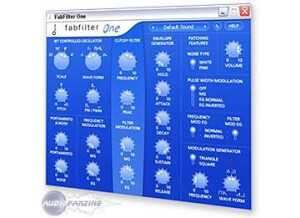
    FabFilter's One is a basic, but highly effective software synthesizer. I've only had the chance to mess around with this soft synth as I've only really scratched the surface with it as of yet. I don't own it, which I why I haven't used it all that much yet, and is also why I wasn't involved with installation. This is FabFilter's simplest synth, as their ideas are expanded in their other virtual synths. The interface has just one oscillator, but a serious amount of further control for messing with the sound of this oscillator. It's got sections for a cutoff filter and envelope generator, along with a variety of further parameters for modulation and other purposes. It doesn't have anything out of the ordinary when it comes to a synth, but also isn't really leaving anything out. It's got a really plain and basic interface to control everything, making it as simple as possible to control this synth. If you're new to synths it might be a good idea to have the manual, but certainly not necessary considering that this is a very basic soft synth. SUITABILITY/PERFORMANCE A producer who I work with has the FabFilter One soft synth on his home studio's system. He's got pretty much all of what FabFilter has to offer, most of them being effects and signal processing plug-ins rather than synths. I don't know all of the specs of his machine off the top of my head, but it's Pro Tools HD based which really says enough about the stability of the system. Again, this is a simple synth anyway so it doesn't take up too much processing power to begin with. OVERALL OPINION While it's not writing software synthesizer history, the FabFilter One virtual synth is a very solid, yet very simple one. FabFilter has more in depth synths for those who are looking for something a bit more complex, but for those who just want a cheap and simple soft synth, One is for you. It has a great overall sound that is highly manipulable with the wide range of parameters offered, although there's only so far you can take it with one oscillator. This is the perfect place to start if you're looking to get your feet wet with soft synths, but is definitely useful for more experienced users as well. It's cheap enough where this one is absolutely worth checking out for yourself!

  • moosers's review

    The FabFilter Pro-L is a high quality limiter plug-in that is available for DAW’s across the board. I didn’t really know too much about Fab Filter until someone I work with hipped me to them and I’ve been using them within his set up ever since (I’m an assistant for him). While I’ve mostly used the filter plug-ins that they’ve got to offer, the Pro-L is as good at what it does as any. Since I don’t own it I wasn’t involved at all with installing it so I won’t really be able to speak about this process. As far as learning how to use the plug-in goes, I didn’t find that this one had too much of a learning curve. It’s not as simple as something like the FabFilter Micro filter (a simple one band EQ), but it’s still not very hard to use. It gives you parameters for choosing the style/mode, lookahead, attack, release, and further options for channel linking, oversampling, dither, and noise shaping. It also has a graph that shows you everything in the background, which is always a good thing. I haven’t checked out the manual for this plug-in, but if you’re a less experienced user it might be a good idea to have it around simply to explain the parameters. SUITABILITY/PERFORMANCE I’ve only used the FabFilter Pro-L plug-in at the home studio of the producer who I work for. I’ve messed around with most of the plug-ins that FabFilter has to offer on this system, and the Pro-L is definitely one of my favorites, which I think is saying a lot because they really have some cool plug-ins to work with. The system that he is running the plug-in is Pro Tools HD 8 based, so we’re not going to be experiencing too many performance issues on it, as is the case with running this plug-in. The Fab Filter Pro-L is definitely one of the most versatile limiting plug-ins that OVERALL OPINION I’ve used before. It goes way beyond what your average limiter will offer. I’ve used this pretty much exclusively on the master fader of sessions for getting a little increase in volume and cutting off the volume at a certain point. The sound of the plug-in is nothing short of outstanding, and with so many options possible it really leaves it up to you to get the job done. The price is about somewhere in the middle, but it’s definitely better than it’s price would suggest. If you don’t know about Fab Filter and the Pro-L plug-in, you’re definitely going to want to check this one out.