Log in
EN
FR

SeriesIK Multimedia iRig

72 products found

Filter
Sort by
Evaluation
  • Reviewed or not
  • Editor’s award
  • Reviewed by Audiofanzine
Availability
  • Available or not
  • Sold new or used
  • Sold new
  • Sold used
Must-have products
  • All products
  • Flagship products
  • Best rated products
  • Hot products
  • Popular products
Price
  • Freeware
€
Clear
Sort by
  • Popularity
  • User ratings
  • Price - low to high
  • Price - high to low
  • Used price, increasing
  • Used price, decreasing
  • Name (from A to Z)
  • Name (from Z to A)
  • Added on
Sort results
  • Popularity
  • User ratings
  • Price - low to high
  • Price - high to low
  • Used price, increasing
  • Used price, decreasing
  • Name (from A to Z)
  • Name (from Z to A)
  • Added on
Filter results 72 results found
Evaluation
Availability
Must-have products
Price
  • Freeware
Show results

The best IK Multimedia iRig reviews

The reviews Audiofanzine members found the most helpful.
  • « Nice »

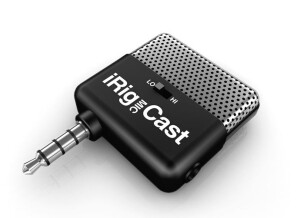
    I was actually awarded this iRig Mic Cast after winning a remix competition locally. It is a portable electrets condenser microphone for iphones, ipads, and ipods. It connects right to the standard mini jack input on the devices and works with iRig recorder App (comes with this app). Setting this microphone up is not hard at all, all you have to do is just plug it in and run the app. The app is free and this microphone only cost 40 bucks so there really isn’t anything to lose but the best part about it is that you will have a condenser microphone and the ability to record with you everywhere! We all take our phones with use ever where we go and it is just as easy to take this little microphone along for the ride to incase we get a song idea on the go. I love to use it to hum melodies into while I am driving so I do not forget them later. It has allowed me to get rid of my regular digital recorder that I was using for years. When you get the iRig Mic Cast, it comes with a desktop stand for your phone or iPod/iPad. So that you can record hands free without even having to hold the phone. This will make the recording quality a lot better too without the mic moving around. Getting out your recordings (out of the app) is kind of easy for me because I choose to just email them to myself. I think there is now a save to phone option right from the app but the app is not very good because it is very simple. There are not a lot of options to work with. However, there are some really good paid apps that are similar to the iRig Recorder app that will allow you to take it a lot further.

  • « Interesting but not that great sounding »

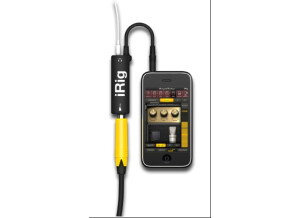
    Given the popularity of the Apple touch products, it was only a matter of time when somebody decided to create some sort of software amps simulator for it. IK Multimedia has developed the AmpliTube iRig in an attempt to create some sort of rival to the "pocket" amp sims out there. While their intentions were good, their execution was a tad poor. First of all, this requires a special cable to work with the guitar. You can't just plug in any adapter and expect it to work. Once you plug everything in, it works decently. There are some real inherent problems, number one being that the built-in speaker on the touch devices suck. One solution to that would be to use some sort of external monitors, but that'll defeat the entire purpose of having a "pocket" amp simulator. The good thing about this product is that there are very few crashes. I did experience one, but I just reloaded the program, and I was back to where I left off, really. It's easy to install, easy to set up and easy to maneuver around. It doesn't seem to suck the battery life any more than other applications out there for these devices, so there shouldn't be any huge issues there. One thing I'm curious about is if somebody calls you. I never had anybody call me when I was using it with my iPhone, but I wonder if the application would close, still work or what. Despite me giving the other parameters some high marks, the product really isn't that great. For one, you need the special cable to use it. Also, the built-in speakers on the Apple devices are pretty poor. You could add some sort of external monitors, but it defeats the entire purpose of this device, in my opinion. It might be work checking out, but I think there are better options out there for this kind of thing.