Log in
EN
FR

Sonalksis

17 products found

Categories
Filter
Sort by
Evaluation
  • Reviewed or not
  • Editor’s award
  • Reviewed by Audiofanzine
Availability
  • Available or not
  • Sold new or used
  • Sold new
  • Sold used
Must-have products
  • All products
  • Flagship products
  • Best rated products
  • Hot products
  • Popular products
Price
  • Freeware
€
Clear
Sort by
  • Popularity
  • User ratings
  • Price - low to high
  • Price - high to low
  • Used price, increasing
  • Used price, decreasing
  • Name (from A to Z)
  • Name (from Z to A)
  • Added on
Choose a category
Sort results
  • Popularity
  • User ratings
  • Price - low to high
  • Price - high to low
  • Used price, increasing
  • Used price, decreasing
  • Name (from A to Z)
  • Name (from Z to A)
  • Added on
Filter results 17 results found
Evaluation
Availability
Must-have products
Price
  • Freeware
Show results

The best Sonalksis reviews

The reviews Audiofanzine members found the most helpful.
  • moosers's review

    Sonalksis' Ultimate-D is one of four plug-ins found in Sonalksis' Mastering Suite. This is a dithering plug-in which you throw at the end of your master buses' chain for higher resolution in the digital world. The bundle in general is a great one to have if you're looking to do some mastering at home inside the box. The bundle has been out for a few years and is available for both Mac and PC systems and in VST, AU, and RTAS plug-in formats. You can also buy Ultimate-D as an individual plug-in, but it's really only worth it to get it in the context of the Mastering Suite bundle in my opinion. The interface of Ultimate-D is easy to understand if you understand the basics when it comes to dithering. If you don't know what dither is or feel lost with it, I'd do a bit of research to better understand the purpose of it as it will help you to use this plug-in and other dither plug-ins to their full potential. Ultimate-D is definitely more in depth than your average dithering plug-in as it gives you parameters to set the bit depth (quantize), content (electronic, acoustic, hybrid), and application (tracking or mastering). You can also compress the signal a bit, which is nice as usually you'll only have a quantize parameter in a dither plug-in... SUITABILITY/PERFORMANCE I've used Sonalksis Ultimate-D on a professional studio's system running Pro Tools HD. I don't know all of the specs of their computer, but since I'm only using it on the master buss, it doesn't take up much processing power. If you're using it in tracking mode on individual tracks (not sure why you would), it might take up more processing power, but most users won't have a problem when it comes to performance. OVERALL OPINION While don't have it at home, I use Sonalksis Ultimate-D at one of the studios that I work out of if I'm going to print mixes - whether they are roughs or final mixes. I don't know if it would be used in a serious mastering session, but for doing it myself it definitely does the job well. I've used other dithering plug-ins like those made by Waves, but this has the most control and does a great job. The entire Mastering Suite bundle is worth looking into, but I don't think it's worth it to buy this plug-in on it's own if you're not interested in the rest of the plug-ins in the Sonalksis Mastering Suite.

  • « Sonalksis FreeG »

    FreeG is Sonalksis’ master fader plug-in. It features all the essentials of a channel fader, such as mute, pan and peak, and RMS readout, with the quality, precision, and accuracy found throughout the company’s products. The great news about the FreeG is that you can download and use it completely free. Yes, this one is on Sonalksis. Get yours on their website. <a href="http://www.glintonline.com">http://www.glintonline.com</a> As we all know, not all great things in life have to cost money, and FreeG, despite not being an extremely essential type of plug-in for one’s recording endeavors, is definitely a very handy tool for tracking, mixing, and mastering. Most of the DAWs on the market don’t offer the precision of metering on their channel faders. The FreeG does. There is even an option (Fine) that allows you to have the fader’s readout stretched out for even more precision on level. Peak and RMS readouts also help assure your accurate metering. Once installed, the FreeG also comes in a Mono version, which can be of great use in tracking The only detail missing here for me, unfortunately, is a Solo button. What a miss guys. I’m not a software engineer but I’m sure a Solo button could have become a complicated task to accomplish since it would have to make the plug-in control the DAW, and that’s not how things work. But beggars can’t be choosy, and either way it is free, works great and is useful. I guess we shouldn’t complain about this one. I’m always crazy about how Sonalksis’ knobs, faders and switches give this impression of solid precision, even though you sometimes are manipulating them with a crappy mouse. This plug-in, as with other Sonalksis products, functions with zero latency. Looking for more precision for metering and manipulation on your DAW’s faders and you don’t have to spend a penny for it? Sonalksis FreeG is the answer. A simple, useful and solid product. If you record, mix or master music using a computer, I’m sure you will see FreeG as a valuable tool for your studio. This review was originally published on http://www.musicgearreview.com

  • « Sonalksis TBK2 »

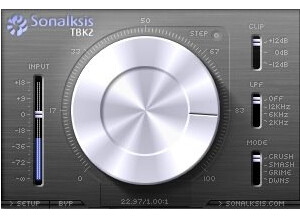
    The TBK2 is part of Sonalksis Creative Elements bundle. It is a Digital Grimebox that creates sonic degradation. It differs from regular degradation effects with its real-time automation capabilities that allow for smooth transition on audio degeneration. It is made for creative use on any of the steps during music creation, be it recording, mixing or mastering. As with the other TBKs, the TBK2 is also sold for a price of $99.99, while Sonalksis’ Creative Elements Bundle retails for $249.99. A free trial is available on Sonalksis site. <a href="http://www.glintonline.com">http://www.glintonline.com</a> TBK2’s functionality can essentially be put to use in three different ways of audio degeneration manipulation: bit crushing, down sampling, and distortion. Once again, it is Sonalksis’ software that features a simple design but proves powerful enough to create very interesting and sometimes surprising results. It sounds great for bit crushing drum grooves, down sampling strings instruments and distorting bass lines. Clipping control is a nice feature that helps you to not be taken by surprise while adjusting depth levels, saving your ears some pain and preserving their longevity Although this is a plug-in with which you certainly can get some really interesting sounds, I think so few Mode types of audio degeneration available (comprised of 4) can sometimes limit further processing experimentation. Despite its small dimension and few features, the TBK2 is quite a machine. Knob and controls present precision on manipulations with zero latency Producers and electronic musicians are certain to have a blast with this no ordinary bit crusher/down sampler plug-in. Easy and intuitive to use, able to deliver quality audio degeneration results. Price can be a little hefty depending one’s budget, but if you are looking for such an effect, then go for it with no regrets. This review was originally published on http://www.musicgearreview.com

  • « Sonalksis StereoTools »

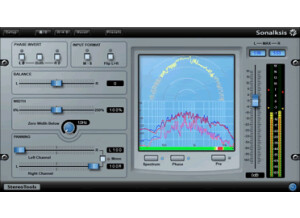
    StereoTools is one of the four plug-ins that comprise Sonalksis’ Mastering Suite Bundle, the other three being MaxLimit, MultiLimit, and Dithering-Q. Created to be a complete tool for stereo manipulation, the StereoTools offer not only processing features but also detailed graphics that help monitor frequency, phase and positioning. StereoTools is currently priced at $219.99. The Mastering Suite Bundle is sold for $599.99. Sonalksis offers 14-day free trails and even software rentals for those on a budget. <a href="http://www.glintonline.com">http://www.glintonline.com</a> There is something I’ve been noticing about every Sonalksis product I tried, which gives the impression that it is a possible company “trademark”; simplicity and powerful results. The StereoTools isn’t any different. At first glance, this plug-in might give the impression of just being a very expensive product with not much to offer. It’s almost funny, but the few faders and knobs featured in its interface can definitely give a completely new character to any musical piece. Some of the features are very simple and useful, such as the precise output fader, a mono switch, panning and phase inversion switches for both left and right and flip for stereo imaging. The power of this tool can be found under the Width fader that can quickly compress your stereo mix to mono, but also can expand it to an even further spread. It can definitely make a mix fuller, richer, and bigger. The Zero Width Below Knob is another highlight of the product, letting you filter lower frequencies out of the stereo widener fader. The graphic screen is the other big plus of this plug-in. First you see the stereo graphic for visual monitoring of the sound spread. Underneath you can activate spectrum, a frequency versus amplitude graphic, and the one I personally liked a lot, a phase graphic that shows phase correlation in real time. This tool also comes with a few very useful presets and many setup customizations. The StereoTool is also of great use for positioning of single tracks in the perfect place in stereo imaging, making the mix cleaner and more professional. I think a price reduction could make this product a little more accessible to everyone. Once again, a solid plug-in. Faders and knobs offers firm precision. Graphics give accurate information. Another great tool for mastering engineers and music producers as well as for the home studio lads who want to take their mixes to the best level possible, without leaving their homes or spending too much money. StereoTools can quickly and easily redefine sonic imaging, while enhancing quality and professionalism of your music. This review was originally published on http://www.musicgearreview.com

  • « Sonalksis MaxLimit »

    MaxLimit is one of four software tools developed by Sonalksis specially created for modern mastering applications. Nowadays the digital revolution age has drastically transformed how music is mastered. Digitally produced music tends to keep pushing the limits of how hot a mix can be, leaving little to almost no room for mastering, disrupting the music level dynamics, thus disrupting how the music is perceived by the listener. MaxLimit was created to deal with just that. Ultra hot mixes. Different from a regular limiter, Maxlimit is intended to deal with these issues by solving them while conserving music dynamism. MaxLimit is sold at Sonalksis.com for $279.99. Mastering Suite Bundle is priced at $599.99 and includes MaxLimit and three other plugins. Free 14 days trial is also available in the site. <a href="http://www.glintonline.com">http://www.glintonline.com</a> At first the MaxLimit might look like a regular limiter. Input>threshold>output. The three knobs and three buttons that surround those common features give this limiter its uniqueness. Release allows anything from transitory 1ms release times up to a full second. With the assistance of Smooth you can carefully blend the limited signal so result is natural. The Auto button gives the Release an automatic feature, so it can automatically release depending the income signal. The link buttons cleverly ties threshold and output faders together so you can further carefully explore the outcome when changing threshold level. Once again, Sonalkisis brings few but very useful presets. They are a good demo of what MaxLimit can do. Product is great, but makes me wish for a smaller price tag. Definitely goes for the Mastering Bundle, instead of buying one at time. Solid plug in. Faders give control precision and can also customized under set up tab. Powerful result without consuming a lot of RAM. Great tool for mastering, independent if you at your own home studio or in professional environment. It can definitely help to give any mix a great smooth result. This review was originally published on http://www.musicgearreview.com

  • « Sonalksis DQ1 »

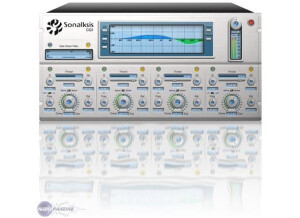
    Sonalkisis DQ1, as its name might already hint, is a Dynamic Equalizer for sound frequency sculpting. It features almost every single control found on its dynamic equalizer brother, the CQ1, a 4-band selective frequency booster/reducer offering nice presets and precise control. The catch is found on the tiny selector found on each of the 4 bands, a switch from static to dynamic frequency processing. The DQ1 is priced at $279.99, but is also offered as a package with the CQ1 for a price tag of $449.99 <a href="http://www.glintonline.com">http://www.glintonline.com</a> If you already love the CQ1, it is certain you will go crazy for the DQ1. The DQ1 can be easily described as an evolution of the CQ1, not to knock or undervalue its software brother, it just seems DQ1 was designed to deal with more complex tasks. Each of the threshold bands feature two-slider control for low and high values, so you can more precisely assign what frequencies you wants to manipulate. Having two threshold values requires two faders to assign gain. The low-gain parameter sets the filter gain that is active when the audio signal falls below the low threshold. The high-gain sets the filter gain that is active when the audio signal reaches the high threshold. The tiny switch at the bottom at each gain gives you the power to use the band as a regular, static equalizer, with the option to choose between low or high threshold, or use both simultaneously, creating a dynamic equalization. I have no negative feedback for the DQ1. Unfortunately it makes me contest the CQ1’s existence. As with the other Sonalksis software products I own, the DQ1 is a solid plug-in. The knobs and sliders set parameters with precision. No latency, real time graphic monitoring, and a few very useful and powerful presets. It also doesn’t consume almost anything of your RAM. This a killer tool for enhancing your recordings. It can definitely give them new life. Its simple, clever and powerful features are surely of great use for home and professional studios. If you are debating between CQ1 and DQ1, go ahead for the DQ1. Simplicity can always be handled by complexity, but sometimes is harder to do it the other way around. Or I would just recommend get the Sonalksis Multi-Band Dynamics Pack so you can have both and apply them as you desire. This review was originally published on http://www.musicgearreview.com

  • « Sonalksis CQ1 »

    The Sonalksis CQ1 is a multi-band, frequency-selective dynamics processor that I only recently discovered, and I am really impressed with the results I can get with it. While retailing for $279.99, there is a free downloadable trial of this product at the Sonalksis website so you can get a preview and feel for the product. The CQ1 (Multiband Compander) is sold along with DQ1 (Dynamic Equalizer) in the Sonalksis' Multiband Dynamics Bundle. It retails for $449.99 <a href="http://www.glintonline.com">http://www.glintonline.com</a> There are a few reasons why I loved this plug-in so much, but first off I have to bow to simple fact that the CQ1 is another great plug-in made by this European company. With CQ1 you can easily select the frequencies you want to compress or expand using its four-band features. No wonder Sonalksis describes the CQ1 as a “frequency sculptor”. The side-chain filter is a great feature to select and eliminate undesirable frequencies of a track. Despite similar capabilities with the DQ1, the CQ1 can achieve more aggressive “sculpting” results. The interface is intuitively easy to operate, and offers well-designed presets as well as the capabilities to make and customize your own. I use the CQ1 not only on individual tracks but also for final equalization/frequency sculpting of my master output. This is an amazing and flawless sound shaping tool. The CQ1 offers zero latency and supports up to 192Khz. Its interface is easy to use and makes it easy to monitor what you are accomplishing with the product. For all those who want a polished final product right out from their home or professional studio. CQ1 is a great tool for every stage of music making, be it recording, mixing or mastering. This review was originally published on http://www.musicgearreview.com

  • « Sonalksis SV-315 Mk2 Compressor »

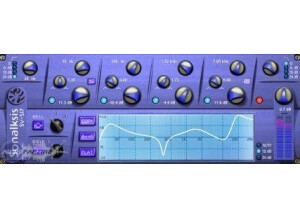
    Sonalksis is an European software company that makes audio tools designed especially for mastering applications. I came to known Sonalksis only recently when recording drums for my band’s up coming record. We've heard good things about its products and we decided to try them out ourselves. The SV-315 Compressor is part of Sonalksis Essentials pack and was created not only for mastering purposes as well as for recording. Luckily I’ve got a NFR version of this plugin compressor. It retails for $260. If you buy the whole Sonalksis Essentials package, you will end up saving some money. The Essentials pack includes the SV-315 compressor, SV-719 gate and SV-517 equalizer and retails for $599.99. <a href="http://www.glintonline.com">http://www.glintonline.com</a> The Sonalksis SV-315 Mk2 Compressor have a few features that made me really happy. For example, its capability of having the compressor and its built-in limiter working independently, external side-chain function and precise knob control (some softwares can be a real pain when you have to tweak its parameters with a mouse). The beauty on this piece of technology really is how truly emulates a real analogue compressor. I’ve used it for tracking drums and the results were quite impressive. It comes with few, but very powerful presets. Little pricey, but I guess you can’t get good quality for low price anywhere. If you are thinking to buy this piece, go for the whole package and save a few bucks. The gate and EQ are really good too. Simple and clean interface with standard but powerful features. One of the best software compressors I ever used. It works just like a real analogue hardware. This review was originally published on http://www.musicgearreview.com

  • « good value »

    The Sonalksis SV 315 Compressor was easy to install and I haven't had a problem with it since I installed it. I run it with Pro Tools 7.4 and it was as basic an installation as any plug-in I have installed. I've never used the manual but I don't think you would need it unless you were having problems getting the plug-in installed on your machine. But you shouldn’t have any problems on any machine, its very easy to install and doesn’t crash. Not even on pc ( as one of my friends uses it on pc) SUITABILITY/PERFORMANCE I run the Sonalksis SV 315 on my Mac Book Pro that has a 2.2 Ghz processor and 4 GB of ram. I use it in Pro Tools 7.4 that I run with my Digi 002R interface. I've never had a problem running this plug-in on my machine and I'm able to run a few of them at once. I think that has more to do with my machine than the plug-in, but there is something to be said that I have never had an issue with it. OVERALL OPINION I've had the Sonalksis SV 315 Compressor for about 8 months and it has become an integral part of my plug-in collection. I love the way it sounds on electric guitars and electric keyboards. It makes for a thicker sound and adds a nice crunch to guitars. It is also extremely easy to use as it only has 3 parameters, making for a simple layout that is easy to understand. I think it is pretty fairly price as far as plug-ins go and is definitely a good value considering that you are getting a nice sounding compression plug-in. It also has a nice metering section that makes it easy to monitor output and compression. All in all, this is one of the better compression plug-ins I have come across and will continue to use it when mixing in Pro Tools.

  • moosers's review

    Sonalksis' MultiLimit plug-in is one of four that comes in the Sonalksis Mastering Suite. Both the plug-in and the bundle are available for both Mac and PC operating systems and in RTAS, VST, or Audio Unit plug-in formats. The interface of the plug-in itself is fairly easy to understand if you understand the principles of a limiter. It is split up into five separate frequency bands, which each allowing you to control parameters for drive, gain, release, solo, and on, and a series for four sliders above them to allow you to set each cross over frequency between each of the bands. There are then more general parameters for threshold, ceiling, release, smooth, and clip. Once you break it down it should be pretty easy to understand, and there's a nice graph there that shows you where your bands are on the frequency spectrum. A manual shouldn't be necessary, but while I'm sure there is one for it, I haven't seen it. SUITABILITY/PERFORMANCE I've used the Sonalksis MultiLimit plug-in at a studio I was recently working out of, but I don't have it on my system at home. I was running it on a Pro Tools HD system, so we didn't have any issues with it or printing with it as we were doing. It probably does take up a decent amount of processing power, but it still shouldn't give you much of a problem if you're currently comfortable running RTAS or other native plug-ins. OVERALL OPINION Sonalksis' MultiLimit plug-in from their Mastering Suite is a great sounding multi-band limiter for your DAW. It's easy to use and still gives you a lot of control over your sound, as between the five bands you should be able to get as specific as you'd like. In general the sound is pretty punchy, and you can get your mixes a good bit louder with this. It's probably not worth buying it unless you're going to just go for the full Mastering Suite bundle, as not only are the others great to have to do a complete mastering job, but it's also cheaper to get everything together. Check this out if you're looking for some good mastering plug-ins!