Log in
EN
FR

Software convolution reverbs

136 products found

Sort results
  • Popularity
  • User ratings
  • Price - low to high
  • Price - high to low
  • Used price, increasing
  • Used price, decreasing
  • Name (from A to Z)
  • Name (from Z to A)
  • Added on

The best Software convolution reverbs reviews

The reviews Audiofanzine members found the most helpful.
  • moosers's review

    I had no problems at all getting started with the Trillium Lane Labs TL Space. You need an iLok to authorize it with, but if you have experience with that it should be no problem. I run it with Pro Tools 7.4 LE and I had no need for the manual. It is easy to install and figure out the functions. SUITABILITY/PERFORMANCE I use this on my Macbook Pro (2.2 Ghz, 2 GB Ram) and I've had no issues at all with it. I use it on an auxiliary track with every session I do. This saves processing power; if I were to put this plug-in on every track however, I do believe it would slow down my computer quite a bit. This is to be expected with any sort of powerful plug-in such as this one though. As long as I keep it on one track or a few at most it runs great. OVERALL OPINION I've had it for about a year now and it is the only reverb plug-in that I use - its that good. Not only is it really easy to get a nice sound from it, but the controls are really in depth and useful. I've used a a couple of reverb plug-ins in the past and this one trumps them all. While I haven't done this, I believe that you can download extra presets for it, a great feature that I will look into when I have a chance. Even though it is definitely a bit pricey, for me it is worth every penny. I've used an EMT 140 plate reverb and the emulation of that on this plug-in is impeccable. If you are looking for a serious reverb plug-in, spend the money and get this; you won't regret it and you will have a great sounding reverb for all of your sessions.

  • JoeW1's review

    Reverberate from LiquidSonics is compatible with any platform like Xp , Vista , 7 or MAC. The manual that is included with the program is easy to catch , enough to obtain the necessary information of how the reverb works and reacts. The setup doesn't require a lot of time or effort , it's very fast and easy to follow. SUITABILITY/PERFORMANCE The software from LiquidSonics works beyond great , the program is very stable , provides a very delicate touch of reverb , some high quality reflections and time delays. I'm getting great results while using this product , it really helps to combine different sounds and colors to other instruments or sounds. OVERALL OPINION Reverberate is a dual true-stereo convolution reverb with a lot of presets , around 144 which I totally enjoy using , some stereo delays with modulation for IR2, IR2 and after effects. I also like the interface , a very catchy design that incorporates a sample browser , some EQ and LFO modulation and of course early reflection module. Another remarkable aspect of this program is the full file support for wav, SDIR, aiff and flac. You get other awesome features that are low CPU down sampling mode option and 0 latency response. My opinion about the value for the price is awesome , extremely cheap product , only about 50 $ , but you get a very complex and professional sounding reverb. Precision and quality of the sound is also pro , the tale sounds realistic , the effect that is has on the shape of the sound is great , 9/10. I've tried different reverbs , some way more expensive , some cheaper , this one is better than average and not as good as Aether for example. Knowing what I know, I'm quite sure that I would get a bigger reverb in terms of price and quality , but having said that , for its price range , this is probably your best choice.

  • « Crazy versatile reverb »

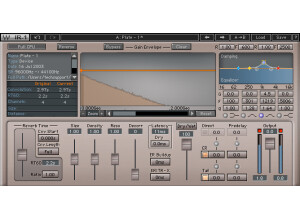
    The IR-1 is like the mack daddy of reverbs. It has everything you can think of and then some. They have some crazy algorithms going on in this, and tons of different spaces were pre installed on this thing. As for the list of features, it has tons: a CPU mode, reverse knob, IR graph, reverb dampening, reverb EQ, reverb time section, reverb control parameters, latency, dry, ER buildup, ER/TRX crossover, crosstalk, dry/wet, dry gain, wet section, output gain fader and an output meter. This plugin is fairly hard to use because of everything that's going on. I can't stress finding tutorials on this enough. I've used it for months, and I'm still discovering new things about it simply because of everything you can do with the plugin. In fact, it's almost too versatile for its own good. Whenever I decide to make a reverb, I find myself messing with the options more than actually creating a fitting reverb at times. You can get that tweaking syndrome going on where it's never perfect enough. SUITABILITY/PERFORMANCE Waves has a well known reputation for having some of the best and most stable plugins ever to have graced the music software industry. This plugin is just like every other Waves plugin out there -- it's rock solid. The main issue I have with this plugin is that it's 32 bit. Logic and OS X are now fully 64 bit, and to utilize this plugin, a 32 bit bridge is needed. I'd like to see these plugins move towards 64 bit in the next update. It would alienate some of the older hardware users, but I have a feeling most people would upgrade their hardware to utilize these plugins. The other issue is that it can take up quite a bit of memory when in full CPU mode. I have a Mac Pro, so it's never a huge issue for me. However, others might run into trouble. Thankfully, they have a switch to allow you to select full or low CPU mode. OVERALL OPINION This plugin is so complex that it can be a bit overwhelming. I usually just want to create a basic reverb, but I tend to get tweaking syndrome with this thing. There's so much going on that I can't stop messing with what I have. Definitely try it if you're a tweaking fan, but if you need something that sounds great with less clutter, check out the IR-L.

  • « 5.1 surround reverb »

    Waves IR-360 is a plugin that's mostly used for people who are doing things involving movies. The plugin itself is a 5.1 surround reverb plugin, and it's crazy powerful. It has a CPU mode, Reverse, IR graph, reverb damping, reverb EQ, reverb time section, various reverb control parameters, latency section, dry, ER build up, ER/TRX crossover, crosstalk, dry/wet, dry gain, front/rear balance, front/rear pre-delay, wet section parameters, output gain fader and an output meter for you to monitor everything. As you can see, the plugin itself is packed full of features, and a lot of this might go over some beginners' heads. There were no compatibility issues with this plugin at all. I can't comment on the manual as I never read it, but that's because I'm used to working with plugins like this. If you're a beginner, you might want to watch a few tutorials on this to see how everything works. Thankfully, pulling up this plugin and getting a usable sound is fairly easy. SUITABILITY/PERFORMANCE Waves plugins are the king when it comes to compatibility. I've never experienced a single issue when it comes to compatibility with these things. They're cross platform compatible, so you can use this on both Windows and OS X. If I had to list one gripe, it would be that these plugins are 32 bit. In a 64 bit world, the 32 bit plugins can be a bit annoying as a separate bridge program usually needs to be activated for them to work in a 64 bit environment. That aside, the plugin is great. The cool feature about this is that, despite it being powerful, you can use it on some lower end systems if you remember to press the CPU button in the plugin. That'll prevent it from wreaking havoc on your RAM. OVERALL OPINION The plugin itself has some limited uses for my application as I mainly deal with stereo sounds. However, when I tried this with my Final Cut Pro movie I made, it worked awesome. I find it sounds very natural and authentic without having that fake harshness that so many reverbs out there can have. I recommend anybody who deals with 5.1 sound to check it out.

  • « Wow, for a software plugin, Wow. »

    I use this in both Logic 9 and Ableton 8 and I have had no compatibility issues. Yes, the manual is clear and sufficient. If you are familiar how reverbs work, you only need to reference it for certain things specific to this software. Yes, the general configuration is fairly simple. All of the parameters are easily accessed. SUITABILITY/PERFORMANCE Yes, the software works great with the exception of one problem. I had initially setup up the IR samples to reside on an external hdd but I found that everytime I opened up the plugin, they were not showing up. All I had to do was go into the settings and point it back to the HDD. After a week of that I just decided to put in on my internal hdd and have had no problems since. The performance is great. Switching between presets is quick and simple and there is no clicking noises when doing so. I have been using this plugin for about 6 months now. OVERALL OPINION What I like most about this unit is the reverbs are top notch. I expected really good reverbs for the price, but I was very impressed when used in our studio. We have a few hardware reverbs and I still like to use them for their specific characters, but I find myself pulling this out way more often. Most likely due to its convenient home in my computer but also because it is just so great sounding. Other than the issue with the samples not showing up when using the ext hdd, there are no problems. $500 is a lot to spend on a plugin, but if you are doing a lot of work and want access to a lot of different high quality reverbs, this unit will make you very happy even at that price point. 10 out of 10 for software reverbs. It is really the best one I have used to date. I have used a lot of other reverb plugins (audio damage, built in Logic and Ableton plugins, lexicon which were pretty good, etc....) Yes, I would buy this again.

  • moosers's review

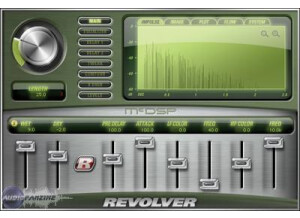
    The McDSP Revolver reverb plug-in was quick and easy to install. I bought it electronically as part of the McDSP Project Studio LE bundle, and had it up and running with my iLok within a matter of minutes. I had no compatibility issues with my machine and have had no problems with it since installing it. I don't have a manual for this, and I'm not sure that one even exists - it is not needed as the plug-in is easy to figure out on its own. SUITABILITY/PERFORMANCE I am running the McDSP Revolver reverb plug-in on a Mac Book Pro that has a 2.2 Ghz Intel Core 2 Duo processor and 4 GB of RAM. I use the plug-in in Pro Tools LE 7.4 that runs off of a Digi 002R audio interface. I haven't had any problems running this plug-in with this configuration, as it has always run smoothly. I have never run more than one of these at once because I put it on an auxiliary track and send the signal from the tracks via buses. This saves processing power and I do it with all reverbs and delays. This being said, I don't think you would have too much trouble running a few of these at once if you wanted, but it really depends on what kind of machine you are running this on. OVERALL OPINION I've been using the McDSP Revolver reverb plug-in for about six months. The plug-in is easy to use and has some great sounding reverb and delay effects. It has a lot of parameters that make it capable of getting a variety of different sounds, and being that I bought the plug-in in a bundle, it was dirt cheap. I love the sounds I get from this plug-in and I highly recommend it for all digital audio workspaces. McDSP makes some great plug-ins for extremely reasonable prices and would recommend looking into the Project Studio LE bundle as a whole.

Categories that may interest you