Log in
EN
FR

Digital Fish Phones

8 products found

Categories
Filter
Sort by
Evaluation
  • Reviewed or not
  • Editor’s award
  • Reviewed by Audiofanzine
Availability
  • Available or not
  • Sold new or used
  • Sold new
  • Sold used
Must-have products
  • All products
  • Flagship products
  • Best rated products
  • Hot products
  • Popular products
Price
  • Freeware
€
Clear
Sort by
  • Popularity
  • User ratings
  • Price - low to high
  • Price - high to low
  • Used price, increasing
  • Used price, decreasing
  • Name (from A to Z)
  • Name (from Z to A)
  • Added on
Choose a category
Sort results
  • Popularity
  • User ratings
  • Price - low to high
  • Price - high to low
  • Used price, increasing
  • Used price, decreasing
  • Name (from A to Z)
  • Name (from Z to A)
  • Added on
Filter results 8 results found
Evaluation
Availability
Must-have products
Price
  • Freeware
Show results

The best Digital Fish Phones reviews

The reviews Audiofanzine members found the most helpful.
  • « Free Useful Tool »

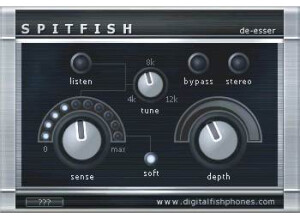
    The Digital Fish Phones SpitFish can be for mono or stereo vocal tracks. This free VST has the tools needed to get those “S” sounds or “SHH” sounds out of the vocal mix and it does it very good for it to be a free plug in. The interface is very small with only a , Tune Knob, Sense Knob, Depth Knob, and listen, bypass, stereo buttons. Most of all the stuff that Digital Fish Phones has made is awesome and they try to keep all of the VST’s free. I haven’t seen manual for SpitFish and I don’t think they have come out with one, but they do have an actual help button on the VST dashboard so if you need help you can click on it. I think it will take you to a help page on their website. Setting up this VST was simple and quick, it installs in only a few seconds and it is extremely low on your CPU. SUITABILITY/PERFORMANCE I run the SpitFish on my MacBook Pro 2.66 Hhz i7 Dual Core 4GB laptop. I have not been using the SpitFish long and I really don’t use it that much. It was free so I downloaded it. I have other paid plug ins that can do exactly what The SpitFish can do and they are a little more in depth. But if you can afford to have the paid VST’s that can handle vocal tracks , I say it is a easy decision that you must go download the SpitFish right away. You will love how well it can take those sounds out of your vocals and clean up your mix. OVERALL OPINION SpitFish is very easy to use and to install, there is nothing to it. I wish that tit was a little more in depth though with more options to it. I would use it a lot more if it was more in depth. Since it cant compete with some of my Waves plug ins, it will just have to sit on my computer and never get used. But for free, you really cant beat what it can do. It is a must have for someone who can’t afford those expensive plug ins.

  • moosers's review

    The Digital Fish Phones Normalizer is a free plug-in for Mac and PC operating systems. I think it’s only available in VST format, but I’m not 100% sure on this, although that’s the format I used it in. I don’t have it running anymore on my current Pro Tools rig. It’s been a little while since I installed and used the plug-in, but you can still download it on the Digital Fish Phones website and have it up and running fairly soon from now. The plug-in is designed for fixing a specific problem in your DAW where there is much processing power unnecessarily being taken up. I never really had the problem, but downloaded all of the DFP plug-ins and had it in my suite anyway. It couldn’t be easier to use, as it just gives you a threshold parameter to work with. There are two methods to choose from, although I don’t recall which I normally used and how they’ll affect your end result differently. I doubt a manual was put together for the Digital Fish Phones Normalizer plug-in, but the good news is that you won’t need one. SUITABILITY/PERFORMANCE Ever since I made the switch from running Cubase on a PC to Pro Tools on a Mac, I haven’t had this plug-in on my home system. When I did, it was running on a Hewlett Packard Pavilion dv8000 Notebook that had 2 GB of RAM and a 3.0 Ghz processor. It fixed a specific issue that some audio hosts can have and helps you to save processing power, so if you have an issue it’s going to help in this department. OVERALL OPINION While not necessary for everyone to have, if you are having a denormilzation problem, it’s free and worth having. It’s not an effect or anything and is really just necessary by utility. I downloaded all of the Digital Fish Phones plug-ins for free right off the bat, and kept it in my system til I switched over to Pro Tools. If you aren’t have any problems in your DAW, you’re probably not going to need this, but for those who do, it’s nice that there’s a free plug-in out there to help fix the issue.

  • moosers's review

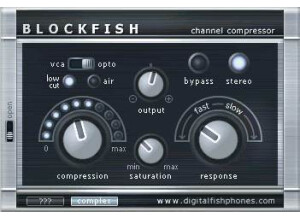
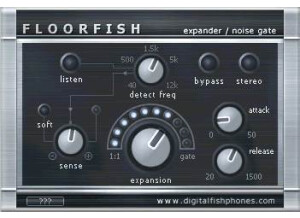
    The Digital Fish Phones 'Fish Fillets' refers to a bundle of free plug-ins from DFP. You can get these plug-ins individually, but part of this little freeware bundle are the Blockfish, Spitfish, and Floorfish plug-ins. It's all dynamic processing plug-ins, as Blockfish is a compressor, Spitfish is a de-esser, and Floorfish is a gate/expander. These are available for both Windows and Mac operating systems, in VST, AU, and DirectX formats where applicable. You can download all of these right from the Digital Fish Phones website, which hasn't been updated in a bit as these plug-ins are somewhat on the older side as far as plug-ins go. I'm not currently running these plug-ins, but used to use them a good amount when I had a PC for audio software. Learning to use each of them isn't hard, as even though there's a nice amount of control available here, they're still fairly easy to use. I don't think there's a manual for the Fish Fillets, but double check the website if you're after one. SUITABILITY/PERFORMANCE While I was running the Digital Fish Phones 'Fish Fillets' bundle it was in Cubase SX 2.0 and later in 3. I ran everything on a Hewlett Packard Pavilion dv8000 Notebook that consisted of a 3.0 Ghz processor and 2 GB of RAM. These were quite stable for me, as they seemed to take up virtually no processing power, which is a huge plus. I used them a lot on drums and can't recall having any issues with them at all. OVERALL OPINION The Digital Fish Phones 'Fish Fillets' bundle is one you should definitely have if you're after free plug-ins! These are some of my favorite free plug-ins, although I'm not running them anymore due to compatibility with Pro Tools and because I've got higher end plug-ins where I wouldn't use these for much. Having said this, they're definitely worthwhile if you're looking to expand your plug-in palette. Definitely head over to the Digital Fish Phones website and grab yourself these plugs along with the others that they've got for free.

  • moosers's review

    Digital Fish Phones's Dominion software is a free VST plug-in for both Mac and PC systems. It hasn't been updated in a while, so I don't know what the exact compatibility is going to be with this, but when I used to have it it was on my PC laptop as a VST plug-in. You can still download the plug-in straight from the Digital Fish Phone's website, which has a clear overview of everything involved here, which should be find in place of a manual if you thought you might need one. Essentially this plug-in gives you control over the envelope of your signal, which can be very helpful on a few different levels! The interface consists of sliders for input and output levels, as well as level and length for both sustain and attack. It also has a saturation section and a high frequency filter as well. It's easy to understand while it still provides you with a nice collection of controls... SUITABILITY/PERFORMANCE While I don't have this plug-in anymore, when I did it was running in Cubase SX. I had the Digital Fish Phones Dominion on my old Hewlett Packard Pavilion dv8000 notebook, which consisted of a 3.0 Ghz processor and 2 GB of RAM. I really didn't use this plug-in in an excessive amount at all, using maybe one or two instances at most if that within a session. I wouldn't think that users would have a hard time running it, but as always it really depends on the system you're using. OVERALL OPINION If you have a compatible system, the Digital Fish Phones Dominion plug-in is free and is definitely worth having. There are certainly other plug-ins out there that will give you control over the envelope of a sound, but this is a unique take on it, and once again, it's free! I really like the layout of this and while the sound isn't going to do anything crazy for you, you can do some helpful things with it if you know how to use and what to do with it. Definitely head over to the Digital Fish Phones website and give Dominion a shot along with the other plug-ins known as the Fish Fillets.

  • moosers's review

    The Digital Fish Phones Endorphin plug-in is a dual band compressor, usable in either traditional stereo or M/S modes. It is a free plug-in that is available for download straight off of the Digital Fish Phone website. All of their plug-ins are free, so they're definitely worth knowing about in general. I don't remember exactly what formats this one in particular in compatible with, but I was using it on my old PC system as a VST plug-in. I haven't tried, but I don't think it will run in Pro Tools on my current Mac system. As long as you're properly compatible, it should be easy enough to download and install the plug-in as I don't recall having any problems doing so myself, although it's been years since I had it. The interface of the plug-in itself isn't too hard to use, although there's a nice array of parameters to get used to here. For starters, there's a button to use the plug-in either in M/S or stereo mode, followed by sliders for input trim, output drive, attack, release, comp low and comp high, and de-compression/saturation. It also has options for using it in M/S mode, as well as mix low and mix high levelers. I'm unsure of if there's a manual for Endorphin. SUITABILITY/PERFORMANCE While I'm not currently running the Digital Fish Phones Endorphin plug-in and it's been a few years since I have, when I did run it, it was on my old PC laptop and in Cubase SX 2.0 and later in 3. The computer was a Hewlett Packard Pavilion dv8000 with a 3.0 Ghz processor and 2 GB of RAM. I don't really remember having any problems running this plug-in and I'd honestly be surprised to hear if anyone did have problems with it. Usually free software like this is made with the intention to be used on all sorts of systems... OVERALL OPINION Since it's free, the Digital Fish Phones Endorphin plug-in is definitely one to check out if you're DAW will allow you to in terms of compatibility. It's a pretty in depth dual channel compressor, and it's awesome that you can use this is M/S mode rather than just in stereo as you'll get with most plug-ins. This feature helps to set this plug-in apart a bit, although I don't think it's the best sounding compressor overall. I like to array of parameters here, as it's definitely a fresh and unique approach to compression. Again, if you're able to run this on your system, definitely give it a shot as even though it's not really a professional plug-in, it still sounds pretty good and can do some interesting things for sure.

  • moosers's review

    The Digital Fish Phones THD is a free saturation plug-in that I’ve used on Windows as a VST plug-in on my old DAW. I believe it’s also available for Macintosh systems but I’ve yet to try it on my current Mac system. You can download the plug-in straight from the Digital Fish Phones website, which also has a bunch of other free plug-ins worth checking out. This, I believe is the first made by DFP, and it shows in the interface and sound. It should only take a minute to download and install it and I wouldn’t think you’d encounter any problems as long as you have a compatible system. Using the plug-in is easy, as it gives you parameters in the form of sliders for gain, punch, clip shape, and output. It’s got the presets as well, but overall isn’t the most effective ‘analog’ saturator. I doubt a manual was ever made for this plug-in. SUITABILITY/PERFORMANCE I don’t run the Digital Fish Phones THD saturation plug-in any longer as when I did it was on my old Cubase SX based DAW. This system had Cubase SX 2.0 and later 3 running on a Hewlett Packard Pavilion dv8000 laptop with a 3.0 Ghz processor and 2 GB of RAM. I never had any problems at running this that I can remember and it takes up such a low amount of processing power that I don’t think anyone should anticipate issues with it. It’s free, so just go ahead and try it for yourself. OVERALL OPINION While it’s cool to have a free analog style saturation plug-in, I can’t say that THD is very effective. I won’t complain about it too much since it’s really old as far as plug-ins go and is of course free. However, it just lacks a certain depth you’d want with a saturator and really fails to add proper thickness to your sound. It will do something for you, but I wouldn’t expect too much from it. If you’re still reading this and are interested in THD, definitely give it a shot for yourself as you’re most likely going to have to pay for any good saturation plug-in, which there are few of to begin with!

  • moosers's review

    Digital Fish Phones' BlockFish plug-in is a free piece of software for compression. All of Digital Fish Phones' plug-ins are free, and this one is part of three 'Fish Fillet' plug-ins that were created by an independent developer a little while back. It's available for Mac and PC platforms and in VST format for both and AU for Mac. You can download it straight from the Digital Fish Phones website, which only takes a minute as will be the case with installation as well. Learning to use the plug-in isn't hard at all, although there are two layers to it. The main section has parameters for compression level, response, saturation, and output, as well as two modes to choose between - VCA or opto. You can also make further adjustments in a section window that has parameters for low cut frequency, opto memory, air frequency and level, saturation emphasis frequency, and dynamic saturation. It's all easy enough to follow, but I'd recommend sticking with the main parameters to start and work from there as needed. I don't think there's a manual for BlockFish or any of the Digital Fish Phones plug-ins, and if there is I haven't seen it. SUITABILITY/PERFORMANCE I don't have the Digital Fish Phones BlockFish plug-in anymore, but I used to use it in Cubase SX 2 and 3.0 when I was using mostly free plug-ins and didn't have as many as I do now. I was running it on a PC with a Hewlett Packard Pavilion dv8000 laptop that had a 3.0 Ghz processor and 2 GB of RAM. I used this plug-in a lot and multiple instances of it at once without issues on this system. I'm sure it would run even smoother on my current Pro Tools rig (using the Fxpansion wrapper), but I really don't have a need for it. OVERALL OPINION If you're looking for a free compression plug-in, the Digital Fish Phones BlockFish plug is a must have. I have a lot of more professional plug-ins that I use at home now, but when I didn't have as big of an arsenal, I used this one a lot. I used it a lot on drums, especially kick drum, as it's good for hitting your signal really hard. It can be more subtle but I didn't find that it sounded as good when used in this capacity. I haven't used it in a few years but since I've got the Fxpansion VST to RTAS wrapper, maybe I'll try it out again sometime soon although it's really not necessary for me since I've got a ton of great compressors in the box already. Definitely check out the full line of Digital Fish Phones plug-ins and BlockFish if you're able to run them, as it's quite solid for a freeware plug-in.

  • moosers's review

    Digital Fish Phones FloorFish plug-in is a free sidechain expander/noise gate plug-in for Windows systems. It’s available as a VST and Audio Units plug-in for Windows & Apple based operating systems, the reason for this most likely being because Digital Fish Phones isn’t exactly a commercial company. It seems to me that it’s just a guy or a few people who developed these plug-ins a few years ago. You can still download this plug-in straight from DFP’s website if you’ve got a compatible system. This is a quick process from what I remember as I downloaded all of their plug-ins at once, although it was a few years ago. The interface of FloorFish is very easy to follow, although you should know the basic purpose of what this is for. It gives you parameters for detection frequency, expansion, sense, attack, and release. Even if you don’t know all that much about expanders and gates, this is good place to get started since it’s only got the basics. I highly doubt there’s a manual for this… SUITABILITY/PERFORMANCE While I'm no longer running the Digital Fish Phones FloorFish plug-in on my system, when I did run it, it was in Cubase SX and on a Hewlett Packard Pavilion dv8000 lap top with a 3.0 Ghz processor and 2 GB of RAM. I don’t remember having too many issues running this, as I would really only use it when on drums when I was looking to gate them. I remember running a few instances at once without a problem, but it has been a little while. OVERALL OPINION When I used to run the Digital Fish Phones FloorFish, I used it a decent amount for gating tom tom drums and unwanted noise here and there. I rarely used it as an expansion, but it’s also pretty effective for this purpose as well. It’s not the most effective of it’s kind as the Waves plug-ins I have now to do this definitely work a lot better, but for an older plug-in and being that’s free, it’s a must try. Unfortunately not all users will be able to try this one, but for those who can I definitely recommend that you do so.