The Eiosis E2 Deesser is the most in depth processor of it's kind that I've seen, software or otherwise. The plug-in is available in all plug-in formats and for both Mac and PC operating systems. I wasn't involved at all with installing this plug-in, as I don't own it and only have experience using it at the professional studio where I'm currently working. I can however, comment on the interface and overall ease of use of the plug-in. While I wouldn't say that this plug-in is the easiest to use, the trade off is that it's the most versatile of it's kind that I've used and really isn't too hard to use in the end. Eiosis uses some unique parameter configurations and algorithms for their plug-ins, as you've got control here over things that you normally wouldn't. With the E2 Deesser, you can find and hear the unwanted sibilance and remove it. The make up is certainly unique and will take a little while with it to get used to, but once you've got the hang of it it's fairly easy to operate. I've never had a need to check out the manual, but it might be helpful if you're feeling lost with the make up of this one. SUITABILITY/PERFORMANCE We're running the Eiosis E2 Deesser on a few systems at the studio that I'm working at, as we've got a number of different rooms to choose from here. We do have it on the main room's system, but I've used it in one of the smaller mixing suites, which is still Pro Tools HD based, so I can't say I've ever had a problem with performance here. It isn't the type of plug-in that you're going to be using on every track anyway, so as long as you have a system where you're currently able to run plug-ins without a problem, this one shouldn't put you over the edge... OVERALL OPINION If you want a serious, serious de-essing plug-in for your DAW, look no further than the Eiosis E2 Deesser. It's probably the best overall de-esser that I've used, and this includes hardware as well. It gives you way more control than you would even dare to ask for, and provides a unique system for toning down that unwanted sibilance. While not the cheapest plug-in in the world, if you're a professional who deals with vocals a good amount, it may be worth it to have. I'd definitely recommend checking out the demo version of this plug-in if you're at all thinking about getting a de-esser in any form.
The process of installing the Eiosis ELS Vocoder plug-in wasn't hard as it was the same basic process as installing most plug-ins out there. I didn't have any compatibility issues or other problems and found the whole installation process to be pain free. The plug-in has an interface containing a slew of parameters and sections and did take me some getting used to. The plug-in has sections for two VCOs, an LFO, a pitch extractor, speech, output mixer, and a number of faders for controlling different frequencies. I haven't had a need to look at the manual and don't think that you need it anyway perhaps unless you are a beginner or are having technical problems. SUITABILITY/PERFORMANCE Within my current configuration I haven't had any issues running Eiosis ELS Vocoder. I am running the plug-in on a Mac Book Pro that has a 2.2 Ghz Intel Core 2 Duo processor and 4 GB of RAM. I run the plug-in in Pro Tools LE 7.4 that runs with a Digi 002R audio interface or a Digidesign Micro Box 2 depending on where I am working out of. I have only had a need for running one of these within a single session, so I can't say how well it would run if you wanted to have a few of them going within a single session. This being said, I don't think that that many users will be needing to run more than one or two vocoders in a single session... OVERALL OPINION In terms of sound quality, the Eiosis ELS Vocoder is one of the better vocoding plug-ins that I have used. While it can come off as being a bit convoluted a first because of everything going on, once you sit down and take it section by section everything is pretty easy to understand. The sound quality is pretty awesome and because of all the different parameters you can get just about any type of vocoder sound that you are after. While the price might be a bit expensive, if you are looking for one of the best vocoders out there I would at least recommend trying out the Elosis ELS Vocoder plug-in.
The Eiosis E2 Transienter is an in depth transient designer plug-in. It comes in all major plug-in formats, including RTAS, Audio Units, and VST. It is compatible on either a Mac or a PC as well. I don't own this plug-in, so I don't know what the installation process is like with the E2 Transienter. I've used it on a Pro Tools HD system in TDM plug-in format. The interface of the plug-in is split up into two different sections - a detection and an attack section. You can actually take out some of the parameters within this plug-in if you just want to use the basic features. It definitely took me a few uses of the plug-in to understand everything going on here, but most of what goes on here is easy enough to figure out as long as you understand what this plug-in is to do. The detection parameters are for identifying the transient section you'd like to work with, while the attack section is for equalizing the attack. I've never seen the manual for this plug-in... SUITABILITY/PERFORMANCE The system that I've run the Eiosis E2 Transienter plug-in on is Pro Tools HD based, with an Apple Quad Core computer. We've actually got the plug-in running on a few different systems within our studio complex, but all of them are Pro Tools HD based. I've only had a need to run one or two of these at a time within a single session, so I haven't exactly tried to tax out the system with this plug-in. In an HD system, this would be near impossible anyway. Since I've only ran the plug-in in a Pro Tools HD setting, I can't really say how well this plug-in will run on an LE type of system... OVERALL OPINION I haven't used too many different transient designer plug-ins, but the Eiosis E2 Transienter is the best of the bunch that I have used. It has more control over your sound than I've seen in another plug-in like this, or even in hardware like this. You can really change the color of the sound of whatever you run through this plug-in, whether it be drums or another instrument. Drums are the easiest thing to use with this plug-in, but it's definitely suitable for any and all applications if you know how to use it. I'm not sure what kind of price this plug-in commands, but if you're looking for a transient designer plug-in, this is probably the best one you'll find out there...
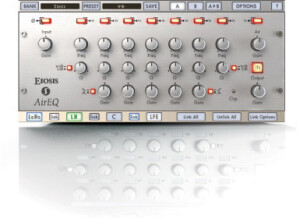
I didn't have a single problem installing Eiosis AirEQ as I didn't have any compatibility issues or other problems. Within a few minutes I was able to use the plug-in within my configuration and was able to figure out the interface rather quickly as well. The plug-in is a parametric EQ and has seven bands of EQ, the middle five of which have parameters for all of frequency, gain, and Q, while the outside two only have frequency and gain as they are really low and high pass filters. In addition to these parameters, Eiosis AirEQ has some buttons for pads and to choose the type of filtering as well as a knob for output gain and air gain. If you have experience with EQs you won't need a manual for this plug-in. SUITABILITY/PERFORMANCE Thus far I haven't had any problems at all running the Eiosis AirEQ plug-in. I am running the plug on a Mac Book Pro that has a 2.2 Ghz Intel Core 2 Duo processor and 4 GB of RAM. I run the plug-in in Pro Tools LE 7.4 that runs with either a Digi 002R audio interface or a Digidesign Micro Box depending on what I am using. This plug-in has run pretty flawlessly within this configuration as I am able to run as many of them at a time as I'd like, although I tend not to go to crazy with it and use it only on things that I really need it on and use other EQs for other things. As long as you have an adequate system that can run your sequencer with plug-ins well, you won't have any problems running this plug-in. OVERALL OPINION I've had the Eiosis AirEQ plug-in for about six or eight months and I really like just about everything about it. It has a very user friendly interface that is to the point and without any clutter at all. It provides more than enough control over your tone and everything sounds quite clean when run through this EQ. It is a powerful piece of software that would definitely recommend to anyone looking for a software EQ that is a little more in depth than the standard ones that come with Pro Tools and other sequencers. The price isn't the best, but definitely isn't overpriced; it just isn't a bargain. Overall, this is a very nice plug-in from the a company that I didn't know too much about until getting this plug-in.