Log in
EN
FR

Emagic

Series

40 products found

Categories
Series
Filter
Sort by
Evaluation
  • Reviewed or not
  • Editor’s award
  • Reviewed by Audiofanzine
Availability
  • Available or not
  • Sold new or used
  • Sold new
  • Sold used
Must-have products
  • All products
  • Flagship products
  • Best rated products
  • Hot products
  • Popular products
Price
  • Freeware
€
Clear
Sort by
  • Popularity
  • User ratings
  • Price - low to high
  • Price - high to low
  • Used price, increasing
  • Used price, decreasing
  • Name (from A to Z)
  • Name (from Z to A)
  • Added on
Choose a category
Choose a series
Sort results
  • Popularity
  • User ratings
  • Price - low to high
  • Price - high to low
  • Used price, increasing
  • Used price, decreasing
  • Name (from A to Z)
  • Name (from Z to A)
  • Added on
Filter results 40 results found
Evaluation
Availability
Must-have products
Price
  • Freeware
Show results

The best Emagic reviews

The reviews Audiofanzine members found the most helpful.
  • moosers's review

    Installing the Emagic EVP73 aka the Emagic Vintage Piano was easy and I had no compatibility issues or any other problems relating to installation. The configuration is easy to follow and easy to understand what everything does. The interface is clean and is straightforward, making it easy to get a variety of high quality vintage electric piano sounds. It has parameters for decay, release, bell volume, damper, and intensity. It also has a tremolo section with three parameters to control the rate and tone. I don't have a manual for this, so I can't speak to how helpful it is or not. SUITABILITY/PERFORMANCE I am running the Emagic Vintage Piano '73 on a Mac Book Pro that has a 2.2 Ghz Intel Core 2 Duo processor and 4 GB of RAM. I run this virtual instrument in Logic, but have also used it as a standalone unit. I have also used this successfully with a Hewlett Packard lap top with a 3 Ghz processor and 2 GB of RAM, running it with Cubase SX 2.0. I never had any problems running it on either machine and playing it with a MIDI controller. OVERALL OPINION I've been using the Emagic EVP73 for about five years and I have found it to be a really realistic virtual electric piano with a variety of vintage electric pianos sounds. You can get a classic Rhodes or Wurlitzer sound, or set your own with a variety of parameters for tone and tremolo. It also has useful presets and the price is pretty reasonable considering how high quality the effects are. I would compare this to the Native Instruments Elektrik Piano, with this being the cheaper of the two. I like both virtual instruments in terms of sound quality, and would definitley recommend checking both of them out if you are in the market for a virtual vintage electric piano.

  • « Very Cool »

    The Emagic EMI is a very cool looking interface that can handle your midi as well as audio needs. Surprisingly I had never heard of this device until about a year or so after it had already came out and just after reading the specs on it I knew I would want to give it a try. I didn’t even have to purchase it in order to use it because one of the members of my band purchased it and he would always bring it over. That is how I had the chance to work with it, and if I was in need of a interface at the time, it would have been the one that I would have ended up purchasing without any questions. UTILIZATION The Emagic EMI has some amazing features that I couldn’t believe that was possible with a USB interface. Once you update and load the drivers into your pc for the interface you will be good to go and can use this for any single daw or program that you prefer to use. I have used it in over 5 different daws and programs and it has worked perfect in each one of them. it’s a pretty universal device and was mad for all platforms and will cause no issues. GETTING STARTED The original EMI had came out about 10 years ago, and I remember using it a few times. So I knew that this one would be good, and not too mention it looks really cool and matrix blue like. They where pretty expensive for such a small interface when they first came out. I am not sure what they sell for today or what they are used. OVERALL OPINION If you are in need of a cool interface that can handle all of your recording and monitoring needs. You will want to take a chance with this interface. It is great and has very low latency.

  • moosers's review

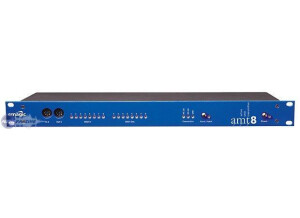
    The Emagic AMT 8 is a simple eight channel MIDI I/O interface. It is USB based, so you're sending all eight channels of MIDI ins and outs to your computer. The unit simply has eight MIDI inputs and outputs and LED lights to help you decipher what is going through. I've used the AMT 8 with a number of different keyboards, but usually only use one or two of them at the same time. It is definitely nice to have the options, however. It is rack mountable and will take up only a single space. UTILIZATION Setting up and using the Emagic AMT 8 MIDI interface is an easy task. Simply make your MIDI connections, plug the USB port into your computer, and you're good to go. I've used the AMT 8 with a Pro Tools HD system and an Apple Quad Core computer, so there were no problems transmitting the signals from the computer. You can also just use the AMT 8 without a computer as a regular MIDI interface if you don't want or need it to be used with any software. OVERALL OPINION I can't really say that I have any complaints about the Emagic AMT 8 at all. It is a very simple MIDI interface, with plenty of connections and features to keep you busy and to get the job done. While there isn't anything bad about it, beyond its simple make up, there also isn't anything extraordinary. Having said this, I really wouldn't expect anything special from it, as it does what it is supposed to do and that is good enough for me. Emgaic has a few different models out there, including the Unitor 8, which also is a great MIDI interface. There are a number of nice MIDI interfaces out there, but those made by Emaigc seem to be superior because of their great build and versatility. The price isn't bad at all, so if you need an eight channel MIDI interface, I wouldn't hesitate to pick one of these up...

  • moosers's review

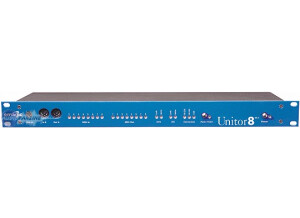
    The Emagic Unitor 8 is an eight channel MIDI interface. I have used it for linking up a digital keyboard with MIDI ports via USB to control virtual instruments. It has eight MIDI inputs and outputs, as well as a USB port to send it to your computer. It is a really basic MIDI interface, but offers up pretty much every type of connection you'd like to have with an in depth MIDI interface. The Unitor 8 is rack mountable and will only take up a single rack space. UTILIZATION Setting up the Emagic Unitor 8 is pretty simple. Just plug your USB cable into it and into your computer, and then make whatever types of MIDI connections you need, which could be as simple as send your keyboard MIDI out to the Unitors MIDI input, or could be more complicated if you have more MIDI connections to make. Either way, it is a very simple device to use because once you make your connections, you're good to go. It also has LED lights for each of the channels so you can monitor your input and output signals, which is nice so you know that everything is working at all times. The Emagic Unitor 8 can be used with any sort of software... OVERALL OPINION The Emagic Unitor 8 is pretty much your perfect and simple eight channel MIDI interface. There isn't anything complicated or convoluted about it. I'm not 100% sure if they still make this, but I don't think that they do. However, it would definitely be pretty easy to locate a used one. The price will of course vary for a used one, but since these weren't all that pricey to begin with, I would imagine you could find a deal where you wouldn't have to pay too much for one. While this many MIDI channels isn't necessary for all users, for those dealing with MIDI a lot, it is definitely nice to have so many channels and options for connections. The Emagic Unitor 8 would definitely be my first recommendation for someone looking for a nice MIDI interface.