Log in
EN
FR

SeriesNative Instruments Kontakt

22 products found

Filter
Sort by
Evaluation
  • Reviewed or not
  • Editor’s award
  • Reviewed by Audiofanzine
Availability
  • Available or not
  • Sold new or used
  • Sold new
  • Sold used
Must-have products
  • All products
  • Flagship products
  • Best rated products
  • Hot products
  • Popular products
Price
  • Freeware
€
Clear
Sort by
  • Popularity
  • User ratings
  • Price - low to high
  • Price - high to low
  • Used price, increasing
  • Used price, decreasing
  • Name (from A to Z)
  • Name (from Z to A)
  • Added on
Sort results
  • Popularity
  • User ratings
  • Price - low to high
  • Price - high to low
  • Used price, increasing
  • Used price, decreasing
  • Name (from A to Z)
  • Name (from Z to A)
  • Added on
Filter results 22 results found
Evaluation
Availability
Must-have products
Price
  • Freeware
Show results

The best Native Instruments Kontakt reviews

The reviews Audiofanzine members found the most helpful.
  • « The Industry Standard in Sampler Platforms »

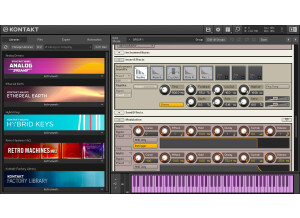
    Native Instruments has been around for some time, leading the music software industry with sample profiles and effects. In order to best use the software a platform had to be developed, similar to requiring a Mac or Windows OS in order to run a word processor, for example. Similarly, Native Instruments developed Kontakt in order to run in-house, licensed and third-party samplers. For those unaware of what a sample is, the most obvious would be traditional instruments, such as piano, bass, orchestra strings, etc., all of which sounds are controlled by a ‘controller,’ e.g., piano keyboard or MIDI guitar, for instance. Consequently, you can take a synth, piano or guitar and have it sound like something completely different. Originally, I investigated the Kontakt platform as I wanted to work with a sampler program called Dystopian Guitars, a third-party product developed by PulseSetter Sounds (I did a review with demos on this, as well). Kontakt was required to host Dystopian Guitars, and both worked seamlessly together – no locking up, no pausing or glitches. Moreover, Kontakt comes with its own sample library and has become the industry standard with the biggest selection of samples from Native Instruments and other sample designers – in other words, if you want variety in choosing your samples, you’re going to have the largest selection with Kontakt versus any other platform. The accompanying demo includes some sample sounds that come with Kontakt, as well as a few from Dystopian Guitars. The Kontakt program does allow a person to create his or her instruments, for those with the determination to do so. Being new to the platform, that certainly is over my head for now, but it will be an interesting project down the road. Regardless, Kontakt is very easy to use. It can be a stand-alone platform, so that you can open the program and play samples live through a computer, or it can be integrated into a DAW for recording purposes (you need to create a new soft-synth track and add Kontakt to the effects bin). Once open, you simply select what library you want (e.g., orchestra instruments) and what instrument you want. With your computer or DAW set up properly (e.g., select what instrument will control the sounds, e.g., piano keyboard), you then replicate the chosen sampled instrument, e.g., cello, violin string section, etc. In a nutshell, that is it, for both live play or if recording an instrument in your DAW, thereby developing soundscapes for movies, gaming or jamming backing tracks. You then can increase the complexity of samples, merely by adding layers onto the Kontakt platform, e.g., merging a bass guitar with a pad and perhaps a kick drum – all controlled and timed perfectly by the same notes being played on the controller. This certainly is a time saver (presuming they all play the same notes), but allows you to create a wall-of-sound for those massive Devon Townsend backing tracks. Both the ease of use and flexibility of Kontakt are key aspects to why this program is a must. Now, the latest version of Kontakt (being version 6 at the time of writing this) has some new features from the previous versions. They include a wavetable synthesis module, new instruments, new modulation effects (choral, flair and phasis), the ability to drag-and-drop your own instruments, enhanced effects and creator tools in the new standalone application. For those familiar with Kontakt, this brief overview and included demo obviously are to the point, but for new users who may be of a different musical background, e.g., a guitar player familiar with hardware (pedals and amps), like myself, the use of Kontakt and what it offers opens a door to a whole new world of composition possibilities. In that regard, the accompanying demo includes basic operation of Kontakt, and how it works within a DAW, but also its use in replacing or substituting instruments in an already created backing track (in this instance, PG Music’s Band-in-a-Box). As stated, Kontakt does include a variety of instruments, some traditional (e.g., guitar, bass, piano, strings, etc.), but also some that offer hundreds of sound variations (e.g., Ethereal Earth). Those will keep anyone busy for a while, but then there are hundreds of unusual, unique and fantastic sounding libraries available that puts an entirely different spin on the term Gear Acquisition Syndrome.

  • « Fantastic Program »

    Kontakt is my one and only sample player. It's a strong and versatile program and after using it for about 7-8 years I'm still learning more and more about how powerful this thing is. I generally use Kontakt as a plug-in and outside of some occasional samples I've programmed myself in some of Logic's synthesizers, I use Kontakt exclusively for sample playback, editing, and creation. Most projects I've done start with me opening a multi-channel instance of Kontakt and loading up the sounds I need. For a complete beginner it might take a bit to realize the full potential of this program, such as the sample editing capabilities and using the multi-channel aspect to save CPU, but it's generally straightforward. Once it's loaded up, all you have to do is find your sounds and double-click. The Kontakt sound libraries themselves are pretty decent although not the best. The orchestral samples are very flexible and controllable, but just don't sound that great. However, they can be effectively utilized mixed-in with more professional samples for a bigger, fuller spectrum of sound. I find the strings, for example, to be a bit harsh but that can be great if you want to boost the upper frequencies of a more dull string patch, or a synth pad. In the end, there are some decent sounds in there but you have to go looking. The best thing is to separate all the sounds that really excel into another folder for easy access. Besides being a great sample player, Kontakt has been really useful to me in creating and editing my own samples. You can drag and drop any audio file into the Kontakt interface and it is immediately mapped out and pitch shifted onto the midi keyboard. After that you are free to edit the audio in so many different ways and add other audio files as well to make an entire sample collection in one .nki file. I've used this function to create my own sample libraries of percussion instruments that I've collected over the years and I've already started on some cool flutes and other wind instruments I've got lying around as well. It's an incredibly easy process and can also be really useful for sound design. You can drag any audio audio at all in and then mess with it as much as you want. Sometimes the results of random experimentation can be quite useful. I really can't see any big cons to this software, I'm just such a fan. There isn't much it can't do and there are seemingly endless possibilities. Cheers!

  • « Innovative Sampler »

    Kontakt is a software application and plug-in that can be used as a stand-alone software instrument, or as a plug-in inside a DAW. It is primarily a 'sample playback' engine and comes with a decent library. Kontakt can be expanded by purchasing more individual sound libraries with more sounds. You can also also create your own sound libraries in Kontakt with your own samples if desired. The software can be purchased as an individual software application, however I received it as part of the Native Instruments Komplete Bundle. It can be downloaded off the NI website and installed. Authorization is completed using the NI Service Center application. SUITABILITY/PERFORMANCE Kontakt is really easy to get started with. The libraries are easy to use - just drag and drop and play your keyboard. However, Kontakt also allows for deep editing for the experienced user. I am not an expert user by any means, because there is a whole scripting language that can be used for users that really want to program kontakt. I have created sampled drum libraries as Kontakt instruments. The round-robin and velocity layer sample playback is easy to set up, but it might take looking through the manual to understand. My recommendation is to experiment. OVERALL OPINION There are many sample-playback applications on the market. Kontakt comes out ahead in my mind because of the amount of libraries available in the Kontakt format, the innovative user interface, the flexibility of use, and the constant addition of new features. The sample libraries from NI for Kontakt are a bit hit-and-miss. There are a few that stand out in my mind - Damage, Alicia's Keys, Session Strings Pro, etc. There are a few that I don't like - Balinese, George Duke, etc. And a bunch that are average, Studio Drummer, Classic Pianos, etc. There are also a bunch of third part sound libraries to consider. I used Steven Slate Drums 3 in Kontakt for a long time before he released his own stand-alone application. Serious composers should probably look at EastWest libraries rather than Kontakt. If you are looking to just do some general propose music producing/mixing, Kontakt is the way to go.

  • afterglow479's review

    This installed with no problems. Native Instruments has the software installation down to a science to be problem free, unlike some other audio companies. There is a large component that is a sample library, so expect your installation to take a long time while it copies over these gigabytes of data. After that you'll have to register your serial which is pretty simple and doesn't take long. There is a large manual on how to use the sample player properly along with some documentation on all of the patches as well. Overall I feel the manual is a bit patchy in its usefulness, but most things are covered well. SUITABILITY/PERFORMANCE I have a custom built PC that is running Windows XP. It has a dual core processor by Intel with 4GB of RAM. For my DAW i'm using Cubase. Kontakt works without a hitch on my system after installing it in the VST format. Kontakt uses a good deal of system resources, so people with less powerful computers beware. Expect to have a shortage of RAM with all of these samples to load! The program is pretty stable, it doesn't crash often. OVERALL OPINION I have been using kontakt for years. You can find it in a lot of different studios that do any kind of arranging. Its best assets are the ease of use and the customization that you can do on the different patches. The sounds themselves are kind of hit or miss. Some of the string patches sound realistic, while others sound like total 80's cheesy strings. As for strings, I have had good luck by combining more than one patch playing the same arrangement and bussing them to one reverb to improve realism. There is of course way more than just strings in Kontakt, but that has just been my main use for it. It's a good value for the price considering the wide variety of patches you get and the nice interface. I would get it again.