Log in
EN
FR

Soundhack

8 products found

Categories
Filter
Sort by
Evaluation
  • Reviewed or not
  • Editor’s award
  • Reviewed by Audiofanzine
Availability
  • Available or not
  • Sold new or used
  • Sold new
  • Sold used
Must-have products
  • All products
  • Flagship products
  • Best rated products
  • Hot products
  • Popular products
Price
  • Freeware
€
Clear
Sort by
  • Popularity
  • User ratings
  • Price - low to high
  • Price - high to low
  • Used price, increasing
  • Used price, decreasing
  • Name (from A to Z)
  • Name (from Z to A)
  • Added on
Choose a category
Sort results
  • Popularity
  • User ratings
  • Price - low to high
  • Price - high to low
  • Used price, increasing
  • Used price, decreasing
  • Name (from A to Z)
  • Name (from Z to A)
  • Added on
Filter results 8 results found
Evaluation
Availability
Must-have products
Price
  • Freeware
Show results

The best Soundhack reviews

The reviews Audiofanzine members found the most helpful.
  • moosers's review

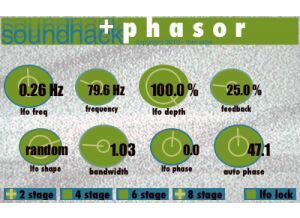
    The Soundhack +phasor is a newer free plug-in for Mac systems that can support VST plug-ins. Right now it's only available in this format, but on their site it says it will sometime be available in other formats as well. I only tried out this one in the last month or two, as I've got all of their other freeware plug-ins on my system already. I'm running this in Pro Tools 9, but you'll need the Fxpansion VST to RTAS converter if you want to do this sine it's only available as a VST plug-in. If you do have a compatible system, it's very easy to go right on Soundhack's site to download and install the plug-in, as the whole process shouldn't take very long at all. Learning the interface of the plug-in is about as easy, as it just consists of a series of parameters that shouldn't be unfamiliar to those who have used phasers before. The LFO has parameters for frequency, shape, phase, and depth, and there are other parameters for frequency, bandwidth, feedback, and auto phase. There's no manual made for this plug-in. SUITABILITY/PERFORMANCE My system at home that I'm running the Soundhack +phasor is a Pro Tools 9 based system. You can't currently run this plug-in in Pro Tools unless you have the aforementioned VST to RTAS wrapper as I've got, but hopefully soon they'll have this in all plug-in formats. The computer I'm running everything on is a Mac Book Pro lap top that has a 2.2 Ghz Intel Core 2 Duo processor and 4 GB of RAM. I run Pro Tools with a Digi 002R audio interface as well. This plug-in takes up just about the smallest amount of processing power possible, and it's free anyway so even if you think you're system won't take, you might as well try. OVERALL OPINION While certainly not the best sounding plug-in phaser in the world, I wasn't expecting that from the Soundhack +phasor. It's free, and in general I try not to expect too much from freeware as I'm just happy to be getting it free in the first place! You can actually do a good amount with this plug-in, but the overall sound quality isn't the greatest as I find that anything more than subtle phasing isn't ideal with this. You may as well try the plug-in for yourself if you're still reading this review, as even though I haven't used it much since trying it, others who may not have as many options in their plug-in suite already will probably use it more than I. At the price of free, there's no reason not to give it a whirl.

  • moosers's review

    The Soundhack + Chebyshev is a free plug-in that is part of Soundhacks' freeware bundle of software. Chebyshev is a unique distortion plug-in that aims to add harmonic distortion using chebyshev polynomials. I'm not 100% clear on what this actually entails, but as far as I can tell it's like using a number of processors at once in series. You can download this free piece of software along with the others in their freeware bundle directly from Soundhacks' website. The plug is available in VST, RTAS, and AU formats for both Mac and PC operating systems. The interface of the plug-in isn't hard at all to follow, as it's got a series of six different chebyshev polynomials to add harmonic overdrive in different places. A manual isn't really necessary, as just playing with it for a minute or two will give you a good idea of what it's all about. SUITABILITY/PERFORMANCE Right now I've got the Soundhack + Chebyshev and their full freeware bundle running on my system at home. This system consists of Pro Tools 9 and a Mac Book Pro lap top computer that has 4 GB of RAM and a 2.2 Ghz Intel Core 2 Duo processor. I don't think it's possible for a plug-in to take up less processing power than this one. If you're in doubt at all, just try it for yourself as it's free! OVERALL OPINION While worth having around since it's free, after initially using the Soundhack + Chebyshev plug-in, I must be honest in saying that I haven't used it much. It's definitely a cool concept for a plug-in, but for me it doesn't do all that much. It can warm up your sound a little bit, but often it seems to do more harm than good. To me, if I'm after some harmonic overdrive, the only way to do this is by using real tubes. Like I said, it's free so you might as well give it a try for yourself, but I personally don't see myself using the Soundhack + Chebyshev harmonic overdrive plug-in too much in the future...

  • moosers's review

    The Soundhack +Decimator is a free lo-fi plug-in that is available for most systems. It comes in formats for both Mac and PC, as well as in RTAS, AU, and VST, which is pretty rare for a free plug-in like this to be available across the board. It's easy enough to download and install the plug-in straight from Soundhack's website, which should only take a matter of minutes. It's also really easy to use the plug-in, as the only parameters it gives you is control over the bit and sample rates. It's designed for lowering each of these parameters to create an digital aliasing effect and for decimating the signal. You definitely shouldn't be needing a manual for this one... SUITABILITY/PERFORMANCE Right now I'm running the Soundhack +Decimator plug-in on my recording rig at home. I'm running an RTAS version of the plug-in in Pro Tools LE 8, which I run with a Digi 002R and on a Mac Book Pro computer with 4 GB of RAM and a 2.2 Ghz Intel Core 2 Duo processor. It wouldn't be possible for this plug-in to take up any less amount of processing power, so everyone should be able to run this regardless of the type of system you're using. OVERALL OPINION The Soundhack +Decimator plug-in is the type of lo-fi effect that you might as well have around just in case you're feeling using something like this. I've only messed around with it after downloading it, as I've yet to use it for any serious musical endeavor. I work mostly with acoustic instruments, but I can see this being most useful for electronic music for downsampling and getting lower bit rates for sure. Either way, being that's it's a free one, you might as well go ahead and try it for yourself if you're still reading this...

  • moosers's review

    Soundhack's +compound is a compressor/expander plug-in that is available for free within Soundhack's free bundle of plug-ins. These plug-ins are available for either Mac or PC and can be used as either VST, RTAS, or AU (Mac only) plug-ins. You can download the full bundle that includes +compound straight from Soundhack's website. Just download the proper one for your system and follow the step by step instructions and you're good to go. I can't imagine anyone having any issues with this part of using the plug-in as long as you've got the right one for your system. As far as using the plug-in is concerned, it's really pretty easy, but at the same time they're giving you a good amount of control. The included parameters are for ratio, threshold, attack, release, soft knee, and gain make up. It's also got some RMS metering. A manual shouldn't be needed, but I haven't seen it for this plug-in so I can't speak to it's make up. SUITABILITY/PERFORMANCE I recently download the entire Soundhack freeware bundle, and I'm currently running the +compound plug-in along with the other ones in Pro Tools LE 8. I run Pro Tools LE with a Digi 002R audio interface. I'm running everything on a Mac Book Pro that has a 2.2 Ghz Intel Core 2 Duo processor and 4 GB of RAM. I've only thus far used this plug-in a handful of times, only running at most two of them at once, so I haven't exactly tried to max out this plug-ins performance, but I think that as long as you are currently able to run some plug-ins on your system without problems, that you'll be okay with this one. OVERALL OPINION Soundhack's +compound plug-in is a nice little compressor/expander plug-in, although I'm not sure that the sound makes it anything to write home about. Don't get me wrong, there's definitely a good amount that you can do with it and it doesn't sound awful at all, but I probably wouldn't use it for any serious mix. I figured I might as well try it since it's free and all, but I don't know how much further use this plug-in will see in my home rig. I think that everyone should give it a try, but I've got other plug-ins that I've paid for that I would much rather use when it comes to compressor. There are other plug-ins in Soundhack's freeware bundle that I've used more than this, so it's definitely worth checking out the full bundle...

  • moosers's review

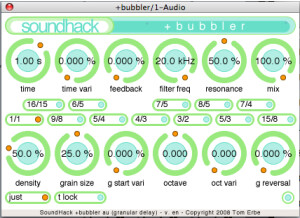
    The SoundHack Delay Trio is a free plug-in bundle consisting of three different delay plug-ins. All of the plug-ins are free, and included in the bundle is the +delay plug-in, +pitchdelay, and +bubbler. Each aims to give you a different look on software delays. The plug-ins come in both a Mac and PC format, with either VST, AU, or RTAS formats to choose from. You can download the plug-ins as a bundle right from SoundHacks's site, and the whole process of installing and downloading them shouldn't take very long at all. Each of the three plug-ins has a good amount of control to work with, but I wouldn't say that they're difficult plug-ins to use as everything should be more or less self explanatory. A manual shouldn't be necessary with the Delay Trio of plug-ins. SUITABILITY/PERFORMANCE I'm currently running the SoundHack Delay Trio plug-ins on a Mac Book Pro computer and in Pro Tools LE 8, so needless to say I'm running the RTAS version of the plug-ins in OS X. The Mac Book Pro that I'm running the plug-ins on has a 2.2 Ghz Intel Core 2 Duo processor and 4 GB of RAM. I run Pro Tools LE 8 using a Digi 002R audio interface or a Digidesign Micro Box. These plug-ins won't take up too much of your processing power, but admittedly I haven't had a need to really run more than one or two of them at a time, and when I do use them I'll do so on auxiliary channels to ensure that I'm getting the most from them in terms of processing power. As long as you have a system where you're currently comfortable running your DAW and some plug-ins, I don't believe you'll have an issue running the Delay Trio. OVERALL OPINION For starters, let me say that I think it's awesome that SoundHack is giving away not just one delay plug-in, but three in the Delay Trio bundle. You aren't going to find too many plug-in bundles for free out there, let alone some that actually sound pretty good and that give you a variety of colors to work with. It's also nice that these are available for Pro Tools, as many free plug-ins out there are not. While the sound of these plug-ins can sound digital at times, they're still worth having around as I'll bet that more times than not they'll see some real use. It's defintitely worth a few minutes of your time to head over to SoundHack's website and try these plug-ins for yourself.