Log in
EN
FR

Apogee

134 products found

Categories
Series
Filter
Sort by
Evaluation
  • Reviewed or not
  • Editor’s award
  • Reviewed by Audiofanzine
Availability
  • Available or not
  • Sold new or used
  • Sold new
  • Sold used
Must-have products
  • All products
  • Flagship products
  • Best rated products
  • Hot products
  • Popular products
Price
  • Freeware
€
Clear
Sort by
  • Popularity
  • User ratings
  • Price - low to high
  • Price - high to low
  • Used price, increasing
  • Used price, decreasing
  • Name (from A to Z)
  • Name (from Z to A)
  • Added on
Sort results
  • Popularity
  • User ratings
  • Price - low to high
  • Price - high to low
  • Used price, increasing
  • Used price, decreasing
  • Name (from A to Z)
  • Name (from Z to A)
  • Added on
Filter results 134 results found
Evaluation
Availability
Must-have products
Price
  • Freeware
Show results

The best Apogee reviews

The reviews Audiofanzine members found the most helpful.
  • moosers's review

    The Apogee Electronic AD-16X is an analog to digital converter. At the studio I use this in, we have it locked into the Apogee Big Ben that runs with a Digidesign 192 I/O audio interface to run Pro Tools HD. The AD-16X has 16 channels of converters in the form of both ADAT and AES. It also has a world clock in and out and is powered by your traditional AC power cable. The unit is pretty easy to use, and since I have it synced up with another converter and audio interface, I pretty much leave it as is and gives me a great high quality conversion on up to 16 channels of audio! For me, this is a huge asset as I'm not a huge fan of the converters made by Digidesign, and these are a great replacement. OVERALL OPINION I've been using the Apogee Electronic AD-16X analog to digital converter for about a year and I've been quite pleased with the results that I get with it. It is easy to use for what I do with it and is an awesome substitute for Digidesign's converters. This being said, these aren't cheap, as they are a huge quality converter from a highly trusted company. I would recommend this not only to professional studio owners with any type of rig, but also for the home studio owner looking to bolster their chain with a great converter like the AD-16X. I can't say enough about how clean the signal is from not only the AD-16X, but from all of Apogee Electronics converters. While these aren't for the studios out there on a tight budget, for those looking to put together a superior Pro Tools rig with the highest quality convetors available, a converter of this quality is a must. I highly recommend checking these out if you're looking for a analog to digital great converter.

  • « Perfect solution for guitarists »

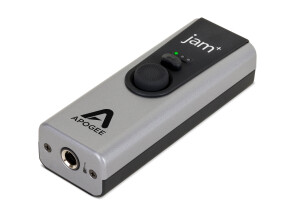
    The Apogee Jam is designed to allow you to record your guitar or bass into an iPad, iPhone or other Mac OS. It's about the size of a very small cell phone (even smaller) and does one thing and does it very well. I'm using it with an iPad and iPhone to record electric guitar. Zero latency! Those 2 words are the wishes of most recording professionals when using computers or idevices to record, and the Jam provides that or very close to that! Another HUGE plus is the inclusion of a gain control knob on the side of the Jam. Signal too hot? Easy, adjust the gain. The Jam will tell you how your signal is by the light...green is good, orange is getting hotter and red is too hot. Using the Jam is as simple as: 1) Plug the included cable into the Jam 2) Plug the other end of the included cable into the dock of the iPad/iPhone (or included USB cable into your Mac) 3) Watch the blue light come on 4) Once the light turns green, you are good to go. No drivers or software necessary to download or install...it's that easy! After trying the iRig and Peavey Ampkit Link to record with my iPad and receiving less than stellar results, the Apogee Jam was a breath of fresh air. The sound is excellent, ease of use is perfect and overall, the unit delivers what it is supposed to: allowing you to get YOUR guitar tone into a recording using your iPad, iphone or Mac OS.No feedback, just pure guitar tone. The sound you achieve is clear and the results will make you want to record more.

  • « "Beautiful, Classy and Royal!" »

    The Firewire Apogee Duet was something I found and bought after doing a lot of research. This tiny silver looking box comes with 2 Microphone inputs (with Phantom Power) delivering world class Apogee Pre-amps, 2 Line-level inputs and 2 Monitor outputs, all bundled and tied up together in a single breakout cable. Having a Mobile setup, i.e. a Macbook Pro , a Shure - PG27 Condenser Mic and a DT770 Pro BeyerDynamics Headphone, and being someone who always travels, I wanted a device that could integrate all my equipment at one place without cluster-confusion at the same time without compromising the quality for sound. This is where I found the existence of Duet. Duet caught me immediately with its crystal clear AD/DA conversion. The sound is absolutely fantastic. Being a Logic 9 and Logic X user mostly, Apogee already has a place inside the Logic DAW option menus to control the Input levels. The dedicated Headphone input is also commendable. The Giant wheel knob on the Device is easy to use and straight forward giving us several options (Can be used to adjust Input levels and control the main output volume levels etc). Especially found them helpful while switching between Headphone and Monitor Outputs to check the levels individually. The Low Latency Monitoring option provided with the Stand-alone Maestro application provided by Duet is also helpful at times where you can listen to the recording that is coming directly from the Duet and not from the DAW. This goes into your smallest travel bag, your laptop case or your work pouch. The idea of having a device that could accompany you without any hindrance and attend to all your primary recording requirements giving you a unique incomparable quality is something special, and Apogee Duet makes it a reality for me. UTILIZATION The Legacy Duet that I am still using has the updated driver for the latest Mac OS Mavericks, and this shows how consistent and alert Apogee products are when its come to updating. Stability has never been an issue for me with Duet. 2 to 3 crashes have happened until now, but only when the session was overloaded with more than 100 tracks. Can't blame just the Duet. Duet initially became my recording companion on the Leopard OS, recording on Logic Pro 9. Most of my projects usually have almost 20-25 audio tracks with Sample Rate set to 44KHz. With my usual setting of the I/O Buffer set to 256 Samples (only while recording audio) and the Logic Software Monitoring enabled, the Duet provides me with 16.0ms roundtrip latency, which is fairly acceptable. I have to say that in this mode, Duet has never given me any kind of latency, and that is, even with any time or DSP based effects, for e.g., with delays and reverbs etc. Aside from recording, Duet plays back my session like the playhead scrolling without any stops/pops/clicks. Unless your system does not have enough breathing power to play back the sessions. This depends on the amount of free RAM and other requirements etc. For e.g., My sessions are always hybrid modelled, i.e, a session having midi instrument tracks and audio instrument tracks together, and Duet does a good job in handling this, playing back for me realtime multiple midi instruments (usually around 10-15 midi tracks) and all my audio tracks. All in All, Duet has read my biggest session till date having 200 tracks with 150 audio tracks and 50 instrument tracks without any overload warning or stop. (Note that while I playback after recording, the I/O Buffer is always set to 1024 samples giving a roundtrip latency of 50.8ms) GETTING STARTED Setting up the Duet was simple and clean for me. Coming in a Rectangular shaped box, there is nothing that is not clear inside this while unpacking the Duet. 1 Firewire cable, 1 Breakout cable and the Duet itself. As mentioned in the Manual clearly, after connecting it via a Firewire (Gives you a Firewire 800 and 400 free cable each with the case) to my laptop, I had to install the dedicated driver provided on the apogee website and had to install the Maestro, to control Duet on a stand-alone basis. Once opened with Logic Pro 9, it detects for the newly attached duet and then we are ready to adjust the levels and hit record. The functions of Duet are easy to understand. Today I am using the Logic X on the Mavericks 10.9.4. Its been 6 years. There has never been any compatibility issues with me. OVERALL OPINION Pros 1) Amazing AD/DA Conversion giving crisp and clear recording. 2) Strong Outer-body, has withstood a lot of misplaces by me. 3) The cables provided within do not cuddle, clatter or has never been bent, destroying the connectivity. 4) Easy to use and understand. 5) Offers 44Khz to 96KHz recording and playback. Cons 1) Moderate amount of heat exertion while recording and playback. 2) Only XLR Inputs and 2 Stereo Outs. 3) The Led levels sometimes portray peak levels even if the gain level is down. 4) Crashed once while recording in 96Khz. The price I got this for (directly ordered from the website) was for $533. Some might argue that this is a bit overpriced as there are many sound cards out there that gives you more input and monitoring options. But for me, someone going for the perfect quality recording sound, I would say the price is justifiable for this being the main reason. Apogee Duet was my first sound card. My first recording on a DAW was using this device. After being used to this quality, I have never been satisfied with the sound of other sound cards (not naming them), that comes in this same range of price and value. After these many years experience, Apogee only amazes me with the numerous amounts of recordings I have made and it still does. The choice I made was perfect!

  • « Brand New!! »

    The Apogee Quartet is a Mac based USB interface that offers 24 bit resolution and four mic pre amps. It has 4 inputs and 8 outputs. The pre amps are extremely good and they should be for this unit costing over 1200.00 dollars! Installing his interface was pretty simple, it only took us about 20 minutes to install it in the personal studio on campus. We have used this interface to record some acoustic and electric guitars with it and the quality is amazing. This is the best interface that you can have right now for a personal set up running a Mac system. We have used this interface to record into Pro Tools and even Logic on multiple occasions. It will work great with either set up that you might have. UTILIZATION The Apogee Quartet just sits on your desktop, it can not be racked and you plug it in through USB. Being that the Quartet is fairly new it will be interesting to see if any bugs or driver issues come up in the next year. We just got this interface on campus last week, I am privileged to be the one who go to use it first and go through the installation process. I am not getting any latency, which really isn’t possible but the latency is very minimal. GETTING STARTED To this point, we have not had any driver or compatibility issues. As I stated this just came out so its kind of new and only time will tell how it will play out. I don’t see any issues popping up in the future because of how simple it was to install. The manual is easy to read through, I didn’t take a glance at it out of curiosity on some of the features that the Quartet has to offer. OVERALL OPINION The Quartet is a great interface so far, I can not wait to record with it some more. All of the functions are right on the main panel of the interface and so are the LED’s showing your levels and activity. I have used a lot of Apogee interfaces and this one is better than a lot of them. It is also pretty expensive. The sound quality is crystal clear. Start saving up to get the Quartet!

  • « No cracking or popping »

    The Apogee Big Ben is a rackable unit taking up 1 rack space. It will offer up to 192 kHz sample rates and simple real time conversions between any audio digital formats. While using Big Ben you will not have any issues with popping noises or cracking sounds and though this unit might look easy to use because of how smooth the front interface is, it could still take some getting use to and some time to understand just how everything works. It comes with a manual that is easy to understand and comprehend if you want to go that route and read it. The Big Ben analog converter is made to last you a long time, and not to mention it has a flawless design that is made to be shown off. I am very happy that I purchased this unit over a year ago and I still use it very much today. The quality of audio you can get with the Big Ben is outstanding. Most of the products that Apogee makes are well built and stable. I have used many other analog converters, some good and some not so well. But with the 1 video BNC, 1 ADAT optical and 2 AES clock inputs with 6 word 2 AES and 1 S/PDIF outputs you will have all of your clock options to keep everything working together and in synch. A normal issue with some other analog converters that I have used in the past is the popping and jittering sounds it can give you when converting. With the Big Ben I have not had any unwanted noise at all. This unit came out long before I purchase it, but after hearing another local musician talk about the Big Ben I knew that I had to give it a shot. If something were to ever happen to the one that I purchased I would purchase another one right away.

  • moosers's review

    The Apogee Electronics AD-8000 is an 8 channel analog to digital converter for use in recording studios. This is definitely on the older side of AD converters as this was originally put out almost 15 years ago. While it's a little bit outdated, it's not obsolete as it's still a solid converter. However, you can only record with up to a 48 kHz sample rate, so it's not going to be best for high end audio recording, although it is 24 bit. The AD-8000 has eight XLR analog inputs as well as AES/EBU and S/PDIF connections. On the front panel you can monitor the levels of your eight channels as well as control a slew of options, many of which I've never had a need to venture into. It also has a 1/4" input in front for plugging in headphones. This make up is definitely a lot different than the more modern Apogee converters, which are more to the point, but this has the same basic functions. OVERALL OPINION The Apogee Electronics AD-8000 is one of the earliest analog to digital converters that I've used, and while it's not ideal for modern digital audio recording, it can still be useful when used in the right settings. The main downfall with the AD-8000 is that it only supports up to a 48 kHz sampling rate, so if you're going to want to record at 96 K, this isn't going to be for you. The good news is that it is indeed a solid converter if you're working at 48 kHz and a 24 bit rate and also can be had on the cheap since it's pretty outdated at this point. I'd probably only recommend this if you're using your DAW for mostly non-musical purposes or already can only record at 48 K due to your interface. If you're putting together a professional recording studio, this isn't going to work however due to this lack of options in sampling rate. I'd be nice to have as an extra, but not a main converter. If this won't work for you, I'd check out the newer Apogee stuff as they're pretty much the best converters you can get.

  • moosers's review

    The Apogee Ensemble is an eight channel firewire based audio interface. It has four built in microphone preamps, which each also have 1/4" TRS connections. There are four more channels of inputs in the form of 1/4" TRS as well. In addition to these inputs, there are eight 1/4" outputs as well as S/PDIF and ADAT optical connections. It also has two firewire ports and word clock connections. On the front of the interface, it has 1/4" connections for headphones. The Apogee Ensemble is designed for the user looking for top of the line conversion inside of a audio interface. This will take up only a single space in a traditional rack space. UTILIZATION I don't find that using the Apogee Ensemble to be hard at all, as everything is pretty user friendly and straight ahead. I wasn't involved with setting up the interface, although I really don't think that I'd have an issue doing so if I needed to. You set the level of the pres on the front with the input and output knobs. Even if you're new to audio interfaces, everything is pretty self explanatory, although I'd recommend having the manual around if you're new to this sort of stuff. GETTING STARTED In terms of the sound quality of the micpres and otherwise on the Apogee Ensemble, I have no complaints and only good things to say about it. As always with Apogee units, you're getting the best of the best in terms of A/D/A conversion, so you don't have to worry about that here. While the mic pres aren't the warmest sounding pres I've used, and they certainly won't match that of an analog console, they do have a very clean sound that will get the job done in more situations than not. The best part about this interface is that you can rest assured knowing that you are hearing exactly what you are sending into it and vice versa. OVERALL OPINION As far as compact audio interfaces go, the Apogee Ensemble is really one of the best out there. Of course it will cost you the price of a high end interface, but if you're serious about building a top notch studio without getting a huge console or investing a lot of money in top of the line preamps, this is one of the best deals out there. I highly respect Apogee from using their converters, and it is great to see that being transported to a compact audio interface like this one. Definitely check out the Apogee Ensemble if you're in the market for a high end firewire audio interface.

  • moosers's review

    The Apogee Electronics Rosetta 800 192K is an analog to digital converter in the form of a rack mountable piece of gear. It has all sorts of connections in the back for ADAT, AES, and analog. There are a ton of possibilities with the Apogee Electronics Rosetta 800 192K, but I use it mostly for converting digital audio in a Pro Tools HD system. I don't always take advantage of the 192 K sample rate, but it is nice that you can go up to that sample rate if you desired. I usually set it on analog and use it at 96 K or 48 K and I find that these options work great for me, but for those who use 192 K, this is a great unit to have around. OVERALL OPINION I've been using the Apogee Electronics Rosetta 800 192K for about a year and half and I really love the clean signal that this produces. It is the perfect analog to digital converter in my opinion as it has all of the bells and whistles and still does a great job of converting the signal. It always comes out super clean and I can never tell that anything has even been converted because it is so smooth. To me, the Apogee Electronics Rosetta 800 192K is just about as good as it gets in an A to D converter that you can get, and you definitely pay the price for it as this isn't a cheap piece of gear. Because of the decently heavy price tag, I would really only recommend this to professional studio owners or to those who are looking to spend a decent amount of money for a converter that will last them for a long time in their home studio. I've come to trust the entire line of Apogee Electronics converters as I've never had any issue with any of them and they always do their job incredibly well. The bottom line is that the Apogee Electronics Rosetta 800 192K will converter your audio with pristine brilliance and I highly recommend checking it out.

  • moosers's review

    The Apogee Electronics DA-16X is a digital to analog converter. It has 16 outputs in both AES and ADAT optical form as well as a world clock input and output. The digital to analog converters are clean and this unit is overall a great complement to the Apogee Electronics AD-16X analog to digital converter. In the studio that I use this in, this and the AD-16X are synced up with the Apogee Big Ben. All three of the Apogees are linked to a Digidesign 192 I/O audio interface to run Pro Tools HD. The Apogee DA-16X and its counterparts are a great complete to a Pro Tools system, or on their own as they are great converters. OVERALL OPINION I've been using the Apogee Electronics DA-16X digital to audio converter for about a year and I've been very pleased with the results I get. Having this linked up with the AD-16X and the Big Ben make for a high number of channels that will come in crystal clear. These converters are much cleaner than Digidesigns, which make them a great complement to the Pro Tools HD system. While there are a bunch of great high quality converters out there, Apogee has a great reputation for making some of the best on the market. Since I'm not a huge fan of the Digidesign converters, having the Apogee DA-16X has become a must have as I love having this set of high quality converters. While this might not be a be must have for home studio owners, for professionals who want the best possible recording chain they can get, this is a great option. The main reason it isn't all that suitable for home studio owners, is that it is quite expensive, and if you get the DA-16X, you almost need to have the DA-16X and the Big Ben. However, this being said the Apogee Electronics DA-16X is a great digital to analog converter.

  • « Love it »

    Apogee Duet 2 is an amazing usb audio interface, very portable i travel with it all the time, its also very sturdy, it comes with a breakout cable connects instruments, cables, microphones and speakers, has 2 ins and 4 outs, features XLRs plus original 1/4 inch inputs/outputs, also has a headphone port. Has awesome OLED display screen i think thats the biggest improvement from the last duet interface, its small screen but its easy to read. Also i like how it has a usb 2.0 connection on my old Duet i had to use the firewire, the usb helps bring lower latency . It also come with external power if you needed it to use for phantom power option. It comes with a Maestro 2 software you can also download it on the apogee site lets you manage and control the duet from within, the duet 2 has two small knobs in from and one big wheel, the two small ones can be set to any setting for example you can make it be the mute button, and the the big wheel is your main control of volume for each channel. I use it with my 15 inch macbook pro with 8GB RAM, by the way the apogee Duet 2 runs ONLY ON THE MAC OSX PLATFORM. UTILIZATION I mainly use Logic Pro and Pro Tools with it works out for me, I recently had some poping sounds come out when i was moving the volume knob, but after a quick restart it went away, I also remember one time it shut off randomly on me, just some small glitches that don't occur repeatedly. I use it on the daily basis so it has put it a good amount of hours. GETTING STARTED I had no compatibility issues everything connected well, I used the manual to figure out the start up but overall its a simple audio interface compare to other ones. The functions are easily accessible and controlled. OVERALL OPINION I also have the Apogee Duet which gave me some problems so i had to switch to the Duet 2 and I love it, if it broke down on me i would get it again its so portable and the sound is clear, its the best sounding interface I ever heard for that price, the price is fair . Apogee is know for quality and I approve .

  • « Very good, Very expensive »

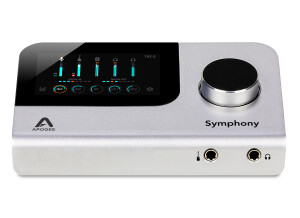
    The Apogee Symphony is a 16 in and 16 out interface that connects to your computer via USB connection. When I purchased it I was immediately drawn to the design of it and the build of it. It is built out of high quality materials and nothing about it says “cheap”. UTILIZATION There are 16 balanced inputs and you can connect the mics via the external microphone preamps and same thing with the guitars. There are 2 channels (S/PDIF) and 16 Analog Outputs. This interface may not be for everyone do to the price and the complicated set up. It took me a while to get this set up and my computer specs where just about standard with what the Symphony was requiring a user to have for this interface. GETTING STARTED I was having major driver issues when using this with my desktop Mac computer. For some reason I had to do installs about 3 different times before the interface would be recognized by my computer. But after I finally got it to install correctly it worked like a charm. These issues could have been my fault or my computers issue; I really didn’t think it had anything to do with the interface. OVERALL OPINION Being that this interface is so expensive, it may not be worth the money. I have used other interfaces that cost hundreds of dollars less that gave me the exact same sound. But it’s Apogee and they also have more expensive gear. If you are a Macbook user I wouldn't recommend this unless your MacBook is your main set up than in that case this could be your main interface. But if you have a desktop Mac and enough money to invest this is the interface to have. The preamps are amazing and the sound quality is about as good as you are going to get from working at home!

  • « This should come with the Duet 2 »

    The Apogee Duet 2 Breakout Box has 2 ¼ inputs for instruments, 2 XLR microphone inputs, and 2 XLR outputs. This interface is very inexpensive and could be used as a main portable set up for the roadie! This box is built to last a long time, it is made out of aluminum and will not scratch easy either. One of the things about this unit that left me wondering what Apogee was thinking is that they put the I/O on the front of the device. So that means when it is sitting on your desk you have the cable right in front of you connected instead of on the back where it wouldn’t have mattered. This really isn’t an issue it is more about personal preference but I just don’t see why they did that. Also, this box is only about 1.5 to 2.0” deep (depth) and when you start have your XLR cables plug into the back of it and even some ¼ cables on the back it will cause the Breakout Box to start to tip over and become heavy on the back side so the front of it will lean up. This is also something that they should have thought about before manufacturing this unit to sell. It does work great and is made to last, but they cables should have been more thought out and with the depth of the unit they should have done something to fix that issue. I also feel like when purchasing the Apogee Duet that the breakout box should be included with it because the Duet is very expensive. This unit is not a “must” have but it is very helpful to have. It should have been included with the Duet though, why not it is only a hundred dollars? If you are a Duet user I suggest getting this to make your switch outs and changing your I/O’s a lot easier.