Log in
EN
FR

PC Keyboard and Mice

32 products found

Filter
Sort by
Evaluation
  • Reviewed or not
  • Editor’s award
  • Reviewed by Audiofanzine
Availability
  • Available or not
  • Sold new or used
  • Sold new
  • Sold used
Must-have products
  • All products
  • Flagship products
  • Best rated products
  • Hot products
  • Popular products
Price
  • Freeware
€
Clear
Sort by
  • Popularity
  • User ratings
  • Price - low to high
  • Price - high to low
  • Used price, increasing
  • Used price, decreasing
  • Name (from A to Z)
  • Name (from Z to A)
  • Added on
Sort results
  • Popularity
  • User ratings
  • Price - low to high
  • Price - high to low
  • Used price, increasing
  • Used price, decreasing
  • Name (from A to Z)
  • Name (from Z to A)
  • Added on
Filter results 32 results found
Evaluation
Availability
Must-have products
Price
  • Freeware
Show results

The best PC Keyboard and Mice reviews

The reviews Audiofanzine members found the most helpful.
  • moosers's review

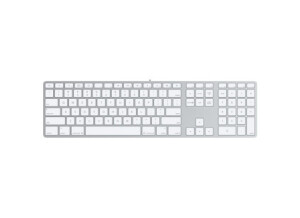
    The Apple Slim Keyboard is one of the newest computer keyboards that Apple has to offer, save for the wireless version of this slim keyboard. I don't believe that 'Slim Keyboard' is the proper name given to this keyboard, but Apple doesn't really distinguish names between their different keyboards as they come out. This version I only recently used extensively for the first time. I regularly work with a producer as his engineer and he just got his home studio happening, which includes this keyboard for controlling the computer. I've used a few other Apple keyboards, but this slimmer model is definitely up there with the most comfortable computer keyboards I've used in general. I love the slim feel to it as it's really easy to manipulate it in any way you might need to. Of course there isn't that much of a difference between this and the Pro Keyboards from Apple, but there's certainly a different feel to this one. All of Apple's keyboard will more or less do the job, but this one is certainly a bit easier on the eyes and has a really fluid feel when you press down any of the buttons. It's also nice that it takes up as little room as possible on your desk, and has two USB jacks on the sides of it for plugging in a mouse or otherwise. They're now making a wireless version of this keyboard, so this can be had for a bit cheaper than it was when it came out I believe. I don't know if it's worth spending too much more on this when compared to the Pro Keyboard, as both do the job just fine. If the price is really close however, I'd definitely choose the Slim Keyboard for it's overall feel and look, but it's not going to be worth it if it's too big of a price difference.

  • moosers's review

    The Apple Pro Keyboard is a wired keyboard controller for Apple computers. This isn't the newest incarnation of the Apple keyboard, as there is now a wireless version. We have the Apple Pro Keyboard in most of the rooms at the studio complex that I work at, as it's of course meant to be used with Apple desktop computers. I used to have one of these at my home studio as well when I was using an Apple G4 desktop computer, but now have a Mac Book Pro laptop so I don't have it anymore. The Apple Pro Keyboard has everything you need in a keyboard for your Apple computer, as it has all the proper functions, and both looks and feels good. It's easy to type on as everything is spaced out enough while it still has all the commands needed. Those who work on Apple computers will know that a major part of using it is for the keyboard shortcuts, so having a full keyboard like the Pro Keyboard will make this as easy as possible. Beyond this, there isn't much that you need to be aware of as it's a pretty basic keyboard overall. Since there is a wireless version of this keyboard, you can now get the Pro Keyboard for a pretty reasonable price. It's definitely a nice keyboard to have and does everything the wireless version will do, so if you're in need of a keyboard for a Mac and don't want to spend too much money, the Pro Keyboard will be the perfect option for you. I do believe that there is an older version of the Pro Keyboard as well, but the latest wired one should be available for a fairly reasonable price. If I ever have a need for a keyboard at home again, this will definitely be the model I go after...

  • moosers's review

    Macally's IceKey is a USB based keyboard that is designed for use with Apple computers. The studio that I work at has one of these in there. It's a slim keyboard with USB ports built into it, with two of them in total. It comes in both black and white colors, although the one we have is white. There isn't too much that sets the IceKey apart from other Mac keyboards, but it's still highly effective and will do the job as well as any out there in my opinion. Macally makes all sorts of computer and electronic gear that's made for Apple products, much of which serves as a replacement for more expensive Apple made products. The IceKey keyboard has all of the features you'd get with an Apple keyboard, with a slightly modified design and feel. It's best suited for use with an iMac which has no keyboard at all, but of course will work with any Apple computer. We're using it with a Mac Pro desktop within one of our smaller producer suite studios. While I like using IceKey, I don't know that I like it as much as I do an Apple keyboard. This mostly has to do with the fact that I'm really used to using original Apple keyboards. I would recommend using this as a replacement, as it's a pretty big difference in price if you're going to go with the latest and greatest that Apple has to offer. However, if you want to go with a used older Apple keyboard, it's not going to be too much of a difference in price. In most cases it's probably going to be worth it to grab a new keyboard like IceKey rather than spend a good amount more on a new Apple. If you're in the market for a keyboard for your Mac, I'd encourage you to check out both this and Apple's products to decide for yourself whether the difference in price is worth it for you and your computer situation...

  • AnimalTracksStudio's review

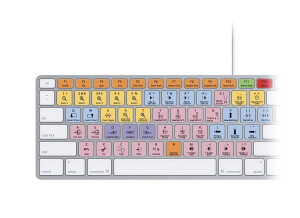
    DIGIDESIGN PRO TOOLS CUSTOM KEYBOARD - STICKERS Until you actually use a set of keyboard short cuts for the Pro Tools recording environment, you have NO idea how fast you can be when it comes to laying down and editing your audio tracks. You are most likely like everyone else and using the mouse to go to the tool bar, hitting the drop down menu and then finding your desired option and clicking on it and then going through another sub menu to get to the choice you really wanted. If you have a lot of disposable income, you may have purchased the actual Digidesign keyboard that sells for the over $100 U.S. Dollar range and are quite happy with that. If you are an average musician, you opted for the stickers that then get placed on your existing keyboard and do the same thing for fewer than twenty bucks. I fall into the second category. I am now on my second set of these things. Second set? You ask. Why in the world are you on your second set of stickers? Have you worn them out? Well, no. Not exactly. The first set actually ended up peeling off the keyboard after about six months of fairly heavy use. The second set, ordered from the same company, has lasted over a year and is still going strong. What is my recommendation for the longer life? Do yourself a favor, go to an electronics superstore and but a NEW keyboard, use a cotton swap with alcohol and wipe off the keys BEFORE applying the stickers. It seems that on my first set, I just applied them on my existing keyboard and the oil from my fingers caused a less than good bond and hence the pre-mature lifting of the stickers. That’s my observation, not that of the manufacturer. But a new keyboard, alcohol, swabs and stickers set me back a whole twenty-seven bucks, I can deal with that.