The Apple Wireless Keyboard is very thin and sleek. I have been using it for a while now with my iPad because it has made type so much easier than using the touch screen keyboard, especially when it comes to typing something long like an email or a paper. If you own an iPad then you must go out and purchase this right away. It is very handy to have and it is very portable as well as affordable (69.00). It takes 2 AA batteries and they don’t last very long if you use the keyboard a lot. I have to replace the batteries all of the time, but I can deal with that because of how easy it makes my life on my iPad. It does come with a manual but you will not need it because setting it up takes not effort at all. The keys are not like typical keyboard keys, they are softer and more flat then regular keyboard keys. It did take some time getting use to using it because I am use to using a laptop keyboard that has a little more heaviness to it. The keys on the Apple Wireless Keyboard are easy to press and they don’t have much of a texture to them. If you want to use this on your mac you will need to have Bluetooth enabled and and OS of 10.8 or higher for it to run. You can even walk away from your Mac or iPad and still use the keyboard up to around 30 feet. This keyboard will also turn off on its own when it is not being used to save battery life but I still don’t think that it is much of a difference as much as I have to switch the batteries out of it. For and iPad user, this is something you cannot pass up on. It is affordable and convenient.
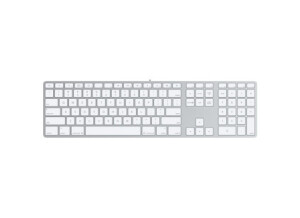
The Apple Slim Keyboard is one of the newest computer keyboards that Apple has to offer, save for the wireless version of this slim keyboard. I don't believe that 'Slim Keyboard' is the proper name given to this keyboard, but Apple doesn't really distinguish names between their different keyboards as they come out. This version I only recently used extensively for the first time. I regularly work with a producer as his engineer and he just got his home studio happening, which includes this keyboard for controlling the computer. I've used a few other Apple keyboards, but this slimmer model is definitely up there with the most comfortable computer keyboards I've used in general. I love the slim feel to it as it's really easy to manipulate it in any way you might need to. Of course there isn't that much of a difference between this and the Pro Keyboards from Apple, but there's certainly a different feel to this one. All of Apple's keyboard will more or less do the job, but this one is certainly a bit easier on the eyes and has a really fluid feel when you press down any of the buttons. It's also nice that it takes up as little room as possible on your desk, and has two USB jacks on the sides of it for plugging in a mouse or otherwise. They're now making a wireless version of this keyboard, so this can be had for a bit cheaper than it was when it came out I believe. I don't know if it's worth spending too much more on this when compared to the Pro Keyboard, as both do the job just fine. If the price is really close however, I'd definitely choose the Slim Keyboard for it's overall feel and look, but it's not going to be worth it if it's too big of a price difference.
The Apple Pro Keyboard is a wired keyboard controller for Apple computers. This isn't the newest incarnation of the Apple keyboard, as there is now a wireless version. We have the Apple Pro Keyboard in most of the rooms at the studio complex that I work at, as it's of course meant to be used with Apple desktop computers. I used to have one of these at my home studio as well when I was using an Apple G4 desktop computer, but now have a Mac Book Pro laptop so I don't have it anymore. The Apple Pro Keyboard has everything you need in a keyboard for your Apple computer, as it has all the proper functions, and both looks and feels good. It's easy to type on as everything is spaced out enough while it still has all the commands needed. Those who work on Apple computers will know that a major part of using it is for the keyboard shortcuts, so having a full keyboard like the Pro Keyboard will make this as easy as possible. Beyond this, there isn't much that you need to be aware of as it's a pretty basic keyboard overall. Since there is a wireless version of this keyboard, you can now get the Pro Keyboard for a pretty reasonable price. It's definitely a nice keyboard to have and does everything the wireless version will do, so if you're in need of a keyboard for a Mac and don't want to spend too much money, the Pro Keyboard will be the perfect option for you. I do believe that there is an older version of the Pro Keyboard as well, but the latest wired one should be available for a fairly reasonable price. If I ever have a need for a keyboard at home again, this will definitely be the model I go after...