Log in
EN
FR

Antares Audio Technology

Series

69 products found

Categories
Series
Filter
Sort by
Evaluation
  • Reviewed or not
  • Editor’s award
  • Reviewed by Audiofanzine
Availability
  • Available or not
  • Sold new or used
  • Sold new
  • Sold used
Must-have products
  • All products
  • Flagship products
  • Best rated products
  • Hot products
  • Popular products
Price
  • Freeware
€
Clear
Sort by
  • Popularity
  • User ratings
  • Price - low to high
  • Price - high to low
  • Used price, increasing
  • Used price, decreasing
  • Name (from A to Z)
  • Name (from Z to A)
  • Added on
Choose a series
Sort results
  • Popularity
  • User ratings
  • Price - low to high
  • Price - high to low
  • Used price, increasing
  • Used price, decreasing
  • Name (from A to Z)
  • Name (from Z to A)
  • Added on
Filter results 69 results found
Evaluation
Availability
Must-have products
Price
  • Freeware
Show results

The best Antares Audio Technology reviews

The reviews Audiofanzine members found the most helpful.
  • « so now everyone can be T-pain? »

    Ah Auto-tune, the saviour to our worlds most terrible singers and the single piece of gear that has made singers all around the world...lazier. Auto-tune runs just like every other vst really, barely ever crashes, simple as anything to install and there are about a ton of helpful vids on how to get the best from it. All options are very visually right in front of the user so its pretty straight forward to use once your used to it. Of course as always theres a nice and easy to understand manual if you need it. Auto-tune is straight forward in the way that you can easily just move your originally notes up a touch or completely soar your c1 note up to a f#4 in a matter of seconds (i just hope your not expecting to sound normal...). of course for all you rappers/hip hop/pop musicians out there you can get that long sought after t-pain robot sound effect simple by drawing straight lines over your graph on the notes you want! woooohooooo!! to vocal laziness!!! SUITABILITY/PERFORMANCE The software works perfectly as intended, produces that perfect pitch vocal/instrument sound whilst adding its own timbre to vocals which in my opinion when used right can sound amazing! though when used wrong... disaster is sure to follow in the way of recycled over-autotuned garbage vocals as seen in todays pop culture. Iv'e used autotune Evo for a long time since it first came out and i am glad i have it.. lets face it, some singers have bad days... months... lives. And I've dealt with a few. OVERALL OPINION I cant really say anything bad about auto-tune itself, its a great tool when used right. The price is good i guess and there are tons of other versions out there but in my preference and opinion this is the best/easiest. if you have no idea what your doing there's an auto mode, if you want certain notes doing certain things... get on over to the graph side of things. Now i know this review seems as though i hate auto-tune... that is not correct, i absolutely love auto-tune when its used with taste and if the person using iit can actually already sing! Auto-tune evo is a must have for any budding studio engineer!

  • moosers's review

    The Antares Systems Avox Duo is a vocal doubler plug-in that is available within Antares' AVOX vocal toolkit bundle of plug-ins. There is a newer version of this plug-in within the Evo bundle, but I've used this one primarily. I didn't have any problems at all installing the bundle on my system, as it was unmemorable since it was just like installing any plug-in pack. Learning how to use the plug-in is also really easy, as the interface consists of a series of sliders to control the sound of the double vocal and the mix of the two. The parameters available are for vocal timbre, vibrato, pitch variation, timing variation, and for setting the levels and panning of both the original vocal and the double. You can also set what kind of voice color you have to make it track best. I've never seen a manual for this plug-in... SUITABILITY/PERFORMANCE I'm running the Antares Systems Avox Duo in Pro Tools LE 8 currently on a Mac Book Pro that has a 2.2 Ghz Intel Core 2 Duo processor and 4 GB of RAM. I run Pro Tools LE with a Digi 002R audio interface or a Digidesign Micro Box if I'm on the go and I monitor everything with a set of Adam A7 monitors. I've never had a need to run more than one of these at a time in Pro Tools, so for what I've used it for I've never had a problem with the performance of this plug-in. OVERALL OPINION While definitely a cool idea, I'm not sure that the execution on the Antares Systems Avox Duo is the best. It sounds decent enough, but it's definitely not a very realistic sounding vocal doubler and I wouldn't print with it for any real mixes. The tracking isn't the best on it, but it's decent enough if you're just looking to add a little bit of depth. Honestly, if you want a vocal double I don't see why you wouldn't use add a second voice to your recording. This is a quick way to get a double vocal in there, but again, I wouldn't use it in a serious mix. I'd recommend trying out the Evo Duo if you're seriously interested in the plug-in like this, as that one sounds a bit better. If you're interested in the other plug-ins in the Avox Toolkit bundle, it's at least nice to have this one, but I wouldn't get this plug-in pack for this plug-in alone.

  • Azuma's review

    There weren't any kind of compatibility issues mainly because this program works on any platform either Windows XP, Windows Seven or MAC OS. The manual provided by Antares was quite good , it covered in details the building of the harmony , the different effects and panning options to achieve a more natural harmonic sound. The general configuration and setup is quite simple , this program is very easy to install and to start use it right away. The typical functions are easily accessible because you have only a simple window to choose different type of voicing , choirs and effects. SUITABILITY/PERFORMANCE The software works correctly in this configuration , the gear is very stable and I haven't had a bad time using it. I'm getting good performances in building certain harmony effects , in creating different choir effects and many other cool features of this program. I've been using this harmony engine for about 6 months , but believe me , this is a very powerful musical tool. OVERALL OPINION What I like most about it are the choir effects , I like how smooth they blend it with the rest of the recording , I also do like some features from Autotune like humanize and naturalize the vibrato and texture of the voice. Another great feature is the harmony control where you can adjust the scale , the type of scale and the way the voices will interact. My opinion about the value for the price is great, I think this is a very powerful tools that deserves the money if you need a plugin like this. Precision and quality of the sound is quite good , however if the voices are very high they do tend to sound very robotic so keep that in mind if you're quite extreme with your harmonies. Knowing What I know , I would get this program again , mainly because of how useful and fast it is , and I also do like the fact that is doesn't require a lot of cpu power.

  • « A cheap microphone fix »

    The Antares Mic Mod EFX is geared toward people that record at home and do not have a great microphone. I have used this plug in many times because during certain times of my musical career I have had to use microphones that are sub par. This plug in will give you the sound of a really good microphone by using a cheap one. I would use this plug in on my effects rack (whichever one that my microphone was connected to) and dial up the sound that I was looking for and it would instantly give me a better sound. I have used this software with a whole lot of microphones that cost less than 100 dollars and it would turn that microphone into a 300 dollar mic with no problem. I have also used this on a Mac and a PC and it ran perfectly on both. SUITABILITY/PERFORMANCE Being able to choose your pickup pattern and filters right from this plug in no matter which microphone you are using is a great feature. This plug in gave me the ability to turn a cheap microphone into some of the microphones that I wish I could afford. Now it does not sound perfect by any means but it is a vast improvement from the way the cheaper microphone already sounded. OVERALL OPINION Installing it takes no time and it runs just like any other plug in does. It can run in VST, AU, or RTAS format and you can use it with any DAW that you want to. This is a must have for anyone using a cheaper microphone; it is a way to get a higher quality sound easily without spending a boat load of money. This only cost 99 dollars, and even now that I have better microphones at home I still find my self using it to make them sound even better.

  • moosers's review

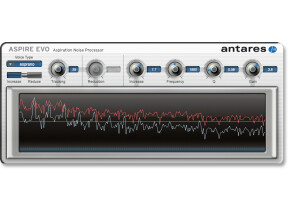
    The Antares Systems AVOX Aspire Evo is a unique vocal processing plug-in that is a part of the AVOX Evo Vocal Toolkit of vocal plug-ins. The plug-in is unique because it allows you to actually control different components of the human voice without affecting the harmonic content that is there. I wasn't the one to install this plug-in or the bundle it comes in, as I don't own this and have only used it at the studio where I'm working. Learning to use the plug-in certainly won't take just a minute, as even though the parameters are pretty simple, learning to master using it isn't easy. I certainly wouldn't say that I've mastered getting the best sounds possible from it, but after using it for a little bit it's a lot easier to use than it was when I first tried it. The plug-in has settings for choosing the voice type (alto, soprano, etc), as well as if you'd like to increase or decrease a certain aspect of sound in the voice. It then also has parameters for tracking, amount of reduction or increase, desired frequency, Q (band width), and lastly gain. The main working parts here are that of a filter or equalizer, but it's highly specified for the voice. It also has a graph which will show you both the original and the affected sound wave. A manual would be a good idea if you're feeling lost, but I haven't seen one of this myself. SUITABILITY/PERFORMANCE We've got the full AVOX Evo bundle and the AVOX Aspire Evo plug-in running on all of our Pro Tools HD systems at the studio where I work. We have a number of different studios on site, all with Pro Tools HD, so we rarely will have any problems running plug-ins, let alone one where you're generally only going to be running one at a time. That's the case here as I can't say I've ever had anything close to performance issues with this plug-in on any of the systems we've got. OVERALL OPINION While certainly a great idea and good execution here, the Antares Systems AVOX Aspire Evo is definitely a bit of a glorified EQ. What I mean by this is that at the heart of this plug-in is a specified EQ, so while it's a nice one to have around, most of what can be done in here can most likely be handled using an in depth parametric EQ. Having said this, the Aspire plug-in does it's thing and does it well. In general it's got a clean and realistic tone, but I find that you can't really make too many drastic changes to the sound without it sounding artificial. I wouldn't buy the AVOX Evo bundle for this plug-in, but if you do have the bundle already this plug-in is definitely one that can be helpful to you.

  • « Warm it up! »

    Warm is a plug in made for Macs and PC’s, it is a very universal plug in that is not only very affordable but it can work with just about any program that is on the market like Cubase, FL Studio, Ableton and a bunch of others. It is very light on your CPU and hard disk space and only takes minutes to install. I purchased this directly from a retailer online and got a link to download it within a few minutes. From the time that I purchased it to the time that I started using it was no more than 15 minutes which was great! SUITABILITY/PERFORMANCE Warm is very easy to use and it has a ton of great features for it to only cost 50 bucks! It is probably the easiest and most inexpensive way to warm up your tracks. There are two tube models that are based off of Antares award winning analog tube technology. I have been using this for a few months and I was absolutely shocked on how good it could make things sound for this price. OVERALL OPINION I have used this on a number of different computers and operating systems and it works great. I even have an old Windows XP laptop from 2005 and it works great with it. It is not as fast on that computer though but it is due to the laptop itself and not Antares Warm.

  • « It provides great sounding. »

    There weren't any kind of compatibility issues in the program worked really great as well on my Windows XP, Windows Seven or a MAC OS. The book provided by the program was pretty clear and I could understand the general configuration of the program and how the settings worked. General configuration and setup is pretty usual and simple and you can go for you in just a couple of minutes. the typical functions are accessible fro a nice window in the great design have a lot of editing options to choose from. SUITABILITY/PERFORMANCE The software works great as well as standalone program it's very well made I gotta notice the stability of the program. There is a very nice effect that you can find on skrillex songs and other rap songs provided by Autotune. I also enjoyed the precise pitch information provided by the program, and how you can control the vibrato, notes, the tone in the range, and many other cool features. OVERALL OPINION What I like most about it is the great control provided by the program, how you can edit and tweak the sounds, I also enjoy the new design, and without a doubt the robotic feel of the soft. I can't complain about the quality of the plugin, or the precision, because both of them are very well handled and implemented, gotta give some some credit to Antares for that. There are plenty of audio corrections type of plugins out there, however Autotune still sits on top with Melodyne Editor, there is a slight upside down, Autotune can edit only human pitch, Melodyne can edit any kind of pitch, drums, guitars, piano, etc. If you're interested in pitch control, audio editing, vibrato amount, then without a doubt, AutoTune is just for you, give it a try.

  • moosers's review

    Everything was pretty easy to get going for Antares Auto-Tune 5 on my system (Macbook Pro, 2.2 Ghz, 2 GB Ram). Of course you need an iLok to authorize the plug-in, but since I had previous experience with setting that up it was pretty easy. I really had no need to look at the manual. SUITABILITY/PERFORMANCE I run my Macbook Pro with Pro Tools LE 7.4 and a Digidesign 002 rack and Auto Tune works great with it. I haven't had any problems with running it except sometimes it slows down a bit when too much information is going on, but I guess that is to be expected. OVERALL OPINION I've owned Auto Tune 5 for about 10 months now but I had been using an earlier version for about a year and half before that. I love the interface of the software, both in graphical mode and in automatic it is easy to configure and to tune things up with. The sound is pretty smooth, along it really depends on the singer. If a vocal is relatively close this thing works great for just making it that much better. However, it can definitely sound computerish if you try to stretch its limitations on a poor singer. Although I have yet to use Melodyne, it seems some of their new products (Direct Note Access) may have Auto Tune beat at this point and when Melodyne releases their new software I may have to switch over to that simply because it has more features, although I'm sure Antares will have a response to it. Auto Tune is a bit pricey, but for me it is essential to have when working with clients. I will probably stick with this unless I try out Melodyne and decide to start using that.

  • « Worth the buy »

    Auto Tune EFX 2 is made by Antares and it is a pitch correction too/plug in that is fully customizable. You can run it in VST, AU, or RTAS format on either your Mac or PC. It is very affordable and probably one of the easiest ways to get studio quality pitch correction at your home studio. I purchased this online directly from Antares and received a link within 10 minutes to my email to download it. Setting it up was quick and easy. The pitch correction is very smooth and it has some effects that you can use to give some flavor to your vocals. SUITABILITY/PERFORMANCE The price of this plug in is very low but the quality is great, you will have enough effects and stuff to work with that it will feel like you are working with a 500 dollar plug in. All of the effects are of great quality because it uses the same stuff as the full Auto Tune 7 uses to achieve the pitch correction and effects. OVERALL OPINION I have been using this for almost a year and it has never crashed on my but on my Windows Vista laptop it does run a lot slower than it does on my MacBook but that is probably due to Windows not being as good as the OSX in Macs. I can easy achieve the pitch correction that I am looking for with this plug in because it allows me to dial up the correct key and the rest is all done by the EFX2 generator. All of the pitch correction is very smooth and almost undetectable as long as you are close to the relative key. I do not use all of the effects a lot but when I do I get some really cool sounding vocals. EFX 2 is also pretty light on your CPU usage as well.

  • « Antares ATR-1A »

    Purchased unit through American Musical Supply on line. Price was approx: $350 USD. Purchased for live application vocal intonation. When the software version of the product was dubbed "The Holy Grail" of recording there was no exaggeration. Let's face it every singer has a bad night every now and then. Well, this will help prevent that. The unit is a simple single rack space with 6 buttons a few lights a knob and an lcd screen.(not even an on off switch)with the press of a couple buttons youre in business. Just a turn of the knob to bring you to the key you (or the vocalist) needs to be in and thats pretty much it, instant perfect pitch. There is some minor tweaking that needs to be done from the factory presets, but nothing that doesnt take 3 seconds or so to adjust. In the studio, this can save hours of having to manually adjust pitch by hand using the software version of the unit(in my opinion, the hardware actually sounds more transparent) In addition to being transparent the unit can be set up to have a prety cool robot like effect (which is pretty obvious) on the singer or solo instruments voice. No more embarassing off key notes.... SIGN ME UP!!! The unit isnt perfect but it is darn near close. If the vocalist is severly off there is an audible intonation problem as the unti doesnt know which note to go up or down to. But i think thats more a problem with the singer than the unit. The unit could use an on/off switch. Solid built chassis, the power supply is a proprietary 7 pin din. Buttons are flat which reduces the possibility of things being broken on the front panel. The one knob on the face seems to be securly fastened and seems quite sturdy. Awesome unit! If vocalists buy only one thing for their live or studio vocals this should be it! It can only take one sour note to turn away fans and industry... this can help reduce the chances of this happening. This review was originally published on http://www.musicgearreview.com

  • « Antares ATR-1 »

    I believe I purchased mine at Manny's Music in NY. This machine is the best thing that can happen to your voice besides singing lessons. It corrects your pitch, fixing bad notes in real time, and can even add realistic vibrato and extend your range. It has a MIDI input which can be used to "play" your voice, enabling you to make your voice sing fast, complex runs, etc. It can even create special robot-like effects. I go into more detail about this and other equipment I own at my site, Motionizer.com, address http://www.motionizer.com I don't have anything negative to say about it, except maybe the control panel takes a little getting used to. They tried to simplify the unit by providing only a few buttons; but sometimes, that only makes a product even more complicated... It's small, light-weight, and generally well-made. I like the big, clear display. I highly recommend this unit. It was a great idea, and it's a big help for marginally-fine vocalists (like me.) This review was originally published on http://www.musicgearreview.com

  • « I wish to avoid sounding like a mic purist, but: »

    First off, I don't own this software; my extended family has a few connections in the industry, and I have a relative who is quite up to his neck in the big name plugins, so I have no idea how the software runs, or how easy it is to install. That being said, this is one of the most interesting pieces of software I've seen. Before I heard of it, I had wished for a program that made any signal source able to sound like it came from ANY microphone. Then I discovered this. WOW! SUITABILITY/PERFORMANCE Anyone who has ever worked with a microphone keeping recording techniques in mind will find the mix modeler to be the simplest thing in the world. There is nothing but a menu for selecting the source microphone and the modeled microphone. And the list is endless, trust me; you'd have to be using a pretty darn obscure microphone to lose out with the mic modeler, and even then, they'll have sonically similar ones on the list. After that, there are the gain settings; there are also settings for tube saturation, as well as pattern-selection (when applicable) and pass-filters. One can even adjust his or her modeled proximity to the microphone! OVERALL OPINION Don't get me wrong. It's obviously not quite going to be like the real thing. It can't possibly replace every microphone. Do not buy this and an SM58 and expect to be set. I repeat: It's a program. It isn't essential to have at all, because all this plugin really does is automate frequency shifts, which you can probably do on your own anyway. Obviously, it's more complicated than that, but the only thing terribly revolutionary about the Mic Modeler is its concept. A U47 sound will come from a U47, but if you are interested in experiencing new sounds without the tedium, this plugin may be for you!