Log in
EN
FR

Waves Software Exciters/Enhancers

11 products found

Sort results
  • Popularity
  • User ratings
  • Price - low to high
  • Price - high to low
  • Used price, increasing
  • Used price, decreasing
  • Name (from A to Z)
  • Name (from Z to A)
  • Added on

The best Waves Software Exciters/Enhancers reviews

The reviews Audiofanzine members found the most helpful.
  • « Neat bass shaper, but easy to overuse »

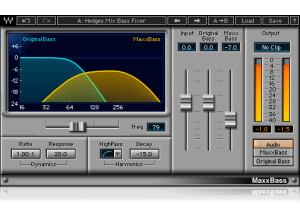
    In electronica music, the number one thing you always want is some huge bass that really thumps you in your chest. Because of that, Waves made this plugin to help those who are trying to achieve that crazy low end that really gets your body moving. The plugin has a cutoff frequency that allows you to adjust it from 32 Hz to 256 Hz, a radio knob to allow you to compress from 1.00:1 to 4.00:1, response, high pass filter, decay, input gain fader, original bass fader, maxxbass fader, output meter and monitor section settings to all help you shape that low end you're looking for. The plugin itself might be a touch daunting for those who have never used something like this, but once you start moving knobs, you should get the hang of it. I've never read the manual, so I can't really comment as to how well it's written. To enable this, simple call it up in your DAW on whatever buss you want for some crazy low end. SUITABILITY/PERFORMANCE I've never experienced a single issue while running these plugins, and I don't really expect to. Waves is pretty famous for being one of the best companies when it comes to overall stability and performance. The plugins are always rock solid. The plugins themselves are cross platform compatible, so both OS X and Windows users alike can utilize these without any issues. It also doesn't take up too much RAM, which is a huge plus. There is one issue, however. This is a 32 bit plugin, and I'm not a huge fan of the way my DAW implements these. My DAW is a 64 bit DAW, and for me to use these, it launches a special bridge application. It's a bit annoying as they disappear while in the background. I'm hoping that Waves updates these in the future so I don't have to keep using this app. I've been using the Waves bundle for the past six or so months, and it's been one of the best purchase decisions I've ever made. OVERALL OPINION In my spare time, I do electronica music. Clear chest pounding bass that doesn't sound muddy or hinder other instruments in the mix can be a huge pain, and it's what I'm constantly battling. This plugin helps me shape those low end instruments quite a bit easier than if I wouldn't have it. I wouldn't use it for much other than electronica, however.

  • « Fattens the sound »

    Waves has recently released a new products for those who need something very simple to use. The software is part of the OneKnob series, and just as the title says, these plugins only have one single knob to control the effect. In a way, these plugins are a bit gimmicky. However, they really do work quite nicely. The plugin is very simple to use. To increase the fatness of your mix, you simply add this to whatever bus you want fatter, turn the dial until you get the fatness you want and leave it be. It's that simple. The OneKnob Phatter is included in the OneKnob package series or the Mercury bundle. Both of these will get you the product, so it's not like you're just buying a single plugin. In one way, it can be a bit of a pain as the OneKnob package alone is around $300ish. Even though it includes seven of their plugins, I find it to be a bit of a ripoff. The Mercury bundle makes it a bit easier to swallow, but that thing costs a ton anyway, so you'd better be getting every single plugin that Waves offers. SUITABILITY/PERFORMANCE Waves plugins have always been some of the most stable plugins I've experienced. They're cross platform compatible, so they'll work with both PCs and Macs. As a Mac user, that's a huge advantage for someone like me. They run in 32 bit mode, but Logic uses a wrapper-like application that runs so you don't interfere with your 64 bit interface. I've tried this on various different buses, and it seems to work on anything with ease. It even works nicely on MIDI, which I found a bit surprising. There are no performance issues at all, and that's a huge plus when working in a DAW filled with all kinds of synths and tracks running tons of plugins. These plugins came with my Mercury package, and I've had that for a few months now. OVERALL OPINION I never found a ton of use for this plugin as I'm always battling bass in my DAW. There are times where I might use it on lead tracks, but aside from that, it's about as useful as the OneKnob Filter. If you're big into electronica, it'll probably be more useful for you.

  • « Instantly make anything sparkle »

    Waves has recently released a new products for those who need something very simple to use. The software is part of the OneKnob series, and just as the title says, these plugins only have one single knob to control the effect. In a way, these plugins are a bit gimmicky. However, they really do work quite nicely. The plugin is very simple to use. To increase the treble of your mix, you simply add this to whatever bus you want brighter, turn the dial until you get the brightness you want and leave it be. It's that simple. The OneKnob Brighter is included in the OneKnob package series or the Mercury bundle. Both of these will get you the product, so it's not like you're just buying a single plugin. In one way, it can be a bit of a pain as the OneKnob package alone is around $300ish. Even though it includes seven of their plugins, I find it to be a bit of a ripoff. The Mercury bundle makes it a bit easier to swallow, but that thing costs a ton anyway, so you'd better be getting every single plugin that Waves offers. SUITABILITY/PERFORMANCE Waves plugins have always been some of the most stable plugins I've experienced. They're cross platform compatible, so they'll work with both PCs and Macs. As a Mac user, that's a huge advantage for someone like me. They run in 32 bit mode, but Logic uses a wrapper-like application that runs so you don't interfere with your 64 bit interface. I've tried this on various different buses, and it seems to work on anything with ease. It even works nicely on MIDI, which I found a bit surprising. There are no performance issues at all, and that's a huge plus when working in a DAW filled with all kinds of synths and tracks running tons of plugins. These plugins came with my Mercury package, and I've had that for a few months now. When I'm doing quick mixes or just need to do something real quick without a huge EQ change, I'll throw one of these in the bus. I find it's a bit more musical than just notching the EQ in the upper KHz range. OVERALL OPINION The OneKnob Brighter is definitely a good plugin, but it also has its flaws. For one thing, you can't cut. For another, you can't really do anything except make the mix brighter. Because of that, the actual OneKnob bundle is a bit expensive for what it is. Thankfully, these plugins are included in the Mercury bundle, so it's more of a "bang for your buck," but it still leaves something to be desired when using these in a pro setting. I have a feeling they're geared more towards beginners who don't want to deal with all of the knobs and different settings some of the deeper plugins can do.

  • moosers's review

    The Waves Aphex Vintage Aural Exciter is a new plug-in that was co-designed by Waves and Aphex and modeled after the original Aural Exciter from Aphex. The plug-in has only been released recently and only in the past few weeks has the studio that I work at picked it up. I wasn't the one to install it, but this process shouldn't present anyone with any problems I don't think. Regardless of if you've used or even heard of the original Aural Exciter, the interface of the plug-in is fairly simple to understand. It gives you parameters of mode (four to choose from), input and output levels, aural excitement level, and an analog setting that is found on almost all of the new Waves plug-ins. The interface also has two different configurations to choose from. It's available across the board in terms of compatibility, as are all Waves plug-ins, so no issues to worry about there. It's easy enough to use where I don't believe a manual is necessary. SUITABILITY/PERFORMANCE I've yet to encounter any issues while running the Waves Aphex Vintage Aural Exciter, but our systems at the studio are all Pro Tools HD anyway, so it's rare that we'll experience lagging of any kind when it comes to plug-ins. This has run smoothly for us and I don't expect that this will change at all. I think that even if you're running the RTAS version of this plug-in that those with a good enough system to run your DAW in the first place should be able handle it. OVERALL OPINION The Waves Aphex Vintage Aural Exciter is one of the most effective plug-ins that I've used in a while. This plug-in can really liven up a track as it's useful across the board when you're looking for some brightness added to the mix. I've used it thus far for mixing purposes on individual instruments, but will probably try it on a master buss sometime soon as well. I can't say how it compares to the original Aural Exciter, but just having this plug-in alone will do a lot for you. I love using it on vocals and guitars as it's a great tool for helping these sounds cut through the mix a little more. I don't think the Waves Aphex Vintage Aural Exciter is part of any bundles yet, but it's definitely worth checking out on an individual basis for any professional DAW owner.

  • moosers's review

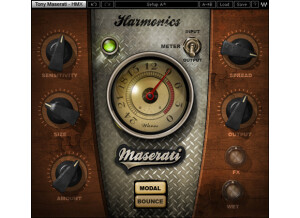
    The Waves Ltd. Maserati HMX Harmonic Generator is a unique plug-in that comes as part of the Tony Maserati Collection of plug-ins. Tony Maserati is of course the famed producer who has worked with virtually every pop star out there. I installed this plug-in along with the rest of the Maserati Collection and all of the Waves plug-ins, which was a pretty quick and easy process that I didn't have too much trouble with at all. Learning how to use the plug-in isn't quite as easy as installing it is, but it's still pretty simple to understand. For me it was just a matter of messing around with the different parameters available in here to get a good idea of what the plug-in was all about. It's got two different modes - 'bounce' and 'modal,' the first of which is kind of a chorus effect, and the latter of which adds a bit of depth and liveliness via reverb. The parameters are different for each of the two modes, with almost no overlap. Some of these are pretty ambiguous parameters on paper however, so it's definitely necessary that you get in there and mess around with them a bit to find out exactly how they'll affect your sound. A manual might be helpful but I haven't seen it for myself... SUITABILITY/PERFORMANCE I've got the Waves Ltd. Maserati HMX Harmonic Generator plug-in currently running on my recording system at home. This system is made up of Pro Tools 9, a Digi 002R audio interface, and a Mac Book Pro lap top that has a 2.2 Ghz Intel Core 2 Duo processor and 4 GB of RAM. Since I do a lot of interfacing back and forth between home and the studio I work at, I've also used this a bit on our Pro Tools HD systems there. Either way, the plug-in has been running quite smoothly for me as I can't say I've had any issues running a single instance of it, which is all I've needed it for so far. OVERALL OPINION The Waves Ltd. Maserati HMX Harmonic Generator is a really cool little plug-in that can be useful in a variety of different situations. I've used it for a few different applications, and it's definitely versatile enough to be tried out on all sorts of different instruments and vocal types. Between the two modes, there's a ton of different effects that are possible as it's really up to the user to make it happen. I've used the HMX Harmonic Generator primarily for vocals, but recently I've been experimenting a bit more as I recently threw it up on an electric guitar track and was definitely happy with the end result. This one is about what you do with it, which can certainly be many different things!

  • moosers's review

    The Waves Ltd. Maserati B72 Bass Phattener is a unique bass enhancer plug-in that is part of the Tony Maserati Collection of plug-ins. It isn't available as an individual plug-in as you can only get it within this bundle. I didn't have any issues installing this bundle, as I did so when I installed all of the other Waves plug-ins in the Complete bundle. As far as the make up of the interface is concerned, it's pretty easy to follow but this isn't your typical processor so it did take me a bit to get used to how each of the parameters will affect your sound. These parameters include sensitivity, bass, treble, output, and an FX mixing section. It also has two different modes for either DI (direct input) or synth. Those are the parameters at hand, so a manual shouldn't be necessary - just practice with it for a little bit and you should be good to go! SUITABILITY/PERFORMANCE I'm currently running the Waves Ltd. Maserati B72 Bass Phattener and the entire Waves collection of plug-ins on my Mac Book Pro computer and in Pro Tools LE 8. The computer has a 2.2 Ghz Intel Core 2 Duo processor and 4 GB of RAM, while I run Pro Tools with a Digi 002R audio interface. I've only had a need to run this on one or two bass tracks at a time within a standard session, and it hasn't even come close to taxing my system enough to affect it. OVERALL OPINION The Waves Ltd. Maserati B72 Bass Phattener is overall a really awesome plug-in to have around. It is kind of like a beefed up Renaissance Bass, which is one of my favorite plug-ins for fattening up bass. It's got the same sort of effect but there's a bit more that you can do with it. It definitely does as advertised, as it's perfect for juicing up your sound a bit. I've only used the plug-in to date on bass guitar, but being that it has a synth mode it would be cool to try it on a synth bass sometime as well. The Maserati Collection is overall a very impressive bundle, so if you're interested in the Bass Phattener I'd definitely recommend checking out the full bundle as it's the only way you can this one...

  • moosers's review

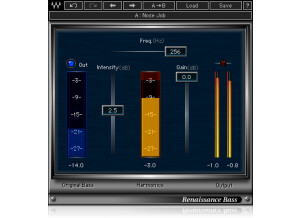
    The Waves Ltd. Renaissance Bass was easy to install and had no compatibility issues setting it up with my Mac and Pro Tools 7.4. It is pretty much your basic plug in installation process. I never looked at the manual as it was easy enough to install and is even easier to use! It only has 3 virtual sliders to control. SUITABILITY/PERFORMANCE I have the Renaissance Bass running on a Mac Book Pro with a 2.2 Ghz processor and 4 GB of ram. The software works exactly as it should on my machine and I never had any problems using it. My machine is pretty sturdy and is able to handle a bunch of plug-ins at once, but like all plug ins, R-Bass will only take you as far as your machine will allow it to. OVERALL OPINION I've been using the Waves R-Bass for about a year and a half and since then I have put it on almost every bass guitar track that I have recorded. It adds a fullness and depth to the bass that is hard to live without after hearing the difference between the signal with and without the plug in applied to it. It is incredibly easy to control as it only has three sliders - one for intensity, one for gain, and one to set what frequency you want to boost. Since it is designed especially for bass instruments, the frequency range is pre set for frequencies that will enhance the bass in your mix. I haven't been able to find any plug ins that do the same things that Renaissance Bass does. If you get the R Bass in plug in pack, it really isn't too expensive and is definitley worth it as you won't be able to live without it after you use it! All in all I'm a big fan of R-Bass and would recommend it to anyone who wants a generally richer bass tone!