Log in
EN
FR

Waves Software algorithmic reverbs

11 products found

Filter
Sort by
Waves
Evaluation
  • Reviewed or not
  • Editor’s award
  • Reviewed by Audiofanzine
Availability
  • Available or not
  • Sold new or used
  • Sold new
  • Sold used
Must-have products
  • All products
  • Flagship products
  • Best rated products
  • Hot products
  • Popular products
Price
  • Freeware
  • Low-cost (< $35)
  • Mid-range ($35 - $75)
  • Premium (> $75)
€
Clear
Sort by
  • Popularity
  • User ratings
  • Price - low to high
  • Price - high to low
  • Used price, increasing
  • Used price, decreasing
  • Name (from A to Z)
  • Name (from Z to A)
  • Added on
Sort results
  • Popularity
  • User ratings
  • Price - low to high
  • Price - high to low
  • Used price, increasing
  • Used price, decreasing
  • Name (from A to Z)
  • Name (from Z to A)
  • Added on
Filter results 11 results found
Brands
Evaluation
Availability
Must-have products
Price
  • Freeware
  • Low-cost (< $35)
  • Mid-range ($35 - $75)
  • Premium (> $75)
Show results

The best Waves Software algorithmic reverbs reviews

The reviews Audiofanzine members found the most helpful.
  • « Flexible reverb and reflections plugin »

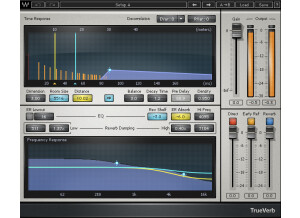
    There are quite a few reverb plugins in the Waves lineup, and it's no surprise as reverb is almost always used in a mix somewhere, in some form. A good sounding reverb can make a mix really breathe and give it some nice air. In the 80s, it was shoved down everyone's throats, but people seem to have learned since then that tons of reverb can actually make a mix sound muddy. This plugin is super versatile in that there are tons of different features you can choose from. It has adjustments for decorrelation, reflection variations, reverb variations, dimension, room size, distance, link parameters, balance, decay, pre-delay, density, low cut, high shelf, absorption, frequency, damping, various ratios in the EQ, mix, direct, and tons of other adjustments in here. To use this, simply enable it on whatever buss you want to use it on, and start adjusting. It's a bit more complex than some of the other plugins that Waves offers, so it might be worth reading the manual. Personally, I never read it as it's still a fairly straight forward plugin. SUITABILITY/PERFORMANCE Waves is the king when it comes to things such as stability and overall performance. For one, this plugin doesn't take up too much RAM or processing power, and that's a big plus considering a DAW can have tons of different plugins and virtual synths running at any time. The plugins are all cross platform compatible, so anybody with an OS X or Windows machine can run these without any problems. I've never experienced a single issue while running this plugin when it came to things like stability and overall performance. There is one issue, however, that I did come across. These plugins are 32 bit inside of OS X. For me to utilize these in Logic Pro, it needs to run a special bridge application as my DAW is a 64 bit DAW. I'm not a huge fan as to how Logic Pro implements this, and I'm hoping that Waves updates these later on. I've been using the Mercury bundle for the past half a year or so, and it's been awesome. OVERALL OPINION I've used this on the master buss successfully. I've also used it on guitar tones to help space them out a bit and give them some more depth. Personally, I tend to reach for either a basic reverb plugin or Space Designer inside of Logic, but if I want a different flavor, I'll reach for this from time to time. It's never failed me, that's for sure. It all depends on what type of reverb and style you're going for. It also helps to choose the plugin you're most comfortable with.

  • « Add that 80s shine »

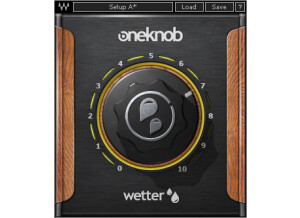
    Waves has recently released a new products for those who need something very simple to use. The software is part of the OneKnob series, and just as the title says, these plugins only have one single knob to control the effect. In a way, these plugins are a bit gimmicky. However, they really do work quite nicely. The plugin is very simple to use. To increase the depth of your mix, you simply add this to whatever bus you want more 3D sounding, turn the dial until you get the sound you want and leave it be. It's that simple. The OneKnob Wetter is included in the OneKnob package series or the Mercury bundle. Both of these will get you the product, so it's not like you're just buying a single plugin. In one way, it can be a bit of a pain as the OneKnob package alone is around $300ish. Even though it includes seven of their plugins, I find it to be a bit of a ripoff. The Mercury bundle makes it a bit easier to swallow, but that thing costs a ton anyway, so you'd better be getting every single plugin that Waves offers. SUITABILITY/PERFORMANCE Waves plugins have always been some of the most stable plugins I've experienced. They're cross platform compatible, so they'll work with both PCs and Macs. As a Mac user, that's a huge advantage for someone like me. They run in 32 bit mode, but Logic uses a wrapper-like application that runs so you don't interfere with your 64 bit interface. I've tried this on various different buses, and it seems to work on anything with ease. It even works nicely on MIDI, which I found a bit surprising. There are no performance issues at all, and that's a huge plus when working in a DAW filled with all kinds of synths and tracks running tons of plugins. These plugins came with my Mercury package, and I've had that for a few months now. OVERALL OPINION I've used this plugin on some clean tones and leads for that 80s sound, but it's a somewhat limited plugin. It can work on vocals, depending on what you're doing with them, but considering I mostly play heavy metal, the plugin has limited usage in my application.