Log in
EN
FR

TC Electronic

351 products found

Categories
Series
Filter
Sort by
Evaluation
  • Reviewed or not
  • Editor’s award
  • Reviewed by Audiofanzine
Availability
  • Available or not
  • Sold new or used
  • Sold new
  • Sold used
Must-have products
  • All products
  • Flagship products
  • Best rated products
  • Hot products
  • Popular products
Price
  • Freeware
€
Clear
Sort by
  • Popularity
  • User ratings
  • Price - low to high
  • Price - high to low
  • Used price, increasing
  • Used price, decreasing
  • Name (from A to Z)
  • Name (from Z to A)
  • Added on
Sort results
  • Popularity
  • User ratings
  • Price - low to high
  • Price - high to low
  • Used price, increasing
  • Used price, decreasing
  • Name (from A to Z)
  • Name (from Z to A)
  • Added on
Filter results 351 results found
Evaluation
Availability
Must-have products
Price
  • Freeware
Show results

The best TC Electronic reviews

The reviews Audiofanzine members found the most helpful.
  • « His Excellency Ditto II »

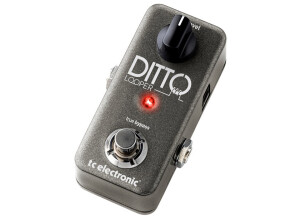
    See the detailed specs on TC Electronic's website. USE Since this is the first review on a device of a new genre, I will be as precise, especially as the user manuel (to be downloaded from TC's website) is not as clear as it seems - just like the device itself by the way. The compact user manual is a pdf file with a better layout than this very paragraph: I have edited it as a personal memo, provided you undesrstand French I willingly share it with you at the following address : http://1drv.ms/1BuAMux Basic features It is a bit subtle at first, but it soon becomes automatic after tapdancing with it for some time. Starting from scratch, both LEDs off: - activate once the left ( "Loop" ) footswitch to start recording a first loop (-- red LED on) - activate a 2nd time to end the loop that keeps being played (-- green LED on, blinking when the loop ends) - activate it a 3rd time to record an overdub on the previous loop (-- red LED on) - do it a 4th time to end the recording of the overdub (-- green LED on, blinking when the loop ends) - following pairs of activations of the footswitch behave as 3rd and 4th time for additional overdubs To stop the sound, with the right selector on "Stop": - activate once the right ( "FX" ) footswitch (-- left green LED blinking, signaling a sound is ready to play), or activate twice the "Loop" footswitch (but it is less precise and lets unwanted sound be heard in between - a flaw already present in the first Ditto). To start the sound again: - activate the "Loop" (left) footswitch (-- green LED on, blinking when the loop ends) - 2nd, 3rd (etc) activations act rhe same for overdubs To erase the last overdub ( "Undo" process): - while the loop is playing, press a long time the left switch to "undo" (-- the green LED blinks for half a second), and the loop keeps looping without the last overdub (-- green LED on, blinking when the loop ends). To restore the last overdub ( "Redo" ): - same as fo "undo", long press while the loop is playing (a short press will record a new overdub). This Undo/Redo feature is useful and convenient. Please note that the original loop remains the basis, unmodified in length, though you can overdub and punch in/ou at any moment of the said loop. There are three ways to erase the whole loop and its overdubs: - a long press on the FX (right) footswitch (whether the loop is playing or not) - a short press followed by a long on on the "Loop" (left) footswitch (the same as in the first Ditto) - a long press on the "Store" switch, which also erases the backing track recorded in the "B" memory slot (read below). Ditto 2 contains two memory slots, read simultaneously: - slot A ( "Loop" ) is where the live loops are being recorded - slot B ( "Backing track" ) is where the files that transit to and fro the Ditto and a computer are stocked. The files (all named "Track" ) can be wave, aif or mp3 files from the computer or wave or aif coming transferred from the "Loop" slot. Ditto's memory keeps both the contents of the A and B memory slots when unplugged. The "Backing track" feature To save in slot B a loop recorded in A (hence saving the latter): - short press the "store" handswitch (-- the left green LED blinks quickly for half a second). This erases any content already stored in "B". Ditto then plays simultaneously the "A" loop and the last file stored in "B" (the sound level of A can be changed at anytime using the loop level knob, that of B requiring to use the level knob + handswitch on "level"). A only contains the loops recorded as described earlier for the basic "loop" features, in parallel to the backing track which is the constant reference which will be played again and again. The "backing track" stored in B is not affected by the "Loop" or "FX" footswitches, and can only be erased by a long press on "store". The handswitches are located on the left and right sides of the knob: - a short press on the left switchstores the loop in B, a long press on it erases everything (as was already described). - the right switch switched up or in the middle position makes the "FX" (right) footswitch control the half-speed (green LED on) or reverse (red LED on) features. Pushed down, the same right handswitch makes the same footswitch control looping. Effects When the FX handswitch is used to select either of the two effects, activating the "FX" footswitch starts or stops the same effect, no matter whether the loop in playing, being recorded or stopped. Overdub can be done forward, backward, at half or double speed, and the LED blinks alternately in green and red (a real Christmas tree) with both effects on. No limit! Stereo Everything is doubled, including the two memory banks, so we have 2 devices with a single recording and playing command. If the guitar is plugged in the "mono" in with nothing in the "stereo" in, the mono signal entering is identically duplicated to both outs, including in "bypass" mode. Any instrument plugged solely to the "stereo" in is only routed to the "stereo" out Plugging two different, mono instruments on each of the "in"s leaves them independent, each will have its own dedicated out even in "bypass" mode. A stereo backing track stored in the "B" memory slot comes out translated in mono if only one out is being used. Combinations are almost endless... Quality and conception - the footswitches are soft and look sturdy. They're very sensitive as contact is done after only 2mm, with no hardpoint, allowing for an esceptionnal precision, no need to stomp violently. Beware not to wear too large a shoe so as not to risk switchinh both unwillingly. - as usual with non-slanted pedals, activating the footswitches requires to lift the whole leg, which (for a guitar player) can soon become exhausting. A little DIY can help here to make things more comfortable and also to make the LEDs more visible and the knob easier to reach. The wedge I use can be seen here https://flic.kr/s/aHsjXnEY6f , and another (more elaborate) version for an Xotics RC Booster here : https://flic.kr/s/aHsjPdJw2c . - the handswitches are small and compact. The left one (3-position, spring-return) is a bit hard. They are fixed straight to the electronic circuit, not on the external case - a benign exception to the general high building quality of the whole. - the level knob is great: huge in size, shaped for fingers, the white mark on it can be seen from 6ft above. Too bad there is no mark on the box itself, though - no, I'm just splitting hair. - connectors aregathered on the upper side of the box, which is a great choice which avoids cables to take too much space on both sides - a problem too often encountered. - the box is made of sturdy molded aluminium, the paint reminds of that of a luxury car. The good taste of the discrete, metallic, dark grey box color is not to be discussed - we don't care btw, only sound colors are relevant. SOUND QUALITY Review conditions Test 1 in mono: Solid body -- effects -- tube amp -- Ditto in FX loop It seems quite logical to use the Ditto in the amp's effect loop, at the very end of it, so that the initially recorded loop's sound remain unmodified by any other factor (effects, hi or lo gain amp in, amp settings...) that will still be useful to shape the overdubs. In case you don't have an FX loop, the best is to use the Ditto last in the chain, just before the amp's input. Test 2 in mono : Hollow body -- Ditto -- Acoustic guitar amp Test 3 in stéréo : Solid body -- stereo effects -- Ditto -- mixer -- studio amp Ditto respects the stereo loop, which is a good point. The result Both the true bypassed signal and recorded part sound transparent, no color or spectrum, no gain in highs or lows. No difference can be heard on a studio stereo amp (the loop is also recorded on the second channel, which couls have been thought of as a mere bypass). No much more to say here, the signal is perfectly respected. I even unwillingly tried the true bypass in reverse order after inverting the in and out jacks by mistake, it works just the same in both directions! A real pleasure to be able to add counterpoint high and low funky riffs on a series of bossa nova rhythm changes, for instance. Of course the mix shouldn't be overloaded, but this device can be used to record a whole musical piece. OVERALL What makes His Excellenct Ditto II better than the first is the ability to stop a loop by pushing the second switch only once, and the possibility to erase it by a long press on the very same switch, hence suppressing the short, audible transition (a real liability in live situation). The possibility to use batteries instead of an adapter is also a good thing for those reluctant to adapters, but I haven't tested how long batteries last. The "Backing track" and the possibility to import external files can be useful depending on the user's need, but it can't compete with pro backing tracks played on a CD or MP3 player or a guitar trainer such a s Tascam's GTR1 (which includes an efficient loop feature), which allow instant play of any music track of your choice. Indeed, the way to transfer files through a computer is not very quick, and Ditto can only keep one track at a time. For mere backing track, one had better export their best Ditto-recorded tracks to their computer so as to be able to play them back later through a more versatile and convenient device. The half speed feature can be used to provide violin-like or fast sounds, but prove less useful than a customizable speed rate which would allow analyzing a fast part. The reverse feature is not something I use much, except for goofing with friends once in a while. A basic reverb or metronome would have been more useful to me, but that is not so important and it's just a question of taste. The secondary features can be of interest for some, but as far as I'm concerned I essentially bought the Ditto for a basic use as a looper with a mono guitar signal. I use it in rock and jazz styles to work alone as well as in a band for some phases and analyzing some parts which are hard to set efficiently in rehearsal. In a nutshell, I consider this device to have been cleverly conceived with high quality materials for a high-quality sound in the end. What more could we ask for?

  • « Made for instant playing »

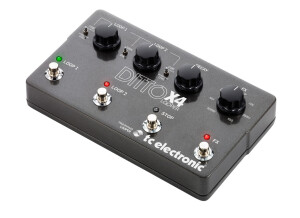
    I tried it in a mixed setup : with a Flashback X4 and its looper followed by a Vox VDL 1 Looper then into Ditto. The pros : - Couldn't be more intuitive. You choose from either serial of parallel mode, start playing and you're not even 2 minutes away from new musical ideas. All can be setup in real-time using the front knobs - perfect for people like me who can't stand menus/submenus and so on. - the "smart" serial mode which only start loop 2 when loop 1 is over. I didn't have this option on my Vox VDL1, making it impossible to switch naturally from a verse to the chorus. With the Ditto, you just play without having to keep focused on your feet. Now, I use both chained so as to benefit from each of them's proper features. - It looks goog (yes, it does count for me) - Features MIDI (for possible expansions) - 24-bit sound - Included effects - plus they're easy to reach. - Loop length The cons : - No mic in (perhaps a next version with 3 loops? that would be the perfect looper) - Impossible to save more than a single loop or wav file, so unsuitable for backings tracks - Impossible to sync it with the other Ditto pedals that I own, so as to increase the number of loops (the Digitech Jam Man allows it: if the future Ditto models add that feature there'll be nothing left to complain about) I long hesitated between the TC Helicon Voicelive 3, Stereo Jamman, Boss RC300 or Ditto, and finally opted for the Ditto. Here's why : Voicelive : after watching the Youtube videos dealing with its looper feature, I decided all the manipulations that were necessary to enter and exit each mode definitely didn't suit my workflow. If I haven't been able to use a digital mulit-effect in a live situation for the past 25 years, there's no reason to expect me to manage to use a Voicelive in such a situation, especially with the stress of being on stage. The Voicelive certainly was made for a brain that doesn't get as easily saturated as mine. Jam Man : Almost perfect - except for the fact you can't play several loops in the same time, plus each loop has to be saved before getting to the next one. Unusable outside of the studio. Boss RC300 : Almost perfect for me - except for the MIDI sync problems often debated on forums and that still haven't been solved since the 10+ years-old RC 50. Plus, recording is 16-bit while others are in 24 (not that much of a problem to me though, especially for live). I had recently bought a discounted VOX VDL1 but it didn't totally suit me as both loops don't automatically work in series while that was an important feature to me. I was about to sell it but adding it to the Ditto I now have a very interesting multiloop system (with effects). This Ditto is a great purchase I made, it makes me smile the moment I start playing.

  • « almost perfect »

    CHARACTERISTICS What are the effects, or types of effects available? LOOP, samples, loops, samples, loops!! UTILIZATION Is the general configuration easy to use ? can’t get any simpler. Is sound/effects editing easy? again, can’t get any simpler Is the O&M Manual clear and precise? ... ditto, can’t get simpler SOUND QUALITY Is the sound of your instruments or your microphones faithfully reproduced? well yes, that's it, the reason for my review I own an RC 20 XL and the timeline, and well, the sound is better on the TC than on the other two, being a true bypass and having no compression keeps the sound real. With what instruments do you use them? guitars, that's it OVERALL OPINION How long have you been using it ? 1 month, continuously with no sleep or food What thing do you like most/least about it? the presets: - one press and you start the recording -one more press, it loops - press again, you get to redo, etc.. - hold the button down, you get to undo - press twice, stops the loop - hold it down a few seconds, erases BUT, IF YOU HOLD IT DOWN WHILE THE LOOP IS STOPPED, YOU HEAR A MICRO SECOND BEFORE THE DELETE, which means that right when you think you don't need the loop anymore, you need to press twice to stop the loop AND HOLD IT DOWN TO DELETE, if you forget, you're dead!!! So that's one bad point, which is mega for a live application!! Did you try many other models before getting this one? like daddy, I've got two. What is your opinion about the value for the price? I read the preceding reviews (posts)..OK money's tight guys, but $100, pretty cheap, what else can I tell ya. Fender or Boss would have put the same thing out at over $150. Innovation, development, shipping, patents, mark ups, middlemen , all this costs money. May not sound like much but try calculating in reverse: $100 - tax - profit margin: the distributor has to buy it at around $60 from the reseller who has to buy it from TC at around $40/45, TC is probably making only $40 a pop!! so, no, the price is very competitive and we get stomped on by the distribution.

  • « Best of both (phaser) worlds ! »

    After a long hesitation with the MXRs (especially 90 script and logo models) and the EH Small Stone, I came across (through forums, videos...) this gorgeous, all dressed in yellow TC Helix which looked like it gathered all features from the aforementioned models. To say the least, I have no regret whatsoever regarding this purchase! I'm even close to ecstacy! To make it short, the Helix features several modes, the "Vintage" one is close to MXR (both the script or logo, yes it is!), the "Smooth" mode reminds of the Small Stone and the "Tone Print" allows to configure the pedal via USB or directly through an iPhone put right next to the guitar's pickups (go and see the videos, it's really, really ingenious). I'll only detail the first two modes here. 4 ins/outs, mono and stereo... a great start! In addition, the Helix features can be fine tuned with a very wide array of sounds: Speed allows to set the phasing effect's frequency, Depth defines the width of the variation, the feedback (like a delay) allows to set the repeat and signal regeneration rates, and the Mix (the only pedal with that option btw) which allows to mix the dry and the effect itself. A great feature, for sure! The "Vintage" mode is rather light ans will give it all on Van Halen-style rhythms or big overdriven solos where the phaser will bring real volume and roundness. I put it ahead of the OD, after which I put an EQ and delay. Once all pedals settings set properly, solos become huge! In clean sound it's very neutral even if you can get weird sounds by tweaking the knobs! The "Smooth" mode delivers a bulked up version of the effect. It really gets your clean and crunch sounds powered up for rock, funk and so on. On overdriven sounds, the effect is really present even if the "mix" knob allows to control the effect. I also noticed the Helix does not color the sound, it's really transparent! In a nutshell, it's really versatile, true bypass, noiseless - and addictive! A stompbox made to be soldered right on your pedalboard so as to never get away from it, ever! I had it for €115 at Thomann, a real bargain! TC Electronic quality... Plus, it's built like a tank!

  • « Play Guitar Harmony Instantaneously »

    SOUND: Some pedals tend to get you more excited than others. The Quintessence Harmonizer is one of those pedals. Not only can it give your tone that added touch, thickness and dimension, as though playing with another guitarist, but TC Electronic did an excellent job in its tracking technology. Other harmonizers that work this well and sound this good cost a lot more (are more bulky on the pedalboard) and often involve scrolling through digital screens – Quintessence operates with knobs and switches. Below is a YouTube demo of how this pedal works, followed by examples (starting at 2:15 in the video) for its use with various scales/modes. The Quintessence merely replicates whatever note or notes you play (it’s polyphonic, by the way) – if you play clean you will hear harmonized clean and if you play distorted, then the harmonized note is distorted. Now, the best way to explain what happens with harmonization is to consider a basic two-finger power chord – this likely is one of the first things we learn as guitarists, placing the index finger on the thickest string (any fret position) and another finger (often the ring finger) on the next string below and two frets up. As we crank out some riffs up and down the fret board, and on those two strings with that spacing, we unwittingly play a root (the thickest string) and a fifth (next string down). For example, if the main (root) note on the top string is A then on the next string down and two frets over we have E… the FIFTH of the root. And so, in essence, what the Quintessence allows you to do is select what KEY you are in… what SCALE you’re playing over and what HARMONIZING note you want to match, whether it’s the 5th, a 4th or a 3rd + 5th combination, etc. Again, the video above provides sound samples that explain far better than written words; there are several lead examples, as well as how the pedal can be incorporated with rock rhythm and bar/power chords. There are other features to this pedal. First, there is a CUSTOM position under Scale. By default this is the Locrian mode; however, you are able to visit the TC Electronic website and upload (via USB or Smartphone) a different scale, e.g., Lydian Dominant or Whole Tone. Second, under Harmony there is TP1, TP2 AND TP3 (these stand for Tone Prints 1, 2 and 3); those presets are configured to produce one octave below and one octave above harmony (they all are the same), but again you are able to upload custom Tone Print harmonies. The third function is called MASH, which allows you to vary a linked effect parameter when you press down continuously on the footswitch and with variable pressure. This too can be customized, but it is set to ‘bend’ a note upward (whether a half-stop or a full stop depends on the note and what scale you are playing); the last part of the video demonstrates how this works, giving some very nice and authentic pedal steel guitar sounds. A very cool function is that the Quintessence can operate in stereo. This allows you to have a line out for the actual note being played (an analog-dry-through signal path so your note remains unaffected) and a different line out for the harmonized note. Of course, you can operate in mono and both the played note and harmonized note blend. The stereo out is very useful when recording, as you may wish to increase or decrease the volume of certain harmonized notes at different points in a composition – to provide emphasis or to downplay (or eliminate). Or for those who gig in stereo, you can have two different signals going to two different locations on stage. OVERALL IMPRESSION: Encased in steel, Quintessence Harmonizer is of steel construction and plastic knobs. The two toggle switches are far removed from the stomp switch, and each are also protected between two knobs. The stomp switch is a ‘soft’ switch, in that it is used to toggle the pedal on and off, but also used to activate the MASH function (by holding it down). The standard 9v (100mA) power input is located at the back, and away from wandering feet (it also works on a 9v battery). Although it is possible to apply the Quintessence throughout an entire song – either using the same or different settings (depending on Key, Scale and desired Harmonized note), where this pedal really shines is when you want to provide emphasis to your guitar playing, e.g., during a solo or part of a solo, chorus of a song, etc. In that regard, the Quintessence’s stomp switch can be set for Momentary (step on it when you want to harmonize) or Latched (keep it on until you decide to switch if off). I’m also a fan of subtlety. I really like this pedal at about 40% MIX or slightly less, as the harmonized note is about the same volume or slightly less than the original note, which I find more complimentary rather than distracting. When used in this manner, you can even apply a harmonized note that is slightly dissonant, yet sounds supportive if turned just below a particular threshold (producing a slight drone effect and while fattening up a guitar’s original signal and tone). EASE OF USE: A person who will enjoy and make use of this pedal likely is not a beginner; it will be someone with a modest music theory background. Beginners who want to get a fatter guitar sound are better off looking at the Mimiq Doubler by TC Electronic, which merely replicates a guitar signal 1-3 additional times, e.g., multi-tracking. With Quintessence you need to know what key you are in and what scale you are using – at the very least some tweaking will help you figure it out, but I suspect doing so will intimidate and frustrate some beginner players. Likewise, you need to know what harmonizing note you can play over top a particular scale (some sound sweet while others are dissonant – a 4th may work fine, whereas a 6th sounds grating). The reason why this is important is that how any harmonizer TRACKS notes that are played and what the harmonizing note should be (whether selecting a 3rd, 4th, 5th, etc.) is based on the scale, and the scale’s relation to the root note. C Mixolydian, for example, has a Bluesy sound and it is different (it has a flattened or lowered 7th) when compared to C Ionian (major)… and so when playing harmonizing notes over C7 (which makes more musical sense than over a C Major chord when using the Mixolydian scale) Quintessence’s Harmonizing 5th over Mixolydian’s lowered 7th will be different than it is for a regular 7th in the Ionian scale. Again, some tweaking makes it clear what sounds good and what does not. Regardless, if any of this seems confusing the group over at TC Electronic have provided a lot of excellent information on basic music theory and how to use the pedal accordingly. Below is the user manual to give you a better handle on its potential: http://cdn-downloads.tcelectronic.com/media/7668628/quintessence_harmonizer_m_en.pdf

  • « Wide Range of Settings + Looper »

    SOUND: TC Electronic’s Flashback X4 is a combo pedal, offering a wide array of delay types with a looper and as demonstrated in the YouTube video below: TC Electronic is known for its quality delays and the company brings its best in Flashback X4. You get 12 delay types, starting with Tape, which has a very vintage and widely popular tone. Tube is slightly warmer than Tape. Space has rich echo sounds based on the Roland Space Echo. Analog produces a nice fading echo, while Analog with Modulation adds some swirls in the mix. Reverse is based on the old Hendrix experimentation, reversing a tape delay signal. Dynamic is unique, as the delay swells in volume when you stop playing and reduces while playing. 2290 is a vintage TC Electronic delay from 1985, producing a crisp and clean echo – while the 2290 with Modulation adds a tri-chorus effect in the mix. Slap produces that vintage slap-back echo, reminiscent of Scotty Moore and Chet Atkins. Lofi has a (well… lo-fi) tone that sounds dirty. Finally Ping-Pong shifts the echo back and forth from left to right (cool when running your gear in stereo, although it sounds great in mono). The overall quality of sound is obvious and pristine; whether keeping the effect low or high in the mix both the guitar signal and the delay are audible and separate. What also is cool is that you can edit and create unique delays (and save them in three presets) or upload TonePrint delays, which are delays designed for TC Electronic and by professional musicians like Petrucci, Morse and Townsend. OVERALL IMPRESSION: TC Electronic is known for its delay pedals, and so you know you have quality on your pedal board. However, the Flashback X4 is not the most pedal-board-friendly, since it has a second function – a looper. Gigging musicians may opt for the Flashback Mini (if not wanting to store a preset or a TonePrint) or the Flashback (regular) or Flashback 2, both of which can save at least one presets/TonePrint. However, even with the added size of the Flashback X4 if you’re looking for a delay that offers three presets that can be accessed with footswitches, as well as another four TonePrints, upward of 7000ms of delay and have access to the many delay types (that you set manually), then you would be hard pressed to find a better and more complete option… all at a price of $249 USD. What also makes this version of Flashback useful is the MIDI in/out, stereo capabilities and being able to use an expression pedal for some unique and ambient effects. The Flashback X4 does come with its own power supply, but you can use any 2.1 mm 9v-12v supply that gives at least 300mA of power. EASE OF USE: The first part of the Flashback X4 is the DELAY. Three factory presets are included at the footswitches, which you can change and save. The other delays (e.g., Tape, Tube, Space, etc.) and all their elements are “what you see is what you get.” For example, you can select Tape delay and from there you turn a knob to select Delay Time (unless you use the Tap temp function), Feedback (or how many repeats you get) and Delay Level (how much you want to hear the delay, e.g., the mix between dry and wet). This is very straight-forward stuff. There’s also a Subdivision Selector so that you can chose the note intervals that the delay is based upon (e.g., quarter note, dotted eighths or quarter notes + dotted eighths). It doesn’t take long to set these and to know where to set them, although it depends if you want a hint of delay or a lot and how much feedback, etc. (and once you find what you like, simply save them in the footswitch presets). Use of the TonePrints (uploading them more particularly), or creating your own unique delays/TonePrints is more involved, but not that difficult to apply. Users first would download the free TonePrint Editor and hook up the Flashback X4 via USB (cable included) to a computer… or you can use a SmartPhone and stream the information to the pedal. Once in the editor you can select from dozens of custom TonePrints from world-class musicians… you can edit them or create your own from scratch in the editor and then save those in the presets or in the four TonePrint slots (located with the delay type selections). This also brings us to the use of an expression pedal. When using such a pedal to create unique delay effects, you can apply different elements to the pedal. For example, you can create a delay time swell, from 200ms to 1000ms… you can increase the amount of modulation in the mix, or perhaps alter the Feedback or the Delay Level… or all the above. The second part of the X4 is the LOOPER, activated with a flip of a switch and while still able to access the various delay types (with other loopers you still need a delay effects pedal) so that whatever you record includes delay. However, you do not have access to the presets, since the footswitches now have different functions when working the Looper. You can add as many dubs or layers to your loop (up to 40 seconds of record time) simply by pressing the REC footswitch, and each one can have a different delay type and mix. Once you press REC a second time the recording stops and the loop plays continuously until you press the Play/Pause footswitch – also, you would have to press REC again to start another dub. If you don’t like a recording you press the UNDO/REDO switch (obviously pressing it again will REDO the recording … and holding it down for a few seconds wipes out the Loop and all its layers). There’s a ONCE footswitch, which is useful if you stop soloing and want the loop to play one last time before ending. One thing you should be aware of is that the Looper does not save any recordings… once you turn off the Flashback X4 you lose what you recorded. RELIABILITY & DURABILITY: TC Electronic’s Flashback X4 is a hefty piece of technology, encased in steel. The company did not skimp on the quality of the housing, that much is obvious. The footswitches are soft-click-based and all solid to the touch. The footswitches are spaced apart well enough that it’s unlikely you will double-click anything. The footswitches also are far removed from the heavy black plastic knobs, large enough that you likely could rotate them with a foot (with the exception of the delay selector, which clicks in place). The two switches on the front (Subdivision Selector, e.g., eighth notes, full notes, and the Delay/Looper switch) are small and located between larger knobs, and so they are well protected from mishaps. All lines (input/output/power/USB/MIDI) are located in the back, to save on pedal board space and to keep unwanted force or pressure away from a stomping foot. You cannot use a battery with the Flashback X4, but a 9v DC power supply that provides at least 300 mA (power chord included or use your own pedal board power supply).

  • « Almost perfect for me – except for... »

    One of the rare combos to feature a 2x10" speaker... Lightweight, yet powerful enough for small stages. Doen not color the instrument excessively... It doesn’t provide a Markbass’s sound of punch either, but for such a price it’s more than enough. The additional integrated tuner is appreciable. I only regret the absence of an FX loop, and the fact that you can’t combine the 2 "Tone Print" effects. A nice feature is the possibility to connect the XLR direct out before or after the amp’s EQ… When I got it, I also appreciated the fact that TC was having a special discount with a free footswitch… HOWEVER !!! after 18 months using it and a few shows : ----------------------------------------------------------------------------- I discovered manufacturing issues, mainly screws badly fixed on a speaker – the tweeter in my case – and the box containing the electronic parts. But worse even, there are repeated problems with the power supply, causing sparks when powering on and/or playing with the distortion switched on on certain notes. These problems appeared after a show during which I had pushed the volume hard. As a result, 3 shows and as many visits to be serviced. Bad luck, just a bad series? I’ll let you judge. After 24 months using it : ------------------------------------------ My electronic issues have vanished, I had no need to contact service again. However, the cover vinyl is fragile: it gets scratched off at the merest impact. A flycase is necessary...

  • « I recommend it »

    The best place for this audio processor is a rack, its versatility makes it an irreproachable tool. UTILIZATION Used as an S/PDIF DAC, this M One integrates perfectly in an AES3 digital processing chain made up of a DEQ2496 and a DCX2496 for the amps. It's very intuitive to use, even more so thanks to the display and the synopsis of the functions. The background noise is almost inaudible, the controls are well thought-out, the knobs may seem fragile, but they aren't. The control panel and the housing are very nice, it features XLR and RCA for audio, but also MIDI ports and a jack for external control. SOUND QUALITY The different choice of reverbs, echoes, limiters, expanders, compressors are of very high quality, which makes them usable in most cases. It has a bypass, to make it transparent. OVERALL OPINION This processor proves to be very effective in use. Don't forget that effects are like the dressing for salads, they shouldn't be more important than the main ingredients. To sum it up, it's a hardware unit with an extremely good performance and a very affordable price tag.

  • « Top quality equalizer »

    The TC Electronic 1128 digitally controlled analog 28-band high-performance graphical equalizer, winner of the 1995 Tin Ear Award really lives up to its name. The late 80's/early 90's amazingly transparent equalizer sports MIDI and footswitch controls. Features such as Store and Recall makes this a perfect EQ in either a professional recording studio, in a bass rack or even in conjunction with a guitar rack. And yes, this gismo is rackable and that's the only way you can have it. The unit was originally shipped in different configurations. Some of them even had a D-sub connection, so you could hook up the unit to a TV and watch the spectrum analyzer on that instead of the rather small display build into it. You have a choice of using either XLR or 1/4" jack connections with this unit. The 1/4" jack is -10 dB (instrument level). Not only do you get 28 bands of graphic equalization, but you also get a possibility of adjusting the input as well as output level for the whole unit. This is very convenient, if you go into some drastic cutting or boosting. The unit is designed with variable Q as well as minimum phase shifting. The design and technology of these analog filters enable the user to do equalization in a better quality than any manually controlled analog graphic EQ. UTILIZATION As always, TC Electronic has made a product, that is simple and easy to operate. The manual is well written and easy to understand. Programming presets is however a tad tricky. It is easy to locate the correct frequency band, that you want to adjust, get it adjusted and move on to the next. The problem lies in making sure that the preset is stored as you want it to. The lack of an "Enter" button makes it a bit confusing. In order to store a preset, you press the Store button, select the preset number you wish to store on press store again. There are no confirmations that the preset has been stored. Besides that, the newly made preset gets named "USER". You then have to navigate on to a completely different menu, create a name there and then select a preset number on which you want this name to stick. Come on TC - you could have done better! A good thing, however, is the ability to change the view angle on the LCD display. SOUND QUALITY Once again, TC has done an excellent job. This unit is really ridiculously transparent, which is great for a unit designed in the late 80's/early 90's and is digitally controlled. The unit sounds as an EQ should sound, with a minimum of added noise to your signal. It is hard to come by and EQ in that class, which is still affordable for a normal human being, even today! OVERALL OPINION The unit has been discontinued by TC Electronic and is therefor not supported any longer. Should you however be able to find one on the used market and are willing to take the risk of buying a unit without support - you won't miss out on something good! Pros: - Build in spectrum analyzer - Ability to store and recall presets - Clear LCD display Cons: - Poor menu layout - No support anymore

  • « It would be great if it cost less!! »

    The M2000 is simple to operate and you can do some really cool stuff with it. But the price is what throws me off. It cost over a grand and I did not feel like I got a grand worth of effects out of it. It does have some very good effects but there are other similar units that virtually sound the same with the same effects but cost about half the price. UTILIZATION The reverb you can get with this rack is very good, you will have full control over the parameters of whichever effects you choose to use. I love the chorus and the delays a lot because during a live show it is great to use some chorus to beef up the vocals a little bit to make them sound bigger. SOUND QUALITY There are 250 presets on the M2000 which is a lot but not all of them are that good. The ambiance effects are good for the most part but there are some of them that are not good at all and it almost makes me wonder why they even put them on there. There is also a tap temp button which comes in handy to sync up your clocks if you are in a studio with this rack. It also has XLR, RCA and ¼ input/ output audio connections. The LCD screen is decent but could be a lot better especially when paying this amount of money; it should be a little more vibrant and easy on the eye. OVERALL OPINION We have also used the pitch effects on the M2000 and they are ok but nothing to get too excited about because I have used better pitch effects on cheaper units. This unit would be worth the buy if it was in the 600 dollar range but because of the cost I do not recommend getting this unless money is not an issue for you.

  • moosers's review

    The TC Electronic NR-1 Nova Reverb is a reverb pedal that can be used with any electronic instrument. Since I've only got experience using the NR-1 with electric guitar and in the recording studio, this review will focus on these applications of the pedal. The pedal has stereo (two) 1/4" connections for inputs and outputs. It has a power supply jack as well, and I believe the power supply comes with it, although I'm not 100% sure on this. It isn't a rack mountable piece of gear as it's a foot pedal. UTILIZATION There is definitely a whole lot that you can do with the TC Electronic NR-1 Nova Reverb, so getting in depth with it is certainly going to take some time. Getting basic sounds from it definitely isn't difficult however. It's got five main modes, with parameters for decay, pre delay, color, dynamix, and mix level to control all of the sounds. It has two buttons - one of engaging the effect, and one for choosing and setting your presets. A manual is definitely a good thing to have around if you are looking to learn everything about this pedal, but isn't necessary if you're just using the basics. SOUND QUALITY The TC Electronic NR-1 Nova Reverb is definitely one of the more versatile reverb boxes that you'll find out there. The five main reverb modes that it has are for room, spring, hall, plate, and 'specials.' Each has their own sub presets as well, as for example the plate setting has options for either a tin, silver, or gold plate reverb. Overall, the sounds on the Nova Reverb are extremely clean sounding. It's a very versatile pedal, as it's possible to get just about every type of reverb sound imaginable. Even though it's a digital pedal, it doesn't come off as tinny or digitally enhanced as many digital reverb pedals do. I like the plate setting the best, but that's just my personal opinion. All of the sounds are definitely useful, I guess I just like plate reverb the best in general. You can save presets for each of the main settings, so it's nice that you can come back to sounds you've made. OVERALL OPINION The TC Electronic NR-1 Nova Reverb is definitely designed for the professional who is seeking a versatile reverb pedal for the road or the studio. While it doesn't have the warmth that you'll find with analog reverb pedals, it has a flexibility that won't be found on analog pedals. The trade off is definitely worth it for those who are looking to get a lot of different high quality reverb sounds in one place. The price is more expensive than most pedals out there, but this does more than most pedals out there. For any experienced player who is looking at reverb pedals, the NR-1 is a must try.

  • RickD's review

    This is a stereo preamp (with adjustable input gain on the front) with all the main guitar effects except a proper distortion. The flangers & phasers are lovely and the delays & reverbs are wonderful. It's digital, of course, with 8 processors, 1 per effects module. So, unlike with other gear, you don't have quality loss when piling up effects, the quality remains optimal throughout. 2 high impedance asymmetric 6.35mm jacks, 2 line level TRS outs on similar jacks. SPDIF in & out on coax. 24 bit 44.1 khz conversion, but not sure the digital I/O's can convey 24 bit signals...someone told be that they were 20 bit...(check that, i'm not sure). There's MIDI in & out i believe, and you can easily set up a MIDI pedal board such as the Roland FC-200...the G-Force has a ready made template for it all set up. For the price, i think they could have made this a 96 khz machine and/or have AES/EBU I/O's in addition to the SPDIF coax...it's just not a pro machine without AES/EBU! UTILIZATION Extremely easy to use, all is very very intuitive. You can see it wasn't designed like a TR-505 or an MC-303! :-D Editing & saving presets is real easy. Great manual, that is even nicely made...not just some cheap photocopy look-alike, this is nicely bound & all...a high-class manual for a high-class piece of gear. ;-) SOUND QUALITY The effects are nice but you can be tempted to overdo it...because they are so nice! Then again, you'll have that problem with any effects processor...it's just that the others don't sound so good! ;p The reverbs are amazing, of course, and you can use this for vocals or anything you like if you come in digital. This is a very good effects processor. The dynamics are good but not perfect: i still prefer going direct into a good amp, but if you accept that the sound is just different then you can enjoy it for what it is. It's still good, it's just not 100% the same...maybe only 95%? Anyway, incomparable with any Boss or Roland or Digitech effects i've tried...and i have tried a lot of those. True, the price isn't comaparable either! ;-p OVERALL OPINION I've had it about 7 years. Best thing? Everything! Worst? No real distortion. You can add crunch, or boost existing distortion, but this is not a SansAmp or a POD...no cabinet simulation here worth mentioning, that just wasn't the aim of the machine...but you want those luch choruses or reverbs then this is the way to go. Was 11400 Francs when i got it, that was the best price in France at the time...say £1140 or 1700 €. Now it's below 1000 €. Still expensive, but possibly the best for the money. The price actually remained stable on this for 6 or 7 years i believe! The only other piece of gear i know of to do that is the Roland VS-2480 multitrack recorder...which stayed at 4500 € in France...