Log in
EN
FR

TC Electronic Computer Music

85 products found

Categories
Series
Filter
Sort by
TC Electronic
Evaluation
  • Reviewed or not
  • Editor’s award
  • Reviewed by Audiofanzine
Availability
  • Available or not
  • Sold new or used
  • Sold new
  • Sold used
Must-have products
  • All products
  • Flagship products
  • Best rated products
  • Hot products
  • Popular products
Price
  • Freeware
€
Clear
Sort by
  • Popularity
  • User ratings
  • Price - low to high
  • Price - high to low
  • Used price, increasing
  • Used price, decreasing
  • Name (from A to Z)
  • Name (from Z to A)
  • Added on
Sort results
  • Popularity
  • User ratings
  • Price - low to high
  • Price - high to low
  • Used price, increasing
  • Used price, decreasing
  • Name (from A to Z)
  • Name (from Z to A)
  • Added on
Filter results 85 results found
Brands
Evaluation
Availability
Must-have products
Price
  • Freeware
Show results

The best TC Electronic Computer Music reviews

The reviews Audiofanzine members found the most helpful.
  • moosers's review

    The TC Electronic M30 Reverb is a software plug-in that is compatibility with a variety of interfaces and systems. I didn't have a problem at all installing the plug-in as I went through the simple prompts that always come up when you are installing a plug-in. It was also easy to download from the website, as I got this plug-in as a free download during a 72 hour period (which is still going on as of today) that TC Electronic offered up this plug-in for free. I had the plug-in downloaded and up and running within a few minutes. The interface of the software is also simple enough to follow as there isn't anything complicated going on here. The plug simply has knobs for pre delay, decay time, hi color, mix, and a mode section. Everything is straight forward and easy to understand, so although I haven't seen the manual for this plug-in, I don't think one is necessary as everything is self explanatory. SUITABILITY/PERFORMANCE I am currently running the TC Electronic M30 Reverb on a Mac Book Pro that has a 2.2 Ghz Intel Core 2 Duo processor and 4 GB of RAM. I run the plug-in in Pro Tools LE 7.4 that runs with a Digi 002R audio interface. Thus far I haven't had an issue with the plug-in, although I haven't been using it for very long. I have run it only on a auxiliary channel and sent buses to it, as this is what I always do with reverbs and delays to save processing space. While I've only downloaded and been using the plug-in for the last day or so, I haven't encountered any problems with it related to performance. OVERALL OPINION In the short time that I've been using the TC Electronic M30 Reverb plug-in I've been pretty impressed with it. While I probably wouldn't have bought the plug-in, since I got it for free I have been able to try it out in my configuration. I've been impressed with gear made by TC Electronic and this is no exception. The plug-in offers up a very realistic sounding reverb in a variety of forms. Even if you don't get this free plug-in in time before the free download expires, this is a cheap enough plug-in that it would be worth a trial to see if it something that you might want to be, as it really has a great tone. I'd definitely recommend this plug-in for any home studio owner looking for a good sounding reverb on the cheap, or anyone in the next few days of this review as you can get it free!

  • « quality »

    I bought it for the I/O's and desktop remote, & on-board DSP. Use it to interface DAW to console bi-directionally. . & sometimes plug straight in . Good analog+ADAT connectivity via FW400. PC running w7,i7 cpu, ddr3 6gb, 3x1T Hd. Reaper, Cubase . . Used in a recording studio for 4 years. UTILIZATION stable drivers. slightly dicey install with previous versions, but sorted on latest version, always stable once installed though. Run 128 latency with up to 120 tracks & about 200 vst's before needing to change to 256 . Use REAPER now, and Cubase previously. Driver mature, and no further updates needed. GETTING STARTED There are all functions on the TC settings menu on screen, and mixer pages, remote assignment etc... On the unit are the trims for the 4 front-panel xlr's, their pad, and +48v accross them on a switch. OVERALL OPINION good sound with precise dynamics and good stereo spread, spaces sound real. No hiss. good pre's. had creamware scope xtc, and a yamaha 01x, and a protools AM3 prior to this card. May one day upgrade to the ssl AX madi stuff, but very happy with this card.

  • « Simple and effective! »

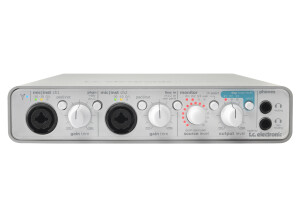
    Firewire audio interface with minimalist design but putting an emphasis on quality. UTILIZATION I use it at home with Windows 7 and cubase 5 No audible latency with VSTis and audio. GETTING STARTED Extremely easy installation, drivers can be downloaded from the TC site in a wink of an eye. Connect it and it works. The TC Near application is very intuitive and nice-looking. OVERALL OPINION I was looking for a firewire interface to replace my alesis io|14 that started to show signs of fatigue...and I found it! Bye-bye to untimely dropouts and crackling pots and connections... This TC is clean, solid and WHAT A SOUND it has!!! It's faithful to the brand's image, this interface is a model of transparency, especially in this price range. The flip side is that now I can hear all the defects... Go get yours without thinking it twice.

  • « its a road warrior »

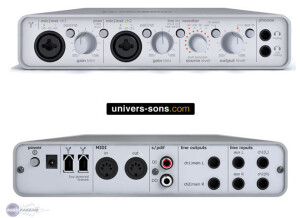
    The Konnekt 24D is a full featured interface that has powerful but quiet pre amps. It has firewire connectivity and two high quality mic inputs that can be switched on the go to hi-Z instruments like guitars. It comes with Cubase LE which is a great value for an interface of this quality. You can use it as a stand alone interface as well and it won’t need to be hooked up to a DAW if you do not want it to be but it does get its power from the connection to a computer. The effects are in real time (DSP). UTILIZATION This interface was not the easiest to set up, but it didn’t take long. I used it for about 6 months back in 2009 and still own it but do not use it any more. The plug ings that come with it are very good and they add great value to this interface. I was using this interface for a portable set up of mine. GETTING STARTED The preamps are very good, they are clean and they also have a lot of headroom. To be in this price range you probably will not find something much better. There are 3 input gain lights on it and 3 knobs. The interface seemed to be built pretty well and could handle the tough life on the road. Out of all of the times that I used it, I never saw any physical wear and tear on it and it never had any issues as far as not working properly and I was using it almost every day in a different place. OVERALL OPINION This interface was not made to give a great sound quality because for the price you could not expect that. The quality was decent, and worked well for me to get some ideas down while I was out and about. I really enjoyed working with it, it is a shame that they are not making it anymore.

  • « comes with Ableton »

    The Twin is made by TC Electronic and it is a very simple interface to use with a lot of ins and outs. It is a 14 in and 14 out interface that has two great microphone preamps and comes with a few plug ins and Ableton software. I have used this interface with Abelton, Acid, Reason, FL Studio and a few other programs and it has worked fine with all of them. For a while this was the only interface that I had owned due to getting my home studio redone so I had to use it on my PC running Windows XP (at first) then on my Vista PC and it never gave me a single issue no matter which computer I ran it on or which software I ran it with. It seemed to be very versatile and had great preamps for it to be this price. UTILIZATION I love everything that TC Electronics puts out because it is always made with quality and they have great customer support. I have had some smaller issues with TC stuff in the past but the support people on the phone always walked me through it without paying a penny. This interface was great right out of the box and I had no issues with installing and the drivers where very stable. GETTING STARTED This interface was small and compact, the manual was clear and sufficient (though it was a lot of pages and I don’t understand why). All of the main and basic functions of this interface are easy to use and work with. If you use Ableton than this interface will pretty much automatically work and you will not have to do anything if you install the Ableton that comes with it and follow the instructions you will be up and running in as little as 15 minutes. OVERALL OPINION This interface is compact and small, it gives a great quality and the preamps are clean and warm. This unit should cost about 50 dollars more than what it does considering the quality of the preamps and how universal the interface is with other software and computers.

  • « Vintage but still up to date »

    The TC Electronic Mercury -1 is a VST that has two oscillators and they are mono. You can use the layer functions of Mercury to layer up to around 4 different sounds or patches on top of each other to get those really full rich and unique sounding synths that will really stand out. The Mercury has 2 ADSR Envelop generators and 128 patches. The TC Electronic Mercury works well across the board, it will work with G3 or G4 Macs and Any Windows system ( windows 95, 98, 2000, XP or Vista). I have not used it on Windows 7 to know if it works properly yet though. The Mercury has been out for a while now and it considered a “vintage” synth. But in my book , it is very up to date as well as vintage. The manual (PDF) is easy and clear to read. SUITABILITY/PERFORMANCE The TC Electronic Mercury is an absolute gem for someone who is a programmer or sound designer. The possibilities are endless in that aspect. Even if you are knew to creating sounds or working with VST’s you will have no problems installing or running and using TC Electronic Mercury 1. The Synth originally came out in the early 2000’s and is still used by a lot of home musicians all over the world. There have been rumors of a new version of it a while back, but I don’t think they ever made one. I have been using Mercury -1 off and on for about 6 years. Haven’t really been using it lately though. OVERALL OPINION The price of Mercury 1 is very affordable and you get exactly what you pay for. A good quality synth that doesn’t crash or cause any errors with your system or the DAW you are using. The program will work effortlessly. The sound quality is good, and I am happy that I purchased this years ago. Hopefully I will be loading it up again soon.

  • moosers's review

    TC Electronic's Master X3 is mastering software, meant to be the virtual version of TC's popular Finalizer hardware. I don't have this plug-in on my own system, so I wasn't involved with installing it or anything that goes along with this. However, I've used it enough at the studio where I work to get a pretty good grasp on the interface. The processors at play here include a compressor, limiter, and expander, with it all split into three separate bands for more precise control when needed. It doesn't have any in depth equalization, but between these processors and the three bands you're able to do pretty much what you'd like with the sound. It's a lot like the hardware version of the Finalizer, but everything is more in one place here. The manual is probably a good idea for new users, but not completely necessary. SUITABILITY/PERFORMANCE The studio I work at has a number of rooms on site, with all of them running the TC Electronic Master X3. It doesn't get used all the time since not too much in the box mastering goes on, but for demos and for rough mixes, it does see some action. I've mostly used the plug-in in our C room, which is Pro Tools HD based and runs on an Apple Power PC G5 that has 8.5 GB of RAM and dual 2.3 Ghz processors. This is more than enough to use this plug-in comfortably, especially considering you're only going to need to run one of these at a time. OVERALL OPINION TC Electronic's Master X3 is really nice to have around for quick mastering jobs, but to me isn't going to be the end all be all for in the box mastering. Having said this, it's quite effective for what it is as I don't believe that any all in one mastering software is enough to do a professional job. I will say that this is about as close as they come for having an all in one chain. It's not too cheap, so unless you're using it a lot it's probably not going to be worth it. However, if you know how to use it and your mixes are great, it can certainly do some good work for your and is definitely an option worth considering for professionals or high end amateurs...

  • moosers's review

    The TC Electronic Megaverb TDM/HD is an in depth reverb plug-in, designed for use with Pro Tools HD and other TDM systems. I don't know if there is an LE/native version, but I can only assume so. I didn't have anything to do with the installation of this plug-in, as it was already installed on the studio's computer once I got there. However, I can talk about the interface of the plug-in and getting to know how to use it, which for me wasn't difficult. If you have ever used a TC Electronic reverb plug-in before, this will seem pretty familiar to you, as it has a lot of the same types of parameters and settings. You've got sections for controlling the shape, size, and wall diffusion of the virtual room, as well as a high cut filter, decay, and pre-delays. There are also more standard parameters like mix, input and output level, I/R balance, tail balance, and stereo width, so as you can see there is a ton of control available with Megaverb. Even though there is a lot going on, it is all pretty self explanatory and user friendly, so I don't think that you need a manual at all. SUITABILITY/PERFORMANCE Being that this is a TDM plug-in, the TC Electronic Megaverb doesn't run on your computer and will only run off of your HD systems processing power. For this reason, I can't say that I had any problems at all running the plug-in in the Pro Tools HD system that I used it in. I always run reverbs and delays on auxiliary channels anyway to limit the amount of processing power being used, regardless of if I'm using it in HD or LE. I'd suggest doing this, but if you have this TDM version of Megaverb, you're probably going to be fine either way. OVERALL OPINION There are certainly a high number of reverb plug-ins to choose from out there, and while the TC Electronic Megaverb TDM/HD plug-in isn't my favorite, it is definitely still worthy of a look. It has a very clean sound quality that can be manipulated in all sorts of different ways. I do however think that the plug-in is a little bit overpriced, as there are some plug-ins out there for the same price and cheaper that I like using better. If you are a home or professional studio owner looking for a reverb plug-in, I'd definitely suggest trying out as many different ones as possible, including TC Electronic's Megaverb.

  • moosers's review

    The TC Electronic Tube Tech CL 1B is a plug-in version of this Tube Tech hardware. I had no compatibility issues at all and it has always run pretty flawlessly for me. The interface of the plug-in is incredibly accurate when compared to the hardware version of the CL 1B, and everything is easy to access and understand. You've got knobs for gain, ratio, release, attack, and threshold. It then has a programmable meter a few other switchable knobs. I don't have the manual for this plug-in, but it is easy enough to use that I never needed it. SUITABILITY/PERFORMANCE I am currently running TC Electronic Tube Tech CL 1B plug-in on a Pro Tools HD System that runs off of an HD 3 Accel card, a Digidesign 192 I/O audio interface and an Apple Mac G5 computer. I've never had a problem running a few of these at once on this system, and I've probably had five or six of these up at once without any issues. It really depends on your personal set up how many of these your system can handle at once. OVERALL OPINION I've been using the TC Electronic Tube Tech CL 1B plug-in for about a year and have found it to be a great substitution when I don't have access to a real Tube Tech CL 1B. I love plug-ins that are modeled after real gear because they are easy to use if I have already used the hardware version, which is the case with this plug-in. The price of this plug-in is more expensive than I believe it should be, which is really this plug-ins only problem. Beyond this, it runs smoothly and really has a great sound quality. While it doesn't sound as great as a real Tube Tech CL 1B (and I believe no plug-in is as good as the real thing), this is a good emulation and is definitely worth having in your arsenal.

  • Audiofanzine FR's review

    (Originally written by karl.vdb/translated from Audiofanzine FR) Which technical specifications motivated your choice? I needed a sound card I could use in standalone mode (I wanted to upgrade my system combining an M-audio PCI card with a Yamaha MG10/2 mixer, which has an average sound quality). The number of inputs is ideal for me. What do you use it for? Home studio application with Sonar 8 PE and as standalone device. What's your setup (motherboard, CPU, RAM, hard drive,...)? Motherboard: Asus M2N CPU: AMD Athlon X2 4000+ Ram: 3 GB HDD: 160 GB Windows XP SP2 DAW: Sonar 8 PE Do you use it with other instruments or systems (mixing console, preamp, DtD, ...) and what's your setup? I connect it directly to my MP8 digital piano (I only use the audio functions, the Midi is connected directly to the computer via USB). I didn't buy the 24D version because Sonar 8 offers lots of good plug-ins. UTILIZATION - Did you have any problems during installation? No problems at all, just install, connect, update the drivers and configure it... Perfect! - Did you have any incompatibility problems? No - How complicated is the overall configuration? Very easy compared to my previous M-audio - Is the user's manual clear and comprehensive? Yes (I only miss descriptions about the DPC) GETTING STARTED Is the driver stable? Very stable up to now. I was a bit worried because of several reviews I read, but fortunately the interface was updated and it is now very reliable. - Are they up-to-date? ?? - Which software do you use? Sonar 8 PE - What's the latency of your system? 11.6 ms - How many tracks can you record/playback simultaneously ? ?? OVERALL OPINION - How long have you been using it? Three days only and I'm fully satisfied (I will update this review in the future). - Which feature do you like the most / the least? Ease of use and audio quality - Did you try any other models before buying it? I only compared it with my previous system (M-audio 1010LT + Yamaha mg10/2 mixer) and the Konnekt is much better. - How would you rate its value for money? Very good! - Based on your experience, would you buy this product again? Yes, for sure

  • phraseland's review

    Firewire DSP Interface with a bunch of Effects loaded. It has everything from a very nice sounding vintage compressor to the M3 Mastering plugin. It is also expandable and professional plugins (like Sony Oxford) can be purchased afterwards. I use an old PC and have a MOTU2408 with PCI card installed. Since this device and the MOTU PCI card take up a lot of the processing already I have been able to work quite nicely even with an inferior computer (check also my posts about the 2408 and Melodyne). I use mainly Steinberg Cubase SX and Wavelab. This unit really works well and is basically plug-and-play. The only problem occurs at times with the firewire port on laptops - but on my Dell laptop I have had as many or few problems as on my PC. Sometimes the unit just doesn't get recognized and rebooting it takes care of the problem. UTILIZATION As I said the installation worked pretty well. At first my PC didn't recognize the unit though and I had to restart twice to get it working. After that it was smooth sailing (most of the time...). TC gives you a lot of nice plugins right away and supplies trial versions of their other products. Those you can use for 10 or 20 hours without restriction - after that you have to buy them. It is a bit annoying that they also show up on the VST folder and you have to remember which ones you own and which ones you don't. So it could easily happen that you use the MX5 instead the MX3 and suddenly it stops working. Some kind of visual filter would have been nice here - but it seems they really want to push their products. GETTING STARTED The unit is very stable. Every once in a while it can't be recognized but it really doesn't happen often. The latest update was quite nice because it gave a grafic overhaul to most of the plugins...but it seems they also changed the architecture! So after installing the update all my previous projects in Cubase weren't finding the plugins anymore!!! That was really annoying and even though I do like this device it really made me mad. This shouldn't happen with such a prestigious company. OVERALL OPINION I have been using the TC Firewire for about a year now and I think if I spent the money again I would buy a product from Universal Audio. It seems that they have more of a unique sound. The TC Reverb, the Dynamic EQ and the compression are very nice - the same goes for the Master Compressor. I also like the Voice Strip (especially the Vintage preset). There is a lot of potential in this machine but I always have a feeling that they held back the coolest plugins. Yes they gave me Character but I would have prefered the way Universal Audio goes about it. They give you a few basic plugins along with coupons for software you can buy at their online store. That way you get the four or five plugins you really want and need and not twenty plugins that fill up space and will never really see the light of day. TC Effekts sound very clean and sometimes a bit cold. But they are very precise and can be used in a lot of ways. I think this product is pretty good but I think for me I would choose a different route next time.

  • Audiofanzine FR's review

    (Originally written by fabrice.fargues/translated from Audiofanzine FR) Four 100-MHz DSP, it provides "enough" plug-ins and high-class reverbs... Used with a Powermac G5 2x2 GHz, 8Gb RAM... Cubase 4 UTILIZATION It can't be easier to setup with Mac OS 10.4.9, just plug the card (thank you Apple for the easy access), insert the CD-ROM, follow the instructions and there you go... I haven't had any compatibility problems... Kudos! GETTING STARTED Easy to use... The one thing to criticize would be the user's manual. It's too short and you'll need time to get to know every parameter. It seems you have to "learn by doing", especially when it comes to TC electronics specific parameters... OVERALL OPINION I've owned it for less than one month. I wanted a UAD-1 card because of the reputation of some of its plug-ins. But I found this card at an extremely low price... The reverb effects are sumptuous, the 247C has a wonderful color (and thus won't fit every style), the Voicestrip reproduces vocal warmth very well... In short: if you try it you'll want it. Your mixes will get a deep sound and lose that cold "chemical" color produced by Cubase plug-ins (although some of them are great for certain things). You'll rediscover the sound character of some reference-class hardware processors... I'm thinking about adding a second card, an mkII (with 4 x 150MHz DSPs) so that I can use the fabulous VSS3 reverb... Watch out: addictive product......