Log in
EN
FR

Focusrite Computer Music

123 products found

Categories
Series
Filter
Sort by
Focusrite
Evaluation
  • Reviewed or not
  • Editor’s award
  • Reviewed by Audiofanzine
Availability
  • Available or not
  • Sold new or used
  • Sold new
  • Sold used
Must-have products
  • All products
  • Flagship products
  • Best rated products
  • Hot products
  • Popular products
Price
  • Freeware
  • Low-cost (< $500)
  • Mid-range ($500 - $1,500)
  • Premium (> $1,500)
€
Clear
Sort by
  • Popularity
  • User ratings
  • Price - low to high
  • Price - high to low
  • Used price, increasing
  • Used price, decreasing
  • Name (from A to Z)
  • Name (from Z to A)
  • Added on
Sort results
  • Popularity
  • User ratings
  • Price - low to high
  • Price - high to low
  • Used price, increasing
  • Used price, decreasing
  • Name (from A to Z)
  • Name (from Z to A)
  • Added on
Filter results 123 results found
Brands
Evaluation
Availability
Must-have products
Price
  • Freeware
  • Low-cost (< $500)
  • Mid-range ($500 - $1,500)
  • Premium (> $1,500)
Show results

The best Focusrite Computer Music reviews

The reviews Audiofanzine members found the most helpful.
  • « Top of the pop, man »

    - Which technical specifications motivated your choice? The number of inputs/outputs, the rack-mounting possibility, the MIDI interface, and the brand - What do you use it for? To record in a mini-home studio (awaiting more resources to expand), alone or with a band, to keep the settings of each track. - What's your setup (motherboard, CPU, RAM, hard drive,...)? Adobe Audition CS6 Windows 8, intel i7, 8GB RAM (good setup for the most part) - Do you use it with other instruments or systems (mixing console, preamp, DtD, ...) and what's your setup? ... I'm a newbie, so I can't give any specific characteristics. I use it with a Presonus Studio Channel preamp to record vocals. UTILIZATION - Are the drivers stable? Never had a problem. - Which software do you use? Adobe Audition CS6 - no problems - What's the latency of your system? I record at 8 ms, and I think you can go further - How many tracks can you record/playback simultaneously ? ... Since I don't have a whole orchestra behind me, I have been able to record 4 tracks and play back 8/10 tracks without any problems. GETTING STARTED - Did you have any problems during the installation? You need an Internet connection to download the driver, after having validated a code. - Did you have any incompatibility problems? No, sir. - How complicated is the overall configuration? Even being new to it, I got how it works rather quickly, which means... - Is the user's manual clear and comprehensive? ... Uh... I haven't opened it. OVERALL OPINION - How long have you been using it? Two/three months, not longer. - Which feature do you like the most / the least? The most: everything, really, I'm very satisfied! The least: If you bear with me, I'll go look for something... - Did you try any of other models before buying this one? Two small interfaces: Presonus Audiobox USB and Yamaha Audiogram 3 The 18i20 dwarfs them both (fortunately!!) - How would you rate its value for money? For such a number of inputs and outputs, it's really a very good value for money. It is true that the preamps aren't of the best quality, but they are far from being bad. Anyway, at this price and given what the 18i20 offers, it couldn't be better. - Based on your experience, would you buy this product again? ... If I had the same budget, without hesitation.

  • « Focusrite hit the target with the Saffire Pro 14 »

    I first purchased this interface back in March, 2nd hand for a discounted price of £60, it came with a broken firewire chip as my laptop couldn't detect it being inserted and all the correct software etc was downloaded from the Focusrite website etc, so after a lot of calls to Focusrite and Apple i eventually took it to a local electronics expert in Glasgow and he replaced the firewire chip for £60 within a few days, so after all of that i pretty much paid the same price for buying a broken one 2nd hand as i would if i had bought it brand new. Doh! The Saffire pro 14 comes with 2 Neutrik inputs that allow both XLR input connections for microphones and jack inputs for guitar cables and keyboards etc. These are located conveniently on the front of the interface, along with 2 input gain knobs for each of the inputs, a red O/L light for each channel to tell you before or during recording when the input levels are peaking past 0 and a green 'Sig' light to show when your signal is reach -12db which is what you should be aiming to keep it nearer to rather than the red light. Also on the front is a 48v phantom power switch for using most condenser microphones for example, a monitor knob to control how loud the output volume to your speakers is from 1-10 and a headphone input jack with a separate volume adjustment for that, so switching between monitor volume and headphone volume is very easy to do unlike some other interfaces i have used previously. My setup with the pro 14 is a Macbook pro from 2009 with 4GB RAM, 2.1 GHz Intel Core 2 Duo on OSX 10.6.8 and works perfectly ALMOST all of the time. Around the back of the interface are 4 line inputs for things like speaker cables and 2 more line inputs, along with a MIDI in and MIDI out section, an external power supply input and S/PDIF connection points. Personally i just use the firewire connection to power the interface (also located on the back along with a handy diagram on which way to connect the firewire) it also has the capability of being connected to newer 'thunderbolt' inputs but you will need a special adaptor to allow this, i use the firewire myself. The benefit of firewire over usb 2.0 is that it transfers data faster and free's up a USB slot on your computer that can be used for other things like external hard drives etc and is more stable in my experience. The pro 14 basically has all the home recording studio needs in mind. UTILIZATION From what i have seen on the Focusrite website, the interface drivers are updated whenever necessary, with the pro 14 having been released in 2009 and currently having 3 updates - version 2.4 in 2011, version 3.3 in 2013 and version 3.4 in 2014 for both Windows and Mac. The driver focusrite uses is called 'Mix Control' which is a very detailed extra virtual mixing desk basically, which can control different levels being sent to your monitor mix and headphone mix with zero latency before it reaches your DAW and is pretty much a separate product in itself. Excellent value for money there. Mix control is normally very stable, the only issue i have came across is every now and then the sound will cut out completely so when you hit playback - nothing happens, should this happen to you all you need to do is open up mix control, select the sync source and switch it to SPDIF for 2 seconds and then switch it back to Internal and playback should go back to normal. It took a quick phone call to Focusrite customer services to figure that out, who were very helpful. The Focusrite Saffire Pro 14 works very well with Logic Pro 9 which is my main DAW of choice. GETTING STARTED Because i bought the pro 14 second hand, i did not receive a manual with it, however online manuals can be downloaded from the Focusrite website and has a lot of individual tip sections and youtube videos to get you up and running with the interface. It can be a bit tricky getting started with the Mix control software driver needed to control the interface so again i would recommend a combination of the online manual and youtube tutorial videos to get you up and running because it is worth any initial hassle. There were no compatibility issues with my computer, only the firewire chip which i mentioned at the beginning of the review which was the previous owners fault as he 'hot-wired' the input which means plugging in the interface to your computer's firewire connection with the computer switched on, the manual strongly advises against doing this. For latency settings, in the mix control driver software i have mine set to the default medium and have not experienced any issues regarding this. OVERALL OPINION The sound quality from Focusrite preamps has always been highly praised, and the Saffire Pro 14 is no different. It has a very warm and full sounding preamp section, unlike my previous interface (E-MU) which was admittedly slightly cheaper but also thin and over-trebly sounding when recording. Another huge benefit it has over my old interface is that it is free of 'Digital artifacts' when recording, such as random clicks and pops that add up during a recording and are noticeable and a pain to get rid of. It is very versatile, portable and perfect for home recording. The mix control software is fantastic and can be used to a basic level to meet your needs or more in depth if you wish to pursue that. Overall i would recommend buying it new as opposed to second hand incase you get a nasty surprise, there are some negative reviews out there from users who have had a bad experience with the Saffire pro 14 but so far mine has been positive and i would make the same choice time and time again if given the chance. If you need a high quality sounding interface under £150/$300 then shop around and get this.

  • « Encore du bon! »

    Sans port Thunderbolt, passez votre chemin! Elle succède à une Motu Ultralite MK3 Hybrid, et elle lui succède sans aucune honte. Loin de là… Les plus: - La qualité des pre-amp est vraiment top, meilleure que ceux de la Motu à mon gout. - Le format, petit mais costaud - La latence - Le son de sortie Les moins : - Pas d'aération, mais ne chauffe pas trop quand on fait que de l'écoute, un peu plus quand l'alim phantom est active - Le logiciel Focusrite Control, que je n'aime pas (purement subjectif) Je retournerai chez Focusrite pour la prochaine carte son je pense. Vraiment pas déçu!

  • « Great value for the money! »

    I bought it after reading many reviews and talking to some friends, had really good recomendations. I use it for 2 channel recordings in my home studio while making sound effects for videogames, voice over or a couple real instruments to put with the virtual ones in a soundtrack. Setup is simple, I pretty much just plug any electric instrument straight into the Hi-Z input, or my rode mic in the front pre-amp. I'm using it on a 2014 mac book air i5 1.4GHz, 4GB ram, osx mavericks. Also used it in a mac mini mid 2011 model with 8gb ram, and it works fine on both. UTILIZATION Since it works fine with my setup I've never really bothered looking for updates, I like their software for monitoring, latency is low and quite acceptable. I've used it with Reaper 4, Logic 9 and now Logic X, runs smoothly on all of them. I've never really used all of its inputs at once, though, but with 2 channel recordings I can easily use Logic guitar amp/pedal simulators as well as have a nice vocal chain with EQ, compression and reverb, all in real time while recording, all tweakable later on the mix. :) GETTING STARTED It was pretty much plug and play... well, after installing the monitoring software. Since the basic functions are easy to get working I didn't bother going into the advanced stuff, I just rather do all the monitoring and processing in the DAW, its simpler and fits well my workflow. OVERALL OPINION I really like the preamps, they were the main reason why I've bought the interface. They are clean and sound good even if you leave a lot of headroom (peaks of -18dB are totally fine), which is good if you're the type of person that likes to get the signal into your software and then forget that everything in between is even there. :) Before this one I had a cheap m-audio interface and with the focusrite it was the first time that I really could tell a BIG difference in sound quality from what I was doing before. At some point, if you keep working a lot and start listening to other more expensive interfaces, you'll probably want to move on, either for a specific set of features, more channels, or (even) better pre-amps. But for sure, if you're coming from a cheaper interface (or even if you're looking for your first one) this little focusrite will definitely help you get really good recordings for not much money. Absolutely recommended.

  • « Small latency issues with Macbook »

    The Focusrite Saffire Pro 26 comes with a very good price tag on it for the features. The preamps are very good, there are 8 of them in total and it also comes with some very good plug ins. There are some small latency issues with it comes to using it with Mac computers because of Apples FireWire drivers which I have had many issues with in the past. This interface is very portable though and gets its power from the computer. UTILIZATION Setting up this interface does not take long, it comes with manual to walk you through the process and it comes with all of the proper drivers for both Mac and Windows systems. I used this with my MacBook and had it sitting underneath of my laptop on the desk so it didn’t take up much room. It is a “long” interface in width and it cannot be racked. GETTING STARTED I have used the original Saffire that came out years ago from Focusrite and it is almost the same to me as far as quality goes but this version looks a lot better. The EQ and compression that comes with it is very good but I am more impressed with the amp simulation. Using the phantom power is easy, but there is not an actual switch on the unit, you will need to control the phantom power from within the software. You can control the phantom power for the microphone channels from channel 1 to channel four easily. OVERALL OPINION Overall, I do like this interface but I am on the fence about it and if I could do it all over again I am not 100 percent sure if I would get it again. The latency issues on my MacBook gave me plenty of problems to deal with and that really is more Apples problem than it is a problem on Focusrite’s hands.

  • « Small but packs a punch! »

    The Focusrite Saffire Pro 24 DSP is a 16 in and 8 out interface that can work with a Mac or a PC computer via Firewire connection. There are 2 microphone preamps and built in effects. This interface has front panel metering LED and two headphone busses on the front for two different monitor mixes. There are 6 TRS analogue outputs and 1 6pin Firewire socket for connection. It is very small and portable but it seems to be very delicate. I do not think that it would hold up long if dropped or if it fell of my desktop and hit a hard surface. The knobs just don’t seem like they could withstand the impact without breaking off. UTILIZATION The price of this interface is very good, there are other interfaces in this same price range but most of them do not have effects built in and do not have a Firewire connection unless you want to go with a USB connection. This interface comes with compression, and EQ plug ins, it will work with just about any DAW (and I mean ANY one!). GETTING STARTED My favorite part of this interface is that it can work with multiple applications at one time. A lot of interfaces in this price range struggle with this feature/function. I am able to listen to audio from another source on my computer or pull samples by recording form other programs on my computer and bring them right in to my DAW with this interface. OVERALL OPINION I can even record directly from online sites that play music and bring it directly into my DAW without having to shut anything down or close it and reopen. This is a huge feature for me being that I am a composer that does a lot of sampling and using other FX from different sound sources in my music. I can say that I really appreciate this function from Focusrite.

  • « This has some Classic Pre-Amps »

    The Focusrite Liquid Saffire 56 is an interface that connects to your computer via FireWire. It is very stable and will not crash or cause you system any problems at all. The drivers have not been updated for my desktop computer yet but so far I have not had any issues to want to update. The pre-amps are very good; you can choose which style of pre-amp it is you want to use. There are a total of ten different pre-amps to choose from and all of have a different “feel” and warmth to them since they are based off of classic pre-amps. UTILIZATION There are 28 inputs and 28 outputs on this interface which is plenty for your set up. Depending on how many instruments and microphones you have set up you could need more or less. But for me I have a drum set and about 7 other instruments that are all ready to be recorded so I needed an interface to be able to handle that. GETTING STARTED One thing I can say about this interface is that it can cause some issues with you computer if you don’t have a fast processor. My processor is an i7 core and it runs smoothly but I can only imagine using it on a slower computer. It would cause a world of problems especially when using certain pre-amps. OVERALL OPINION When you purchase this you will also get some great plug-ins from Focusrite too like the reverb and gate plug-ins. You can use these plug-ins in any program you want because they are VST’s. The only reason I really chose to go with this interface is for how many inputs it has. The pre-amps feature played no part in my decision though it was a nice bonus to be able to switch pre-amps on the fly and get some different sounds instantly. This price of this interface does cost more than I wanted to spend but after working with it I see why it cost so much.

  • « Decent preamp for a 150 interface »

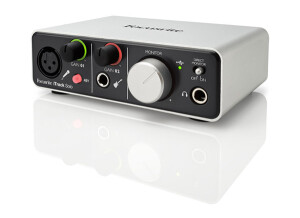
    The Focusrite iTrack Solo is a standard 2 in and 2 out audio interface that has 1 microphone input. It can be used on your Mac or PC , it only cost around 150 dollars. The iTrack Solo is very portable, that is what Focusrite was going for when they made this interface, they wanted to create something solid but still portable enough to take with the mobile musician. UTILIZATION It is a 2 channel audio interface, with a solid preamp that has phantom power to give you some solid and clean direct recordings. The iTrack Solo is built well and will last you a long time if you take care of it. You can get up to 24 bit/96kHz resolution using it with your home set up which is not bad for an interface that is this inexpensive. It has a direct input for your guitar as well to make it very easy to record directly into your computer or DAW hassle free. No matter where I have used this interface, on a PC, Macbook and even my iPad, I am always able to knock out some really clean recordings that will sound like they came from a more expensive interface when in fact they come from this iTrack Solo. GETTING STARTED The drivers are very stable on the iTrack Solo and I mostly used it with GarageBand on my Macbook or iPad. I have only recorded one track at a time with this interface, and I have not received any driver updates yet. Maybe they have released some on a Windows computer though. OVERALL OPINION Overall this is a great and compact interface that is good for your budget because it is cheap and works well. The only reason you would need to upgrade from this is if you want to record more tracks simultaneously or want to add more to your set up. Otherwise this interface could last you a long time.

  • « Best Interface in its class, and maybe a few other classes! »

    Focusrite is renowned for their recording preamps. In recognizing that there was a need and a desire for this award-winning technology in a more affordable and pared down package, Focusrite created the Saffire Pro series. The Saffire Pro 24 boasts two of Focusrite's Saffire preamp inputs, available as a multi-input for XLR, Speakon, and 1/4 inch plug. Each preamp is accompanied by dedicated gain control. Phanton Power is also available. There are also two line inputs, SPDIF In and out, Midi In and Midi Out, an Optical Input capable of operating 8 inputs in the ADAT for drum recording, and 6 Line outputs for multiple monitoring solutions. A firewire output transfers data to your computer, while having the capability to power the Saffire Pro 24 without the need of the included 12vdc power adapter. In addition, there is switchable 48v phantom power and input monitoring LED meters on the front to monitor signal levels. Two Monitor volume controls adjust how loud you hear the Saffire's output. One for the normal monitor outputs, and one for the headphone output, which is conveniently located right below the control. UTILIZATION Focusrite offers regular updates for the Saffire series as well as the Saffire Mixcontrol software that helps interface it with your computer. The MixControl program is rather easy and intuitive to use, and once you have it set up according to your inputs, it can be minimized or even closed and you may use your DAW of choice. I run my Saffire Pro 24 through the latest version of Reaper, and utilize Amplitube 3, Amplitube Metal, and Amplitube Fender in addition to recording my actual guitar cabinet. Up to over a dozen tracks can be recorded simultaneously with the Saffire 24. With its firewire connection, the Saffire is limited only by your computer's capabilities. The Saffire Pro 24 itself is tremendously stable. I've owned mine since November of 2010 and have never encountered an issue with it. Any issues when using the Saffire lie with my computer or DAW. GETTING STARTED There have been some compatability issues reported with the Saffire, although most are easily solved with an upgrade in MixControl software or other applicable drivers. Installation itself is as simple as installing any other peripheral device. Simply install the software first, then connect the Saffire and power it up. The process from here is fairly intuitive. It sits easily on your desktop, being roughly the size of one-half rackspace. Instructions included with the Saffire are easy to understand and fairly basic. OVERALL OPINION The Focusrite Saffire Pro 24 renders amazing quality recordings, especially at its price point. I would venture to say it holds its own against units many times its price. My guitar tracks are incredibly accurate and detailed, never flat or compromised. A/D conversion is indistinguishable from a Digirack 002 I compared it against. The unit itself is well-made, utlizing Neutrik jacks for the Focusrite preamps. I'm very fond of Neutrik and regard them as one of the best jack and plug manufacturers on the market, preferring to use only Neutrik plugs for my instrument cables whenever possible. The external enclosure is metal, and fit and finish are excellent. The knobs are of reasonable friction and don't feel cheap or loose. The Focusrite Saffire Pro 24 has served me so well at this point, that I haven't given a thought to upgrading, and I may not upgrade for quite a long time. I'm planning on using this interface to track guitars and vocals for my upcoming album. That's a testament to the quality and value of this interface.

  • « Pro Tools Ready. »

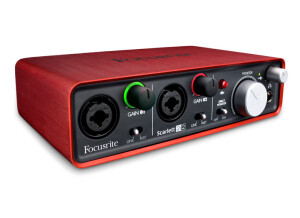
    The Scarlett 2i2 is produced by Focusrite, it seems to be a pretty standard interface for the home musicians looking to have quick and painless way to lay down some demos. It provides a very good quality on the go, and it should work with any system and any interface. One of the main things about the FocusRite Scarlett 2i2 is that it can be used in Pro Tools. They actually advertise that it will work in Pro Tools and use that as a selling point. I have never used it in Pro Tools but I have heard good things from others saying how well it works with it. The price tag on the Scarlett 2i2 was 200 dollars when it first came out which I though was a fair price for an interface that was very universal and worked in the all mighty Pro Tools. UTILIZATION The latency is very low and we never had the need to update the drivers because they worked great. We used it to record some very basic stuff, no more than one track recording at a time on our laptop that was running Windows Vista. GETTING STARTED Only problem we had with the FocusRite Scarlett 2i2 is when first installing it to my laptop we got a few error messages when plugging it in after the restart of the system. It wouldn’t recognize, so we just did the whole process over again and reinstalled everything and then got no more error messages. OVERALL OPINION The Scarlett 2i2 is a compact interface that can give you a solid at home recording for a small price. The price has come down on this interface about 50 bucks and cost around 150 now. The value for the price is top notch and I recommend getting this over a lot of other interface for the Pro Tools set up. This is cheaper and works just as well as some of the other “leading” interfaces for Pro Tools.

  • « good »

    The Focusrite Saffire had a great sounding quality, it actually surprised me, the only thing that I didn’t care for was the way that it was built. It was built standing upright like the old Mbox was and I hate it being up like that. I would rather have it going flat and sideways. Just because I usually have stuff that can end up knocking it over. The Focusrite Saffire is no longer being made, so buying one will have to be used. But if you can get your hands on a used one you will love it. I still to this day choose the used one over the newer one that came out around a year ago. I cant remember what they called the new one, but I like this one better. UTILIZATION Using it took no effort at all, everything is labeled in plain site right on the front of the interface and its all self explanatory. You can plug your mics and instruments right into the front of the interface. But since it’s a standing up right interface, you plug your mics in, if you have a lot of mic movement or your cords get moved a lot your will start to see this device slide around a lot, its very light. Its not top heavy, its just light. GETTING STARTED The price of the Saffire is very good now, I recommend purchasing it if you need a good cheap interface. The software that came with mine when I purchased it, I cant remember what it was, but I didn’t use it I actually probably threw it away. OVERALL OPINION Overall, it’s a great interface. If you cant find it online to buy used then you will probably need to go ahead and get the upgraded version which will cost a lot more than this one will used.

  • « Nice and easy »

    I've had mine a little over a month now. I love it! I had read some reviews elsewhere complaining about latency issues and FW problems, etc. I put a Lacie FW400 card in my old Dell Dimension 3000 w a 2.80 GHz Pentium 4 and t works seamlessly, although being dingle core, the FW interface eats up more CPU than I would like. But that is no problem because it is so versatile as a mixer I just use it as an 8 channel ADAT expansion to my E-Mu 1212M card which gives me two more analog inputs with Pro Tools 190 HD converters. And that still leaves me 2 S/DIF channels. UTILIZATION I can run all that at 48K all day plus I have 2 channel direct zero latency monitoring off the 1212M and two different zero latency headphone monitor channels and a third monitor output channel giving me a total of 4 different monitor mixes as well as a variety of ways to mix them. And I can use the E-Mu-s 32 bit on board effects on all channels independently as inserts if I want to add saturation, color, tube simulation, etc., as well as really nice digital compression. GETTING STARTED Getting started was easy! OVERALL OPINION Overall, its Clean, pristine, and with tons of dead quiet headroom! I went through two TrakMaster Pro's that had horrible noise issues above 6 on the gain control. I replaced them with a Studio Projects VTB1(which is actually also an exceptionally clean and useful pre amp for the money) that was much better. But the pre amps in the Pro 49 are what one expects from Focusrite. They don not color the sound they way a Never or other vintage type pres do, and they don't add tube harmonics. But what they do is give you a clean, very musical, very accurate transmission of whatever you plug in it. You can get all kinds incredibly realistic, relatively inexpensive (and even free) plug-ins to give you all the warmth and color you desire as well as compression, etc. (the included Focusrite FX bundle is actually pretty good...), or run it back out and through an analogue source after you have recorded the dry signal. Either way, you won't be disappointed! It has the quality and versatility of interfaces costing far more and is a steal relative to the OctoPre MK II w/o compression.