Log in
EN
FR

SeriesFocusrite Scarlett

40 products found

Filter
Sort by
Evaluation
  • Reviewed or not
  • Editor’s award
  • Reviewed by Audiofanzine
Availability
  • Available or not
  • Sold new or used
  • Sold new
  • Sold used
Must-have products
  • All products
  • Flagship products
  • Best rated products
  • Hot products
  • Popular products
Price
  • Freeware
€
Clear
Sort by
  • Popularity
  • User ratings
  • Price - low to high
  • Price - high to low
  • Used price, increasing
  • Used price, decreasing
  • Name (from A to Z)
  • Name (from Z to A)
  • Added on
Sort results
  • Popularity
  • User ratings
  • Price - low to high
  • Price - high to low
  • Used price, increasing
  • Used price, decreasing
  • Name (from A to Z)
  • Name (from Z to A)
  • Added on
Filter results 40 results found
Evaluation
Availability
Must-have products
Price
  • Freeware
Show results

The best Focusrite Scarlett reviews

The reviews Audiofanzine members found the most helpful.
  • « Exceptional value for money »

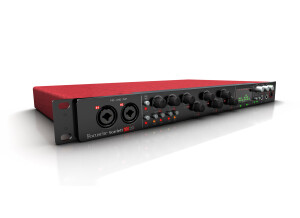
    I was persuaded by the seriousness of the brand Sturdy and appealing looks I needed 8 analog inputs The outputs were not that important I have been into computer music for a long time, I7 2.9 GHz 4GB Ram, HDD 7200rpm, Cubase 7 64 under w7 pro 64 UTILIZATION Everything seems to work just fine. I downloaded the most recent drivers. I bought it yesterday to replace a layla 24/96, whose driver don't quite follow the evolution of the system. 4 to 5 ms of latency. I have already done a couple of recordings and haven't had a single problem yet during recording or playback. Aside from that, I had an issue with cubase and the "monitoring direct" option, which remained grayed out while an echo disrupted the recording, so I had to deactivate the tracks' bus. Nothing unsurmountable, but I contacted support about it. GETTING STARTED No issues during installation, you only need to follow the instructions. Pretty easy OVERALL OPINION I bought it yesterday I found no review Different discussions led me to choose this soundcard It's pretty solid, it doesn't give any problems The preamps don't have too much gain, but it's enough A nice idea: Instead of a VUmeter, it's the LEDs around the controls that illuminate (green-orange-red) The mixing console is quite comprehensive, but I haven't really dived into it. Its value for money seems unbeatable: However, I would've loved an ambiance simulation for the mix, like on most other soundcards (the saphirre pro 24 DSP's VRM) A drawback for mobility fans (which isn't my case): It can't be USB powered, only via an external PSU. I will update my review once I have more experience with it.

  • « A good product »

    - Which technical specifications motivated your choice? The number of I/OS, the brand. What do you use it for? Mobile recording and as audio interface for my keyboards (Mainstage). What's your setup (motherboard, CPU, RAM, hard drive,...)? I use it with a mac mini (Intel core i7, 16GB RAM, 500GB HDD) Do you use it with other instruments or systems (mixing console, preamp, DtD, ...) and what's your setup? ... For recording I have used an ADAT Marian (ADCON) converter to have free analog I/Os, otherwise I use ADAT cards on digital consoles...depending on the setups I find where I go. I almost only do demos, to be true. For my keyboards, I use simply the MIDI interface of the Scarlett, together with a UM550 for MIDI routing of two keyboards and a pedalboard. The audio of my Prophet08 is processed within Mainstage and then sent to the Scarlett. I use 4 analog outputs (1 stereo for the stereo sum, in case the console is too small, 1 stereo for my personal monitoring on stage...And the rest is output separately via ADAT with the 8 outputs of the external converters. That way, the FOH engineer can do whatever he wants from the console. UTILIZATION Are the drivers stable? Yes. Very stable, actually. To be honest, since I switched to Focurite, I have no problems in this respect. I used to have a Digi002, and it was a nightmare, but now I'm pretty chilled. Are they up to date? No, but when they work fine... Which software do you use? Logic pro 9, Reason 7 and Mainstage 3. Everything works smoothly. You only need to be careful with the launch options (32 bits/64 bits) so everything works together, but otherwise, it works fine. What's the latency of your system? On paper, too high. With a 256 buffer, the software displays a round-trip latency of 20ms...But, actually when I play on top it's almost imperceptible. And I am pretty sensitive to such details, so I suspect the real latency value to be equal or less than 5ms with this buffer value. And also knowing that my Mainstage uses a lot of resources (sometimes 6 or 8 virtual instrument tracks with my prophet08 which goes through the Scarlett and Reason in the background, the CPU gets really hot). So I take some precautions. To be true, recording live (even with 16 tracks) I can lower the buffer to 128...But, in the end, it's absolutely useless for what I do. So its awesome! How many tracks can you record/playback simultaneously ? ... I have already recorded 16 tracks. I haven't tested the playback, but I use 10 outs live and it works smoothly. I think you can push it to the limits without any problems. GETTING STARTED Did you have any problems during the installation? Yes, you need an Internet connection to get the drivers. Did you have any incompatibility problems? Not for the time being. How complicated is the overall configuration? It's easy, even if I don't like the Scarlett MixControl software...But, at the same time, with such number of ins/outs it's not easy to offer routing options that are clear without a Rube Goldberg machine. Personally, I haven't used it much. I muted all hardware monitoring from the interface to use software monitoring (or real monitoring on a hardware console before the interface, when I do demos). Is the user's manual clear and comprehensive? ... Yes. But, at the same time, it is dispensable. OVERALL OPINION How long have you been using it? 7/8 months. Which feature do you like the most / the least? The most: The stability The least: The complexity of the MixControl software...But I think you can get used to it if you dedicate some time to it, which I haven't done. But it's no deal breaker. Did you try any of other models before buying this one? I had Focurite Saffire 6...at home, due to my laziness of having to take it off the rack every time to work. And I was very happy with it, given the stability of the drivers, so I decided to be loyal to the brand. How would you rate its value for money? Regarding the number of I/Os, very good. The preamps are neither excellent nor bad.... they are OK and do their work. An interface with 18 inputs equipped with 8 preamps and a Wordclock output, for this price —and seeing how it all works—, is a good investment, I think. For the time being, at least. Based on your experience, would you buy this product again? ... Certainly! Considering my budget. I think that if you want something better without compromising on the number of I/Os and features, you need to fork out a lot more with other brands. So, yes, I'd buy it again without hesitation.

  • « Solid bare essentials audio interface »

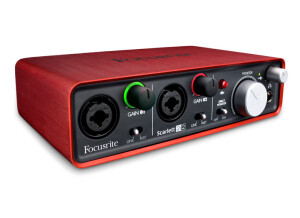
    The 2i2 features 2 XLR-TRS combo inputs with independent volume knobs that have an LED ring around them to indicate levels. These inputs can be switched between line and instrument levels independently of each other. There’s a 48v button for microphones that require phantom power. There are 2 ¼” TS outputs on the back for your monitors. You can enable direct monitoring via a switch on the front and control the overall output of the audio interface via the monitor knob. There’s also a headphone output with an independent volume knob. The interface is bus-powered and connects to your computer from one USB port on the back. The one downside to the unit is that it doesn’t have a MIDI input/output which some audio interfaces in this price range do have. UTILIZATION I've been using the 2i2 for 2 years with Renoise, Maschine, and REAPER on both a Windows 7 and 8 64-bit system using an Intel i5 2500k @ 4.5ghz. It's possible to get the latency under 10ms round trip, however, I ran into driver instability when trying to go lower than that where the driver would sporadically crash and cause lots of distortion and slowed down audio. Outside of that, absolutely no driver problems or latency when recording instruments. GETTING STARTED It’s a pretty simple interface and very straight forward to use. Very clearly labeled knobs and switches for all of the functions. The software for controlling the interface is a one function affair--changing the buffer length. All other functions like changing the sample rate and bit depth are done through the Windows Control Panel. OVERALL OPINION It’s a fairly low-noise unit, I’ve mostly used it for recording guitars or synths directly and I have no real complaints there. The headphone output is not bad even with high impedance headphones like my 250 ohm Beyerdynamic DT880s. There’s not a ton of gain and I need to set it about half way on the headphone volume knob to get to my preferred listening level, but it does drive them okay and the DAC is very good. It would certainly drive lower impedance headphones satisfactorily. It’s a great interface for someone who doesn’t need a lot of inputs, outputs, or advanced DSP features. Although the lack of a MIDI in/out is a bit of a bummer, if you just need to record one or two instruments or if you need an interface for your mobile production setup, this is definitely something to consider. Pros: + Great Price + Portable + Clear sound + Good monitoring features Cons: - No MIDI I/O

  • « Great value for the money! »

    I bought it after reading many reviews and talking to some friends, had really good recomendations. I use it for 2 channel recordings in my home studio while making sound effects for videogames, voice over or a couple real instruments to put with the virtual ones in a soundtrack. Setup is simple, I pretty much just plug any electric instrument straight into the Hi-Z input, or my rode mic in the front pre-amp. I'm using it on a 2014 mac book air i5 1.4GHz, 4GB ram, osx mavericks. Also used it in a mac mini mid 2011 model with 8gb ram, and it works fine on both. UTILIZATION Since it works fine with my setup I've never really bothered looking for updates, I like their software for monitoring, latency is low and quite acceptable. I've used it with Reaper 4, Logic 9 and now Logic X, runs smoothly on all of them. I've never really used all of its inputs at once, though, but with 2 channel recordings I can easily use Logic guitar amp/pedal simulators as well as have a nice vocal chain with EQ, compression and reverb, all in real time while recording, all tweakable later on the mix. :) GETTING STARTED It was pretty much plug and play... well, after installing the monitoring software. Since the basic functions are easy to get working I didn't bother going into the advanced stuff, I just rather do all the monitoring and processing in the DAW, its simpler and fits well my workflow. OVERALL OPINION I really like the preamps, they were the main reason why I've bought the interface. They are clean and sound good even if you leave a lot of headroom (peaks of -18dB are totally fine), which is good if you're the type of person that likes to get the signal into your software and then forget that everything in between is even there. :) Before this one I had a cheap m-audio interface and with the focusrite it was the first time that I really could tell a BIG difference in sound quality from what I was doing before. At some point, if you keep working a lot and start listening to other more expensive interfaces, you'll probably want to move on, either for a specific set of features, more channels, or (even) better pre-amps. But for sure, if you're coming from a cheaper interface (or even if you're looking for your first one) this little focusrite will definitely help you get really good recordings for not much money. Absolutely recommended.