Log in
EN
FR

Korg Computer Music

126 products found

Categories
Series
Filter
Sort by
Korg
Evaluation
  • Reviewed or not
  • Editor’s award
  • Reviewed by Audiofanzine
Availability
  • Available or not
  • Sold new or used
  • Sold new
  • Sold used
Must-have products
  • All products
  • Flagship products
  • Best rated products
  • Hot products
  • Popular products
Price
  • Freeware
  • Low-cost (< $95)
  • Mid-range ($95 - $150)
  • Premium (> $150)
€
Clear
Sort by
  • Popularity
  • User ratings
  • Price - low to high
  • Price - high to low
  • Used price, increasing
  • Used price, decreasing
  • Name (from A to Z)
  • Name (from Z to A)
  • Added on
Sort results
  • Popularity
  • User ratings
  • Price - low to high
  • Price - high to low
  • Used price, increasing
  • Used price, decreasing
  • Name (from A to Z)
  • Name (from Z to A)
  • Added on
Filter results 126 results found
Brands
Evaluation
Availability
Must-have products
Price
  • Freeware
  • Low-cost (< $95)
  • Mid-range ($95 - $150)
  • Premium (> $150)
Show results

The best Korg Computer Music reviews

The reviews Audiofanzine members found the most helpful.
  • jthedon2009's review

    For how long have you been using it? About three years now and not a single fault with it. What thing do you like most/least about it? Ok its like this once you buy the Korg Pad Kontrol you will never feel like using any OTHER Midi Studio Controller...Period, this machine will never fail you or let you down, the only thing I dislike about it is the roll function does not work to well with any sequencer eg, Fl Studio and Ableton live. Did you try many other models before getting this one? No I Had been using my typing keyboard to make beats before that and it was a big step up to say the least! What is your opinion about the value for the price? Ok you could go and get a Akai Mpd Or A M Audio Trigger Finger but waste your money on those things when you could buy this for alot less... Knowing what you know now, would you make the same choice?... Yes most definitely without a single doubt this is the best midi drum pad ever on first sight you will feel the pads and the will feel hard and rubbery but once you load some sounds then you will apreciate the softness of them.

  • « Not so good velocity pads, great XY pad! »

    The unit is USB powered with one mini USB port. It features 16 velocity-sensitive pads and a single X-Y pad. It's very small, light, and portable. It's entirely plastic and a little flimsy. The pads themselves are significantly smaller than full-sized drum controller pads, but still big enough to be played without accidentally hitting multiple pads. Unfortunately, the quality of the pads is not as good as other pad controllers out there. The pads are a bit mushy with a bit of play before they'll trigger a sound. This means you have to hit the pad fairly hard to trigger a sound reliably, which makes playing lightly to get very low velocity notes very difficult if not impossible. It's pretty easy to get started with, you simply plug it in and play. There are 4 lights used to represent 4 scenes which you switch between with the scene button. Each scene can be customized to send different midi values or behave differently with the Korg Kontrol Editor software. Each pad can also be customized to send up to 4 notes per pad. The software itself has a nice layout with everything on one page and you can easily change each pad to act as either a standard drum pad or as a toggle for things like clip launching in Ableton Live. One interesting function is the touch scale which turns the X-Y pad into a midi ribbon controller sending notes determined by where you press on the pad. With the Gate Arpeggiator enabled, your notes will trigger in sync with your host. The velocity sensitive pads each have a note and scale written above them on the controller and when you hold down the Scale or Key button and press one of these pads, the XY pad will be quantized to that particular scale or key. The unit has most of the significant musical scales including Chromatic, Major, Minor, Pentatonics, Blues scale, and it also supports one user made scale that you can define in the Kontrol Software. The NanoPad2 doesn't generate sounds itself but Korg does supply a very nice software bundle with the NanoPad which includes Korg M1LE, UVI Digital Synsations, EZ Drummer Lite, AAS Ultra Analog Sessions, Lounge Lizard Sessions, and Strum Sessions. I haven't tried other pad controllers in this price range, but while the velocity sensitive pads aren't very good compared to more expensive products that feature drum pads like Native Instruments Maschine or Akai MPCs, the touch scale feature of the XY Pad makes the NanoPad2 worth purchasing. It's a pretty cheap unit at around $50 USD and the build quality certainly reflects that, but with the touch arpeggiator you get a pretty fun and inspiring way of creating leads and arpeggiated melodies.

  • « Pure analog tone without the maintenance! »

    "I hear you're buying a synthesizer and an arpeggiator and are throwing your computer out the window because you want to make something real!" So goes the line in James Murphy's disco rant on LCD Soundsystem's first album. Ironically in an age where so much technology is literally at our fingertips, in the form of iPads and smartphones alike, there is an ever-mounting interest in what it means to be analogue. For the general music consumer, the rebirth of vinyl records is an obvious example. For the recording musician, the renewed enthusiasm for 80s era synths since the turn of the century has mounted to a frenzy of musicians scouring garage sales, pawn shops and online auctions all trying to find that one forgotten, unique, but synthetic, yet analog tone. As a result, a few classics of the era have become studio mainstays and are preserved much in the same way fabled compressors and rack-mounted gear are preserved. But much like rack-mounted gear, the size, weight and maintenance of such equipment is a major constraint for the project studio owner or the mobile music professional. With this is in mind, developers have done much in the way of creating virtual instruments as plugins, much in the same way they developed plugins for emulating rack-mounted signal processors. In both instances, the hands-on tactility of the original components is what is ultimately lost. However, virtual instruments for the iPad is a whole new ball game, offering an interesting mix of both the plugin and the hardware. As someone who has tested Korg's iMS-20 app and Moog's Animoog app, I have become quite fond of their new iPolysix, the virtual reincarnation of their fabled Polysix synthesizer from the early 80s. This is primarily because of its simplicity. It is a lot less like owning an "all-in-one" synth emulation app and more like owning a singular analog instrument. In essence, the extent of this app's features are no more than those physically available on the original instrument itself. Given it's hearty $40 price tag in terms of the app market, this may be a turn-off for the feature-obsessed consumer, but for the purist looking for a singular, competent analog piece, this is its greatest point of attraction. Because the development of this app was dedicated to the faithful recreation of one singular, sought after piece of equipment, its authenticity can rival that of its original, analogue counterpart. That means in the hands of an artist, all of it's original constraints and idiosyncrasies work together with the creative process to make sounds using the app the same way one would with the analog piece. This also means that if the sound the artist was after couldn't be accomplished with the instrument on its own, that it could be integrated with other studio equipment to achieve the desired effect. This is where I most love this app. I fire it up and my iPad transforms into an analog synth. I can then use it's interface just as I would the original unit and integrate directly into my studio as another instrument. In the example composition I have provided, I recorded two tracks into pro tools, routing from the headphone output of the iPad through a Palmer DAACAPO impedence converter and through a chain of guitar effects pedals. The results is a composite tone that has resulted not from the iPolysix on it's own, but as an integrated, physical piece of hardware in my studio. https://en.audiofanzine.com/virtual-instrument-iphone-ipod-touch-ipad/korg/ipolysix/medias/audio/a.play,m.473855.html The beauty of the iPolysix being a virtual synth outside of the box is that you get all of the ease of presets, zero-maintenance and minuscule physical footprint with all of the creative possibilities of integrating it physically with the other elements of your studio. If you're already an iPad owner and you consider the use of this app more like an outboard piece of gear, then the $40 price tag for a classic analogue synth is pretty incredible. Pros +out of the box integration +authentic recreation of the original hardware +authentic, analog tone +ease of use, maintenance and portability +midi in/out wirelessly via Wifi, for direct integration into Pro Tools or Ableton Cons -most purists will still want to use a high-end midi controller in place of the touch-screen keys, which defeats the small footprint -more of an iPad con, but the headphone output has low stereo output -perhaps the lack of features and varying synth tones will be a turn-off for those in search of a more flexible app

  • « "Making music on the road? Grab one!" »

    I am a musician who constantly writes music on the roads, and the Korg nanoKEY2 was a great addition to my backpack. This 25- key USB powered midi keyboard is tiny, cute and responds to your finger tips in a much more better way than its predecessor nanoKEY. Having used the old version nanoKEY that I was not quite happy with, I wanted an upgrade for this. Having gone through several other options, finally was happy to see the release of the nanoKEY2. Weighing only 0.54 Ibs, this tiny midi keyboard is easy to program with and make music. "Plug n Play" would be the right term I give to this "smaller than your keyboard" device that attracted me always. Using Logic 9 and Logic X, The nanoKEY 2 immediately gets recognised as a new midi device. The new sustain add-on was a very good thought, as this was not there in nanoKEY1 (Also note that the CC feature in nanoKEY1 is not available in this version anymore). Connectivity to an Apple's iPad (supports from iOS 4.2.1) using Apple's iPad camera connection kit is very handy for musicians on the go these days. Imagine you have the nanoKEY2 and your iPad (Make sure to have a music application that supports Apple Core Midi) and you want to write some music. Its possible now with the nanoKEY2 and only you would see playing the keyboard, because it is that tiny! This is also a perfect addition if one has the dual USB ported MicroKey (another product by Korg). I usually connect the nanoKEY2 to the latter when in need of more keys while writing music. UTILIZATION The nanoKEY coming in two colours white or black, can be plugged directly onto your Mac (OS X 10.4 or later) or PC. Open up your favourite DAW and start using it. The manual is clear and to the point. Though I must say that it is a bit geeky. There are two buttons for shifting the Pitch up/down. An Octave shift up/down with octave ranges up-to +4 or -4. The modulation button is similar to the previous version, though I have not found this feature useful unless one is performing live. For those who are into extreme and advanced midi features, this also integrates with the Korg Kontrol Editor software, that comes as a free download on the Korg website. One can choose from four different velocity settings provided, which in-turn affects, reacts and responds with the modulation and sustain buttons of the nanoKEY2. OVERALL OPINION Pros 1) Soft key-bed and strong keys. 2) More velocity friendly than the nanoKEY1. 3) Easy Plug and Play. No driver needs to be installed. 4) Sustain button is very helpful. 5) Light weighted and gets into your work backpack. Cons 1) The Keys could be more softer and a little longer. Some fingers might find it hard to get used to playing. 2) No free additional - bonus software licenses. 3) Be careful not to give this to a 5 year old kid. This is going to break. 4) No LED's displaying the Octave shift range. I would say that for $68, the nanoKEY is a bit overpriced. Given the fact that one can't perform extreme musical and advanced writing nor put this inside a heavy tight luggage (as it would break), I wish this was priced a little more less. But having said that and having a previous experience with its predecessor and using other midi devices like the Axiom keyboards etc, the precision and quality while playing the nanoKEY2 is worthwhile. If you travel a lot and if you are looking for something small that could fit in to your quick midi-input needs, then this is a quick and easy solution. The Plug and Play feature makes it easy to connect to any system you need, wherever you go. Lastly, while thinking about the price at this moment, I would have gone for a better and cheaper option that time, even though if it is more larger in size and weight than the nanoKEY2.

  • « Good size and nice playing feel »

    I bought it due to its size. I didn't have the space for a 49-key keyboard, besides, I'm not a pianist. But 25 keys is not enough. The 37-keys format is a good compromise. The MIDI connection via USB is a good point given the built-in hub that I use to connect a launchpad mini, which works perfectly. It's very light. It fits inside a bag. Responsive pitch wheel. UTILIZATION The keyboard is fairly good in the sense that you have a decent sensitivity. It's nothing spectacular, but with my level of piano it's ok. And the keys aren't that small. You won't hurt your hands playing chords ;) I haven't read the manual, it's plug & play. Apparently it comes with a software bundle... I'll have to check that later. OVERALL OPINION I received it today. Time will tell. I've had several synths, including the NL2X, which isn't well-known for its keyboard. I love the mellow side of this Korg Mini. Pros: mini dimensions, 37 keys, responsive pitch wheel, quality ok Cons: time will tell For the price, it's a chance not to be missed.

  • « A must have »

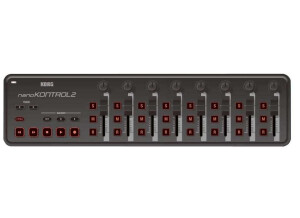
    The Korg nanoKONTROL 2 is a MIDI controller that connects to a computer USB port. It is very affordable and can be purchased in white as well. This controller is relatively small and does not take up much space at all. It cannot be racked; it will have to be used as a table top unit. I use this controller to control synths and effects racks in my DAW and it works great. At this price, I cannot believe more people are not purchasing it. It works great and has never giving me any issues. Sometimes I use it during shows to tweak synths and other sound in real time and it has never let me down. I think I will be using it for a long time. Setting up the nanoKONTROL 2 is very quick and easy. It is just like setting up any other MIDI controller or USB controller. I have only used it on my PC running Windows 7 and with Ableton Live. But I am pretty sure it can be used in just about any DAW. I do wish there were some presets built into Ableton for it so I could have had some templates to go off of instead of having to program it all myself. It would have just made it a lot easier but it still wasn’t hard to do it. It was just time consuming getting it all how I wanted it. But after I did it once, I didn’t have to do it again because I can save the template. I recommend this controller to any DJ or computer musician who wants to use some hardware to tweak things instead of using all software. It really helps me being a DJ having something that is small and doesn’t take up much space to teak sounds and effects with. It is also well built and doesn't seem cheap even though the price is low.

  • « Good emulation of the M3. »

    This VST installed nicely and quickly and has worked nicely on both of my computers. I have used it on a low end computer (1.8GHZ pentium and 1gb ram) as well as my current (2.5GHZ Core2Quad & 4GB ram) and it runs equally as brilliant on both. The lbirary is easily accessable and nice to use, a breath of fresh air from other VST's that opt for dropdown menus that can't be scrolled in Ableton Live. It works nicely in both of the DAW's that I use, Ableton and FL Studio. SUITABILITY/PERFORMANCE This software works well in both of my DAW's and performs admirably. There is a huge bank of sounds available and they all load near instantly. The CPU load is pretty low too so there is no problems with stacking up sounds. The memory usage is also low for a VST of the nature that it is, it has hundreds upon hundreds of preset sounds in the library. It is remarkably stable too, I have never found any crashes using soley this VST. I have been using it for a couple of months now. OVERALL OPINION I love some of the sounds on offer from this VST, they are thick and somewhat juicy. However the acoustic sounds on offer are remarkably dry and sound boring. Some of the sounds are pretty low quality too. There is a problem I have found using this vst, the sounds don't save in unless you double click on the library instead of just the single click to load the sound. Also, sometimes the VST will pick the wrong sound after you double click one of the sounds you want. It makes it a nightmare to find the sound you are looking for again through pages upon pages of sounds. I would still get this VST though knowing what I know now.

  • mooseherman's review

    This, basically, is one of the more popular keytars out there. It's basically a 41-note remote keyboard, actually a MIDI synth or module controller. Therefore, it has the general MIDI connection. I was looking to try a Keytar of some type, thinking it might be fun. There wasn't much about this instrument that intrigued besides the keytar novelty and the fact this is one of the more popular keytars. UTILIZATION The setup of this was no more complex than any other MIDI controller. I didn't have a manual, but I could figure out the setup process pretty clearly. It's easy to use one hand to press the buttons which change between the 64 different programs. With the same hand you can use the knobs to control the modulation, pitch bending, and volume. OVERALL OPINION I feel like I got what I expected out of this thing. It is a whole lot of fun to play, and it sounds just like you'd expect, a cheesy, 80s style synth. The fact that you can really only play it with one hand at a time is sort of frustrating to any real keyboardist, but it was really only designed for simple chords or single-note riffs anyway. As someone said to me before, "it's not like you're going to play a concerto on this thing". Another criticism I had was that the touch sensitivity was almost nonexistent, but then again, you'd only expect an obnoxious synth sound from this anyway. Overall, if you know the limitations of the instrument from the beginning, and are still interested, nothing is going to sway your interest. Definitely recommended for anyone who really wants it. Just good luck finding one, I happened to stumble across it randomly. I know many others who are willing to pay a decent price for one.

  • FP User's review

    The Korg Kontrol49 comes with lots of features. I haven't figured them all out yet. But the ones I have used are neat. The Korg comes with eight sliders and eight encoders plus one master encoder, which allow you run scenes which you can store on your computer in a program called Kontrol49 editor librarian. It's a very efficient way of getting to the sounds you need. The only down side that I can think of is demo software (NOT Korgs Legacy Software) the other software. Like Reason, lounge lizard, there's another one but I can't think of it's name right now. They don't let you use the software long enough to make an intelligent dicision about them. With the Korg software you can take a year or more to decide. Because of the way they made the demo software. It's the full version without the abillity to record or save. Also while you'er playing a hiss sound play over what you play every few minutes. So what! I played with Korgs software long enough I've already decided to buy it. It was the fact that I could work with the software in the demo version that convinced me to buy the full version. The other software companys should wake up and smell the coffee your in business to make money hello! Korg is! Are you?! Price paid 399.00 UTILIZATION Very easy to use. My cmputer freezed up a couple of times but that was because I had too much other stuff on it, like a flight simulator, ect. That suff is off now. My computer works just fine. I don't plan on taking my Korg on the road bcause I' not a musician. I'm a magician. I bought the Korg so I could make some instrumental music royalty free for my show. So for me the Korg is built just fine. OVERALL OPINION My Korg midi controler when hooked up to my Toshiba Laptop has an incredible sound. It's full and can sound mellow at the same time. When used with the Korg Legacy software it's amazing the different sounds you can make by taking just one sound and tweeking it with the Kontrol49 sliders or the encoder knobs. Even moving one slider a little bit changes the sound. You have hundreds of sounds to choose from. I saw the Eagles Band playing on T.V. there in the back ground was someones keyboard and it said &quot;KORG&quot; at that time I was thinking of buying a keyboard or keyboard controler. When I saw that Korg I was hooked. The rest is history. At the present time I'm waiting for delivery of the full version of Korg's Legacy software with the MS-20 synth along with it! That's also a Korg!! I'll let you know about that after I've played with it for a while. Originally posted on FutureProducers.com Posted by: konjecer ( 8-, 2005)

  • « Korg DS-10: a pocket-sized sonic lab »

    I use Korg DS-10 either on its own or routed through effects pedals. The Nintendo DS comes with obvious limitations, and as far as I know, there’s no MIDI support. But honestly, that doesn’t stop this thing from being seriously fun and inspiring. I’m a longtime Korg fan, so maybe I’m biased, but the sound is there—distinct, digital, and proud of it. I first messed around with Korg DS-10 about ten years ago when I knew nothing about synthesis. It didn’t click at the time, and I quickly moved on. Fast forward to now: I’ve been using it seriously for the past year, and it’s a totally different experience. The sound engine is excellent and has real personality. It may run on a handheld console, but it’s far from being a toy. The semi-modular aspect is a great touch. It lets you experiment, patch, and learn without getting overwhelmed. The built-in effects are surprisingly solid and add depth and character to the sound. On the downside, there’s no tutorial, and the interface isn’t the most intuitive at first. It takes some effort to get used to, especially for beginners. And let’s talk about the current resale prices—it’s ridiculous. Fortunately, there are still alternative ways to get your hands on it. All in all, Korg DS-10 is a highly engaging tool for sound exploration and out-of-the-box music-making. It’s not perfect, but it’s incredibly charming.

  • « You can use it ANYWHERE! »

    It really doesn’t get more portable than using Korg’s M01. You can literally put this on your DS and put it right in your pocket and have a fully functional VST with you at all times no matter when or where you go somewhere. I have been using this almost since it first came out, in fact I purchased it about 2 months after it came out because it was a bit expensive for a music game , so I wanted to wait to see if I could get it one sale. The manual is very easy to understand, but the manual was not needed, I just like to play around until I figure things out, and it was just a matter of understanding the interface and layout of everything. SUITABILITY/PERFORMANCE This runs perfect on any DS , you will have no problems getting started with it, you might have a learning curve though if you are a beginner and if you aren’t a beginner it might take some getting use to because you will be working on a much smaller screen than you computer screen is. Placing midi notes into the play list one a small DS screen was a little weird and difficult for me. Toshio Iwai was the official designer of how the software would look, he did one heck of a job getting it to look very professional on a gaming device. I have not seen these in Gamestop for a while now, I still wonder if they still make them? OVERALL OPINION I am very happy with my 45 dollar investment in getting this for my DS. It is unreal the stuff you can do on M01. Who would have thought that you could do all of this stuff on a Nintendo DS. Technology has really taken a turn with this one. I hope they come out with more software for DS like this, purchasing this is a decision that I am still happy about to this day.

  • « Korg K-49 »

    This is the white and silver K-49 keyboard midi controller by Korg. The K-49 stands for the 49 key model. Korg also makes a 25 and 61 key model. The knobs and buttons are: at the top is a mouse type thing called the click point controller, then you have 2 assignable knobs, 2 assignable push buttons, an octave up button, an octave down button, modulation wheel, pitch bend wheel as well as a volume slider. The back has a power jack, a USB jack and a midi out. I was diving into the world of computer recording and bought this to use with my Reason setup. I was able to get the keyboard, computer and software talking in no time. The K49 came with software of its own, but I already had Reason, so I only used it to install the driver. I paid around a $100 for it at my local music shop. It was plug and play with most things. I used this for my Dell PC. The K49 came with its own USB cable. The USB cable looked like its own jack. I never lost the cable, but if I did I imagine it'd be a pain to get a new one. It feels like a mediocre keyboard. For $100 it does not feel cheap. It is lightweight, I'm going to guess no more than 5 pounds. The knobs are sturdy. A great workhorse plug and play midi controller. This review was originally published on http://www.musicgearreview.com