7 products found
Choose a category
Selected category: Software modulation effects


The Digidesign AIR (Advanced Instrument Research) Multi-Chorus is a plug-in that comes free with the newest version of Pro Tools. Users of Pro Tools 8 will get this plug-in for free when they upgrade or buy an audio interface with the Pro Tools software. It installs during the initial installation process of Pro Tools 8, so no further action is needed to install the plug-in. The interface of the plug-in makes it a pretty versatile one as it includes setting controls for rate, depth, low cut, width, pre delay, waveform, the number of voices, and mix. It has a very similar interface and make up as the AIR Chorus plug-in that also comes free with Pro Tools 8, but allows for a thicker sound with more perceived voices. I don't think that a manual is something that is necessary, if one exists at all. SUITABILITY/PERFORMANCE Having just upgraded to Pro Tools 8, I'm now running the Digidesign AIR Multi-Chorus on my Mac Book Pro that has a 2.2 Ghz Intel Core 2 Duo processor and 4 GB of RAM. I run Pro Tools 8 with a Digi 002R interface or a Digi 002R audio interface depending on if I'm on the go or not. To date I haven't had any issues at all running the plug-in within this configuration, as the plug-in definitely doesn't take up much processing power at all. I only first used the plug-in a few months ago when I upgraded to Pro Tools 8. OVERALL OPINION For Pro Tools 8 users, the Digidesign AIR Multi-Chorus is a great tool to have, especially at the price it is at, which is free! I like this plug-in a lot as I think the tone quality is clean and that you can do a great deal with it. It is possible to get a thick chorus sound from this plug-in without a doubt, whether it be on vocals, electric guitars, or whatever else. Both this and the regular AIR Chorus can do some pretty cool things, and both are pretty unique to each other although they do share some similar overlapping tones as well. Everyone who has Pro Tools 8 should absolutely have at least checked this one out by now, as it is a very useful tool.
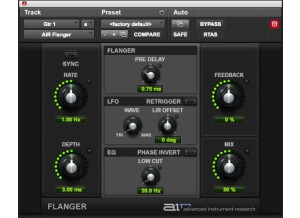
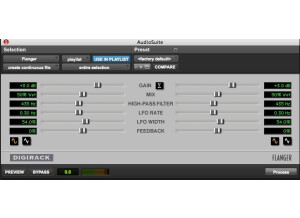
This review if for Digidesign's AIR (Advanced Instrument Research) Flanger. If you have Pro Tools 8, you probably already know that AIR plug-ins are a suite plug-ins that come free with Pro Tools 8, including this one. To me, if you don't have Pro Tools 8 yet it is worth it for these new useful plug-ins alone. You don't need to do anything in terms of installation once you've installed Pro Tools 8, as it will take care of it during the initial process. Using the AIR Flanger isn't by any stretch a hard thing to do. As long as you understand what the parameters do, you've good to go. The parameters that you have include those for rate, depth, feedback, and mix, as well as sections for flanger, an LFO, and a low cut equalizer. The flanger section contains only a parameter for pre delay, and the LFO has just a wave type selector and an L/R Offset. I was pretty familiar with these parameters going in, so I didn't need any help figuring it out. A manual however isn't made for this plug-in as far as I know. SUITABILITY/PERFORMANCE I'm running the Digidesign AIR Flanger plug-in on my home system where I recently upgraded to Pro Tools LE 8 from 7.4. I run Pro Tools LE 8 on a Mac Book Pro that has as 2.2 Ghz Intel Core 2 Duo processor and 4 GB of RAM. Within this configuration, Pro Tools runs with a Digi 002R audio interface. Thus far I've only had a need to try out the AIR Flanger on a single track at a time with a single session, so I can't say how well it will run if you want to run a bunch of them at a time. However, these AIR plug-ins are designed to only take up a small bit of processing power. OVERALL OPINION I can't ever say a bad thing about a free plug-in, so I won't start here. In fact, I actually really like using AIR Flanger. I find it easy to use and I also find that it is capable of getting a very wide palette of different flanging tones. It has a clean tone overall, but like most plug-ins it lacks the body and fullness that you'd get with an analog flanger. So while not my favorite sounding flanger out there, in most situations it will be good enough to get the job done without a doubt. The only place that you can get the Digidesign AIR Flanger is with Pro Tools 8, so if you've got an earlier version of the software, I'd highly recommend taking the plunge into Pro Tools 8 so you can get this one for free in addition to all the other ones you'll get.
Digidesign's AIR Phaser is a plug-in available in the newest version of Pro Tools. Pro Tools 8 features a whole line of these AIR plug-ins, which stands for Advanced Instrument Research. They all have a similar look and are all free! Like all of the AIR plug-ins, the AIR Phaser plug-in installs automatically when you install Pro Tools 8, so you don't have to worry about any other steps to install this plug-in beyond installing the main software for Pro Tools 8. The interface of the plug-in is to the point and is generally very easy to follow. It's got main parameters for rate, depth, feedback, and mix, as well as a section entitled 'phaser' which has poles parameter, which gives you four different steps to choose from, as well as a center parameter which allows you to adjust the frequency. There is also an LFO section with parameters for waveform, and left/phase phase. Lastly, there is a low cut knob with an adjustable frequency. I don't believe that they make manuals for these plug-ins, but you really don't need one anyway. SUITABILITY/PERFORMANCE Having just upgraded at home to Pro Tools 8, I'm running the Digidesign AIR Phaser plug-in on a Mac Book Pro that has a 2.2 Ghz Intel Core 2 Duo processor and 4 GB of RAM. I run Pro Tools with a Digi 002R audio interface or the Digidesign Micro Box for when I'm not at home. So far in the relatively small amount of time that I've been using the AIR Phaser plug-in, it hasn't even come close to affecting my system's performance. I've only had a need to use one or two of them within a single session, so it isn't like I'm trying to max it out. However, I think that as long as you have a system where you can currently run plug-ins and Pro Tools comfortably, this one shouldn't be a problem. OVERALL OPINION Let me start off by reiterating the fact that this plug-in comes free with Pro Tools 8! Moving forward with this in mind, the Digidesign AIR Phaser is a very useful plug-in to have in your arsenal. It won't do the heavy damage that phaser plug-ins like the Eventide Instant Phaser or the Soundtoys Phase Mistress will do, but for a freebee it sure sounds good and offers up a good amount of versatility. If you've got Pro Tools 8 I'd highly encourage you to get in there and play with this one for a bit to see if it is something that could be useful for you. If you don't have Pro Tools 8, you don't have any way to get this plug-in, so I'd recommend upgrading!
Digidesign's AIR (Advanced Instrument Research) Ensemble is a plug-in that can be found exclusively with the newest version of Pro Tools, version 8. It comes free with the software, and you don't need to do anything further to install the plug-in once you've installed Pro Tools 8, as it takes care of it when you do so. The interface of the plug-in is very simple and easy to adapt to. Like all of the AIR plug-ins, it has a pretty bland looking interface, but this does make it easy to follow everything going on. The plug-in consists of parameters for rate, depth, delay, shimmer, stereo width, and mix. All of them come in the form of knobs, so they are easily manipulated without having to put much thought into it beyond what you're looking to achieve. I don't think that they make a manual for AIR Ensemble or for any of the other AIR plug-ins. SUITABILITY/PERFORMANCE I just recently upgraded to Pro Tools 8 from 7.4, and I'm very happy that I did. I'm now running Pro Tools 8 and the AIR Ensemble plug-in on a Mac Book Pro that has a 2.2 Ghz Intel Core 2 Duo processor and 4 GB of RAM. I run Pro Tools 8 LE with a Digi 002R audio interface. Although I had a lot of previous experience with Pro Tools 8 on an HD system, it wasn't until I upgraded to 8 at home that I tried out the AIR Ensemble plug-in. This plug-in takes up a very little amount of processing power, so as long as you have a system where you can currently run Pro Tools and some plug-ins on it comfortably, you'll be fine with this one and most of the other AIR plug-ins. OVERALL OPINION Basically, the Digidesign AIR Ensemble is a plug-in that adds depth to your sound by emulating the multi-tracking of the track on top of it's self. Of course you have all sorts of controls to work with, so it isn't this simple in practice, but essentially that is what the AIR Ensemble plug-in will do for you. It differs in tone quality to the AIR Chorus plug-in, but is generally in the same vein. The plug-in actually has a very clean sound, but this isn't the type of plug-in that I'm using all too often. However, since it was free I'm quite happy to have it around, and makes for just another reason that you should upgrade to Pro Tools 8 from earlier versions if you haven't done so!
The Digidesign AIR Chorus plug-in is one that comes free with Pro Tools 8, the newest version of the software. In my opinion, it is worth upgrading to Pro Tools 8 from a previous version just for the plug-ins, as there are a ton of new ones under the name AIR (Advanced Instrument Research) and otherwise. This of course is in addition to a ton of new features including a new way to comp and an interface that is easier on the eyes in my opinion. You don't need to do anything to install AIR Chorus, as it automatically installs when you install Pro Tools 8. The interface of the plug-in is very straight forward, as is the case with most of the AIR plug-ins. This one has sections for chorus and LFO, the former of which has parameters for feedback and pre delay, and the latter of which has those for waveform (triangle or sine) and L/R phase. It then has parameters for rate, depth, and mix to round things out. I don't believe that they make a manual for this one, but one isn't necessary either way. SUITABILITY/PERFORMANCE I only recently upgraded to Pro Tools 8 on my home studio, but have been using it and the Digidesign AIR Chorus since they first released Pro Tools 8. Right now at home I'm running it on a Mac Book Pro that has a 2.2 Ghz Intel Core 2 Duo processor and 4 GB of RAM. I run Pro Tools LE 8 with a Digi 002R audio interface or a Digidesign Micro Box if I'm on the move. I also had been previously running it on a Pro Tools HD system. In either scenario, I didn't have any problems at all running the plug-in, as it takes up a very low amount of processing power. OVERALL OPINION For a free plug-in, the Digidesign AIR Chorus is really great to have around. I wouldn't necessarily pay for it, but it has definitely come in handy more than I thought it would. It has a pretty clean sound and is capable of getting a good amount of varying tones, as there are definitely a nice amount of parameters to work with. If you've got Pro Tools 8, get to work and try out these new plug-ins including AIR Chorus, as you'll be glad that you have them and even happier that you got them for free!