Log in
EN
FR

SeriesWaves Jack Joseph Puig

10 products found

Filter
Sort by
Evaluation
  • Reviewed or not
  • Editor’s award
  • Reviewed by Audiofanzine
Availability
  • Available or not
  • Sold new or used
  • Sold new
  • Sold used
Must-have products
  • All products
  • Flagship products
  • Best rated products
  • Hot products
  • Popular products
Price
  • Freeware
€
Clear
Sort by
  • Popularity
  • User ratings
  • Price - low to high
  • Price - high to low
  • Used price, increasing
  • Used price, decreasing
  • Name (from A to Z)
  • Name (from Z to A)
  • Added on
Sort results
  • Popularity
  • User ratings
  • Price - low to high
  • Price - high to low
  • Used price, increasing
  • Used price, decreasing
  • Name (from A to Z)
  • Name (from Z to A)
  • Added on
Filter results 10 results found
Evaluation
Availability
Must-have products
Price
  • Freeware
Show results

The best Waves Jack Joseph Puig reviews

The reviews Audiofanzine members found the most helpful.
  • « Most Versatile Signature Series »

    The JJP Signature Series is a suite of plug-ins to be used in a DAW. Installation is completed by downloading the software off the Waves website. Authorization is completed by using a USB stick as a 'dongle' or can be done over the internet if your DAW computer is online. The Signature Series of plug-ins were designed to be intuitive and simple to use. There are different plug-ins designed for specific instruments like: drums, guitars, bass, keys, vocals, etc. Usually just opening the appropriate plug-in on your will immediately make a difference. There are really basic controls like whether a user can increase of decrease compression, but you don't have to worry about attack, release, ratio, threshold, knee, etc. All of that goes on behind the scenes. These plug-ins are most useful for inexperienced mixing engineers, or for people that don't want to spend the time to do a lot of mixing. SUITABILITY/PERFORMANCE There is no doubt that this software is easy to use to get a good sound out of a single track. However, there are a few things to be careful about when using these plug-ins on a full mix. These plug-ins are CPU processor intensive. If you aren't careful, these things will overload your system especially if you use them on all your tracks at the same time. Another thing to watch, is that these plug-ins require ~700 samples of delay in Pro Tools 8 LE. This might not be a big deal if your DAW has automatic delay compensation to keep all your plug-ins aligned. For me in PT8LE, this delay is clearly audible and forces me to spend the extra effort to make sure all my tracks are aligned. Each of the plug-ins add a different amount of delay as well. For instance, the plug-in for drums adds a different amount of delay than the plug-in for cymbals. Therefore it is really easy to get things out of time. Considering that Waves wanted to market these plug-ins to mixing engineers that are less experienced, this delay requires the user to understand a pretty complicated problem of internal processing delay. OVERALL OPINION All of the Signture Series suites are a little bit different. The JJP Signature Series is different because it focuses on parallel mixing. In each plug-in there is a direct signal path which usually includes a little eq and compression. Then there are a bunch of sliders to mix in some things in parallel like punch for drums, 'space' (reverb/delay) for vocals, 'sustain' for guitars, etc. To me, this is the selling point for the JJP Series. I find this series to be useful on a wide range of music styles. The CLA is really great for modern rock, Maserati for pop/rap/r&b, Kramer for anything blues/vintage. If you want some plug-ins that are going to sound good on a like of different material, JJP is the way to go.

  • « Interactive yet complex EQ »

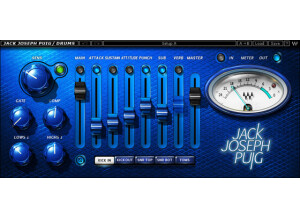
    Jack Joseph Puig is a one of the most famous, award-winning music engineer who's done everything from U2 to No Doubt. Considering his popularity, it was only natural that he would get some famous mixing/mastering plugins, and Waves stepped up to build and offer them to the public. The plugin features modes for kick in, kick out, snare top, snare bottom and toms, sensitivity, main, gate, comp, lows, master and high knobs, a meter switch to select between different views, a phase switch, and center fades that select between attack, size, attitude, punch, sub, length, sustain, tone, presence and verb. The plugin itself is basically an all-in-one plugin to allow for "ease of use" and versatility without having to flood the screen with tons of different plugin. You can really do a ton of shaping with this plugin, and that's the biggest reason for using this plugin. I never read the manual, so I can't comment on that. However, everything is fairly easy and intuitive to use. I never experienced any compatibility issues with this, either. SUITABILITY/PERFORMANCE Waves is one of the number one companies out there when it comes to things like stability and performance. JJP Drums is rock solid, and I've yet to experienced a single crash when using it in my favorite DAW -- Logic Pro. The plugin is also cross platform compatible, so there shouldn't be any issues running this on both Windows and OS X. I do have one minor issue, however. These plugins are 32 bit plugins for OS X, but my DAW is a 64 bit DAW. Because of that, my DAW has to run a special bridge program to fully utilize this. If possible, I'd much rather have to not use that if I don't have to, but it's a fairly minor complaint as they still work perfectly fine. The real cool thing about this plugin is that it doesn't take up too much memory, so you can use quite a few of these as necessary for your overall mix. I've been using the Mercury bundle for about half a year now, so I've had some decent experience with these plugins. OVERALL OPINION Drums are very hard to mix/master, and they take the longest time. You always have tons of different instances of triggers, having to move things closer to the grid without it sounding mechanical, parallel drum compression on the slower stuff and on and on. This plugin is cool for those who just want some simple all-in-one solution to help make their drums sound bigger without having to go through a ton of other plugins and work.

  • « Cool it on the compression Jack! »

    I was skeptical about these artist plugin's but I'm a big fan of Jack's work so I decided to take the plunge. Setup of course is easy. Waves offers so many options for those with different setups. Stereo, mono, vst, whatever. I use cubase and I never have a problem with their stuff. Regardless of how much I like it I always find they have a consistent quality. The Puig vocal plugin isn't rocket science. You only have a handful of controls and the presets are pretty usable depending on what music you're doing. SUITABILITY/PERFORMANCE I'm guessing that this plugin was intended to work in a large band mix. That's how I use it at least. I'm not running a ton of channels in cubase. Just drums. bass, guitar. some synth, and the rare string track every so often. So my mixes probably aren't quite as dense as some. I do layer guitars a lot though. I will say this plugin does make the vocals cut through in a pleasant way. The tone shaping is great. But it seems like the plugin has this crazy strong compression that makes me want to rip my headphones out. I tried dialing it out and it's hard to get rid of it. Basically on all but the most meager of settings, my vocals end up sounding like they've been compressed to the absolute limits and back. Honestly though, I think if you have a super thick mix this would come in handy. Sometimes you really have to push vocals for them to come through in a large cluster of tracks. I can see the excessive compression being useful for that capacity and I guess I should've known better knowing JJP's catalog. He is known for epic mixes. I just wish there was a way to tone that whole thing down. For my uses I'll give it a 5 but I think for the right person it could be a 9. OVERALL OPINION I like how easy this plugin is to use and I think if it didn't sound so dynamically processed it might be my #1. The "magic" button is a mystery to me really. The manual doesn't really explain jack about it. Well, it tries but does more harm than good I think. I get the feeling this vst was supposed to be geared toward beginners. Makes sense. But honestly I still think it's a quality plug. I have the other JJP plugins and I have used some more than others. This one for me is a bit of a miss. I have found other waves plugs I like better for vocals.

  • « Cool strings mastering plugin »

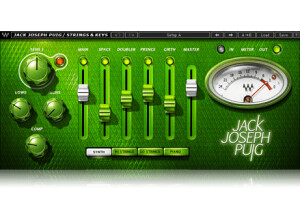
    Jack Joseph Puig is one of the more famous music engineers/producers out there. Just like all his other plugins, this plugin is designed around how he mixes different instruments. JJP Keys and Strings takes a unique EQ/compression approach to mastering different parts. It's basically an all-in-one little utility to help make the parts stand out a bit more. The plugin features knobs for highs, lows, comp, and sensitivity, four different toggle buttons to select between synth, high strings, low strings and piano, sliders that adjust main, space, doubler, presence, girth and master. The plugin itself is pretty different in that it combines these various little EQs and compressors into one plugin that you move independently depending on what you want increased or decreased. I never read the manual, so I can't comment on that aspect. However, the plugin is very simple to use, and I don't see anybody really needing one with something like this. Simply tweak the sliders until you get the sound you're looking for. SUITABILITY/PERFORMANCE Waves is the master when it comes to things like compatibility and stability. First of all, this plugin is rock solid. I've never experienced any slow downs, crashes or instability when using this plugin inside of Logic Pro. It never takes up too much processing power, and that's a good thing considering that there could be multiple instances of this plugin being used on different busses. The one problem I do have, however, is that this plugin is a 32 bit plugin. While I understand it's a touch old, I'd like to see this rewritten in 64 bit. With 32 bit plugins, you usually have to run some sort of bridge/wrapper application to allow you to use them in a 64 bit environment. I find that it's a bit of a pain dealing with that, and I'm hoping they'll update it later on. I've been using the Mercury bundle for about half a year or so, and it's been awesome so far. OVERALL OPINION This plugin has helped me out a few times when I was mixing different string and orchestra parts inside a mix before. It's a fun plugin to use to get a good sound without much effort. That said, I sometimes question these plugins as they lack the versatility that a bunch of other plugins stacked on top of each other have. I like them for getting a good mix without a lot of work, but I always find that if I use a few plugins and take the time to adjust them properly, I can get a better mix. It all depends on how you want to approach it, I guess.

  • « Cool, but I prefer a different way »

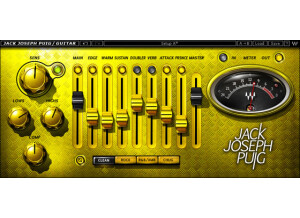
    Probably one of the most famous engineers out there is Jack Joseph Puig. He's done everything from 311 to U2 and beyond. Considering his popularity, it was only natural that he would get some famous mixing/mastering plugins, and Waves stepped up to build and offer them to the public. This plugin features toggles to select between clean, rock, R&B/Amp and chub, a sentsitivity, lows, highs, comp, and master knob, a meter switch to select between output modes, mains control and faders that adjust edge, warm, sustain, doubler, verb, attack and presence. This plugin is a plugin for those who are looking for an all-in-one solution to his or her guitar mixing. It has its own built-in EQ, compressor, reverb and more. I never experienced any compatibility issues with this plugin, so no problems there. I can't say anything regarding the manual as I never read it, but the plugin is fairly simple to use. SUITABILITY/PERFORMANCE Waves is king when it comes to things like stability and performance. JJP Guitars is nice and solid, and I've yet to experienced a single crash when using it in my main DAW -- Logic Pro. The plugin itself is also cross platform compatible, so there shouldn't be any problems running this on both Windows and OS X. I do have a fairly minor issue, however. All of these plugins are 32 bit plugins, but my DAW is a 64 bit DAW. Because of that, there needs to be some sort of bridge program to utilize these. In an ideal world, these plugins would be 64 bit so I wouldn't have to run a separate application to use these. That said, the plugins don't take up much RAM, and that's a good thing as you'll probably have multiple instances of these things. OVERALL OPINION I don't really use this plugin that much. I like to do things differently when mixing guitars. The first thing I always do is add a high pass and low pass filter. That'll give the guitar some room in the mix to stand out and filter out the useless frequencies that may muddy up the mix. Next, I'll add a multiband compressor to help even out those boomy palm mutes. The final thing would be adding maybe a touch of compression or reverb, but it depends on the overall mix that I'm doing. In essence, I don't mess with the guitar tone that much. Because of that, i never found a ton of usage for this plugin, but it's not a terribly bad plugin.

  • « Slider layout is fairly unique »

    In the world of music engineering, Jack Joseph Puig is one of the greats. He's done everything from U2 to 311 to No Doubt and beyond. Considering his popularity, it was only natural that he would get some famous mixing/mastering plugins, and Waves stepped up to build and offer them to the public. The Waves JJP Cymbals and Percussion plugin is a plugin meant for those who are needing some all-in-one device to deal with cymbals in his or her mix. The plugin contains different modes for hi-hats, overheads, room, tambourines, shaker and claves, sensitivity, lows, highs, comp, pan, master and main knobs, a switch to select between different meter modes, and center faders for ambience, attitude, punch and tone. As you can see, the plugin has all kinds of things going on with it. I never experienced any compatibility issues when using it, so no issues there. I can't comment on the manual portion as I never read it, but the plugin itself isn't too hard to use. The good news is that it's crazy easy to setup and run. SUITABILITY/PERFORMANCE Waves is one of the best companies out there when it comes to things like overall stability and performance. The plugin is rock solid, and I've never experienced a single crash when using it in my DAW of choice (Logic Pro). The plugin is also cross platform compatible, so there won't be any issues running this on both OS X and Windows. I do have one issue, however. These plugins are 32 bit plugins, but my DAW is a 64 bit DAW. Because of that, my DAW has to run a special bridge plugin to fully utilize these. I'd much rather have to not use that bridge if I don't have to, but it's a fairly minor complaint as they still work fine. I've been using the Mercury bundle for about half a year now, so I've had some decent experience with these plugins. OVERALL OPINION Cymbals can be a real pain to get correct because they can sound super harsh if you're not careful. This plugin is a nice, all-in-one solution that can really help fix a lot of issues that might occur with cymbals. To be honest, I try to spend as little time on cymbals as possible and just utilize some slight EQ and/or compression. I focus more on the drums themselves than the cymbals when I mix.

  • « Interesting take on bass mixing »

    Jack Joseph Puig is a famous, award-winning music engineer who's done everything from U2 to 311. Considering his popularity, it was only natural that he would get some famous mixing/mastering plugins, and Waves stepped up to build and offer them to the public. This plugin has different modes to select between a DI, amp synth, sensitivity, main, input, master, comp, low and high knobs, meter select switches to select different monitoring modes, center fades to select between edge, attack, width, sub, presence and length. There are tons of different features built into this, and it's a pretty unique take on mixing. Instead of adding tons of different EQs and compressors, this has everything built-in with some visual sliders to move instead of knobs to turn. SUITABILITY/PERFORMANCE When it comes to compatibility, Waves plugins are king. I never once had an issue when running a Waves plugin in my DAW. They're cross platform compatible, so this plugin can be used on both Windows and OS X. They do have one issue, however; these plugins are 32 bit. Today's world is 64 bit, and the 32 bit plugins can be a bit annoying as a separate bridge program usually needs to be activated for them to work in a 64 bit environment. Aside from that, the plugin is awesome. The plugin doesn't take up too much RAM, and considering you might be using multiple instances of this plugin, that's a good thing. I've been using the Mercury bundle for probably half a year or so now, so I've had a fair bit of experience with these plugins. OVERALL OPINION The plugin itself is good, without a doubt. However, when I'm tracking bass for metal, I do things a bit differently. If it's just one bass track, I'll add some slight distortion, run a high pass and low pass filter, add some slight compression and be done with it. I generally don't need extreme EQs or tons of heavy compression to get it to stand out in the mix. In fact, the goal is to make it be in the mix but not dominate it, and I find myself over utilizing these sliders more than anything. This is more of an issue with the way I mix rather than the plugin itself, so I can't rate it down too much.