Log in
EN
FR

MIDI Pedals

209 products found

Sort results
  • Popularity
  • User ratings
  • Price - low to high
  • Price - high to low
  • Used price, increasing
  • Used price, decreasing
  • Name (from A to Z)
  • Name (from Z to A)
  • Added on

The best MIDI Pedals reviews

The reviews Audiofanzine members found the most helpful.
  • « The perfect match for the Axe-Fx... »

    Very compact midi floor controller for the Fractal Audio Axe-Fx, or any other device that needs a midi controller. Jacks for 4 external switches and 4 external continuous controller pedals. With 5 pin midi cable you will need to run the wall wart up front, with a 7 pin midi pedal you can have the wall wart in the rack plugged into the Axe-Fx for less clutter on stage. 15 instant access switches depending on how you have it configured. plus one for tap tempo and one for tuner. You can select multiple instant access switches to toggle more than one button on or off at the same time. My favorite way to use it is with preset banks of 5, which leave you with 5 less instant access switches until you stomp on the reveal switch which will toggle back to 17 switches. Turning the switcher into a virtual 15 efx + tuner + tap tempo pedal board. In my set-up I have it laid out so I have for the IA switches...in no particular order: Tremolo, Chorus, Rotary, Overdrive 1, Overdrive 2, Ring Mod, Delay, Verb, EQ1, EQ2, Phaser, 4 dB boost before amp sim, 4 dB boost at the end of chain for a solo boost, Gate, Pitch, plus wah and volume via external continuous controller. I used to run a T-Rex controller and it 6 IA switches, where I had to basically switch programs mid song if I needed more than 5 on/off functions since one was always use for tap tempo. Going to 17 switches made life so much easier. Plus it pulls the information for your preset off he Axe-Fx no cumbersome naming on the floor controller. Especially when you use the Axe-Edit to edit the presets in the Axe-Fx, and then just have the newly named stuff pulled into the floor controller.

  • « Great Unit but Quality Control an Issue »

    I just bought a Rocktron Midi Mate, had it shipped from the USA, plugged it into my Triaxis using a Rocktron 7-pin Midi cable and supplied phantom power (9VAC) using a Pedal Power AC into the Triaxis. Turned it on and everything just worked! Awesome unit that is perfect for my needs. BUT part of the LED display doesn't work properly (out of the box) which definitely took away the buzz of buying a new unit. Now I need to shell out $60 to mail the unit back for a replacement, or put up with a faulty display. There was nothing wrong with the packaging (padded boxes inside padded boxes) so I can only suspect the unit probably wasn't properly factory tested on the production line in China. First Rocktron product I have ever bought. What's the quality generally like? I searched the net and couldn't find much in the way of problems.

  • « affordable and long lasting »

    The M Audio EX-P is a great MIDI pedal and it will work with all of your M Audio MIDI controllers. This is currently the only pedal that I own but it is the only Pedal that I need for my Axiom Controller. It is well made and will hold up a long time. I have been using this pedal for about 5 years and it still looks like I just took it out of the plastic for the first time. It does not slip on smooth surfaces, like here in my studio I have wood floors and it does not slide across them at all. Also I have used it in a garage before where the floor was very cold and smooth (concrete). It still held up great and did not slide on me. Use can use this pedal with any controller that has inputs for pedals. There are grips on the top part of it where you foot goes to prevent your foot from slipping off of the pedal while performing with it. I remember when I first got this pedal how stiff it was to use at first. It was almost like you have to break it in which is understandable because it only cost about 35 dollars back then so I expected to have to deal with some stuff from it. But the fact that it is still holding up to this day and it has been using hundreds of times is amazing. This pedal is well build and high quality, it seems rather light and plastic like but it will still hold up and now break. M Audio offers several similar style pedals and this is one of the cheaper ones that they make. I recommend getting this pedal if you are in the market to look for a pedal for your MIDI controller.

  • « Hard to program, but powerful »

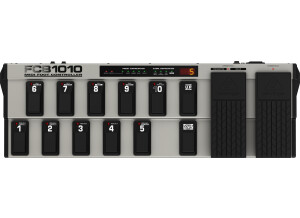
    The Behringer FSB1010 is a Midi Floorboard that can fulfill anyone's midi footswitch needs. With 10 banks of 10 customizable presets each, two expression pedals will customizable midi channel, control, and range, two programmable external relay switches, midi in, midi out, and midi through, this footswitch is very midi powerful! For each preset, you can program 5 different program changes (on 5 different channels), 2 control changes, 2 expressions, and a direct midi note output. You can also set the two external switches on and off; these are perfect for controlling amp channels, such as on Mesa Boogie guitar amplifiers. The hardest part is going through the manual to figure out how to program the unit; it can get very confusing, very fast! Behringer always makes budget, affordable items, and this item is no different. Functionally, it is great, but it is obvious that the ease of programming the unit suffers from cheap development. You have to know your midi very well, which is usually the case anyways with most midi applications. There are lights on each of the pedals, which helps decipher how the preset is programmed (while in the edit more), so that can be helpful. Depending on what version the software is on the FB1010, some of the system features are different. For example, the newer software has an easier, faster way to recalibrate the expression pedals. On the older software, you have to run though an entire diagnostics test, which includes checking the function of all the pedals. I've used this pedal for multiple bands, multiple applications, and although I haven't used it in years, I keep it around, because one day I'm sure I'll need it again. Whether you simply need to change channels, or it you want to use the expressions, or just play some midi notes, you can't go wrong with this midi floorboard. Just don't expect it to be easy to program.

  • « What am I paying for again? Oh yeah... »

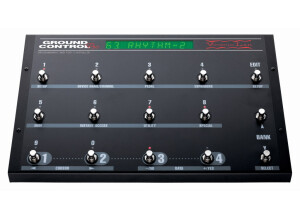
    For those of you who are touring musicians and use rack or midi equipment, I don't even need to say it. Midi controllers are our everything. That's right. We are guitarists/whatever who pay cold hard cash for devices that don't even make sound. That's got to mean something. The bottom line is we need a midi controller that does 2 things. 1. Functions properly for what we need. 2. Doesn't break. Hey, I can't afford a backup for things like this, but unfortunately if I'm on tour and my controller goes down I am basically out of commission. For years I used a Ground Control Pro. Great unit by the way and probably the best value you will find out there for a midi unit. I finally switched to the all access for 2 reason. Even though my GCP had never broken, I felt like it might eventually because of the construction. The All Access felt a bit more sturdy. Also, I needed more presets and IA switches. The all access is indeed very sturdy. It might be the most rock solid controller I've had. I've had some good ones too. The editing isn't too complicated. There's a lot of functionality too. It isn't as functional as some custom options like the Liquid Foot or CAE controller but for most guys it's enough. All I really ask of it is patch and cc changes. Nothing special. This isn't a cheap unit. Definitely not for the budget minded guys. I have had more expensive and nicer units. This one holds its own in quality but not so much in features. I still like the all access though. It's a good touring unit. If you're just playing at home or locally I would get a GCP and save the money. I personally think the quality and extra functionality is worth it for certain breeds of guitarists. It fits that niche. Also I think the menu in the All Access is one of the better ones. Some of these units can be uber confusing, so that's a nice feature to have for guys who aren't super midi savvy.

  • moosers's review

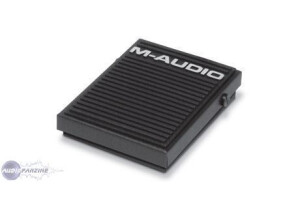
    The M-Audio SP-2 is a sustain pedal for use with electronic and MIDI keyboards. It's compatible with anything that has a 1/4" output for a sustain pedal, which is going to be pretty much every digital keyboard out there. It's got the traditional design for a sustain pedal however, as it's not the cheap press down button that you'll see a lot of out there. This is for players who want a more realistic feel for their sustain pedal, somewhere in the vein of that you'd get while playing a real piano. It can be used for applications beyond sustain as long as your keyboard has the option for sending to another kind of pedal, however, probably 9 times out of 10 people are going to be using the SP-2 for sustaining, and that's what I've used it for as well. I've used the SP-2 along with an M-Audio Axion 61 MIDI controller and I've found it to do the job adequately for inducing sustain into your sound. I love that it has a realistic feel like a real piano would, and while it doesn't feel as sturdy as a real one would, it's close enough to get the job done. I personally don't have this at home but I'm thinking about making an upgrade to it as I've only got a simple press down sustain pedal as of now. This is a lot better and more realistic as I've found out while using it at a home studio where I work with the producer who owns it. The M-Audio SP-2 isn't going to cost you too much at all and if you're after a realistic feel all around for your MIDI controller or other electronic keyboard, the SP-2 or something like it is definitely a good thing to pick up.

  • « Roland PK-5 MIDI Bass Pedal Controller »

    The Roland PK-5 has a black/dark gray housing with brown pedal pads. One-octave pedals ranging from C to C. I've been playing bass for 45 years. Purchased from 8th Street Music in Philadelphia for $459. I wanted synth bass pedals but was unwilling to shell out $3000 for used Moog Taurus I pedals or $2000 for the new Taurus 3 pedals. I was able to purchase the Roland PK-5 and an Alesis Micron keyboard for less than $1,000. The Pk-% is easy to use, although I don't use even 1/4 of its capability. Eight presets enable users of Roland certain modules to control bass, poly, drums and SFX. Used with these modules, the user can trigger drums, background chords and bass while playing, say, another keyboard or guitar. I use the PK-% to trigger monophonic bass sounds from the Alesis via MIDI. I could do up to two notes at atime but that is impractical in my current setup. The pedals can be transposed over 9 octaves. Operation is simple -- plug in your MIDI cables, pick your octave, and play. It seems a bit fragile. A hard road case is a must. Well, built, but mostly plastic. A more rugged wooden housing, though, would increase weight and, probably, cost. The Roland PK-5 is a low-cost alternative for someone who wants basic bass accompaniment is a 'one-man-band' Setting, such as a keyboardist or guitarist who wants to use accompaniment. Functions range from simple mono bass notes via MIDI through a regular keyboard or using one of Roland's modules that offers drums and other polyphonic sounds such as strings that can be controlled via the PK-5. This review was originally published on http://www.musicgearreview.com

  • « well built »

    The DigiTech Control Seven or (Seven Control) is a pretty simple midi pedal. Not too much going on with it that really sticks out to me. A good though about it is that its pretty portal, nice and small and sleek. You can get this online for right around 50 dollars used. It has 7 switches that can basically be used in any midi program. I have used this with Kontakts guitar rig 4 and I LOVE IT. It worked great with it and gave me exactly what I was looking for. It has 5 program switches and can bu used as a stomp box! It has metal chassis and is very compact, this midi pedal will last you a pretty long time. Its very cheap and works great. I actually recommend this one to a lot of people who are looking for a cheap midi foot pedal. This pedal is one of the ones I can say can go head to head with the Behringer pedal (speaking on price and quality) The manual is also extremely easy to understand and use and if you don’t have the manual it can be downloaded on line in PDF format right away. Overall, you really couldn’t ask much more out of a midi “stomp box”. the DigiTech Seven Control will provide you will a high quality midi pedal that you will love no matter what program you are using it with. It will work as a generic controller or maybe your program has a preset for it (but probably not so don’t count on it) Most programs have presets built in for midi devices but unless it’s a device that has some kind of connection with the software through money or promotion then there wont be an automatic preset. So you will have to create your own or just use it generically which is fine by me. You will love this midi pedal!

  • songboy's review

    I have been using this unit for around one year. What I like about the device is it was very easy to use with my Korg TR. I just plugged it in via the midi cable and was instantly using it to scroll through patches. For that purpose it worked great and I never had any problems with it. Now, where I did run into some problems was when I plugged it into my presonus Firebox to control patch selection parameters and hopefully other parameters as well. For some reason, my computer wasn't recognizing the unit through my Firebox. Whether it was indeed the firebox's fault or my computer's fault, I haven't been able to figure out yet. I must have spent over 3 hours trying to figure out how to get the signal. After checking all the cables and looking for any possible driver issues (seemed really unlikely) I just gave up. I left it plugged in though, and a few days later I decided to just push a few buttons and viola, it worked. Unfortunately I cannot figure out how to get this device to do anything besides scroll and select patches. I would love to have it also toggle on/off certain effects, sort of making it a midi stomp box pedal, but alas, no luck yet. I run it though Mainstage (Logic 8) so i figured it wouldn't be a difficult task but I was wrong. Maybe if I ignore it again, it will decide to work...haha. If I could get that function working, I would give this pedal an 11 out of 10. Its sturdy, very simple (no frills, just 12 buttons, a midi channel selector which can be very confusing without the manual, and midi in/out(thru) connections. Mine doesn't have a usb connection but hopefully they will be releasing one that does, if they already haven't. I pad $75 for mine used and consider it a decent buy. Again, if I can get it to do the toggle on/off thing, I will want to have its children. I would make the same choice again if they added a usb connector.