Log in
EN
FR

MIDI Consoles

60 products found

Filter
Sort by
Evaluation
  • Reviewed or not
  • Editor’s award
  • Reviewed by Audiofanzine
Availability
  • Available or not
  • Sold new or used
  • Sold new
  • Sold used
Must-have products
  • All products
  • Flagship products
  • Best rated products
  • Hot products
  • Popular products
Price
  • Freeware
  • Low-cost (< $250)
  • Mid-range ($250 - $500)
  • Premium (> $500)
€
Clear
Sort by
  • Popularity
  • User ratings
  • Price - low to high
  • Price - high to low
  • Used price, increasing
  • Used price, decreasing
  • Name (from A to Z)
  • Name (from Z to A)
  • Added on
Sort results
  • Popularity
  • User ratings
  • Price - low to high
  • Price - high to low
  • Used price, increasing
  • Used price, decreasing
  • Name (from A to Z)
  • Name (from Z to A)
  • Added on
Filter results 60 results found
Evaluation
Availability
Must-have products
Price
  • Freeware
  • Low-cost (< $250)
  • Mid-range ($250 - $500)
  • Premium (> $500)
Show results

The best MIDI Consoles reviews

The reviews Audiofanzine members found the most helpful.
  • « A Specific Mixing Control Surface »

    Used with a Mac and Studio One Pro 3. It is a surface control with the specific controls of a channel strip organized into 7 sections: - input level, low-cut and high-cut filters a phase inversion - gate and transient control - 4-band EQ with selectable frequences and Q… - compression with selectable values for ratio, threshold, attack and release time (gain is automatic) - controls for drive and character (the latter to provide an analog color to the sound) as well as output level, plus two solo and mute keys Finally, on the up and down sides, two series of controls for tracks, presets or plug loading (I’ll detail these later on). Nothing too fancy so far. There are some well-done video tutorials around. The device is wonderfully designed, all made of metal with readable indications, quality knobs and control keys which are well enough spaced for anyone – even those among us with big fingers –, and LEDs everywhere to make it more readable. Let’s get straight to the point. This is a USB- supplied MIDI control surface with no DSP, aimed at controlling not only a collection of Softube plugins emulating professional consoles but also some Universal Audio plugins since version mkII. Please note that: - the SSL4000 plug-in comes with the device - two other consoles are emulated, plus some sort of plugin recycling that can count as a third one (Summit Audio Channel). Other models are rumored to be in the making. - All UAD plugs are not emulated, notably the channel strips (!!!) so check the list of available plugins So if you’re not a UAD user, it’s not obvious that getting this device should be a priority for you. There are of course exceptions (listed below). Depending on the piece of software that you use, you can control the pan, volume, select a track, solo and mute. Well, some DAWS but not all: so far, I believe Sonar and Studio One to be the ones with the best integration (though they’re not the most used. Most parameters featured on the surface can be automated. Regarding its ergonomic aspect, the manufacturing quality and clear (as well as rather classic) layout of the parameters make it a comfortable, intuitive (almost instictive) and easy-to-use surface. But what makes a big difference is Softube’s cleverness to NOT hav but tiny or badly-oriented LED Screens, but to consider how obsolescent such screens are especially while such a device is bound to be used with a real screen. So? Well, just press a small button labelled DISPLAY and you get everything appearing on your screen – all controls, and even 4 display modes! There are two annoying things however: the absence of a transport bar type control and of a motorized fader – a real pity! That would have made it the perfect device. So yeah, I know, Softube has stated before that the Console 1 ONLY aims at controlling the parameters from a single channel strip… But that doesn’t rule a motorized fader out. Finally, in a mixing context, a transport bar is useful, Native Instrument have understood the ergonomic interest of it as they have featured one on their keyboards. While here, you’ll have to use your keyboard and mouse, or invest in a surface control with a transport bar and fader… So, to make it short, a Console 1 mkII with a faderport behind would have been as close as it gets to plain perfect. Now, one can wonder if it’s worth the €500 it costs. I’ll now get to what motivated me to purchase it. First, the excellent SSL plugin that comes with it. As I have neither the budget (purchase, service…) or space to own such a console, a great emulation with physical controls (which is more or less what this product is about) is a real asset. But it’s of course all about tastes, so it’s up to you to decide if this is for you or not. This one plugin has replaced a whole series of plugins that I used before, it’s incredibly efficient and as usual with great plugins if you barely change one parameter and it sounds good then it’s great. Also, I’m a UAD user… (a question of tastes, again). Finally, I intend to buy an 8-fader controller anyway, but for a tight budget that could be a real issue! Edit from September 2018: This one is VERY sturdy: it fell twice from my deck – I have a 2-year-old daughter… Except for a slightly bent corner, it still looks in its prime! It would deserve an extra half-star...

  • « It's fully assignable »

    The Evolution Uc-33 has a smooth design and easy to work with interface. With 24 fully assignable knobs and a LCD screen, plus 9 extra faders that you can use to assign to perform any task you wish in your production software you will have full control over mixing your tracks without even touching the mouse. The Sliders feel really good, they move smoothly and are not too sensitive. Since I have been using the Evolution Uc-33 I have had full control over my mixer and many other functions in Cubase and Reason. I have also used it in FL Studio for a while and it never gave me any issues with assigning different functions to each individual knob or slider. The manual does come with it, but it is not clear cut. It is a pretty small manual for all of the functions you can actually do with this unit. The main face of the Uc-33 is pretty simple, and remember nothing makes any noises or does anything unless you assign it to do something so you can basically customize everything the way you want it and then save it as a preset so you can easily have that same setting when you open up your DAW to start a new session anytime. You can connect this unit to your computer via MIDI with a 5 pin MIDI connection or you can go the USB route which really doesn’t matter. The price of this controller is very fair, it is probably the best part of it. For this price you get a great controller that you can use right out of the box and not have to worry about installing a bunch of software on your system. It is a plug and play set up. Also the Uc-33 is very well built, it seems to be made out of a thick plastic or even with some metal casters. Don’t plan on this thing breaking down on you, because it won’t!

  • AnimalTracksStudio's review

    PEAVEY PC1600X Peavey has certainly packed a lot of features into a small and rather tank like package with the PC1600X. Let’s just say that if you know midi and are comfortable with handling the commands that midi offers, there is really nothing that you can not make this thing do in your midi / DAW system. It can handle programming and midi tweaking with the sixteen sliders, or you can also use it to handle you audio volume level and pan moves in your DAW mix-down. I have used one for four years and it never failed to do what I purchased it to do and more. The only real drawbacks on this unit are that it uses a HUGE power pack of the wall wart variety a whole 16 volts, the display is small and, at time rather cryptic and the volume sliders are not motorized and so you don’t get a visual representation when you go bank to bank as you might in a DAW use. On the up side it comes with fifty presets that cover everything from Pro Tools presets to keyboards and Harmonizers so there is a good chance that you can use it right out of the box without anything more than some minor tweaking of the settings. You will find that saving the settings you make is more of a chore than the actual programming, but worth it once you are done. You can also name and save your presets so that you can have exactly what you want at your fingertips when you need it and named something that is good for you. I retired mine earlier this year when I got a unit with motorized faders. But it still is working and I gave it to a friend that uses it daily in his home studio. These are great units and well worth looking into.

  • « A must have »

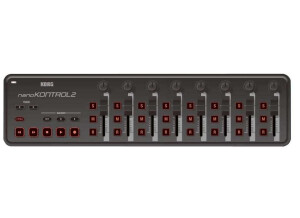
    The Korg nanoKONTROL 2 is a MIDI controller that connects to a computer USB port. It is very affordable and can be purchased in white as well. This controller is relatively small and does not take up much space at all. It cannot be racked; it will have to be used as a table top unit. I use this controller to control synths and effects racks in my DAW and it works great. At this price, I cannot believe more people are not purchasing it. It works great and has never giving me any issues. Sometimes I use it during shows to tweak synths and other sound in real time and it has never let me down. I think I will be using it for a long time. Setting up the nanoKONTROL 2 is very quick and easy. It is just like setting up any other MIDI controller or USB controller. I have only used it on my PC running Windows 7 and with Ableton Live. But I am pretty sure it can be used in just about any DAW. I do wish there were some presets built into Ableton for it so I could have had some templates to go off of instead of having to program it all myself. It would have just made it a lot easier but it still wasn’t hard to do it. It was just time consuming getting it all how I wanted it. But after I did it once, I didn’t have to do it again because I can save the template. I recommend this controller to any DJ or computer musician who wants to use some hardware to tweak things instead of using all software. It really helps me being a DJ having something that is small and doesn’t take up much space to teak sounds and effects with. It is also well built and doesn't seem cheap even though the price is low.

  • BeyondR's review

    Novation ZeRO SL is one of the greatest midi controller that can be used either live or in recordings. What I like most about this product is the great display provided that is very easy to use and giving all the necessary information to the person that is using it. It has a 144 character display , this product has a very well made design and a great quality concerning the features provided and the feedback. Probably one of the biggest advantages of this product is its great display that assists the user on the features that are used , the exact motions that are used , etc . Brightly lit LED has eight smooth encoders , 16 knobs, 8 faders and 32 assignable backlit LED buttons and an auto map function that is very useful. It also has a touch-sensitive rotary encoder which allows a great control in ream time over the hardware for composers and performers. I also love the soft touch velocity sensitive drum pads that allow building different patterns , 32 bright user LED buttons that can be assigned to different tasks , the fact that this product is multi Daw compatible is also a great feature of it. However , the best Daw in terms of compatibility with this product is Ableton Live , so keep that in mind if you're an user of Ableton and you're thinking about buying this product. My opinion about the value for the price is good , this product costs at range of 300 $ , it's not much , buy this controller can make a huge difference in your creation process. Precision and quality of sounds I would rate 9/10 , everything works good. Knowing what I know, I would buy this product again , I love the way it's designed , and I love its features.

  • Jerome06's review

    - How long have you been using the product? About 6 months - Which feature do you like best? The diversity of controls (rotary knobs, sliders, buttons, LFO), and everything can be programmed!!! - Which feature do you like best? The sliders are a bit short. - Did you try any other models before buying it? Yes, the phatboy (a toy), the Doepfer (lot of rotary knobs, no LCD), and other expensive models. - How would you rate its value for money? Very good...You only need to take a look at the number of controls to understand that it's perfect for people who want a good controller at a reasonable price. - Based on your experience, would you choose this product again? Yes, for sure!

  • Audiofanzine FR's review

    (Originally written by Iriebassman/translated from Audiofanzine FR) I bought the Nano Kontrol yesterday. Very light. Faders are a bit soft, but switches are a bit tighter. The provided cable is long enough. The 6 rubber foots ensure a good stability. It has 4 interesting layer modes. The 4th mode is the best for me because in all others modes a switch can control the mute function (for example) but the function will be deactivated as soon as you release the switch. It can be useful for some applications but it's a problem if you need latching switches... But it seems that the KORG Kontrol Editor allows you to configure switch interaction more precisely. In Momentary mode, the transmitted value is "On" when you depress the switch and "Off" when you release it. In Toggle mode, when you depress once it's "On" if you depress it again then it's "Off". The only problem is that the KORG Kontrol Editor will be available in November so I will have to be patient hoping it will work fine with Linux via Wine. Speaking about Linux, the Nano Kontrol works perfectly with Ardour, Jack-Rack and every other Midi software that allows you to configure a hardware controller. I'm very satisfied with it in my home studio and I think it will be easier to mix my songs with Ardour, given its customization possibilities. _________________ Edit: Korg already released the KORG Kontrol Editor and I can tell you more about the product. This compact controller is good... The software makes it entirely customizable. I think it's good that the presets are stored directly in the Nano Kontrol. In other words, once you configured the controller to meet your needs, you can write the parameter names on the unit, unplug it and then plug it again without losing your settings. It's also possible to change the response of the switches (form MMC to note message). It gives you a wide range of possibilities. And it works wonders with Linux using Wine and Midi. I'm pretty satisfied after several hours of use.