Log in
EN
FR

Waves Other computer music software

34 products found

Categories
Series
Filter
Sort by
Waves
Evaluation
  • Reviewed or not
  • Editor’s award
  • Reviewed by Audiofanzine
Availability
  • Available or not
  • Sold new or used
  • Sold new
  • Sold used
Must-have products
  • All products
  • Flagship products
  • Best rated products
  • Hot products
  • Popular products
Price
  • Freeware
  • Low-cost (< $65)
  • Mid-range ($65 - $100)
  • Premium (> $100)
€
Clear
Sort by
  • Popularity
  • User ratings
  • Price - low to high
  • Price - high to low
  • Used price, increasing
  • Used price, decreasing
  • Name (from A to Z)
  • Name (from Z to A)
  • Added on
Choose a category
Selected category: Other computer music software
Sort results
  • Popularity
  • User ratings
  • Price - low to high
  • Price - high to low
  • Used price, increasing
  • Used price, decreasing
  • Name (from A to Z)
  • Name (from Z to A)
  • Added on
Filter results 34 results found
Brands
Evaluation
Availability
Must-have products
Price
  • Freeware
  • Low-cost (< $65)
  • Mid-range ($65 - $100)
  • Premium (> $100)
Show results

The best Waves Other computer music software reviews

The reviews Audiofanzine members found the most helpful.
  • « Visual monitoring tools for audio »

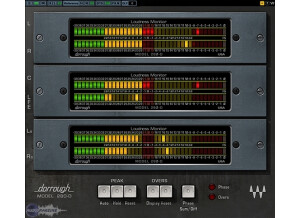
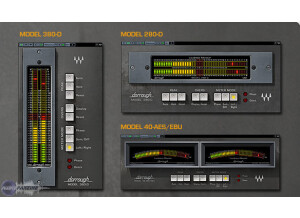
    The Waves Dorrough Meter Collection is a bundle of different frequency analyzing plugins. What makes these special is that they're modeled after extremely famous hardware made by the company Dorrough Electronics. For the past few decades, it was Dorrough that ruled the world in hardware monitoring devices, and considering everything is going digital today, it was only natural for someone to clone the hardware, and what better manufacturer out there than Waves? There are two different versions out there -- the stereo version and the surround version. This review will mainly deal with the stereo version. The package comes with the 280D, 380D and 40-AES/EBU plugins. In reality, they're all basically the same plugin, but they look different. Waves offers different styles for those of you who are used to visually seeing audio in vertical, horizontal or arc form. I never read the manual, but it's not needed with this device. There are a few buttons that'll allow you to hold the analyzer at the peak, reset it, change the phase and adjust the left/right channels to accurately monitor loudness. SUITABILITY/PERFORMANCE The plugins themselves are super simple to use. The moment you pop it into whatever bus you want, you'll easily get the hang of it. Thankfully, most Waves plugins are like this, which is a big plus for anybody considering buying other bundles offered by Waves. The plugins work for both PC and Mac, so the only people really left out would be the Linux guys. The gear has never crashed on me, and that's always been a good thing about Waves plugins. They're pretty much rock stable. OVERALL OPINION These are a good alternative to those who find their current DAW monitoring programs to be lacking. Most of today's professional DAWs don't really need these, but some of the cheaper ones could benefit with the use of these plugins. It's featured in the Mercury bundle, so if you decide to get basically everything that Waves offers, these will be included. If you just want these and want to save some money, get the Dorrough Meter Collection. It'll be much cheaper.

  • « Get rid of that heavy gear »

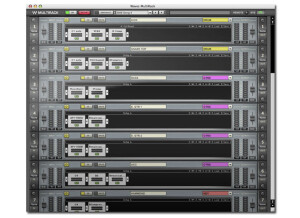
    The Waves MultiRack does not require you to have iLok and activating it is very easy with your USB drive or even you hard drive. It does come with a new plug in that was not available on version 8 it is called NLS Non-Linear Summer. This plug in is gear for people who are working with live sound, I would not purchase it if you don’t have a live use for it. SUITABILITY/PERFORMANCE The MultiRack is easy to install and set up, even if you don’t have the previous version of it and you are installing it from scratch it will still only take a few minutes. If you have the previous version then you know that it required iLok, so if you upgrade to this version 9 of MultiRack you will no longer have to worry about iLok and you can run your Version 8 and Version 9 plug ins simultaneously. MultRack does come with a manual that you can download online, it is easy to use and read through (Adobe Acrobat Reader). You can easily search what you are looking for and it is way better than having a hard copy and having to flip through pages to find what you need. OVERALL OPINION Using the MultiRack will allow you to get that studio quality and sound to your stage audience in no time. You will have full control without having to worry about racking or running cables. It is also compatible with both Mac and PC computers. With the MultiRack all you need is your laptop, interface and MultRack. You will then have everything you need to run your live show. You can get rid of all of the rack-able units and extra gear that you don’t really need which is a plus because you won’t have to carry it around. MultiRack will replace all of those heavy rack-able units that you hate taking around with you.

  • « Not a bad software tuner »

    When it comes to guitars, the number one thing that every guitar must do is be in tune. If a guitar is not in tune, it'll throw your entire mix off. Personally, I'm fairly adamant about perfect tuning and intonation. Well, as perfect as it can be; it's a guitar, after all. Various different software tuners have popped up throughout the years, and the Waves version is among them. It's been around longer than some of them, but it's still a very solid tuner. The tuner itself came with my GTR3 package, and I've used it a few times within the program. It's a chromatic tuner where you can set your reference pitch to nearly anything you need to set it to. It's fairly accurate, although there are some other tuners out there that are quite a bit more accurate. SUITABILITY/PERFORMANCE This is where Waves is the champion. They never drop the ball when it comes to stability. I've never experienced a single mishap or crash while using this software, and I don't expect to. I've been a long time user of Waves, and they never let me down. This is also cross platform compatible. I'm a Mac user, and living in a world that's dominated by Windows users can sometimes be a bit of a drag. Waves caters to both OSes without any issues. There is one issue, however. The GTR3 software is 32 bit software. It's not a huge deal, but OS X is moving towards being fully 64 bit, and I hope they update it before the next OS rolls around and drops 32 bit support all together. OVERALL OPINION The tuner itself is fine. It tunes your guitars, basses or whatever perfectly fine. However, there are better options out there if you're into the whole software tuning thing. Personally, I like to use pedals to tune my guitars. I find that the Turbo Tuner is one of the most accurate and easiest to use tuners out there. The accuracy is way better than this software. They also make a software version of that very pedal, and it works nicely as well. I just find myself being a bit more of a hardware guy. In short, the tuner is good, but there are better ones out there.

  • « Surround edition »

    The Waves Dorrough Meter Collection is a bundle of different frequency analyzing plugins. What makes these special is that they're modeled after extremely famous hardware made by the company Dorrough Electronics. For the past few decades, it was Dorrough that ruled the world in hardware monitoring devices, and considering everything is going digital today, it was only natural for someone to clone the hardware, and what better manufacturer out there than Waves? There are two different versions out there -- the stereo version and the surround version. This review will mainly deal with the surround version. This comes with the 280-D, 380-D, 40-AES/EBU and a Sum & Difference/Phase meter. The biggest difference between this and the stereo version is that these are more meant for movie soundtracks. Despite all of today's technology, people people still listen to music in stereo. We also write in stereo, so the 5.1 plugins don't exactly apply to most musicians out there. Those working for Pixar, however, will find these especially useful. SUITABILITY/PERFORMANCE The plugins themselves are super simple to use. The moment you pop it into whatever bus you want, you'll easily get the hang of it. Thankfully, most Waves plugins are like this, which is a big plus for anybody considering buying other bundles offered by Waves. The plugins work for both PC and Mac, so the only people really left out would be the Linux guys. The gear has never crashed on me, and that's always been a good thing about Waves plugins. They're pretty much rock stable. OVERALL OPINION These are harder to judge as they're not really meant for guitars. You can use them for music, but it's more meant for movie soundtracks and the such. They're set up for 5.0 and 5.1, after all. Because of that, I don't use them much at all. It'll only be the occasional usage when I'm dealing with something in Final Cut Pro or something. They're a bit hard to recommend for musicians, but if you're dealing with movies and motion pictures, check this out.

  • « Frequency analyzer »

    The Waves PAZ Psychoacoustic Analyzer is a plugin meant for monitoring the frequency of whatever track you put it on in your DAW. It's a nicely written plugin that's included in the Mercury, Horizon, Diamond, Platinum, Gold, Silver and Sound Design suites. It's also compatible with both Mac and PC, so nearly anybody can use it. The plugin itself doesn't really need a manual as it's one of the more simple plugins that Waves has to offer. Basically, there is a design on the screen that allows you to monitor the frequency of the track you have PAZ on. This can be either an individual guitar track or the entire mix. Once it's on, you can freeze the analyzer to see exactly how your mix sounds. The tool itself is used only for monitoring, and they're extremely helpful for fixing any overlapping frequencies that are being bundled up, adjusting the mix to suit a particular frequency or even to see what frequencies aren't being used that much. SUITABILITY/PERFORMANCE Waves plugins can sometimes look a bit dated, especially on an OS like OS X, but the performance of them has always been fairly stable. There's an issue with it working only in 32 bit in Logic, but Logic has a built-in converter that'll automatically launch it in 32 bit so you don't have to convert the entire program to run it. It's basically acting like a wrapper to run it in 32 bit instead of 64 bit. I've never experienced any crashes with Waves plugins, and they've saved me a couple times during various mix downs. To top it off, it doesn't require a ton of memory like certain other programs. Then again, this is something you usually don't just leave on your bus as it's not necessary to have it there for the final bounce. OVERALL OPINION I actually find myself using the Logic Spectrum Analyzer more than this simply because it's a little more convenient than scrolling through the entire Waves plugin list to find this. The fact that it's given in basically every Waves bundle proves that it's a necessary plugin, but it also proves that a lot of today's DAWs already have something just like this built in. That said, the plugin is very stable, it works as advertised and it is extremely easy to use.