Log in
EN
FR

Digidesign Dynamic Processor Software

10 products found

Categories
Filter
Sort by
Digidesign
Evaluation
  • Reviewed or not
  • Editor’s award
  • Reviewed by Audiofanzine
Availability
  • Available or not
  • Sold new or used
  • Sold new
  • Sold used
Must-have products
  • All products
  • Flagship products
  • Best rated products
  • Hot products
  • Popular products
Price
  • Freeware
€
Clear
Sort by
  • Popularity
  • User ratings
  • Price - low to high
  • Price - high to low
  • Used price, increasing
  • Used price, decreasing
  • Name (from A to Z)
  • Name (from Z to A)
  • Added on
Choose a category
Selected category: Dynamic Processor Software
Sort results
  • Popularity
  • User ratings
  • Price - low to high
  • Price - high to low
  • Used price, increasing
  • Used price, decreasing
  • Name (from A to Z)
  • Name (from Z to A)
  • Added on
Filter results 10 results found
Brands
Evaluation
Availability
Must-have products
Price
  • Freeware
Show results

The best Digidesign Dynamic Processor Software reviews

The reviews Audiofanzine members found the most helpful.
  • moosers's review

    Digidesign's AIR Filter Gate is a unique plug-in that is available with Pro Tools 8. You can't get it anywhere else, but it does come free with the newest version of Pro Tools, and installs automatically when you install the host software of Pro Tools, so you don't need to do anything further to install it once you've got Pro Tools 8 up and running. It will show up under your modulation effects in your plug-ins. The interface of the plug-in is very basic, as there isn't anything fancy at all about the look of it. Digidesign (now strictly under the name Avid), has made these AIR (Advanced Instrument Research) plug-ins easy to use so that even those new to Pro Tools will be able to use them without a hitch. This one has sections for gate, filter, and modulation, each with their own parameters. There are also parameters to choose the pattern, which there are a ton of choose from, as well as for rate, swing, and mix. I don't think that they make any manuals for the AIR plug-ins as they should be easy enough to use without needing one. SUITABILITY/PERFORMANCE I'm currently running the Digidesign AIR Filter Gate on a Mac Book Pro that has as 2.2 Ghz Intel Core 2 Duo processor and 4 GB of RAM. I just upgraded to Pro Tools 8 from 7.4 LE, which again is the only way that you can have the AIR Filter Gate plug-in. I run Pro Tools LE with a Digi 002R or a Micro Box depending on where I'm working from. Nothing about this plug-in will take up much of your processing power at all. If you've got an adequate system to run Pro Tools on already, you'll be fine with running this. OVERALL OPINION The AIR Filter Gate can produce some really interesting sounds. With a name like 'filter gate,' I expected it to be somewhere in between a traditional gate and a traditional filter, but it definitely isn't like that at all. It's hard to describe the bulk of the sound available here, but they are mostly in the range of choppy, pulsating modulation effects. I'd encourage you to check this one out if you've got Pro Tools 8, as there are a lot of cool creative things you can do with it, although I'm not sure there are any traditional uses for it.

  • moosers's review

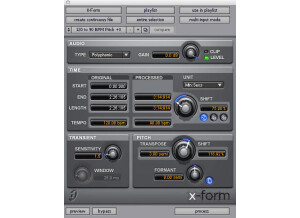
    Digidesign's X-Form is a time stretching and pitch shifting plug-in, available on it's own or with the DV Toolkit bundle for Pro Tools. It is designed for users who want to compress or stretch out audio, giving a lot of control over what you can do. The interface is generally user friendly, containing a few different sections for audio, time, transient, and pitch. The audio has parameters to choose the type of audio (polyphonic, mono, etc), and an overall output gain knob. The time section, which is really the main part of the plug-in contains parameters for setting the time that you'd like to select, the tempo it is at, and the amount that you'd like to shift it. It will show you before you process it what your new tempo and length will be. Next, the transient section has parameters for sensitivity and window, while the pitch section has those for transpose, shift, and format. While this might seem like a decent amount, it is really pretty simple and straight forward, so I don't believe that you need the assistance of a manual for it. SUITABILITY/PERFORMANCE I have only had a need to use one instance of Digidesign's X-Form within a single session, as this is the type of plug-in that I use sparingly and only when something comes up where it is necessary to use it. I've been running X-Form on a Mac Book Pro that has a 2.2 Ghz Intel Core 2 Duo processor and 4 GB of RAM, and in Pro Tools LE 7.4 that runs with a Digi 002R. X-Form has never been taxing on this system at all, and I don't see it being a problem anytime soon because of the nature of it's use... OVERALL OPINION While I won't say that Digidesign X-Form is a necessary plug-in, it is definitely more than nice to have around. When I can I like to use Pro Tool's time stretching options, but not all version of Pro Tools have it, and X-Form can be a bit simpler to use and provides a little bit more control. The plug-in isn't as cheap as you'd like to see it be on it's own, but if you buy it with the DV Toolkit, which I would recommend doing, it is a pretty good deal. The DV Toolkit is a lot cheaper in terms of price per plug-in, so I'd encourage those interested in X-Form to check out this to see if it might be worth it to buy the entire bundle, as you save a lot of money and get a ton of really cool software...

  • mooseherman's review

    This is a pretty easy plug-in to install when you do get it. The manual pretty much tells you everything you need to know, quickly and easily. The general setup is really simple, it only takes a short time. Without getting too specific, if you have Pro Tools set up and have installed plugins, this is no problem for you to do. The functions that are possible with this compressor are pretty standard compression, attack, release, gain, ratio, etc. SUITABILITY/PERFORMANCE I have yet to really have a problem with this plug-in in particular. I have noticed that when I use it with other, more problematic plug ins, it tends to slow down my Mac quite a bit. This is mainly because I'm using it in LE on a Macbook Pro. I've used it in full studio Pro Tools rigs where it worked just fine alongside almost any other plug-ins. I think it was mostly the fault of the other plug-ins, as I can use this one on a multitude of tracks on the same project. So in terms of performance with my setup, it's pretty great. OVERALL OPINION The sounds that come out of this compressor are pretty good. I really don't think it's the best option. New, it's about seven hundred dollars, and I think that's a pretty reasonable price just in comparison to some of the other ones out there, but I definitely wish it was cheaper, or that I somehow could have bought it cheaper. My attitude at the end of the day is usually that if I'm gonna spend a ton of money on compression, I'm going outboard. I'm slowly adjusting that mentality, but this isn't the compressor that's gonna convince me to go digital. To it's credit though, it came close.

  • moosers's review

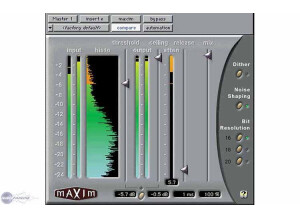
    Installing the Digidesign Maxim compressor plug-in was a quick and easy process as it only took a number of minutes. I had no compatibility issues at all and really had no problems at all across the board. The interface of the plug-in is pretty easy to follow as it has movable sliders for threshold, ceiling, release and mix, and has buttons for dither, noise shaping, and bit resolution. It also has great meters for input, histo, output, and attenuation. I've never seen the manual for Digidesign Maxim so I don't know if it is helpful or not. SUITABILITY/PERFORMANCE I am currently running the Digidesign Maxim plug-in on a Mac Book Pro that has a 2.2 Ghz Intel Core 2 Duo processor and 4 GB of RAM. I run the plug-in in Pro Tools LE 7.4 that runs off of a Digi 002 rack audio interface. With this set up I've never had a problem running this plug-in at all and I'm able to run a number of them at the same time without any issues. I don't always run that many of them at a time, but it is good to know that I'd be able to if I so wanted to. OVERALL OPINION I've been using the Digidesign Maxim for about two or three years and since then it has been a very reliable plug-in for me. I like how simple it is to use and the sound quality is pretty good as well. It works for all sorts of applications, especially for drums including kick and snare drum specifically. The price of the Digidesign Maxim plug-in is very reasonable which makes it a good plug-in for audio engineers of all types, including amateurs and professionals. While there are other compression plug-ins I'd rather use than this one, as this sometimes sounds a little bit too digital for me, but for a lot of different instruments this plug-in will work fine. Overall, if you are looking for a good compression plug-in to use for Pro Tools, the Digidesign Maxim is a fine choice.

  • moosers's review

    The Digidesign Dynamics III was easy to install and I had no compatibility issues with my system. The plug-in comes with Pro Tools LE and is installed while you are installing Pro Tools, so there couldn't be anything easier about that. The configuration of the pedal is a basic compressor and is easy to follow. I don't have a manual for this and I'm not even sure if one exists... SUITABILITY/PERFORMANCE I run Dynamics III with a Mac Book Pro that has a 2.2 Ghz Intel Core 2 Duo processor and 4 GB of RAM. I use it with Pro Tools LE 7.4 and a Digi002R. I have never run it with anything else as I'm pretty sure you can't run it with any other software because it is a Digidesign plug-in that comes free with Pro Tools. I am able to run a bunch of these at once without any problems and I have never had a problem with it whatsoever - this plug-in with my configuration is completely stable. OVERALL OPINION I've been using this since I got Pro Tools, which was about three or fours years ago. The sound of this compressor is good and usable, but since I have other options like Smack and a URS compressor, I don't use it all that often. The sound quality is good but is definitley not spectacular. The meters and graphs are a big upside on this as they are quite helpful. The interface is easy to follow and even those with no previous use with a compressor should be able how to us this. I like it on drums and guitars and I probably wouldn't use it for anything else, as the tone isn't vibrant enough for my taste. It is easy to follow though and since the price is free with Pro Tools, you can't really complain about it at all and it is nice to have as an option.

  • soccerplayer25's review

    Getting set up with the Digidesign Smack LE plug-in couldn't have been easier. I bought it with an iLok, so it was already synced to that. You need to install the iLok driver to your computer and then there should be no problems. I would recommend following the steps in the manual that come with it, they are very simple. SUITABILITY/PERFORMANCE I run this plug-in with Pro Tools 7 LE software on my Hewlett Packard computer with a 3.0 Ghz processor and 1 GB Ram. I haven't had any problems running this plug-in with my set up and it has been very stable. It runs quicker than I thought it was going to, but that could be due to my computer, among other things. OVERALL OPINION I've had this plug-in for about 6 months now and it is my best compression plug-in. I use it on all of my lead vocals and bass guitar, and it also sounds great on drums and electric and acoustic guitars. I hadn't tried out any other compression plug-ins other than the ones that come with Pro Tools, and I definitely like this one better than any that come with Pro Tools. Its so rich and full sounding, and I love the presets. There are a ton adjustable settings to get specific sounds, but it is really easy to dial up a great tone with one of the presets. While it is definitely a little bit expensive, its worth it for me to have a great sounding compressor that I can use over and over again without the hassles of outboard gear.