Log in
EN
FR

Oli Larkin

13 products found

Categories
Filter
Sort by
Evaluation
  • Reviewed or not
  • Editor’s award
  • Reviewed by Audiofanzine
Availability
  • Available or not
  • Sold new or used
  • Sold new
  • Sold used
Must-have products
  • All products
  • Flagship products
  • Best rated products
  • Hot products
  • Popular products
Price
  • Freeware
€
Clear
Sort by
  • Popularity
  • User ratings
  • Price - low to high
  • Price - high to low
  • Used price, increasing
  • Used price, decreasing
  • Name (from A to Z)
  • Name (from Z to A)
  • Added on
Choose a category
Sort results
  • Popularity
  • User ratings
  • Price - low to high
  • Price - high to low
  • Used price, increasing
  • Used price, decreasing
  • Name (from A to Z)
  • Name (from Z to A)
  • Added on
Filter results 13 results found
Evaluation
Availability
Must-have products
Price
  • Freeware
Show results

The best Oli Larkin reviews

The reviews Audiofanzine members found the most helpful.
  • yoTrakkz's review

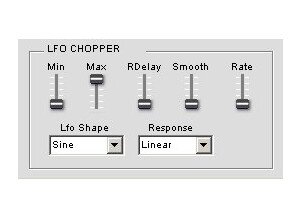
    The Oli Larkin LFO chopper is a free vst plugin that will work for your window’s computers. I ran this will FL studio 8xxl about a year ago. I have no complaints with this, it worked fine and takes up no cpu. The Vst itself is pretty plain though, no bells and whistles just straight forwared. No need for a manual and if you did need one I don’t think you could get one, this is a free software vst that you download anywhere on line and you wont find a manual for it. SUITABILITY/PERFORMANCE The Oli Larkin LFO chopper is similar to tremolo plug ins and works with a bunch of different LFO wav forms. There are only a few sliders on this vst and they are minimum and maximum amplitude, delay, smoothing. that’s about it, like I said its extremely straight forward and easy to use. But the Oli Larking LFO chopper isn’t the only vst like this on the free market. So if you need something similar to this, although this is a great freeware vst, I suggest checking with kvr audio and seeing what other plug ins they have available that are close to this one, or google it on the web because this is not something that is up high on the plug in vst chain. OVERALL OPINION Overall this is a great vst though and the best part is that its free, and we all love free. But with free you get what you get. So be prepared for a plain vst, not to say it doesn’t work good because it does, it actually works great its just not pretty to look at. I have not used it in any other software besides FL Studio so I can’t say wether or not it works with other popular programs. But as long as you are running windows you should be ok. But give it a shot , its free and if you don’t like it you can try some other vst’s that can do the same thing.

  • moosers's review

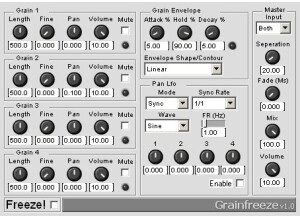
    Oli Larkin's Grain Freeze is a granular synthesis effects plug-in that is just compatible on Windows based systems that have a DAW that can support VST plug-ins. Unfortunately that's the scope of this plug-in and the other free ones that Oli Larkin has to offer, but it's definitely a cool one for those have will have access to it. You can get the plug-in as a free download straight from the Oli Larkin website, which is a process that should take less than a minute. Once it's up and installed, cracking the code of the interface will take a little longer depending on your experience with granular synthesizers. This one has four grain sections, each with parameters for length, fine, pan, volume, and a mute option. The plug also has sections for grain envelope, a panning LFO, and a master control section. Once you get the hang of using the grain sections I think you'll find it to be pretty easy to use in general if you know the basics when it comes to synthesizers. I don't believe a manual was made for this if you were looking for one... SUITABILITY/PERFORMANCE While I no longer have a system that will support the Oli Larkin Grain Freeze plug-in, when I did I was running it in Cubase SX 2.0 and later in 3. The computer that I was running everything on was a Hewlett Packard Pavilion dv8000 Notebook that had a 3.0 Ghz processor and 2 GB of RAM. I also had a MOTU 896HD audio interface to run everything through. I can't recall ever having a problem with this plug-in, but I never used more than one instance of it at a time within a session... OVERALL OPINION The Oli Larkin Grain Freeze is a really cool little free plug-in. It's worth having for everyone who is able to run it, although this will be a limited amount of DAW users since this excludes Mac users and anyone that has a PC who can't run VST plug-ins. Of course you can't complain too much because it's free! It's a really cool sounding effect when used on synthesized sounds or otherwise, and it's versatile between the four grain freezers. It's definitely a unique effect as it's the kind of make up you won't find in too many places, but for me it makes it all the more valuable and impressive that it's free. Check it out for yourself to see what it's all about!

  • moosers's review

    Oli Larkin's Beat Morpher software is a unique and FREE VST and Windows only plug-in that allows you to 'morph' together two separate drum patterns. It works by playing back samples to go with however you set it, but it's unique in that it's actually two drum machines in one and that you can merge the two of them together. It's a really cool plug-in even setting aside the fact that it's free. The downside is that most users won't have access to it due to compatibility issues being that it's so limited in it's compatibility scope. The interface is fairly in depth and has a lot of controls and features to get used to. Setting your two independent drum patterns is easy enough but it's the morphing features that will take a bit of time to get used to, or at least it took a little bit of time for me. There probably isn't a manual so you're on your own here, but the good news is that it's still free! SUITABILITY/PERFORMANCE I used to have the Oli Larkin Beat Morpher plug-in running on my home recording system but no longer have it since I've since switched systems. I used to have Cubase SX running on a Hewlett Packard Pavilion dv8000 Notebook that I was running this on, but now have Pro Tools on a Mac and can't run it any longer. I would be nice to have a bit more compatibility options, but being that it's free we can't complain too much. It should run fine on any system that is able to run it, however. OVERALL OPINION If you've got a PC and can run VST plug-ins, do yourself a favor and give the Oli Larkin Beat Morpher a shot. It's not for everyone, but it can do some really cool things and is definitely worth a try for anyone who likes working with making their own drum patterns and getting sounds inside the box. You can make some pretty insane drum patterns between the two at once and it works with samples so you can still have all your sounds right in it. I haven't used it in a few years now since my system is no longer compatible, but I would definitely still be using it if I did. Hopefully they'll make it compatible on more systems, but I really don't think they will any time soon as it seems to be just the one guy making these free plugs. There's no reason not to try this one out if you're able to!

  • moosers's review

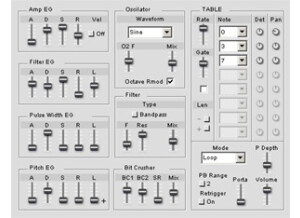
    The Oli Larkin SE64 is a unique and free virtual synthesizer. It's unique because the sounds heard here are from vintage video games! It's a monophonic synthesizer that runs with two oscillators. The synth is unfortunately only available to those DAW users who have a Windows operating system and can run VST software. It should be a quick and easy download, but I honestly don't remember too much about installing it since it was years ago now and I'm not currently running it due to an incompatible system. As far as the make up of the synth is concerned, it's got the two oscillators, one of which can be set to a few different waveforms and the other which is set to a triangle waveform. The synth also has envelope control for a filter, amplifier, pitch, and pulse width, in addition to have controls for a matrix table, a bit crusher, and a variety of other specific controls. I doubt a manual was made, but you should be able to find all the information you need right from the Oli Larkin website. SUITABILITY/PERFORMANCE While I'm no longer able to run the Oli Larkin SE64 plug-in, when I did it was in Cubase SX 2.0. I had a Hewlett Packard Pavilion dv8000 Notebook computer with a 3.0 Ghz processor and 2 GB of RAM that I was using to run everything on. I was able to run the synth without any issues at all, as I believe will be the case with nearly everyone running it - it doesn't take up very much processing power at all. OVERALL OPINION Oli Larkin's SE64 is definitely one of the coolest virtual synthesizers that I've used as it's totally unique. I don't know of any other synths like this that just focus on sounds from old video games, but it's a pretty awesome idea and it's even cooler that it's free. The aim I think is definitely achieved here, as it's possible to get a nice collection of varying retro game sounds for sure. This is really a must have for anyone who has a compatible system which unfortunately does not include myself at the current time.

  • moosers's review

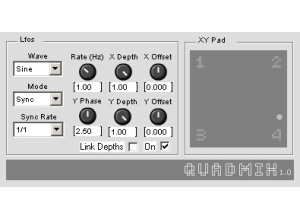
    Oli Larkin's Quadmix is a free plug-in that's actually two in one, also featuring a Quadpan plug-in. The plug-in is for use for synthesizer applications, but essentially it sends four separate inputs to one output, and Quadpan does the opposite of this by sending one input to four outputs. The plug-in is available as a free download on Oli Larkin's website, along with a variety of other free ones. However, you can only get it for VST based Windows systems. The interface has an LFO with parameters for waveform, mode, and sync rate, while there are also knobs for rate (frequency), phase, and X & Y depth and offset as well. It's been a long time since I used the plug-in so I don't remember all the ins and outs of it, but it should more or less be pretty simple depending on what you're using it for. It's a utility plug-in more than anything, and I doubt if there's a manual for it. SUITABILITY/PERFORMANCE I'm not running the Oli Larkin Quadmix plug-in any longer at home since I don't have a system that will run it anymore. My old computer was a Hewlett Packard Pavilion dv8000 Notebook with a 3.0 Ghz processor and 2 GB of RAM, which I used to run Cubase SX 2.0 and later 3. I didn't have any issues running this plug-in on this system and would be surprised if users did have issues with it. OVERALL OPINION While I never used the Oli Larkin Quadmix plug-in too much when I had it, it's still one worth having around if you're dealing with synth related activities. It's not going to be needed on anything close to a daily basis (of course depending on what you're trying to do), but it came in handy a few times for me. It's nice that it's free of course and does give you a good amount of control considering this. Not everyone will have a compatible system, but for those who can get it, it's worth having Quadmix and Quadpan if you're dealing with routing virtual synthesizers at all.

  • moosers's review

    The Oli Larkin Advanced Midi Gate is a free plug-in for use in your sequencer. It can be used for a variety of purposes, but will be used most for triggering MIDI gates. The plug-in is downloadable right from the Oli Larkin site, along with a number of other free plug-ins. Unfortunately, the plug-in is only available as a VST plug-in for Windows operating systems. For this reason, I’m not running it on my current system and haven’t used it in a few years since I had my DAW running on a PC. The interface of the plug-in itself definitely gives you the full array of controls, including envelope parameters, filter controls, and much more for a little MIDI gate. It also has a stereo enhancer toggle knob and LFO sync and panning. I don’t think users will need a manual, nor am I sure if one is even available for this. SUITABILITY/PERFORMANCE I used to run the Oli Larkin Advanced Midi Gate on my old Hewlett Packard laptop. I never had any problems at all running the plug-in as it doesn’t take up much of your processing power at all. The HP computer I was running it on had a 3.0 Ghz processor and 2 GB of RAM, while I was using it mostly in Cubase SX. I’d highly doubt if anyone had a problem running this plug-in… OVERALL OPINION I’ll never say no to a free plug-in, so I was happy to be able to download the Advanced Midi Gate and the other Oli Larkin for free when I was able to run them. I do wish they were compatible on Mac as I’d still be running them, but did get some good use from this when I had it. I didn’t work with MIDI all that often when I did have it, so I’m sure there was a lot I could do with it that I didn’t, but was definitely cool to have around anyway. I like this plug-in because it’s unique and isn’t one you’re going to fine for free in too many other places. In fact, that’s the case with most of the Oli Larkin plug-ins. If you’re still reading this review, I’d suggest heading over to the Oli Larkin site to try this one for yourself.

  • moosers's review

    Oli Larkin's Formant Filter is a free VST plug-in for Windows operating systems. It's not available in any other formats, unfortunately. You can download the plug straight from their website, and it's easy enough to install it as well, as it should only take a couple of minutes from start to finish. This isn't your average filter, as it's to be used with virtual software synthesizers. It's not the easiest plug-in to use in the world, but once you get the hang of it it's not too bad. It's been a couple of years since I've even used the plug-in however, since I don't have a compatible system for it any longer. The interface is made up of main sections for the five band pass filters, an LFO, and a main section. It has preset vowel sounds for getting your sound shapes, but you can also put your own in there as well, although I've only used the built in settings. A manual probably wasn't made for this software. SUITABILITY/PERFORMANCE All systems should be able to handle the Oli Larkin Formant Filter plug-in just fine. I was running it on a Hewlett Packard Pavilion dv8000 Notebook with a 3.0 Ghz processor and 2 GB of RAM and in Cubase SX software. I used it with some free synths, although I don't remember exactly which as it's been a good while now. I wish I could run this on my current system but it's not compatible. I'd be surprised if anyone was having trouble running it if you're already able to run a virtual synth smoothly. OVERALL OPINION The Oli Larkin Formant Filter is definitely a nice freebee for those who have access to it. If you have a virtual synth that doesn't have a formant filter built into it, this is going to be quite helpful. It sounds good and there's a lot that you can do with it between the five filters. I like that it has the vowel sounds built right into it as it makes it easy to get those kind of tones right out of your synthesizer. The only bad thing about this is that you can't get it unless you're running a PC and a VST compatible platform. If you meet these requirements, go ahead and get this plug-in now!

  • moosers's review

    Oli Larkin's AutoPan plug-in is a free VST plug-in for Windows operating systems. Oli Larkin has a bunch of free plug-ins in this format, with this being one of the simplest of the bunch. You can download the plug straight from the manufacturer's website, which is an easy enough process. Unfortunately it's not a plug-in that's available for all users, so make sure you're compatible before going any further. The interface of the plug-in is very simple, and everyone should be able to figure out how to use it regardless of experience. It's got controls for waveform, mode, synch rate, panning mode, depth, and frequency rate. Basically you get a few different LFO shapes to choose from here, but you're pretty limited in the amount of sounds possible. It is easy to use, so a manual isn't necessary nor do I think one is available. SUITABILITY/PERFORMANCE I'm not running the Oli Larkin AutoPan plug-in anymore as I don't have a PC for music anymore. When I did have it, I was running it in Cubase SX. I had a Hewlett Packard Pavilion dv8000 notebook with a 3.0 Ghz processor and 2 GB of RAM and ran everything through a MOTU 896HD audio interface. I can't imagine that anyone would have problems running this plug-in as it takes up just about the least amount of processing power possible. OVERALL OPINION While not the most impressive sounding panner, the Oli Larkin AutoPan plug-in is still worth having around since it's free and easy to use. I didn't use this all that much when I did have it on my old system, but it was one of the only auto panning plug-ins I had so it was definitely good to have just in case. It's only going to be available for Windows & VST based DAW's, as is the case with the other free Oli Larkin plug-ins. They're worth having around for those who are able to run them, but they're not the best in general, although definitely useful. I can't complain at all about free plug-ins, so you should definitely try out this AutoPan plug-in for yourself if you're a fan of free plug-ins like I am!

  • moosers's review

    The Oli Larkin Stereo Enhancer is a really simple and free plug-in for Windows operating systems and VST based DAW platforms. It's the simplest of the free plug-ins that Oli Larkin has to offer, which are definitely worth checking it out in general since they're all free. You can get everything straight from the Oli Larkin website. I'm not sure what year these plug-ins were made, but I had them a few years ago on my old PC system. After you download and install the plug-in, which is a quick and easy process, the interface is going to be easy to figure out as well. The only things you can really do with the plug-in is reverse the phase on either the left or right channel as well offset either of them with a bit of delay that ranges up to 50 ms. It really couldn't be simpler to use, and I don't think there's a manual for it anyway. SUITABILITY/PERFORMANCE I'm not running the Oli Larkin Stereo Enhancer plug-in on my current system since it's not compatible on Mac. When I did run it, it was in Cubase SX 2.0 and 3 and on a Hewlett Packard Pavilion dv8000 lap top with a 3.0 Ghz processor and 2 GB of RAM. I never had any problems at all running this plug-in as far as performance goes, as it really takes up the least amount of processing power possible. OVERALL OPINION While not anything too revolutionary, the Oli Larkin Stereo Enhancer is still a free tool worth checking into if you have a compatible system and might need something like this. It's definitely not the most effect stereo enhancer since there isn't all that much that can be done with it, but it's still good at what it's able to to. I probably wouldn't use it for anything professional, but if you had a rough mix and you wanted to have a little more separation on it, this would be an okay way to do so. If you're running a PC that can only run VST plug-ins, chances are you don't have the most professional set up (no offense!), so this plug-in and the other Oli Larkin plugs would be good free tools to have around.

  • moosers's review

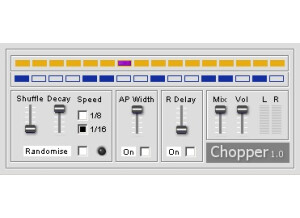
    The Oli Larkin Chopper is a free VST plug-in for Windows. Most of the plug-ins made by Oli Larkin are only VST/Windows compatible, so the audience will be somewhat limited here. This plug-in is a gate that is pattern controlled, essentially acting as a sort of tremolo and delay plug-in. You can download this and the other Oli Larkin plug-ins from their website at no cost to you at all. It doesn't have a very complicated interface, with parameters for shuffle, decay, speed (either 1/8 note or 1/16 note), AP width, right channel delay, mix, and volume. There is enough control here to provide you with a nice array of different variations, but in general it's sort of a one trick pony. However, it should definitely be easy enough to use where you won't need any help from a manual. SUITABILITY/PERFORMANCE I don't have the Oli Larkin Chopper plug-in running any longer, as I've no longer got a compatible system. When I did have a compatible system, it was with Cubase SX and on a Hewlett Packard Pavilion dv8000 Notebook with 2 GB of RAM and a 3.0 Ghz processor. I had a MOTU 896HD audio interface and was mostly running Cubase SX 2.0. This plug-in takes up virtually no processing power when used in small doses - if you're unsure of how it will perform on your system, give it a shot as it's free anyway. OVERALL OPINION Oli Larkin's Chopper plug-in is a neat little effect that can definitely be helpful to have around, especially being that it's free of charge. Unfortunately only those with Windows based operating systems and VST compatible DAW's will be able to enjoy using this, but at least for those who can it's free. It's not the kind of plug-in that you're going to use on a daily basis, but every now and again it might be helpful to add a little choppiness to your guitar or vocal for a little added effect. It's not anything too crazy, but it's free and is absolutely worth checking out for those who are able to download it.