Log in
EN
FR

Software Flangers

49 products found

Filter
Sort by
Evaluation
  • Reviewed or not
  • Editor’s award
  • Reviewed by Audiofanzine
Availability
  • Available or not
  • Sold new or used
  • Sold new
  • Sold used
Must-have products
  • All products
  • Flagship products
  • Best rated products
  • Hot products
  • Popular products
Price
  • Freeware
  • Low-cost (< $40)
  • Mid-range ($40 - $90)
  • Premium (> $90)
€
Clear
Sort by
  • Popularity
  • User ratings
  • Price - low to high
  • Price - high to low
  • Used price, increasing
  • Used price, decreasing
  • Name (from A to Z)
  • Name (from Z to A)
  • Added on
Sort results
  • Popularity
  • User ratings
  • Price - low to high
  • Price - high to low
  • Used price, increasing
  • Used price, decreasing
  • Name (from A to Z)
  • Name (from Z to A)
  • Added on
Filter results 49 results found
Evaluation
Availability
Must-have products
Price
  • Freeware
  • Low-cost (< $40)
  • Mid-range ($40 - $90)
  • Premium (> $90)
Show results

The best Software Flangers reviews

The reviews Audiofanzine members found the most helpful.
  • « Awesome flanger »

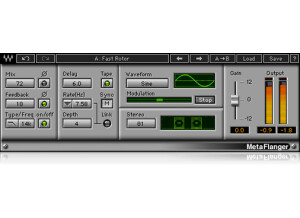
    Flanging has long been a heavily used technique in the rock world. In fact, it almost got to the point where it was overused, but it seems to be going out of style at the moment. That's good for those who want to be unique again, and this plugin should help you achieve everything from a very gentle chorus to some huge jet plane flanger sound. The plugin has adjustments for mix, mix phase wet, feedback, feedback phase, filter type (low or high pass), filter frequency, filter on/off, delay, modulation, tempo sync, link modulation rate and depth controls, sine or triangle waveform, modulation effect freezing, stereo and more. The plugin is very simple to use. Just open up your favorite DAW and put it on whatever buss you want to flange. I usually put this on some sort of aux buss, personally. I never read the manual, so I can't comment on that, but Waves' manuals are generally pretty good. SUITABILITY/PERFORMANCE First of all, this plugin is super rock solid. I've never experienced a single hiccup or crash while using this. Considering that Waves is one of the best companies in this aspect, it's really no surprise. The plugin itself is cross platform compatible, so both Windows and OS X users alike can use this without any issues. The plugin itself also doesn't take up too much RAM, and in a world where processing power/RAM mean everything, that's a huge plus. There is one issue that I have with this, however. The plugin itself is a 32 bit plugin, but my DAW is a 64 bit DAW. That means that my DAW has to launch a special bridge application to allow me to use these plugins without having to lower my RAM limit. It's a minor inconvenience, but I'd still like to see Waves update these plugins in the future. I've been using the Mercury bundle for the past half a year or so, and it's bee a great experience. OVERALL OPINION If you're looking for a very solid flanger that's very versatile, I recommend checking this out. There are some nice free plugins out there, but they're not exactly compatible with all the systems out there like this is. Really, even the standard Logic flanger is good enough for me, but I enjoy the tone that this flanger brings to the table for certain phrases and whatnot.

  • moosers's review

    The Eventide Instant Flanger Plug-in is one of the plug-ins that's included in the Anthology II bundle. I don't believe you can purchase it outside of this bundle, but I'm not 100% sure on this. I wasn't at all involved with installing the plug-in since I don't own it myself. The studio I work at has the full bundle on all of our systems, and the interface and plug-in as a whole is modeled after the hardware version of the same name. It gives you parameters for waveform, oscillator rate, the 'bounce' of the effect, depth, and threshold and release for an envelope follower. It's all pretty easy to follow and if you don't understand what one of the parameters does, simply mess with it to hear how it affects your signal. There are few parameters here, so I'd think most users would be able to figure out how to use it without help from a manual. SUITABILITY/PERFORMANCE I've ran the Eventide Instant Flanger Plug-in on a few different systems here at the studio I work at. Mostly I've used it in two of our rooms, but both are Pro Tools HD based and have quite powerful Apple computers to run it on. Being that it's Pro Tools HD, rarely do we have any issues at all and certainly not related to plug-ins. I don't know how well this might run on an LE system, but if you're currently able to run plug-ins comfortably on your system, I wouldn't think that this one would put you over the edge. OVERALL OPINION The Eventide Instant Flanger Plug-in is only one of many plug-ins in the Anthology II bundle, but is up there with the coolest in the bundle. I haven't used the original Instant Flanger, but I'd imagine that it's just a warmer sounding version of this. I love the make up of the controls as it's a unique take while still giving you all the tools you need to get a wide collection of different flanging sounds. The Instant Flanger is awesome on vocals, but it's definitely not limited just to this use as it's great across the board. I do like it especially for getting that artificial doubling sound on vocals, however. No matter how you use it, it definitely makes the Anthology II bundle worth looking out for.

  • moosers's review

    Digidesign's DigiRack Flanger is a plug-in for Pro Tools LE and HD systems that comes free and in stock with the industry standard DAW. You don't have to take any action to install the plug-in once you've installed Pro Tools, as it installs all of the DigiRack and AIR plug-ins upon initial installation. As far as the interface of the plug-in goes, it looks just like most of the other DigiRack plug-ins, as I guess the thinking with the free plug-ins is to make them as easy to use as possible. The setting controls that it has to work with include those for gain, mix, a high pass filter, LFO rate, LFO width, and feedback. The plug-in can be used either in mono or stereo mode. I don't think that they've made a manual for this plug-in, although I wouldn't be surprised to find something about it in the Pro Tools manual itself. SUITABILITY/PERFORMANCE I'm currently running the Digidesign DigiRack Flanger plug-in and Pro Tools LE 8 on a Mac Book Pro that has a 2.2 Ghz Intel Core 2 Duo processor along with 4 GB of RAM. I run Pro Tools LE 8 with a Digi 002R audio interface or a Digidesign Micro Box if I'm on the move. This definitely isn't the sort of plug-in that takes up much processing power, and also isn't the type of plug-in that most users will be running too many instances of at a time. These two things paired together makes me believe that almost all users will be able to run this plug-in hassle free, but if you have Pro Tools you should just try it for yourself. OVERALL OPINION The Digidesign DigiRack Flanger plug-in isn't the most in depth or versatile flanger plug-in available, but for a stock plug-in with Pro Tools, it gets the job done. I've only used it to do some simple flanging here and there, and many times I didn't even end up printing with it. It definitely comes off as digital sounding at times, but how much can you really expect from a free plug-in anyway. You can't run the DigiRack Flanger without Pro Tools, but if you do have Pro Tools I'd encourage you to check out this flanger plug-in before looking elsewhere...

  • moosers's review

    Kjaerhus Audio's Classic Flanger is one of my favorite sounding free VST flangers out there. I'm no longer running this plug-in ever since I made the jump from Cubase SX to Pro Tools LE about four years ago or so, but this served me well for a few years beforehand. The process of downloading and installing it should only take a few minutes, as I can't recall ever having a problem with any of the Kjaerhus Audio plug-ins in respect to this. In terms of control over your sound, you've got parameters for delay time and delay rate, depth, feedback, mix, and output level. It also has buttons for engaging sync and spread. This is overall a very simple plug-in to use, so I don't think that you need a manual, and I'm not even sure that they made a manual for this if you wanted anyway. SUITABILITY/PERFORMANCE The system that I was running Cubase SX 2.0 on with the Kjaerhus Audio Classic Flanger was based on a Hewlett Packard Pavilion dv8000 lap top PC with 2 GB of RAM and a 3.0 Ghz processor. Now that I'm running Pro Tools on a Mac I can't run this, and I'm not sure that I'd have a need to anyway. When I was running it though, it always ran smoothly for me and without hiccups. Most users should find this to be the case, but how well it will run really depends on your system. The good news is that since this is free you can try it out for yourself on your own system. OVERALL OPINION The Kjaerhus Audio Classic Flanger was definitely my go to flanger plug-in when I had Cubase SX. It's incredibly easy to use and I found the presets to be more than helpful starting points, as there were a few of them in here that I used quite a bit. I used the plug-in for a variety of formats, including for electric guitar and vocals. While if I were to use this today I might have a different perspective since it has been a while, for the time that I was using this plug-in I used it a lot and found it very useful. I'd recommend that anyone who is looking to add some free plug-ins to their system, which should be everyone, and has a PC with a VST compatible DAW, that they download this plug-in and the other Kajerhus Audio plug-ins without asking too many questions, as I think you'll be happy to have them at no cost to you.

  • moosers's review

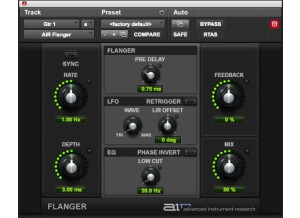
    This review if for Digidesign's AIR (Advanced Instrument Research) Flanger. If you have Pro Tools 8, you probably already know that AIR plug-ins are a suite plug-ins that come free with Pro Tools 8, including this one. To me, if you don't have Pro Tools 8 yet it is worth it for these new useful plug-ins alone. You don't need to do anything in terms of installation once you've installed Pro Tools 8, as it will take care of it during the initial process. Using the AIR Flanger isn't by any stretch a hard thing to do. As long as you understand what the parameters do, you've good to go. The parameters that you have include those for rate, depth, feedback, and mix, as well as sections for flanger, an LFO, and a low cut equalizer. The flanger section contains only a parameter for pre delay, and the LFO has just a wave type selector and an L/R Offset. I was pretty familiar with these parameters going in, so I didn't need any help figuring it out. A manual however isn't made for this plug-in as far as I know. SUITABILITY/PERFORMANCE I'm running the Digidesign AIR Flanger plug-in on my home system where I recently upgraded to Pro Tools LE 8 from 7.4. I run Pro Tools LE 8 on a Mac Book Pro that has as 2.2 Ghz Intel Core 2 Duo processor and 4 GB of RAM. Within this configuration, Pro Tools runs with a Digi 002R audio interface. Thus far I've only had a need to try out the AIR Flanger on a single track at a time with a single session, so I can't say how well it will run if you want to run a bunch of them at a time. However, these AIR plug-ins are designed to only take up a small bit of processing power. OVERALL OPINION I can't ever say a bad thing about a free plug-in, so I won't start here. In fact, I actually really like using AIR Flanger. I find it easy to use and I also find that it is capable of getting a very wide palette of different flanging tones. It has a clean tone overall, but like most plug-ins it lacks the body and fullness that you'd get with an analog flanger. So while not my favorite sounding flanger out there, in most situations it will be good enough to get the job done without a doubt. The only place that you can get the Digidesign AIR Flanger is with Pro Tools 8, so if you've got an earlier version of the software, I'd highly recommend taking the plunge into Pro Tools 8 so you can get this one for free in addition to all the other ones you'll get.