Log in
EN
FR

Software Phasers

84 products found

Filter
Sort by
Evaluation
  • Reviewed or not
  • Editor’s award
  • Reviewed by Audiofanzine
Availability
  • Available or not
  • Sold new or used
  • Sold new
  • Sold used
Must-have products
  • All products
  • Flagship products
  • Best rated products
  • Hot products
  • Popular products
Price
  • Freeware
  • Low-cost (< $40)
  • Mid-range ($40 - $85)
  • Premium (> $85)
€
Clear
Sort by
  • Popularity
  • User ratings
  • Price - low to high
  • Price - high to low
  • Used price, increasing
  • Used price, decreasing
  • Name (from A to Z)
  • Name (from Z to A)
  • Added on
Sort results
  • Popularity
  • User ratings
  • Price - low to high
  • Price - high to low
  • Used price, increasing
  • Used price, decreasing
  • Name (from A to Z)
  • Name (from Z to A)
  • Added on

The best Software Phasers reviews

The reviews Audiofanzine members found the most helpful.
  • moosers's review

    Clone Ensemble's Bass Phaser is a free plug-in for Windows that comes in VST and Direct X plug-in formats. Unlike some of Clone Ensemble's other plug-ins, this one is all free and doesn't have any restrictions on how you can use it. I'm no longer running a compatible system for it ever since I made the switch to Pro Tools on Mac from Cubase SX on a PC. I don't remember much about installing it, but you can download it straight from Clone Ensemble's website and should be easy enough to install after that. The plug-in is also pretty straight forward to use, with parameters for feedback, rate, depth, frequency, stage (five to choose from), bass cutoff, gain, mix, and a few different stereo/mono modes to choose from. I doubt a manual was ever put together for it, but could be wrong about this. SUITABILITY/PERFORMANCE For the time I was running the Clone Ensemble Bass Phaser plug-in, it was in Cubase SX 2.0 mostly and later in 3. I had everything running on a Hewlett Packard Pavilion dv8000 Notebook that was made up of a 3.0 Ghz processor and 2 GB of RAM. Certainly not the best system, but when I was just getting starting with recording, it got the job done and was certainly enough to run this plug-in smoothly. I honestly didn't use the plug-in all that often, as it's pretty specific in terms of what it's designed for, but never had any problems running it. OVERALL OPINION The Clone Ensemble Bass Phaser is the type of plug-in that you might as well have around being that it's free. It's nothing too special in my opinion, but serves it's purpose and is a decent enough phaser for a free one that's now a few years old. Obviously, it's designed for use on bass instruments, so I haven't tried it on anything else. For bass guitar, it sounds pretty full but I didn't find myself needing a phaser on bass too often and still don't. Since it's free I'd recommend downloading it if you have a compatible system, but it's not a necessity at all and is really just worth having around for 'just-in-case' scenarios.

  • moosers's review

    The Soundhack +phasor is a newer free plug-in for Mac systems that can support VST plug-ins. Right now it's only available in this format, but on their site it says it will sometime be available in other formats as well. I only tried out this one in the last month or two, as I've got all of their other freeware plug-ins on my system already. I'm running this in Pro Tools 9, but you'll need the Fxpansion VST to RTAS converter if you want to do this sine it's only available as a VST plug-in. If you do have a compatible system, it's very easy to go right on Soundhack's site to download and install the plug-in, as the whole process shouldn't take very long at all. Learning the interface of the plug-in is about as easy, as it just consists of a series of parameters that shouldn't be unfamiliar to those who have used phasers before. The LFO has parameters for frequency, shape, phase, and depth, and there are other parameters for frequency, bandwidth, feedback, and auto phase. There's no manual made for this plug-in. SUITABILITY/PERFORMANCE My system at home that I'm running the Soundhack +phasor is a Pro Tools 9 based system. You can't currently run this plug-in in Pro Tools unless you have the aforementioned VST to RTAS wrapper as I've got, but hopefully soon they'll have this in all plug-in formats. The computer I'm running everything on is a Mac Book Pro lap top that has a 2.2 Ghz Intel Core 2 Duo processor and 4 GB of RAM. I run Pro Tools with a Digi 002R audio interface as well. This plug-in takes up just about the smallest amount of processing power possible, and it's free anyway so even if you think you're system won't take, you might as well try. OVERALL OPINION While certainly not the best sounding plug-in phaser in the world, I wasn't expecting that from the Soundhack +phasor. It's free, and in general I try not to expect too much from freeware as I'm just happy to be getting it free in the first place! You can actually do a good amount with this plug-in, but the overall sound quality isn't the greatest as I find that anything more than subtle phasing isn't ideal with this. You may as well try the plug-in for yourself if you're still reading this review, as even though I haven't used it much since trying it, others who may not have as many options in their plug-in suite already will probably use it more than I. At the price of free, there's no reason not to give it a whirl.

  • moosers's review

    The Nomad Factory Liquid Phase II plug-in is one that comes as part of Nomad's Liquid bundle and is not sold individually. The good news is that the entire bundle is about as cheap as many single plug-ins. I don't own this bundle, and have just used it at the studio where I'm working since they have it installed on a few different systems here. The bundle is compatible with both Mac and PC operating systems, as well as in every major plug-in format, so compatibility shouldn't be much of an issue here. Using the Liquid Phase II plug-in isn't hard at all, although there is a good amount to work with so it does take a small amount of getting used to, as would be the case with any plug-in. For the phaser there are parameters for stage, resonance, low and high contour, overdrive, and stereo width. It also has an LFO modulation section consisting of parameters for rate, depth, and waveform sync. Lastly, you can set your mix and overall output level inside the plug-in as well. I haven't seen a manual for Nomad's Liquid Phase II... SUITABILITY/PERFORMANCE We've got the Nomad Factory Liquid Phase II plug-in and the full bundle running on all of our systems at the studio where I work. The main room is Pro Tools HD (like the rest of them), and has a Mac Pro desktop computer with 10 GB of RAM and dual 2.66 Ghz Intel Xeon processors. The fact that it's a Pro Tools HD system is enough to run it, but of course the super powerful computer helps as well. I'm not sure how well this might run in Pro Tools LE or 9, but I'd imagine that it would be pretty stable on most systems. OVERALL OPINION The Nomad Factory Liquid Phase II plug-in is pretty average, but will certainly give you the phasing effect. It's not the warmest or most 'analog' sounding plug-in out there, but for simple phasing effects and beyond, it's certainly adequate. The Liquid II bundle as a whole has similar plug-ins for different effects and signal processing, all for a very cheap price, so it's definitely a bundle that is best suited for home studio owners. Professionals most likely already have plug-ins that are better than these, but if you're looking to further expand with more options at a cheap price, the Liquid II bundle will do the trick. So while the Liquid Phase II plug-in isn't anything revolutionary, there's a good amount of sounds that are possible with it and more times than not it will get the job done for in the box mixing...

  • moosers's review

    Blue Cat Audio's Phaser is a free plug-in that is available in pretty much any plug-in format. You can get it for both PC and Mac systems, and it's available in RTAS, VST, Direct X, and AU formats. Just go ahead and download it directly from Blue Cat's site and follow the step by step installation instructions as you normally would, and you're set to go. The interface of the plug-in is much like a few of the other Blue Cat Audio free plug-ins, so if you've got the whole freeware bundle you should be accustomed to this sort of look and feel. It does have a few different skins to choose from if you want to change the look around a bit. The plug-in has a series of simple knob/slider parameters (depending on the skin) that control gain, stages, depth, rate, dry, wet, feedback, and wave shape, from which you have either sine wave or triangle wave to choose from. A manual should not be necessary for use with this plug-in. SUITABILITY/PERFORMANCE Right now I'm running the Blue Cat Audio Phaser as an RTAS plug-in for Pro Tools LE 8. I'm running it on a Mac Book Pro lap top that has a 2.2 Ghz Intel Core 2 Duo processor and 4 GB of RAM, while I run Pro Tools LE with a Digidesign 002 rack version. I listen through everything with a pair of Adam A7 monitors. Even if you don't have that quick of a system, you should be able to handle this and the other Blue Cat plug-ins. You might as well try it for yourself since it's free anyway. OVERALL OPINION It's definitely more than nice to find a whole bundle of free plug-ins that are compatible for Pro Tools, as you won't find nearly as many out there as you would those in VST format. The Blue Cat Audio Phaser is one of these plug-ins, and is definitely worth having no matter what system you have. While it's not the best phaser I've ever used by a longshot, it still sounds good enough and offers up a lot of control and room to mess around with sounds. If you don't already, I'd encourage you to head over to Blut Cat Audio's website and download their bundle of free plug-ins now!

  • moosers's review

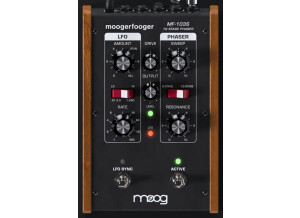
    The Bomb Factory MoogerFooger 12-Stage Phaser is a plug-in that comes in a variety of formats, covering pretty much all of the bases. I’ve only used it as an RTAS plug-in in Pro Tools. The process of installing the whole bundle didn’t take very long as I simply followed the step by step instructions needed to complete the task. This plug-in comes in most plug-in formats and runs on either a Mac or a PC, so you should be okay as long as you’ve got the proper format for your computer. Learning the interface of the plug-in didn’t take very long either, as it’s generally straight forward and easy to follow. It’s basically a virtual version of the popular MoogerFooger 12-Stage Phaser pedal that is designed and put out by Moog. The plug-in is split up into two sections – an LFO and a phaser. The LFO section has parameters for amount, rate, and switch for either a high or low frequency LFO, while the phaser has parameters for sweep, resonance, and a switch for choosing either a 6 or 12 stage phaser. Lastly, there is a parameter for drive, which is basically setting your output level, although it will add some grit to the sound. I don’t believe that users will need a manual for this plug-in, but I haven’t seen it so I can’t speak to it’s make up. SUITABILITY/PERFORMANCE I’m currently running the Bomb Factory MoogerFooger 12-Stage Phaser on a Mac Book Pro that has a 2.2 Ghz Intel Core 2 Duo processor and 4 GB of RAM. I run the plug-in only in Pro Toole LE 8, which I use with a Digi 002R audio interface or a Digidesign Micro Box if I’m on the go. I’ve also ran it on a Pro Tools HD system. I can’t say that I’ve ever had an issue running this plug-in within my home studio or elsewhere. It isn’t the type of plug-in that’s going to take up much processing power, so as long as you have a decent enough system to currently run your DAW, you shouldn’t encounter and performance issues. OVERALL OPINION There’s definitely a lot that can be done with the Bomb Factory MoogerFooger 12-Stage Phaser plug-in, as it’s possible to get a wide array of sounds without having to make vast changes. I usually start with setting it either to a 6 or 12 stage phaser, and work from there. It’s possible to use this plug-in for subtle and light phasing or to get something like a full on step phaser in desired. The overall sound quality is definitely realistic, and is especially warm for a plug-in, although it definitely doesn’t come close to the real MoogerFooger pedal. I’d encourage those interested in this plug-in to check out the other MoogerFooger plug-ins, as I think it’s definitely a bundle worth having. Chances are that if you like this 12-Stage Phaser, you’re going to like the other plug-ins in the bundle as well…

  • moosers's review

    The SmartElectronix Phase 90 plug-in is a phaser effect plug-in that comes in VST format. It's also a free piece of software. It is modeled after the MXR Phase 90 pedals, as the name obviously states. You can download the plug-in free straight from SmartElectronix's website, so the whole process should only take a few minutes as long as your system is compatible with this plug-in. The interface is extremely simple, and somewhat limited, as it only contains parameters for drive, speed, and feedback, which is more than the original Phase 90 pedal has, which only has a parameter for speed. I feel like if they weren't going to keep true to the original, there's no reason why there couldn't be a bit more control over your sound here. A manual probably wasn't made for this plug-in, and isn't necessary either way. SUITABILITY/PERFORMANCE I don't run this plug-in any longer, but when I did I ran it in Cubase SX on a Hewlett Packard Pavilion dv8000 lap top that had 2 GB of RAM and a 3.0 Ghz processor. The SmartElectronix Phase 90 plug-in was able to run extremely smoothly no matter how many of them I wanted to have going at once, which admittedly wasn't very much or very often. This plug-in takes up about as small amount of processing power as you could ask for... OVERALL OPINION While free, I don't believe that the SmartElectronix Phase 90 has too much to bring to the table. While it's worth getting if you have a compatible system since it is free, it doesn't have too realistic of a sound quality. It's also limited in the parameters and control that it offers. While it's simple, free, and doesn't take up much processing power, there are better plug-ins out there that are free as well. I would however, recommend trying it out for yourself if you're able, as other users might be able to get something more out of it than I was able to.

  • moosers's review

    The Kjaerhus Audio Classic Phaser is a free plug-in that is only compatible on PCs and as a VST plug-in. I don't run this plug-in in my current system, as I could not keep it on when I changed from a PC to Mac. I honestly can't remember too much about the installation process of this plug-in in particular, but the Kajerhus Audio plug-ins should all be very simple to install as the process of the other ones is not out of the ordinary. The make up of the Classic Phaser includes sections for filtering, modulation, and output. The filter section has parameters for filter stages and upper (frequency), while the modulation has those for rate, depth, and feedback. The output section simply has parameters for level and mix, which seems to be standard with a lot of the Kjaerhus Audio plug-ins. I don't believe that a manual was made for this plug-in, and most user shouldn't need one anyway. SUITABILITY/PERFORMANCE Before I switched my system from Cubase to Pro Tools, I was running the Kjaerhus Audio Classic Phaser plug-in on a Hewlett Packard Pavilion dv8000 lap top with 2 GB of RAM and a 3.0 Ghz processor. I ran everything through a MOTU 896 HD audio interface. I generally have had no problems at all with performance of the Kjaerhus Audio plug-ins, and there is no exception with the Classic Phaser. It clearly doesn't take up much processing power, but I doubt that most users will need to run too many of these simultaneously anyway. Everybody's system is different, so to get a real idea of how well this plug-in will run on your system, I'd recommend just trying it out for yourself being that it's free. OVERALL OPINION There are definitely a good amount of differing tones available with the Kjaerhus Audio Classic Phaser, which isn't something that you'll normally get with a free plug-in. While maybe not the most realistic sounding phaser plug-in by current standards, it still does sound good and it served me well for a while when I was using Cubase SX. The presets are awesome as they really show the wide array of phasing effects that the plug-in has to offer. There isn't any reason not to have this plug-in if your system will support it...

  • moosers's review

    Nomad Factory's Free Phaser is a plug-in available for free within their free bundle. The bundle also includes a sweeper and a tremolo plug-in as well. I believe that these plug-ins were the original plug-ins made by Nomad Factory, and are now available free on their website. It now says on their site that you get them free with purchase, but I was able to download them without purchasing anything (although I do own some Nomad Factory plug-ins anyway). The plug-in comes in a variety of different formats including RTAS and VST, so most people shouldn't have a problem with a compatibility. It only takes a minute to download and install, as you just need to follow the step by step instructions that will pop up on the screen. The interface of this plug-in is very straight forward and easy to understand. It simply has a series of five knobs that will control the LFO rate, the depth, feedback, color (tone), and volume. A manual surely isn't necessary for this plug-in, really no matter what level you're on. SUITABILITY/PERFORMANCE I'm currently running the Nomad Factory Free Phaser on a Mac Book Pro that has a 2.2 Ghz Intel Core 2 Duo processor and 4 GB of RAM. I run it in Pro Tools 8 which runs with a Digi 002R audio interface. This plug-in is one that won't take up much processing power at all, so I've never had a problem running it ever. I've also never used more than a few instances of it at a time however, but since it is a modulation effect I don't think that many users will need to be doing so anyway. I've also run this plug-in in Cubase SX, starting about four years ago or so. OVERALL OPINION Like I say often about free plug-ins, you really can't go wrong with them. Although many times they aren't the best sounding plug-ins, since they're free you can always at least try it out to see if it works for you or not. While this is the case with the Nomad Factory Free Phaser, it does have some usefulness and I'm glad to have it around. I definitely have a few other options for phasing that I'll use first, but on occasion I'll find that this plug-in will bring something to the table that I'm not able to do elsewhere. The Nomad Factory Free Phaser and Free Bundle are definitely a must have for any DAW user.

  • moosers's review

    Digidesign's AIR Phaser is a plug-in available in the newest version of Pro Tools. Pro Tools 8 features a whole line of these AIR plug-ins, which stands for Advanced Instrument Research. They all have a similar look and are all free! Like all of the AIR plug-ins, the AIR Phaser plug-in installs automatically when you install Pro Tools 8, so you don't have to worry about any other steps to install this plug-in beyond installing the main software for Pro Tools 8. The interface of the plug-in is to the point and is generally very easy to follow. It's got main parameters for rate, depth, feedback, and mix, as well as a section entitled 'phaser' which has poles parameter, which gives you four different steps to choose from, as well as a center parameter which allows you to adjust the frequency. There is also an LFO section with parameters for waveform, and left/phase phase. Lastly, there is a low cut knob with an adjustable frequency. I don't believe that they make manuals for these plug-ins, but you really don't need one anyway. SUITABILITY/PERFORMANCE Having just upgraded at home to Pro Tools 8, I'm running the Digidesign AIR Phaser plug-in on a Mac Book Pro that has a 2.2 Ghz Intel Core 2 Duo processor and 4 GB of RAM. I run Pro Tools with a Digi 002R audio interface or the Digidesign Micro Box for when I'm not at home. So far in the relatively small amount of time that I've been using the AIR Phaser plug-in, it hasn't even come close to affecting my system's performance. I've only had a need to use one or two of them within a single session, so it isn't like I'm trying to max it out. However, I think that as long as you have a system where you can currently run plug-ins and Pro Tools comfortably, this one shouldn't be a problem. OVERALL OPINION Let me start off by reiterating the fact that this plug-in comes free with Pro Tools 8! Moving forward with this in mind, the Digidesign AIR Phaser is a very useful plug-in to have in your arsenal. It won't do the heavy damage that phaser plug-ins like the Eventide Instant Phaser or the Soundtoys Phase Mistress will do, but for a freebee it sure sounds good and offers up a good amount of versatility. If you've got Pro Tools 8 I'd highly encourage you to get in there and play with this one for a bit to see if it is something that could be useful for you. If you don't have Pro Tools 8, you don't have any way to get this plug-in, so I'd recommend upgrading!

  • moosers's review

    The Eventide Instant Phaser Plug-in is a software emulation of the classic hardware version of the same name. Since the studio that I used the plug-in at already had it installed, I wasn't involved at all with this process. However, I haven't heard about any compatibility issues or other problems related to the plug-in at all. The interface of the software is generally easy to figure out and understand, even if you don't have experience with the original Instant Phaser. The parameters that you have to work with here are depth, oscillator, shape, threshold and release under the header of envelope follower, and a mode knob. Nothing about using the plug-in is hard, so a manual is needed unless you're having a problem installing it or something like that. SUITABILITY/PERFORMANCE Since I have run a TDM version of the Eventide Instant Phaser Plug-in on an HD system, I haven't had any issues related to performance. Also consider that I've only had a need to run at most two or three instances of this plug-in within a single session, since it isn't the type of plug-in that I used very often. Even if you have an LE system or something similar, I don't think that this plug-in should present too many problems in terms of how well you will be able to run it. However, since everyone's system is different and how well a plug-in will run really just depends on this, until you have the plug-in on your system it is hard to say for sure how well it will run. OVERALL OPINION The Eventide Instant Phaser Plug-in is included in the Eventide Anthology II bundle, and I'm not sure about its availability outside of this bundle. I can't compared this to the original hardware version, but this isn't something that you want to do anyway because the hardware version will always win! However, this is overall an awesome sounding phaser plug-in, with a lot more versatility than other phasers out there. I love the unique controls that you have, making it easy to get all sorts of interesting and traditional phasing tones. The Eventide Instant Phaser plug-in would be one of the first phaser plug-ins that I would recommend for someone who wants a nice sounding phaser plug.

  • moosers's review

    The installation process of the Trillium Lane Labs TL Everyphase was quick and simple as it only took a matter of minutes. The interface of the software will take a little more time to get used to since there are a lot different parameters to work with here. It has sections for phaser, modulation, LFO, and envelope and each has a series of parameters under these headings. If you have experience working with synths and other phasers you will definitely have the upper hand on this software as it has similar types of parameters. I haven't seen the manual for this plug-in so I can't say how helpful it would be or not as it is pretty self explanatory. SUITABILITY/PERFORMANCE I do not believe that users will have any problems running Trillium Lane Labs TL Everyphase. It isn't a plug-in that takes up much processing power and even though I haven't really ever used more than one of these within a single session, I don't think that you would have problems doing so if you wanted to. I run the plug-in on a Mac Book Pro that has a 2.2 Ghz Intel Core 2 Duo processor and 4 GB of RAM and run the plug-in in Pro Tools LE 7.4 that runs off of a Digi 00R audio interface. As long as you have a decent system like I do, I don't think that you will have any issues in terms of performance with Trillium Lane Labs TL Everyphase. OVERALL OPINION I've been using the Trillium Lane Labs TL Everyphase plug-in for about six months and in my opinion it is overall a very good phaser plug-in. It doesn't have all of the same parameters that you would see on a traditional guitar phaser pedal, but goes deeper into the make up of the sound. You can get all sorts of phaser and modulation type tones as having all of these parameters makes it capable of getting a wide array of different effects. If you are a home or professional studio owner looking for a great sounding phaser plug-in, you should definitely consider Trillium Lane Labs TL Everyphase.