Log in
EN
FR

Software limiters

233 products found

Filter
Sort by
Brand
Evaluation
  • Reviewed or not
  • Editor’s award
  • Reviewed by Audiofanzine
Availability
  • Available or not
  • Sold new or used
  • Sold new
  • Sold used
Must-have products
  • All products
  • Flagship products
  • Best rated products
  • Hot products
  • Popular products
Price
  • Freeware
  • Low-cost (< $90)
  • Mid-range ($90 - $200)
  • Premium (> $200)
€
Clear
Sort by
  • Popularity
  • User ratings
  • Price - low to high
  • Price - high to low
  • Used price, increasing
  • Used price, decreasing
  • Name (from A to Z)
  • Name (from Z to A)
  • Added on
Sort results
  • Popularity
  • User ratings
  • Price - low to high
  • Price - high to low
  • Used price, increasing
  • Used price, decreasing
  • Name (from A to Z)
  • Name (from Z to A)
  • Added on
Filter results 233 results found
Brands
Evaluation
Availability
Must-have products
Price
  • Freeware
  • Low-cost (< $90)
  • Mid-range ($90 - $200)
  • Premium (> $200)
Show results

The best Software limiters reviews

The reviews Audiofanzine members found the most helpful.
  • « An excellent limiter that surpasses many others »

    What configuration, software and musical style or context do you use with this plug-in? What do you think of its stability and overall performance? Intel I5 4460, Presonus studio one 3 After 1 week testing it, no bug, a riduculously low CPU use (2%) compared with ozone 6 IRC 3 which takes up 25%, and a 3ms latency (Ozone IRC3’s latency is 167 ms) Is the plug-in easy to use? Is the user manual comprehensive? The plugin is very simple, the manual is OK Is it efficient? Do its functionalities and features perform as expected? That’s its biggest asset, especially considering its 30€ price tag. Except for the realbuss I’ve never been a big tonebooster fan, I never quite liked their EQ, Isone… And with Barricade I couldn’t reach the results I got from an old PSP Xenon or Izotope Ozone. But I must admit the dev has raised the quality of its limiter in this new version, it doesn’t pale in any way compared with the most expensive models (it’s almost the other way around). I’ve owned a lot of VST limiters: - AOM for one year - IK Stealth, used at a coworker’s: it first comes with a WAHOOOOO factor, but after a few months on projects involving more complex limitations an in spite of keeping awesome punch, you can hear light saturations and it doesn’t please your ear as AOM does) - Nugen, which I tried for a long while: it tends to have the sub frequencies disappear, apart from it it’s a good limiter - Fabfilter Pro L: very nice GUI, but it tends to provide a “flat”, sometimes saturated sound - Ozone 5 and 6 IRC3, which remains my favourite limiter, keeps the signal punchy but takes up a lot of CPU resource. It replaced the old PSP Xenon. And many others… But the Tonebooster’s V4 is very surprising, as for its consumption it provides a really great sound, and used in auto clean mode it almost doesn’t saturate at all on a drum loop which I use to test all limiters – a test which many of them fail. Compared with the others, I’d put it in-between Ozone and Xenon. What are the pros and cons of this plug-in? + ease of use + auto modes with the 4.1 update + its sound + CPU consumption + ergonomy + true peak , which certainly is the most efficient on all limiters - lost options such as stereo link (as for the compressor, I never understood why it was there) Audio samples of limited loop in the media section (with Ozone used as a reference) at a 3dB reduction – which is not much.

  • moosers's review

    Kjaerhus Audio's Classic Master Limiter is a free plug-in that is available in VST format. I was running it in Cubase SX for a few years, but no longer am running it now that I run Pro Tools and don't have my Cubase system anymore. I don't remember too much about the installation process since it was years ago, but I do seem to remember installing all of the Kjaerhus Audio plug-ins at once without issues. Using the plug-in should be even easier than installing it, as it only has a parameter for threshold to work with. All you've got to do is set this and you're good to go. The plug-in also has metering for your stereo output levels, but beyond that there isn't anything you need to know about it to use it. I don't believe that they made a manual for this plug-in, but either way one is not necessary. SUITABILITY/PERFORMANCE When I was running the Kjaerhus Audio Classic Master Limiter plug-in, it was in Cubase SX on a Hewlett Packard Pavilion dv8000 lap top consisting of a 3.0 Ghz processor and 2 GB of RAM. This plug-in takes up even less processing power than the other Kjaerhus Audio plug-ins, which is saying a lot considering that none of them take up much processing power at all. When paired with the fact that most users will be using this plug-in only on their master fader, I really can't imagine anyone having an issue running this. OVERALL OPINION While I wouldn't recommend the Kjaerhus Audio Classic Master Limiter plug-in for use instead of any kind of professional, it does work very well for getting a quick and easy limiter on your master channel. It has a good enough sound that it will give you a clean boost in volume when your mix is said and done. Like I said, I wouldn't use this instead of professional mastering, but if you've got a mix that you just want to touch a bit with a mastering limiter, the Classic Master Limiter is incredibly effective for a free plug-in...

  • moosers's review

    The Nomad Factory Blue Tubes Brick Wall 2S-XP Limiter is a simple limiting plug-in that’s a part of the Blue Tubes Dynamics Pack. It’s the easiest to use in a bundle that has six plug-ins in total including another more in depth limiter. This one is specifically designed for hard limiting, hence the brick wall name. I don’t own the bundle at home so I wasn’t involved in the installation process at all, but the learning the interface couldn’t be easier. It just has parameters for threshold and release, which is really all you need when it comes to brick wall limiting. It also has a switch for peak removal and metering for both stereo channels with options for monitoring input, output, or gain reduction. A manual really should not be necessary. SUITABILITY/PERFORMANCE The studio I work at has the full Blue Tubes Dynamics Pack and the BT BW2S-XP Limiter plug-in running on all of our systems, all of which are Pro Tools HD based. I’ve mostly used it in our main room, which has Pro Tools 8 and a MacPro computer. The computer has 10 GB of RAM and dual 2.66 Ghz Intel Xeon processors. We also have all Apogee converters and monitor with Barefoot MM27’s. Since it’s all HD systems, I’ve never had a problem running this on any of our systems. Most users shouldn’t have issues… OVERALL OPINION The Nomad Factory Blue Tubes Brick Wall 2S-XP Limiter is perfect for doing simple limiting jobs inside the box. I wouldn’t use it for any sort of real mastering purposes, but occasionally during mixing I’ll have a track that might need some limiting done and this is a quick and easy way to get the job done. To be honest, I haven’t used it all that much since I first used it a bunch of times since I don’t have it at home and I like to do a lot of crossing between my home studio and the professional studio I work at. Having said this, it’s pretty effective as far as limiting goes inside the box. I wouldn’t recommend getting it as an individual plug-in since it’s really worth it to get the full bundle due to the difference in price per plug-in, but the bundle is definitely worthwhile.

  • « Simple Digital Limiting »

    Waves L1 is a software effects plug-in to be used in a DAW. All Waves plug-ins can be installed by downloading them off the Waves website. Authorization is completed using a USB stick as a dongle, or using an authorization manager application if your computer connects to the internet. Waves plug-ins are know for being stable, and rarely have any bugs. The 'L1' plug-in has been around a long time and has been tried and tested in all popular DAWs. SUITABILITY/PERFORMANCE The L1 limiter is easy to use. There is 'threshold' slider to adjust how much limiting is occurring. There is an 'output ceiling' slider if you want the signal to be limiter at a particular amplitude level. If you are using a limiter as the final plug-in on your mix bus, I definitely recommend setting the output ceiling to -0.3 or -0.5. The main reason to do this is to prevent inter-sample peaks. Digital limiting prevents the digital samples of a signal from exceeding a particular amplitude. However, when the digital signal is converter to analog, it is possible that the digital samples do not occur at the true 'peaks' of your signal. Because of this, the digital to analog converter will 'clip'. If you set your output ceiling to be less than 0.0, then the inter-sample clipping can be prevented. I received the L1 plug-in because I purchased the 'Gold' bundle from Waves. I have several other limiters (Maxim, FG-X, MaxxVolume, etc.). The 'L1' is definitely not my 'go-to' limiter on my mix bus. The 'L1' has been around a long time, and digital limiting techniques have significantly advanced since it was released. At this time, I would definitely recommend checking out some never digital limiters (L2, L3) if you are specifically looking to get a mix bus limiter. OVERALL OPINION Digital limiting with a plug-in has a unique feature - 'look ahead' limiting. This means that the processor knows what it is going to 'limit' prior to having to process it. The 'L1' limiter was one of the first plug-ins to utilize this kind of processing. I don't recommend using the 'L1' for heavy compression. I notice that this plug-in doesn't sound very good when I have to really squash a signal. If you are going to use the 'L1', I would recommend only using it subtly. The 'L1' can also be used for dithering a signal. This is a necessary processing step if you have recorded a signal at a bit rate (like 24 bits) but your mix down needs to be a different bit rate (16 bits).

  • « My favorite limiter... »

    Purchase plug-in, unlock via authrisation file, ready to go. SUITABILITY/PERFORMANCE Picture prefect, enough said. OVERALL OPINION The Universal Audio Precision LimiterTM is a single-band, look-ahead, brick- wall limiter designed primarily for mastering with program material. The easy- to-use Limiter achieves 100% attack within a 1.5ms look-ahead window, which prevents clipping and guarantees zero overshoot performance. Both the attack and release curves are optimized for mastering, which minimizes aliasing. Since the Precision Limiter is a colorless, transparent mastering limiter–no up- sampling is used, nor does the UA Precision Limiter pass audio through any filters–audio remains untouched unless the compressor is working, in which case only gain is affected. To really be considered a professional limiter, the metering needs to be su- perb. The Precision Limiter features comprehensive, high-resolution metering and conforms to the Bob Katz “K-System” metering specifications. This meter- ing allows the user to see what is happening to audio with a great deal of ac- curacy, with simultaneous RMS and Peak metering and adjustable Peak Hold. And since we know how valuable good metering is, the plug-in can also be bypassed and used strictly as a high-resolution meter. Key features include user-adjustable Release or intelligent Auto Release, which allows for fast recovery–minimizing distortion and pumping–and a unique selectable Mode switch, which allows you to delicately tailor the at- tack shape and control the “presentation” for different material. Mode A is the default shape, suitable for most material, while Mode B can be particularly useful on minimal and/or acoustic program material, yielding a more subtle touch. The Precision Limiter is yet another indispensable UAD tool for your audio arsenal. The Precision Limiter has a 1.5ms look-ahead window to ensure clipping does not occur. This look-ahead function results in a slightly larger latency than other UAD plug-ins.

  • « Great Limiting Plug-in With Warmth! »

    I installed the Nomad Factory AMT Max Warm limiter with no problems. There were no compatibility issues that I had. The manual (a pdf that comes with download) was very informative. The setup was pretty basic and it's a really easy plug-in to figure out how to use. It can be used for mastering as well as mixing which makes it pretty flexible. It's not really a professional quality mastering plug-in but it'll work for home projects. SUITABILITY/PERFORMANCE I've never had a problem with this software not working correctly. I haven't had to use it on a multitude of tracks really, so I don't know how opening multiple instances of it will affect the system, but I imagine that it would react similarly to most plug-ins would to that situation, which would be to slow down. It's been really stable with my Digi 003 rack overall. I've been getting a fast performance. I've been using it for a couple months now and I really like it. OVERALL OPINION The best thing about this limiter is the warmth it adds to a mix. I've basically been complaining that my mixes sounded dull and lifeless, and by adding this to certain elements of the mix I've managed to make it feel much better. I really like the extra low and high end EQ adjusters, which help balance out the frequencies after compression. This really helps the vocal feel more natural while still retaining the warmth that the plug-in provides. While this isn't what I always use I do like it more and more all the time, and am finding that I'll probably stick with it for awhile. I bought it in a bundle and all of the plug-ins in that bundle were totally worth it (price in interview reflects price of bundle as it's not sold seperately).

  • « A Solid Brickwall Limiter »

    The IK Multimedia T racks 'Brickwall Limiter' is available for both Windows and MAC and was totally compatible with my OSX 10.6.8 system with 4GB of RAM using Logic Pro 9. The setup process is sort of straight forward, but it is highly useful if you are installing it on a computer with internet access, otherwise you will be given a code to save to your desktop and transfer onto a computer with internet access so that IK Multimedia's installer can verify you have a legitimate serial number, then you have to transfer more data give to you back to the computer you want to use the plugin on and this will authorise the plugin for that computer. It is understandable given that they want to protect against mass piracy of their product. Once authorised, you just select the plugin from the menu in your DAW and you are good to go, the GUI of the plugin on it's own is simple, clear and easily accessible - unless you are using it within the T racks full skin in which case it might take 10 or 15 minutes to figure the setup out properly. When it comes to T racks plugins and the discussion about the GUI arises, you will always hear people complain about 'that damn dinosaur logo!', in this case i would suggest to suck it up and get used to it because it is here to stay so you might as well learn to love it along with the sound quality of their plugins like this one. SUITABILITY/PERFORMANCE The Brickwall Limiter supports sampling rates up to 192 kHz, ideal for Mastering situations when high sampling rates are benefitial and is fully functioning with 64-bit applications and operating systems. Personally i use it in 32 bit mode in Logic Pro 9 and have never had an unstable moment with the plugin. I have been using it on and off for over a year now, taking time to put it through it's paces as well as trying other limiters at the same time to compare and contrast. T racks plugins give you the option of turning oversampling mode on or off for most of their plugins these days, and the Brickwall Limiter plugin is no different. However with oversampling turned on the Brickwall Limiter becomes a CPU hog, it can be hard to tell the difference but listen closely and it is there, a smoother high end with a touch of roll off normally but whether your computer's processor will be happy about it is a different matter. If you are going to use it then i would suggest to save the oversampling for mastering only, but in a busy mix with lots of plugins and VST's going on then keeping it off is the way forward to save valuable processing power. OVERALL OPINION Very good quality for the price, but not the clear, outright winner in this department as the FabFilter Pro-L, Sonnox Limiter, PSP Xenon, Waves L2 and Ozone 5 Limiter (in my experience) all jostle for the top limiter prize, but the T Racks Brickwall limiter can certainly hold it's own and is especially effective in 'Clean' mode for the stereo output bus due to it's transparency and safety. Other modes such as 'advanced' and 'saturation' seem to make a full mix a bit cloudier and roll high end from the top especially when pushed, which is not always ideal for the final output of your mix but can work in some scenarios, it really is dependant on the music like a lot of things and i would suggest trying these on individual tracks and experimenting with exaggerated input levels to give something dull and lifeless a bit of OTT energy to spark things up. The GUI is impressive in it's fresh, clear and simple look, with large buttons and controls clearly labelled across a futuristic oven like background. It instills confidence in you before you've even heard what it can do which is a plus for the graphic design team at IK Multimedia, but for some people that dinosaur is just too distracting and 'child like' to be considered a serious grown up product, my response to that is to just get over that hurdle and accept the fact that it will never change and realise you are missing out on the quality and options the T Racks plugins provide. If you are on the hunt for clean and loud limiting with flexible but not overbearing alternate options, then you definitely should check out the T Racks Brickwall Limiter.

  • « Outdated Limiter »

    I received the Maxim Peak Limiter with the Pro Tools Factory Bundle. I used it for a long time because it was the only limiter I had (besides the stock Digi Comp/Limiter). Eventually when I tried out other limiters, I never went back to Maxim. The plug-in is very old, and the signal processing is outdated compared to more recent plug-ins. It still sits in my plug-in folder, but I rarely insert it in my mixes. On the plus side, it can make your mixes louder. On the down side, it accomplishes this by audibly destroying your mix. Installation isn't too complicated, however it requires an iLok. I don't mind iLok too much, but I know other people despise it. SUITABILITY/PERFORMANCE The thing that makes a quality limiter is its ability to increase the volume of a signal, without making it sound noticeably worse. There are no limiters that can exist that are perfectly 'clean' and can always make your mix really loud without sounding bad. But there are limiters that do this better than others. The Maxim limiter is much worse than many other limiters at this criteria. It can squash a mix with even slight limiting, which takes the 'life' or 'energy' out of a song. This is most obvious for drums. The Maxim Limiter really destroys any transients in the signal. There are some decent features with the plug-in. The histogram visualization is pretty unique, and it nice to see how the dynamics in the signal change over time. The 'mix' is also unconventional because typically the point of the limiter is to not allow any of the original signal to pass through it. However, this can be used very carefully to mix in some 'dry' or 'unprocessed' signal if the limiter is squashing your song too much. The Dither is functional, and might be the only real reason to use the plug-in if you have better limiters that don't have dithering. OVERALL OPINION The Digidesign Maxim plug-in is a peak limiter to be used in a DAW. Its main purpose is to control the dynamic response of an input signal. Basically it does some advanced processing to make the maximum amplitude level of a signal stay the same level, but allows you to increase the overall perceived amplitude level of the signal. This is appropriate for bringing up the level of a final mix so that it can be at radio or CD volume. If you have ever completed a mix, then listened to it next to your favorite music and your mix was significantly quieter, you need to add use a limiter. The Maxim limiter has been around for a long time. At this point there does not look like it will ever be updated with any new advanced signal processing. If you get it for free with the Pro Tools Factory Bundle, then it might be worth playing around with it to see how it works. Otherwise, I can only recommend looking elsewhere for limiters (Waves, Slate Digital, new Avid Limiter, etc).

  • « Flexible Digital Limiting »

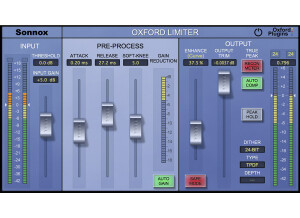
    The Sonnox Oxford Limiter is a software plug-in to be used inside a DAW. It can be downloaded off the Sonnox website for installation, and authorized using an iLok. The purpose of a limiter is to control the loudness of a signal without causing the signal to clip. The Oxford Limiter can be used to achieve this goal, and also contains a fair amount of flexibility compared to other limiters. SUITABILITY/PERFORMANCE The measure of a limiter is how loud it can make a signal before it starts to sound significantly worse. Digital limiting has been around for a while, and have seen many improvements over the years. The Oxford Limiter sounds better to me than other older limiters like the Waves L1 and Maxim. There are many different parts of mixing where limiters are useful. The most obvious place is for the mix bus to achieve CD level amplitude. My current preference for mix bus limiting is the Slate Digital FG-X plug-in over the Oxford Limiter. However, I also like to subtly use a limiter on vocals and on my drum bus. I find the FG-X limiter to be a little bit overkill in these situations, so I usually use the Oxford Limiter. I pretty much use this plug-in for all 'auxiliary' limiting situations, rather than on the mix bus. OVERALL OPINION The Oxford Limiter has been popular for a long time. It contains several controls such as 'attack', 'release', and 'knee' that are typically seen on compressors and not 'stand-alone' limiters. This offers some unique flexibility compared to the competitor plug-ins. The 'Enhance' feature is also unique. Supposedly, it can be used to preserve that transients in a signal that can be destroyed during digital limiting. This can be helpful if you are using the plug-in on your mix bus. Dithering is important part of mix-down/mastering. Any limiter used for this part of mixing should include a dithering section. The Oxford Limiter has an extensive dithering section, and was designed to be a true mastering limiter.

  • « love this compressor »

    The Chandler Limited EMI TG 12413 Limiter Native is a vintage compressor and limiter that can be used as a plug in with any DAW via VST. It cost 300 dollars and it is worth every single penny. The EMI TG 12413 is very easy to use and understand. It only has a compressor/Limit knob, a recovery knob, a output knob, and a hold knob. Installing it was quick and easy, it only took a few minutes to install it and start using it as a VST right away. It does come with a downloadable manual, after you purchase the EMI TG 12413 you will be sent a link to download it and the manual. SUITABILITY/PERFORMANCE The EMI TG 12413 is really like two plug-ins in one because you can use the classic or contemporary versions. The whole VST is designed to bring an original classic sounding analog compressor to your digital set up. I have been using the EMI TG 12413 since 2009 and never had any issues with it, I must have used it on about 6 different computers since then. I love older vintage gear, especially compressors because only older compressors can give you that classic warm that I am always looking for. The EMI TG 12413 was able to give me that sound and at an affordable price. I am so happy they made this VST, the original hardware compressor EMI TG 12413 was a great compressor and I am glad they brought it to the digital world. OVERALL OPINION The sound quality of the compression on the EMI TG 12413 is amazing, I really don’t use the limiter so much anymore but to this day I still use the compressor on certain sounds that I want to give a classic analog warmth feeling to. The EMI TG 12413 has always let me capture a sound that no other software compressors are able to get.

  • « Sonalksis MaxLimit »

    MaxLimit is one of four software tools developed by Sonalksis specially created for modern mastering applications. Nowadays the digital revolution age has drastically transformed how music is mastered. Digitally produced music tends to keep pushing the limits of how hot a mix can be, leaving little to almost no room for mastering, disrupting the music level dynamics, thus disrupting how the music is perceived by the listener. MaxLimit was created to deal with just that. Ultra hot mixes. Different from a regular limiter, Maxlimit is intended to deal with these issues by solving them while conserving music dynamism. MaxLimit is sold at Sonalksis.com for $279.99. Mastering Suite Bundle is priced at $599.99 and includes MaxLimit and three other plugins. Free 14 days trial is also available in the site. <a href="http://www.glintonline.com">http://www.glintonline.com</a> At first the MaxLimit might look like a regular limiter. Input>threshold>output. The three knobs and three buttons that surround those common features give this limiter its uniqueness. Release allows anything from transitory 1ms release times up to a full second. With the assistance of Smooth you can carefully blend the limited signal so result is natural. The Auto button gives the Release an automatic feature, so it can automatically release depending the income signal. The link buttons cleverly ties threshold and output faders together so you can further carefully explore the outcome when changing threshold level. Once again, Sonalkisis brings few but very useful presets. They are a good demo of what MaxLimit can do. Product is great, but makes me wish for a smaller price tag. Definitely goes for the Mastering Bundle, instead of buying one at time. Solid plug in. Faders give control precision and can also customized under set up tab. Powerful result without consuming a lot of RAM. Great tool for mastering, independent if you at your own home studio or in professional environment. It can definitely help to give any mix a great smooth result. This review was originally published on http://www.musicgearreview.com

  • « free! »

    The Maxim Digital Limiter is a free plug-in designed to give your sound more warmth and presence. I didn't have any issues with it as far as installation was concerned as it only took a few minutes. The interface of the software is one of its best features since it is so easy to follow and to use. It simply has sliders for input, output, effect, and curve, as well as buttons for clipping and band split. I haven't seen the manual for this plug-in so I can't say too much about it, but I don't think that one is necessary as it is easy enough to figure out how to use on its own. SUITABILITY/PERFORMANCE I am currently running the Maxim Digital Limiter plug-in on a Mac Book Pro that has a 2.2 Ghz Intel Core 2 Duo processor and 4 GB of RAM. I run it in a Pro Tools LE system that runs with a Digi 002R audio interface and version 7.4 of Pro Tools LE. I'm able to use this plug-in as much as I would like within this configuration, as it is a plug-in that won't take up much processing power at all. This of course really depends on the type of system that you are running, but if you are currently able to run plug-ins without issues, you won't have any problems with this one in terms of performance. OVERALL OPINION While the Maxim Digital Limiter plug-in isn't an essential to anyone's plug-in collection, it is a plug-in that comes in handy for me. If I don't have any access to outboard gear to fatten up my signal, this plug-in works well to help me do so. The price is reasonable for either the TDM or native version and is definitely accessible to both professional and home studio owners. Again, while I don't think that this would be a good place to start your plug-in collection by any means, if you are looking for some new plug-ins to spice up your sound and capabilities a bit, definitely check out Maxim Digital Limiter .