Log in
EN
FR

Software multiband compressors

121 products found

Sort results
  • Popularity
  • User ratings
  • Price - low to high
  • Price - high to low
  • Used price, increasing
  • Used price, decreasing
  • Name (from A to Z)
  • Name (from Z to A)
  • Added on

The best Software multiband compressors reviews

The reviews Audiofanzine members found the most helpful.
  • « Is it magic? Maybe. »

    One thing I can say about PSP plugins is that they are stable, light, and quick to install. I've never had a single issue and I've been using them for years. Well, I used 1 forever and finally got 2 because I liked the original so much. The manual is great and informative, although I must say after all these years of using Vintage Warmer I'm still not entirely sure what it is exactly. I'm fairly sure it's a tube compressor or preamp emulation. At this point I really don't care because I know what it does, and I like what it does. The manual isn't totally required because if you've used anything like this before you won't have trouble figuring out the controls. SUITABILITY/PERFORMANCE I originally used Vintage Warmer as a mastering plugin. It just makes the mixes POP more to my ears. I use it with Cubase and Pro Tools sometimes. I later found that if I used it on tracks that sounded muffled or bland it would magically liven them up and bring them into the mix with a lot more grace. It really became my "last resort" plugin before I forced myself to do a retake of a bad track. Just when I think a track is beyond saving, I put vintage warmer on it and I swear more times than not it's suddenly usable. Not only usable but actually really great. Usually there's not even much tweaking involved. I can actually run a bus with VW in it and run whatever bad tracks I have through that bus. It does the same magic to all of them. When I got Vintage Warmer 2 I was a little upset at first. I felt like I couldn't get the same sound out of it that I got with 1 and I didn't like that. However once I figured out the new controls it won me over. I now like it even more. OVERALL OPINION I think Vintage Warmer might be my favorite plugin. Okay, that's a stretch. But in terms of most used plugins, it's probably in the top 3. There's always one or two tracks on every song I do that want to be difficult. PSP VW fixes them right up most of the time. A warning though, too much of this plugin can really kill a mix big time if you aren't careful. Especially if it's in your master bus. It's a supplemental plugin. Not made for extreme use.

  • moosers's review

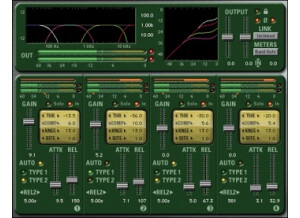
    I didn't have any trouble installing the Waves Ltd. C4 compression plug-in as there were no compatibility issues or problems otherwise. It only took a short amount of time to get the plug-in up and running and since I have installed it on my machine I haven't encountered any issues with this plug-in whatsoever. The interface of the software isn't hard to follow and after playing around with it for a short amount of time I was able to understand everything that was going on within the software. The Waves Ltd. C4 has four separate sections for compressors that each control a certain section of the frequency spectrum and there is a graft that displays this, which really comes in handy. I haven't seen the manual for the Waves Ltd. C4 plug-in so I don't know how if it is helpful enough, but I would only recommend seeking one out if you don't have much experience with compressors or plug-ins. SUITABILITY/PERFORMANCE I am currently running the Waves Ltd. C4 plug-in on a Mac Book Pro that has a 2.2 Ghz Intel Core 2 Duo processor and 4 GB of RAM. I run the plug-in in Pro Tools LE 7.4 that runs off of a Digi 002R audio interface. I have also used the plug-in extensively on a Pro Tools HD, and no matter which system I use I find that the software runs efficiently and without issues. I can run a few of them at the same time, but I tend to only use three or four at most at a time. I've been using the Waves Ltd. C4 for about two or three years and it has been a real beneficial plug-in to have that I use a lot. OVERALL OPINION After using the Waves Ltd. C4 plug-in for the last few years in my Pro Tools system, I can confidently say that I really enjoy using this multi-band compressor. It is easy to use and is helpful for all sorts of instruments and applications. It has a really good sound quality and especially is good for drums and for vocals, as it allows you a great deal of control over your sound. Since it is made by Waves you know that you are getting a good product, even if it isn't the cheapest plug-in out there. I would definitely recommend this plug-in to anyone looking for an effective multi-band compressor, even though it isn't my best compression plug-in.

  • « Excellent compresseur ultra rapide. »

    Je l'ai testé avec Reaper sur Mac . Je possède beaucoup d'autres compresseurs et plusieurs multi-bandes. Ce qui surprend le plus avec Pompeii c'est la transparence quand l'attaque est au minimum. L'effet de pompage est moindre qu'avec les autres. Dès lors, on peut l'utiliser plus violemment sans perdre la musicalité ou l'authenticité du signal. Il faut cependant savoir ce que l'on fait au risque de trop déformer les sons. Le plugin est très facile à comprendre et son utilisation est très intuitive. Ce que j'aime le plus c'est la sonorité résultante des compressions Ce que j'aime le moins ? Rien.

  • « From Warm To Cool »

    The L3-L16 is a 16 band limiter with EQ, and Maximization. It will give a very warm tone, or any type of tone you would want from warm to cool. It is an all in one mastering VST that can be used in a bunch of different DAW’s and programs. Waves allows you to try this plug in before you decide to purchase it. The L3-L 16 is a very powerful tool. It has everything you need to not mix, but to master your recordings. You will need the manual if you want to do things the right way and get the exact sort of a tone you are looking for on your complete finalized track. The manual is easy to use and to understand. All of the main functions are easy to use you will just need the manual to understand how to use them and locate them. SUITABILITY/PERFORMANCE I ran L3-L16 on my Apple Macbook Pro 2.66 Ghz i7 Dual Core 4GB laptop and it worked great, it does take a little more time to install than most of the other Waves plug ins did on my computer. I have not tried to use the L3-L16 on my PC because I hardly every “master” on my PC. The L3-L16 was very stable on my Mac and has never gave me any issues or errors and has not crashed once. I have been using it for around 10 months now and I have got way more than my money’s worth. I have really learned some new mastering techniques with this VST and I use it to help me dictate the mood of the whole track by making it warmer or cooler. OVERALL OPINION The L3-L16 is a full mastering program, if you have a little knowledge with mixing then it is time to start learning how to master your own songs. I didn’t want to have to send my stuff off to get mastered anymore and pay twice the amount of this software just to get a few masters done. I wanted to learn to do it myself and the L3-L16 has really helped me. I am happy with my purchased and I would do the same purchase again if I needed to. The quality is amazing now!

  • « Sonalksis CQ1 »

    The Sonalksis CQ1 is a multi-band, frequency-selective dynamics processor that I only recently discovered, and I am really impressed with the results I can get with it. While retailing for $279.99, there is a free downloadable trial of this product at the Sonalksis website so you can get a preview and feel for the product. The CQ1 (Multiband Compander) is sold along with DQ1 (Dynamic Equalizer) in the Sonalksis' Multiband Dynamics Bundle. It retails for $449.99 <a href="http://www.glintonline.com">http://www.glintonline.com</a> There are a few reasons why I loved this plug-in so much, but first off I have to bow to simple fact that the CQ1 is another great plug-in made by this European company. With CQ1 you can easily select the frequencies you want to compress or expand using its four-band features. No wonder Sonalksis describes the CQ1 as a “frequency sculptor”. The side-chain filter is a great feature to select and eliminate undesirable frequencies of a track. Despite similar capabilities with the DQ1, the CQ1 can achieve more aggressive “sculpting” results. The interface is intuitively easy to operate, and offers well-designed presets as well as the capabilities to make and customize your own. I use the CQ1 not only on individual tracks but also for final equalization/frequency sculpting of my master output. This is an amazing and flawless sound shaping tool. The CQ1 offers zero latency and supports up to 192Khz. Its interface is easy to use and makes it easy to monitor what you are accomplishing with the product. For all those who want a polished final product right out from their home or professional studio. CQ1 is a great tool for every stage of music making, be it recording, mixing or mastering. This review was originally published on http://www.musicgearreview.com

  • « Auto-summing multiband limiter »

    The L3 plugin is the one that really started to put Waves ahead of the competition in terms of flexibility and power. The L1 and L2 plugins were always great, and they contained an awesome look-ahead feature to help really dial in the perfect loudness mix. The L3 takes it to an entirely new level with multiband limiting. The plugin has a PL mixer, linear phase EQ, huge digital resolution, re-quantization and dither, master and individual automatic release controls, supports up to 24bit/96KHz resolution and has mono/stereo components. To use this plugin, you simply enable it on your master buss and start shaping the tone. This is one of the more complex limiters out there, so you might want to check out the manual for this. Another thing you can do is check out Youtube videos on how to properly use a complex multimaximizer like this. SUITABILITY/PERFORMANCE This plugin takes a little more RAM and processing power than the standard L1 and L2 plugins. That said, it's still not a huge deal with today's machines. Waves is the king when it comes to stability. I've never experienced a directly related crash with these plugins, nor have I experienced any freezing or glitches. The plugin is cross platform compatible, so Mac and PC users alike can use this without any issues at all. As a Mac user, that's a big thing for me. There is one issue, however. This plugin is a 32 bit plugin for OS X. I work in a 64 bit DAW, and I need to have a special bridge application run every time I want to use this. It's not a huge deal, but I hope they update it later on in the future. I've been using the Mercury bundle for the past six or so months now, and I'm loving every second of it. OVERALL OPINION This is one of the more powerful limiters out there. There are lots of features packed into this, and it can be a touch overwhelming for first timers. That said, just take everything one step at a time, and you'll soon realize what everything does and how it shapes the sound. I actually prefer L1 and L2 at times for simple mixes, but when I'm concentrating on professional style mixes, I'll break out something like this, or its newer brother -- the L3-16.

  • BadApple's review

    With maximus there was no trouble what so ever in installing it. It should not have had any trouble if you think about it since it is part of fl studio and installs with that program. Everything in maximus is very self explanatory really, its very well laid out and is great to work with. There was no compatibility issues at all with my computer set up. If fl studio can install on your computer then you will have maximus. SUITABILITY/PERFORMANCE My production laptop is 4gb ram and 1.8GHz processor, it runs perfectly fine with what I am using. It does not eat up a lot of cpu either so if you are in need of using maximus on a pretty ropey computer do not fear as it will more than likely run. I have used maximus on my sub basses for a very long time now, you can really strengthen the deepness of the bass from it and it really helps in dnb and dubstep production. The configuration is stable, I do not think that anything has every broken whilst using this program. OVERALL OPINION I have to say that the best thing about it is that it is very simply set out which helps a lot for beginners. I have tried other versions but this is definitely my favourite one out of them all. Sound quality is great can not fault it one bit, maybe a better or more expensive version would have even better quality. It came with my FL so can not comment on price. I would use it over any other plugin out there mainly because I know how to fully use it now and that is the main trouble people may have. I can not think of any bad things about it other than people may not know how to use it.

  • moosers's review

    The Waves C6 Multiband Compressor is an in depth dynamic processing plug-in for your DAW. It's available as an individual plug-in and is only found in one or two Waves bundles, including the Mercury bundle. The C6 is essentially a reincarnation of the popular Waves C4, with added features and control and a slicker sound. I don't have this plug-in at home and have only used it at the professional studio where I'm employed. It's got a pretty easy to use (and colorful!) interface, with six bands of compressor as the name suggests. Each of the bands has parameters for threshold, gain, range, attack, and release. There are also parameters for setting the desired frequencies and crossover frequencies between the bands, as well as a master section of parameters for release, knee, behavior, and S/C mode. There's a handy graph to help show everything visually and there's also an overall output leveler. A manual might be a good idea for beginners, but most will be able to navigate through it without one. SUITABILITY/PERFORMANCE The studio I work at is running the Waves C6 Multiband Compressor on a number of different systems. I've used it on a few of our systems, all of which are Pro Tools HD based, professional recording systems. Our main room runs this on a Mac Pro desktop computer with 10 GB of RAM and dual 2.66 Ghz Intel Xeon processors. Our other rooms have comparable systems, so I've never experienced any issues running the plug-in. OVERALL OPINION The Waves C6 Multiband Compressor is definitely up there with the best plug-ins of it's kind. I haven't gotten to use this one as much as the original C4 (of which this is an upgrade over) since I don't have it at home, but wish I did as I'd be using it a whole lot more. I don't use multiband compressors like the C6 everyday, but if I'm looking to get more precise control when it comes to dynamic processing, using something like this is the way to go. As always with Waves plugs, it's got a super clean sound and between the six bands, there's an endless amount to what you can do with it. It's not going to cheap to buy on it's own, nor is the Mercury bundle cheap that comes with it. However, if you're a professional studio owner, both are something worth considering...

  • moosers's review

    The Waves Ltd. Linear Phase Multiband Compressor is a software plug-in found in numerous Waves plug-in bundles and available individually. I installed this along with the complete bundle of Waves plug-ins, and I imagine that most will be installing it within a bundle, which shouldn't be a hard process. Just follow the step by step instructions like you would for installing any software. The plug-in's interface isn't convoluted as they make it as easy as possible to use everything going on here. The compressor is split into five separate bands, each with their own parameters for threshold, gain, range, attack, and release. You set the crossover frequency between each of the bands to determine where each band is defined. It also has dither, and a variety of other little features to be aware of. It's user friendly enough where I don't believe a manual is necessary. SUITABILITY/PERFORMANCE I've used the Waves Ltd. Linear Phase Multiband Compressor on both my system at home and the ones at the studio where I work. Mostly I'm using it at home, but I do a lot of going back and forth between the two systems, so there is a good amount of crossover. My home system is Pro Tools 9 (Native) based that I run with a Digi 002R audio interface and on a Mac Book Pro laptop with 4 GB of RAM and a 2.2 Ghz Intel Core 2 Duo processor. At the studio we have a number of systems, all Pro Tools HD based. In either case, I can't say that I've encountered any issues related to the performance of the plug-in. OVERALL OPINION The Waves Ltd. Linear Phase Multiband Compressor plug-in is a great one to have in any DAW. While a multiband compressor isn't always necessary, it's definitely a nice tool to have as it can be very helpful be able to compressor separate frequency bands. It's useful for applications of all kinds, namely for vocals, drums, and really across the board in some situations. It has a clean and professional sound, much like many of the Waves plug-ins of this type. I don't know if it's going to be worth it for most users to buy this individually, but those who have a Waves bundle will most likely have this. So if you do it's definitely a tool you should take advantage of and if you don't have it already, this or something like it is definitely worth looking into.

  • moosers's review

    The Digital Fish Phones Endorphin plug-in is a dual band compressor, usable in either traditional stereo or M/S modes. It is a free plug-in that is available for download straight off of the Digital Fish Phone website. All of their plug-ins are free, so they're definitely worth knowing about in general. I don't remember exactly what formats this one in particular in compatible with, but I was using it on my old PC system as a VST plug-in. I haven't tried, but I don't think it will run in Pro Tools on my current Mac system. As long as you're properly compatible, it should be easy enough to download and install the plug-in as I don't recall having any problems doing so myself, although it's been years since I had it. The interface of the plug-in itself isn't too hard to use, although there's a nice array of parameters to get used to here. For starters, there's a button to use the plug-in either in M/S or stereo mode, followed by sliders for input trim, output drive, attack, release, comp low and comp high, and de-compression/saturation. It also has options for using it in M/S mode, as well as mix low and mix high levelers. I'm unsure of if there's a manual for Endorphin. SUITABILITY/PERFORMANCE While I'm not currently running the Digital Fish Phones Endorphin plug-in and it's been a few years since I have, when I did run it, it was on my old PC laptop and in Cubase SX 2.0 and later in 3. The computer was a Hewlett Packard Pavilion dv8000 with a 3.0 Ghz processor and 2 GB of RAM. I don't really remember having any problems running this plug-in and I'd honestly be surprised to hear if anyone did have problems with it. Usually free software like this is made with the intention to be used on all sorts of systems... OVERALL OPINION Since it's free, the Digital Fish Phones Endorphin plug-in is definitely one to check out if you're DAW will allow you to in terms of compatibility. It's a pretty in depth dual channel compressor, and it's awesome that you can use this is M/S mode rather than just in stereo as you'll get with most plug-ins. This feature helps to set this plug-in apart a bit, although I don't think it's the best sounding compressor overall. I like to array of parameters here, as it's definitely a fresh and unique approach to compression. Again, if you're able to run this on your system, definitely give it a shot as even though it's not really a professional plug-in, it still sounds pretty good and can do some interesting things for sure.

  • moosers's review

    The Nomad Factory A.M.T. (Analog Mastering Tools) Multi Max plug-in is one of three found in the Analog Master Tools bundle. You can only get this plug-in as part of this bundle, and it's the most in depth of the three in it. It's more or less a more complex version of the AMT Max Warm plug-in. I don't own this bundle of plug-ins myself, as I've only used them on the systems at the studio where I work, so I didn't have anything to do with the installation process here. Using the plug-in isn't necessarily hard, but there is a decent amount going on that you need to be aware of. From top to bottom, it's got parameters for input threshold and output ceiling for the limiter, as well as five limit modes and recovery time to set. It then has a three band EQ on the bottom with high and low band frequency controls. Any experienced user won't need a manual for this... SUITABILITY/PERFORMANCE The main system that I've used the Nomad Factory A.M.T. Multi Max plug-in on at the studio where I'm employed is Pro Tools HD based and is running on a Mac Pro computer with 10 GB of RAM and dual 2.66 Ghz Intel Xeon processors. We've also got a Neve 8068 console and Apogee converters. While it's designed for mastering, if your system can handle it (which this one can), it's suitable for mixing as well. OVERALL OPINION The Nomad Factory A.M.T. Multi Max is definitely the most versatile in the Analog Mastering Tools bundle, taking the best of the other two plug-ins in the bundle and putting it into one. I've used this one mostly for quick mastering jobs, but use the others more for mixing. It's not going to be your one stop shop for mastering, but for simple home studio mastering, it's definitely adequate as a plug-in and as a bundle as a whole. The bundle is incredibly cheap, as the Nomad Factory bundles give you some of the best bang for your buck out there. The A.M.T. Multi Max plug-in in terms of sound is definitely warm sounding for a plug-in and is incredibly versatile. I don't know if this bundle would be the best way to go in terms of home mastering, but they're great plug-ins to have around for all purposes...

  • moosers's review

    The Nomad Factory Essential Multiband Loudness Maximizer is a plug-in that's a part of Nomad's Essential Suite of plug-ins. The bundle contains nine plug-ins in total, all 'essential' plug-ins for mixing. I didn't have any issues installing the bundle as a whole, as it's compatible across the board. The make up of the plug-in in terms of parameters is simple, as it's really a basic loudness maximizer. The interface contains sliders for input and output levels, threshold, and release. It also gives you control over crossover frequencies. In general it's real easy to use, so as long as you understand the basic working parts of a loudness maximizer, so I don't think most users will need a manual. SUITABILITY/PERFORMANCE The system that I'm running the Nomad Factory Essential Multiband Loudness Maximizer on is a Pro Tools LE 8 system. I've got a Mac Book Pro lap top with 4 GB of RAM and a 2.2 Ghz Intel Core 2 Duo processor, and I'm running Pro Tools with a Digi 002R audio interface. I've only tried running this plug-in on the master fader of a session, so I can't say I've ever had a problem running it on my system at home. OVERALL OPINION While it's not going to break down any barriers, the Nomad Factory Essential Multiband Loudness Maximizer is good at what it does. After trying it out a few times, I don't think I'll be using it much in the future only because I've got a series of Waves plug-ins for this purpose, which are notorious for being the best loudness maximizers out there. If you didn't have anything other than this one however, it would certainly do the job fine. It's not as realistic sounding as something like the Waves L2 or L3, but still does a good job of giving your mixes a boost in volume. The Nomad Essential bundle is one definitely worth considering for anyone who is just putting together a DAW and wants a cheap way to get a slew of quality plugs...