Log in
EN
FR

MIDI Interfaces

390 products found

Filter
Sort by
Evaluation
  • Reviewed or not
  • Editor’s award
  • Reviewed by Audiofanzine
Availability
  • Available or not
  • Sold new or used
  • Sold new
  • Sold used
Must-have products
  • All products
  • Flagship products
  • Best rated products
  • Hot products
  • Popular products
Price
  • Freeware
  • Low-cost (< $50)
  • Mid-range ($50 - $150)
  • Premium (> $150)
€
Clear
Sort by
  • Popularity
  • User ratings
  • Price - low to high
  • Price - high to low
  • Used price, increasing
  • Used price, decreasing
  • Name (from A to Z)
  • Name (from Z to A)
  • Added on
Sort results
  • Popularity
  • User ratings
  • Price - low to high
  • Price - high to low
  • Used price, increasing
  • Used price, decreasing
  • Name (from A to Z)
  • Name (from Z to A)
  • Added on
Filter results 390 results found
Evaluation
Availability
Must-have products
Price
  • Freeware
  • Low-cost (< $50)
  • Mid-range ($50 - $150)
  • Premium (> $150)
Show results

The best MIDI Interfaces reviews

The reviews Audiofanzine members found the most helpful.
  • « Simple and Effective! »

    I have an old Yamaha CS15 that works with Hz/Volts (like most Yamaha/Korg synths of the glorious pre-Midi time) and most Midi -- CV converters on the market weren't really up to the task. That's why, when I saw an ad on AF showcasing this small wonder for not too much money, I didn't hesitate too long. And, to be honest, for the time being, I don't regret it all: Having a CS15 Midi is awesome! USE It's a 100% hardware unit, so it doesn't require any drivers: A simple MIDI cable, two jacks and that's it. I connected and set up mine in 10-15 minutes, clocked. - A Midi Out from my Roland A-880 into the Midi In of the Kenton - The CV Out from the Kenton into the CV In of the CS15's VCO1 - The Gate Out of the Kenton into the Trig of the CS15's EG1 - Some adjustments (Midi channel, Transpose, Trig mode and Hz/Volt selection) - ... ... And that's it!!! It works!! I only need to buy two Y cables to control the two VCOs and the two envelopes of the CS15 and then it will be perfect!! OVERALL OPINION In a couple of minutes I was able to control my CS15 from my Kurweil K2000 or from Cubase or from any of my other keyboards via my UM-880/A-880s. It's brilliant! Sequences of the CS15 from Reason's Matrix Sequencer, splits mixing pads of the SuperNova on the left hand and Lead with the CS15 on the right hand, Layers of Virus+CS15 Leads, envelope/filter triggers synced via Midi to have a Gate effect on anything via the CS15's Audio In, etc... Bottom line: Thanks to this miraculous little box, my CS15 has become a 21st century instrument, completely integrated into my MIDI setup. It's simple and effective.

  • « A basic usb-midi interface »

    The M-Audio (Formerly Midiman) Midisport 2x2 is a usb-midi interface with two sets of midi inputs and midi outputs. It is one of the smallest box-style midi interfaces available, and is suitable for most basic midi needs, where only one or two midi devices are being used. For my studio, I simply need one midi input from my larger keyboard midi controller, and this small box fits the bill perfectly. It sits on the floor under my desk, and I never need to touch any controls on it. UTILIZATION For the most part, the device does is not plug and play, as it usually requires downloading the correct drivers from M-Audio's driver website. Also, installing the drivers can be confusing, because there are two sets of drivers that need to load when you plug the Midisport 2x2 into the computer. Initially, I thought it was repeating itself (and thus something was wrong) and I aborted the second installation. With Windows 7 and Vista, the drivers may be easier to install than with my Windows XP system. Functionally, I've had no problems or glitches with this midi interface. There is no lag or latency that needs to be compensated, and the lights on the Midisport easily let me know when it's sending and receiving data. There is a midi thru switch on the device that, if accidentally pressed, will disable some of the midi data transfer to the computer. OVERALL OPINION Overall, the Midisport 2x2 is a simple device that does it's job, and has lasted me for many, many years. My version is fairly old (still says Midiman), but the newer devices are nearly identical, they just have a different color design. That just shows how durable and lasting the technical design of this simple unit is. Great midi product, which is usually the case with M-Audio, one of the leading midi device companies out there.

  • moosers's review

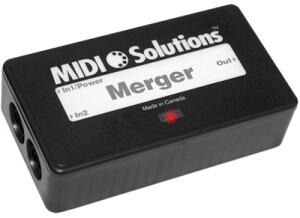
    The MIDI Solutions Merger is a type of MIDI interface which allows you to combine MIDI outputs to be routed to a single MIDI input, or any number of possible routing options of your choosing. The reason that I've used these boxes is for sending a few different MIDI keyboards to a single MIDI port. It makes it easy to do when I only have a single MIDI input going to my console or computer. It can really be used in a variety of ways, as it just gives you extra MIDI routing options. It can also be used in tandem with other MIDI Solutions products to give users an infinite amount of MIDI routing options. As far as characteristics go, it has a MIDI two MIDI inputs and a single MIDI output. UTILIZATION Setting up and using the MIDI Solutions Merger is a simple process, as you simply plug your MIDI signals, whether it be keyboards or whatever, to your two MIDI inputs and you send your MIDI output to your MIDI interface. It really doesn't get all that much simpler than that, and that is really all there is to it, so a manual isn't necessary. OVERALL OPINION MIDI Solutions specializes in unique MIDI boxes and interfaces, so I trust them when it comes to things like this. The Merger is a well designed product that will do exactly as advertised. The price is reasonable and realistic, so if you need a box or two like this one for when you might have a limited amount of MIDI inputs on your interface, I wholeheartedly recommend making the MIDI Solutions Merger the first place you look. I'm really not sure about a product that I would compare with this one, as the Merger is the product that I have used from the beginning and that I will probably continue to use for a good time to come.

  • « Excellent unit, despite its age »

    In my setup I have two A880 units that distribute 6 MIDI outputs from the computer interfaces to all my gear. Also they collect the input from various keyboards and send it to the interfaces. Mind you, this is not an interface, there is no USB input to communicate with a computer. However, they do a very fine job in distributing various inputs to various outputs, with the possibility to merge 2 inputs to one output. Also different filtering is possible, though there are devices on the market that are more extentive in their possibilities than an A880. Active Sensing for example, can't be filtered with the A880 patchbay, but you can filter notes and CC in order to ease the MIDI signals to certain outputs. There are some 'panic' options, to send ALL MIDI NOTES OFF to all outputs. The Roland A880 is a very good MIDI patchbay that is easy to operate and with a good visual feedback. You can store different routing configurations too.

  • « small and compact, worth the try »

    The roland UM One is a very basic and simple midi module that only allows for one midi connection via usb to your computer. This is Ideal for the traveling musician for use with a laptop. That is the only reason that I purchased it so I can switch it back and forth between my MuseBox and Midi keyboard when on the road. This midi interface is the most compact midi interface possible. It can be rolled up and fit right into your pocket like some small in ear headphones and you wont have to worry about it being damaged because there really isn’t anything to damage. Not to mention that it only cost around 40 bucks brand new, if you have a laptop that is semi good, then you will have no lag between the hardware and your computer when using the Roland UM One. UTILIZATION didnt have to update the driver. OVERALL OPINION The roland UM One is Very easy to setup, I didn’t even have to install a driver for some reason my computer just synced right up with it and pro tools is my daw or was at the time I was using this and it worked great and didn’t have any issues with it, I still own the Roland UM one and don’t use it that much anymore though because when I travel I tend to just bring more gear every since I purchase a nice travel case that I can put a lot of my gear in, so just one midi connection wont work for me anymore. But if you travel a lot and have a decent laptop with you and have midi gear than the Roland Um 1 will be perfect for you. It is a must by at 40 bucks what more could you really expect to get. You have nothing to lost with this little un damageable device.

  • moosers's review

    The MIDI Solutions Thru Box is a simple box that allows you to send a single MIDI signal to two separate outputs. It makes it simple to send a MIDI signal to two separate locations, and makes sure that your signal won't be degraded in any way. There aren't any other connections beyond the single MIDI input jack and the two MIDI output jacks, and doesn't need any extra power as it is MIDI powered and will turn on once you've made the connections. I've only used the Thru box in the recording studio, and I'm not sure that I can think of any other uses for the box beyond this. UTILIZATION It really couldn't be any simpler to set up and use the MIDI Solutions Thru Box. Simply make the connections and you're good to go! You can of course use this box with other MIDI Solutions boxes, which is what I'm sure many professional studios will be doing. However, you can use it on it's own if you don't need anything else. The MIDI Solutions Thru box isn't something that I've used on too many sessions, but we had it on hand in one of the studios that I've worked at, as it is something that was needed and came in handy more times than you would think. OVERALL OPINION If you're looking for MIDI boxes to make any sort of irregular (or regular) MIDI connections, MIDI Solutions is the company you want to be in touch with. They make reliable products that in many cases are unique and are hard to find elsewhere. While I'm sure you could find another MIDI thru box like this one out there, I haven't ever used another one, so I don't really have anything to compare this one to. I'd encourage you to do the proper research, but you definitely cannot go wrong with this box and with MIDI Solutions in general. The price is about right for something like this, as I don't think that it is over or under priced. I'd definitely recommend the MIDI Solutions Thru box for anyone in need of one.

  • Audiofanzine FR's review

    (Originally written by aI2seNIc/translated from Audiofanzine FR) Thrubox. 1 Midi input and 3 Midi outputs. 9-volt battery or PSU operation (battery in my case). I read the box switches off after a certain time without signal input... The manufacturer indicates a one-year long battery life. Black rugged plastic housing. UTILIZATION It routes the Midi input signal to the 3 outputs... it's magic^^. It helps me control 5-6 sound generators/drum machines synchronized with Ableton under Windows XP. OVERALL OPINION The Philip Rees V3 isn't bigger than a pack of cigarettes (2.3" x 2.7" x 0.9") and makes a very good job. I didn't feel any Midi latency. I chose the product because it's simple and cheap. The price was ridiculous, thank you Philip! I would definitely buy this product again... or I would try to find a v4 or v8 ;)

  • « Excellent interface with a tiny quirk »

    In my setup, the MicroLite works in conjunction with an UltraLite hybrid and two Roland A880 patchbays in a rather elaborate MIDI setup. All USB gear, the MicroLite included, is connected to my MacBook Pro via a TPLink USB hub and I run Ableton Live v10. The half-width rack size is quite conventient for me, as the module stacks neatly on top of my other MOTU unit. They could also be connected side-by-side with adapters that come with each half-width MOTU unit, but I decided to use my rack space differently. The unit is fairly stable, I have not noticed lags or latency of any significant kind. The only quirk that I noticed is that sometimes the MicroLite won't pass on traffic when a synth with Active Sensing is connected. That is: I have to power up the computer (and thus the bus-powered unit), run my DAW software and only *then* power up the synths with Active Sensing (Korg 01/W and Yamaha V50). The only other workaround to make sure the interface doesn't stress out is by putting a MIDI filter in between, that filters out the Active Sensing. So, either use a filter or adapt your power-up sequence or, as a final resort, remove the USB plug from the MicroLite and reset it after you're all set up and ready to go. Other than that, I love my MOTU gear and I think it's a minor issue.

  • « Cannot config without computer »

    It should have been no big deal to manufacture this 100$ midi device with a couple of dip switches to hard configure the base settings, rather than forcing the user into endless searching for software to configure this device. All I needed was just midi in to midi thru, that's very basic. Why the manufacturer did not include the appropriate softwwre to configure this device is a mystery, in any case a bummer. As I do not use any computer / daw with my music instruments, this device is a big no. I just don't understand why the basic base config is not simply midi in to midi thru, just like all the cheaper similar products. I returned this device to the shop for a full refund. On ebay I found a 20$ midi in to midi thru spiltter that works perfectly without any software. I give one star for the functionality and an extra star for the build, total 2 stars.

  • « Has issues, but good design »

    I am using this with a Windows 10 Dell XPS touchscreen. DAW: Ableton 9.5, Cubase Essentials, and Stagelight. Old school midi gear: Oberheim MC-3000, Roland D-550, JV-2080, JP-8080, JD-800, VSynth, VR-760, Novation Supernova, Moog Little Phatty 1, DSI Prophet 08pe. Initially, I've had no problems with this unit, until I began using Ableton. Live doesn't seem to want to recognize the drivers for it. When it does, it lists them in a way that they can't be edited. I think there needs to be new drivers written for this, as I am using the current driver set. It's possible there is no driver set for win 10 yet. Working with it in cubase is great though. Only issue is that it doesn't seem to want to allow sys ex commands to data transfer some older gear like the D-550. The express replaced a Yamaha UX 250, and it would be lovely if I could use both, but the drivers seem to conflict.

  • « easy to use and portable »

    The MIDISPORT can be purchased in the 2 in 2 out versions too. This is the 4 in 4 out version, it is small and compact. It can not be racked, but it will not take up much space on your desktop because it is not very good. It is also made well and won’t break easily, I have knocked mine off my desktop about 4 times, and my floor is made out of wood and it still didn’t break or crack. I take this MIDI device with me everywhere so I can also have all of my gear ready to go. UTILIZATION I mainly only used the MIDISPORT with my keyboards and a have a few rack modules that I use for sounds like the Motif XS rack and Fantom XR. I have them both going through this MIDISPORT and they work perfectly. It has only gave me some problems when I start switching out the MIDI chords to change out my gear or connections and then I will sometimes have to shut down my whole session and even computer sometimes to get the MIDISPORT to recognized the gear properly. I am not sure what causes this but my guess would be that you just can’t change stuff out on the fly like that. I have not received any driver updates, I am not sure if they have came out with any. OVERALL OPINION I am happy that I have purchased this MIDI device, I use to own the 2x2 version and needed an extra 2 ins and outs to I got this one. It will probably be the only one I will every need for home. But at the studio there are a bunch of devices like this one and they cost a lot more. I still think this one is just as good as any MIDI device that is out. No lag, no hassle; it just works. I recommend getting this if you have a few pieced of MIDI gear that you need to have synced.

  • « Very simple and works well. You will eventually need more MIDI INS and OUTS »

    The MIDI Sport Uno is a small plug and play MIDI device that is so simple to set up. You install the drivers then plug it in and you can use it right away. It does not require any power supply and it connects to your computer through USB. The problem that I had with it is that there was like a slight delay between sending out MIDI signals. Which really messed up my workflow a lot. I used it with my M-Audio MIDI controller when I was getting these issues. UTILIZATION The price of the Sport Uno is 40 dollars, you really can not beat that price but how long are you going to use this MIDI device? Do you plan on having more gear (MIDI)? That is where I had to get rid of it , this was the first MIDI device that I actually purchased and used it for about two months, then sold it and bought one with more inputs, the MIDISPORT 2 by 2, then I ended up selling that to get one with 5 inputs. So I wouldn’t waste your time buying this unless you only plan on keeping 1 MIDI connection. It would be better to just invest in a device that has enough MIDI for your growing set up over time. But if you don’t plan on growing and getting more MIDI gear then the Sport Uno will work great for you. OVERALL OPINION Setting it up was quick and using it is simple. Make sure if you are using it with a MAC that you have 10.1 OS or higher, anything lower than that it will not work. If you are on Windows you will need to download the proper driver especially if you are on a newer system like Windows 7 or even Vista 64 bit. This is a great MIDI device, but it will leave you needing to upgrade within a year.