Log in
EN
FR

Akai Professional MIDI Keyboard Controllers

32 products found

Choose a series
Sort results
  • Popularity
  • User ratings
  • Price - low to high
  • Price - high to low
  • Used price, increasing
  • Used price, decreasing
  • Name (from A to Z)
  • Name (from Z to A)
  • Added on

The best Akai Professional MIDI Keyboard Controllers reviews

The reviews Audiofanzine members found the most helpful.
  • « Comes with a copy of Ableton »

    The best part about the MPK25 is that it is so portable. I was using this MIDI controller for over a year and loved using it. But it got to the point where I started to want to have more octaves (keys) to play, as I am learning to be a keyboard player. Also the price of the MPK25 is very affordable. Everything with this MIDI controller is well built and made to last. There are a total of 13 knobs on the MPK25 and they are on the controller very well, I didn’t have any issues with them coming loose or falling off. The 12 drum pads are very similar to the MPC pads but of course they don’t have the same feel as my MPC does. But pitch and mod wheel are well made. They are nice and loose, sometimes when you get a new MIDI controller the pitch or mod wheel will be somewhat stiff but that was not the case with the MPK25. UTILIZATION Installing it was very quick, just load up the drivers then get it to sync with your program. Setting it up in FL Studio was a breeze, and then I would use the FPC in Fl Studio and sync it with the drum pads on the MPK25. This did take more effort than I expected and it was not automatic. I had to manually assign everything. OVERALL OPINION I loved using the MPK25, I had a small laptop bag that I would put it in and take it everywhere with me. The keys are semi-weighted and will last you a long time. The keys are a little bit stiff when you first get the MMPK25 and use it for the first time. But after a few uses, they will loosen up and feel a lot better when you are playing. The manual that comes with it is more of a quick guide, but it will guide you to setting up the MPK25 quickly.

  • BeyondR's review

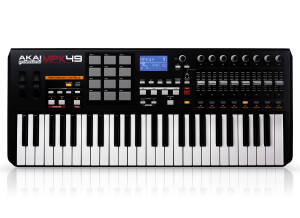
    Characteristics that motivated my choice were the 49-key, that are semi-weighted ,also the semi-weighted keyboard with aftertouch and full-sized keys. The connection type is MIDI. UTILIZATION The general configuration of the soft is quite fast and easy. The manual provided by it is okay, however I would search for some more info on the net for more knowledge regarding the keyboard and its features. OVERALL OPINION Let me start by saying what I don't really like about it, I don't feel comfortable with the position of the LCD display, and where the pads are positions, however I do like their feeling and I gotta give some credit for its control and quality. However what I really like are MMC/MIDI Start Stop transport buttons, and I really love the pads, those 12 pads and the way they feel, they also have velocity and pressure sensitivity which are really great for building nice 16th drum patters and weird velocity changes. Also a fancy feature is MPC note repeat and all-new arpeggiator and 8 full-sized, 360 degree rotation pots, each with 3 banks for 24 pots total, which make a huge difference as well. I gotta admit that the price is pretty high, it costs around 350$, having said that if you want a more complex type of midi controller and you have the money, you should give it a try. It's compatible with Windows XP, Windows Vista, Windows 7, and Mac OS X. If you would like a similar midi controller ( maybe better) you should check M-audio Axiom 49 2nd Gen, there is a slight difference in price, however both of them have pretty decent sound quality and control. Knowing what I know, I don't think I would buy this controller just because I could buy something cheaper and still have the same controls, the arrpegiator is a unique feature provided by Akai, so think about it.

  • « i need more keys »

    The Akai LPK 25 is a 25 key midi keyboard that is really small. I was very surprised to see how small and compact it is. The space between the top of the keys and the top of the board is virtually not even there . There is just a little black strip which cuts the height of the board down and makes it smaller than most 25 key controllers. Akai has really taken over some of the midi keyboards recently with some of there larger models. But the LPK25 is one of the lower end models that they produce. You will NOT be satisfied with this if you play with both hands. You will have to record your lower end instruments and sequences separate from your melodies just because there arent enough keys. I wouldn’t get this unless you are looking for something small enough to go into your back pack so you can pull it out on the go and make music wherever you are. UTILIZATION If you are looking for a good midi controller at home I wouldn’t get this either unless you are tight on workspace and need something small. Not that it cant do what a 61 or 88 key can do because in the end its all the same. But I like to play my melodies with my low end at the same time to really get the sound of it before I record the midi sequence. OVERALL OPINION I am not bias but im just not a fan of 25 key midi controllers because they are just not enough for me. If I am going to use a 25 key controller I mine as well load up FL studio and just use the recorder keys that are on my laptop as the piano keys (fl studio has an option for this) and make my patterns and save money from buying at 25 key controller.

  • « Great mini midi controller »

    Number of Keys: 25 velocity-sensitive Pads: 8 velocity-sensitive, light-up MPC-style pads x 2 banks Knobs: 8 assignable controller pots Computer Interface: USB/MIDI only Programs: 4 Octaves: 9 Arpeggiator: Yes Additional controls: Sustain, Tap-Tempo, CC Dimensions: 6" x 13.6" x 1.2" Weight: 2 lbs (shipping weight 2.5 lbs) I really like this controller because it is small. It's small enough to fit in a computer bag and it's usb powered so you can really jam on it anywhere. UTILIZATION Using this product was really easy. I just plugged it into my mac, installed the drivers and it was good to go. The only thing that takes a little bit of setting up is using the pads. The pre-loaded notes didn't match up with the drum kits in reason so I had to manually change the notes so that I could have a more comfortable and usable drum/sample pad. The tap tempo and arpeggiator features both work very well and come in handy. The keys aren't weighted but if you get used to them you can utilize the velocity sensitive feature. The 8 assignable controller pots are useful too. They are the same situation as the pads, you have to set them up, but once you get them working they are really awesome. You can use them to add real time effects to your synth/instrument. I have some assigned to reverb, delay, modulation, phaser, etc. Using the knobs allows you to add any amount of those effects in real time so that you can improvise some pretty cool stuff live. OVERALL OPINION I really like this controller. It is perfect for a portable midi controller. Weighted keys, more keys, and a modulation wheel would be nice but aren't really practical for such a small unit. For the price, I can't think of a better midi controller. I've used a few other small midi controllers but got annoyed with all of the wires I had to carry around to get it working properly with my computer. This one is one plug and done. No midi adapters, no power chords, no instrument wires, no pedals. It's small enough to just fit in with my laptop wherever I take it. It definitely has enough features to effectively produce some cool electronic music. I would buy this again if I needed another.