Log in
EN
FR

Digital recorders

787 products found

Sort results
  • Popularity
  • User ratings
  • Price - low to high
  • Price - high to low
  • Used price, increasing
  • Used price, decreasing
  • Name (from A to Z)
  • Name (from Z to A)
  • Added on

The best Digital recorders reviews

The reviews Audiofanzine members found the most helpful.
  • zicopilote's review

    Frequency response: 0 +1/–3 dB, 20 Hz–20 kHz (MIC/LINE IN – STEREO OUT) Total Harmonic Distortion (THD) (nominal input/output level) 20 kHz LPF: Less than 0.03% 1 kHz (LINE IN to STEREO OUT), Less than 0.2% 1 kHz (MIC IN to STEREO OUT) Dynamic range (max. level in relation to the noise threshold) IHF-A: 109 dB typ. DA converter (STEREO OUT), 103 dB min. DA converter (STEREO OUT), 103 dB typ. AD + DA (LINE IN to STEREO OUT), 97 dB min. AD + DA (LINE IN to STEREO OUT) 24 Bit / 64 times oversampling AD converter 24 Bit / 128 times oversampling DA converter 32 bit internal processing Sampling rate: 44.1 kHz (±6%, internal), 44.1 kHz (±6%, external) Audio input section: MIC/LINE x 8 channels, DIGITAL IN x 2 channels (optical stereo × Audio output section: MONITOR OUT x 2 channels (stereo × 1), PHONES x 2 channels (stereo × 1), STEREO/AUX OUT x 2 channels (stereo × 1), DIGITAL OUT x 2 channels (optical stereo × Mixer section: 36 channels in total, MIC/LINE Input x 8, Internal Effect Return x 4, Recorder Monitor x 16, Quick Loop Sampler x 4 Stereo Internal effects section: Multi-effects × 2 Bus section: 8 buses in total, Bus x 2 (L/R), AUX x 2 (1/2), STEREO x 2 (L/R), Effect x 2 (1/2) 2.5" IDE 20 Gb HDD. Maximum capacity per song: 6.4 Gb Maximum number of songs: 1,000 songs Recorder resolution: 16-bit linear (uncompressed) Maximum number of simultaneous recording/playback tracks: 8 tracks (recording) & 16 tracks /playback) Number of tracks: 144 (16 tracks + stereo tracks) × 8 virtual Faders: 13 × 45 mm MIDI MTC (Master/Slave), MIDI Clock (Master), MMC (Master/Slave), Program Change, Control Change, Bulk Dump Memory: Scene Memory, EQ Library, Dynamic Library, Effect Library, Channel Library, Sample Library AC adapter: PA-300 Dimensions (W × H × D): 425mm (16-3/4"), 98.8mm(3-7/8"), 321.5mm (12-3/4") Weight: 9.7 lbs MIC/LINE inputs channels 1, 2 (balanced, XLR), +48 V phantom power ±3 V Input impedance 3kΩ, Nominal input level –46 dB at +4 dB, Minimum input level –52 dB, Maximum output level +18 dB MIC/LINE inputs channels 3–8 (balanced, TRS jacks), Input impedance 3kΩ, Nominal input level –46 dB at +4 dB, Minimum input level –52 dB, Maximum input level +18 dB MIC/LINE (HI-Z) input channel 8 (unbalanced, jack), Input impedance 500kΩ, Nominal input level –46 dB at +4 dB, Minimum input level –52 dB, Maximum input level +18 dB STEREO/AUX OUT L, R (unbalanced, jack), Output impedance 150Ω, Nominal load impedance 10kΩ, Nominal output level –10 dBV, Maximum output level +4 dBV MONITOR OUT L, R (unbalanced, TRS jack), Output impedance 150Ω, Nominal load impedance 10kΩ, Nominal output level –10 dBV, Maximum output level +4 dBV PHONES L, R (unbalanced, TRS jack), Nominal load impedance 8–40Ω, Maximum output level 100 mW + 100 mW (40 Ω load) Optical DIGITAL STEREO I/O UTILIZATION Excellent, except for the absence of a USB output and motorized pots, which would be very useful when recalling scenes (which are the settings of a song that you can store). And a small touchscreen (but I'm being picky here). Complex manual, but if you practice and use it frequently it's quite logical. Nevertheless, the controls are sometimes tiresome. A bit slow compared to a computer in certain cases, but it NEVER crashes (and that's priceless). The routing of external effects to insert them into the mix is pretty lousy and takes up two inputs. Bummer. I have two, which doubles the possibilities of my home studio (a master and a slave), and it also allows me to record outdoors at leisure. SOUNDS You get out what you put in. Parametric EQ on every input and every track so you can sculpt your sound the way you want it, and it flatters the ears. The broad possibilities allow you to correct certain "cheap" links in your chain. The converters seem relatively neutral, I can't hear any sound coloration. It doesn't provide any particular color and it's not a Neve or an SSL, you can be sure of that. Careful with the input level, it clips pretty easily and the result is degraded. If you set the compressors correctly you won't get any pumping. Slightly brilliant in the high mids, the mastering section is effective but you will need external processors to complement it. In short, if it grooves at the input, it grooves at the output. OVERALL OPINION After having hesitated between this one and the Korg D1600, I don't regret anything. Even if you are limited for live recordings by the 8 inputs (despite having 16), in the studio, the individual assignation of parametric EQs and dynamic processors to every input, which can be then retouched on every track, makes everything fine. The effects processor has only two channels, but the possibility to assign them during the rough mix allows you to insert others into other tracks, etc., up to the final mix, so you can go very far with this recorder. P.S.: Most factory presets are pretty bad, regardless of whether it's for dynamics, effects or EQ, including (and especially) for mastering! So make your own, save them and everything will be fine!! You will need to add a multi-band processor at the output to get real studio-like results.

  • « Old school feel »

    If you are not big on the whole recording to computer process than the Tascam DP03 will be perfect for you. It is not like the old 8 track recorders. It is very up to date and has a creative and more fluent workflow. Its pretty simple getting your song out of the Tascam DP03 , you can either burn it to CD or transfer it to your computer via USB. If you want to transfer it to a CD (Burn it) you can do it right on the DP03. I think that is amazing for the price of 399 and to have the ability to burn right from the DP03 makes it a steal. You can do some decent mixing on the device as well, I wouldn’t plan on doing any final mixes with it or getting a master out of it. UTILIZATION It will take a while to get the hang of the Tascam DP03 with the small screen and trying to function through it. Learning to work your way through the menu’s. If you have a need to have real sliders and knobs to do your tracks then this is perfect for you. This can basically do anything that a computer can do when it comes to recording music. You just won’t be able to get your final sound, but I feel like its perfect for quick recordings. Also you don’t ever have to worry about it crashing or freezing on you because its not a PC or a Mac. It truly makes recording as easy as possible. SOUNDS Quality is good, it is well built. I would not take any chances with dropping it or setting something on top of it though. Faders or sliders don't seem to be very strong. OVERALL OPINION You will need to refer to the manual of the DP03 more than a several times, because the menu’s are a little confusing and the screen is so small. I wish it had an input VGA to plug in a bigger screen and I think it would have suited us better. With the good solid range of effects and CD burning right from the DP03 you just can go wrong.

  • « Too much or not enough »

    I've been using it for one year now and haven't had any hardware problems. After having tested the H2, H2N and H4N models, I opted for the r16. What I like best about this product is its portability and what I like least is its non-portability. It is in fact very limited in terms of capacity but it works fine as a backup recorder or as a soundcard. However, as a backup recorder, an H4 is much more practical. My R16 doesn't fit in my pocket and takes up the same space as a computer. Its main advantage is that it's a cheap multi-input soundcard. In terms of value for money, I have no complaints. As I wrote above, not-expensive multi-inputs, it's a given. In my experience, I don't think I'd buy it again. I'd buy a non-portable (but transportable) audio interface and a really portable H4. The product is very good, but it's somewhere in the middle of the road, so you'll need to know what you want to do with it and for how long before you need something bigger or smaller.

  • « Excellent .. »

    What connection possibilities (analog, digital, MIDI, etc.) does it offer? - Analog: jack/xlr/rca inputs, rca and headphone output - Digital: no input, optical output - MIDI: only one out - USB 2 - What kind of memory does it use (ZIP, MiniDisc, HDD,...)? CD-R/RW (an important detail is that it only works with the PSU, which means that if you are using it with batteries, you won't be able to burn CDs); Compact Flash type I (from 32 mb up to 1 Gb); (if the device's firmware is updated to version 2.12!!!!) At what sample rate (bits/kHz) does it work? 24 bits/44.1 kHz What syncing options does it support? midi (MMC) How many tracks can it record/play back simultaneously? ... Simultaneous recording: 2 tracks Simultaneous playback: 8 tracks Every track has 8 virtual tracks, for a total of 64 tracks, but you can only play back 8 simultaneously, the subtlety of this "virtual" aspect is that you can bounce maximum 8 tracks onto a single stereo track. USE Is it easy to make settings? Yes and no, the console side of it is reassuring, but you really need to dive into the users manual to make the best of it. However, it has nothing to do with a computer, I managed to create a masterpiece in only one hour (but the world is still not ready to listen to it...). Is the user's manual clear and comprehensive? ... 232 pages for your entire satisfaction! Is it easy to access the main functions? Generally speaking, yes, the manual includes an index to go to the essentials. SOUND For the time being, I have only made direct recordings (guitar, amp, vocals): It sounds great! Concerning the COSM simulations: I haven't used them to this day, so I can't say much about them. The reproduction is excellent, if the original recording is good, obviously. OVERALL OPINION I've had it for a week. I bought it secondhand and if you plan to do the same, ask the seller if he or she updated it, otherwise it's a real pain with the compact flash cards and if you don't have the cards, you can forget about recording anything, unless you use CDs, but then again, you have to plug it to the mains. Go read in the forums about the cards. I used a tutorial to update mine from a CD. You can still find compatible cards available at ,,,,,,, in Germany. For the price and the humble use I give it, YES I'd recommend it.

  • « Take it anywhere »

    The Boss Micro BR-80 has 3 simple modes to it, a multi track recorder, eBand and live recording functions. It will record directly to your memory card that can only hold up to 32 GB which for some artist may not be enough for what they need. The library of built in sounds for backing instrumentals are pretty good for the money you pay for this device. There is also a built in condenser microphone that will allow you to capture ok quality audio no matter where you are. I would not rely on this microphone though, but it can be great if you just want to record something quality if you are out and about and happen to have your BR-80 with you. You can play back up to 8 tracks simultaneously, in this small unit you will have all of the major functions that you need to have a small set up. All of the sounds and even the drums are pretty decent with this unit. You can even edit the drums on the BR-80. The downfall to me on this unit is that the output volume is not very good. Even when using with headphones, I have a lot of great pears of headphones and no matter which ones that I use with the BR-80 the audio is not very loud and if you turn it all the way up; it affects the quality big time. I am not sure what the issue is but maybe that is what you get for the price of a simple recorder. Though I do not recommend getting this if you are looking for it to be your main recording source, but I do recommend getting it for a back up or if you are a record on the go type of musician who may be out and about and wants to record something on the fly. In that case you will have a decent studio on you at all times.

  • « Great unit, poor Tascam customer service »

    The Tascam HSP82 is a high resolution digital recorder (8 Track). It records up to 24 bit WAV format quality and stores them on Flash Cards. There is a color touch screen on it that lets you take control over the whole device via touch screen if you choose. You can run this whole unit on AA batteries or with an AC adapter. The AC adapter does come with it and you do not have to purchase anything else, it is ready to use right out of the box. You can transfer files back and forth to your computer on the HSP82 via USB connection. UTILIZATION Setting this unit up was pretty quick and simple. It seems well built and I think it will hold up and last a very long time. It does come with a manual that is pretty long and lengthy. SOUNDS I do not think that the manual is very reader friendly and it is very unattractive. So hopefully you will not need the manual to operate it, if you do be prepared to have to sit down and read for a long time. Do not think that you can just call Tascam and get great help over the phone. This was a huge issue, we had to call Tascam after some questions we had regarding the touch screen and the person on the phone basically was just a call center operator and not a tech person so they where no help at all, goo thing we eventually got it sorted out on our own instead of waiting 2 days for a call back. OVERALL OPINION This unit is great, outside of the customer service that Tascam provided us I would say this is a must buy. It is expensive but worth the investment. This is not a rackable unit, it is pretty big and bulky so make sure you have the space to sit it down on before you purchase.

  • FP User's review

    You can record 4 tracks, during the capacity of your hard drive sync Midi, MTC or Time Code with your computer or any else machine you can make loops, copy, delete, and many function like a sequencer with the audio tracks recorded Price paid: $500 (second hand) UTILIZATION Not really easy to use, before to read the manuals, but after , no problems user inteface is like a 'normal tape recorder' nice stuff! never had a problem SOUNDS Sound is really great; it's "only " a 16 bits sound, but really better than some usual 24 bits OVERALL OPINION Great great great..... Originally posted on FutureProducers.com Posted by: Unknown (January 0-, 2002)

  • « You Can Overdub the LR Channel on a Zoom H6 »

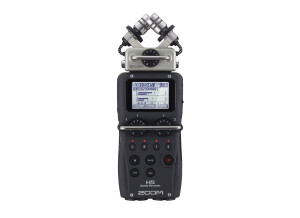
    I'm adding this review here as a previous review mentioned that this excellent product has a significant shortcoming, you can't lay down two stereo tracks using the LR Channel, the one with the Zoom mic capsule. This was definitely true when that review was written and it's true in theory still but there is a workaround which is quite easy since the firmware was updated. I'm using version 2.30. The instructions below assume you have learned to operate the H6 and understand the file structure, which is explained in the manual. 1. Record the first track in the LR Stereo channel as normal. That's Project A created (probably called ZOOM0001 if you are using a clean SD card) 2. Record a short empty track in the 1/2 stereo channel (you don't need a mic) - just set tracks 1 and 2 to stereo, select them and press record for a few seconds. That's the Overdub project created (Might be called ZOOM0002). 3. Insert the SD Card in a computer and open the file browser. 4. Copy the LR WAV file from Project A to the Overdub project. Change its name to the same as the empty 1/2 WAV file already there so your original recording is now located in stereo channel 1/2 of the Overdub project. 5. Put it back in the H6, go to Menu>Project Menu>Rebuild. Select rebuild and agree to its demands. Rebuild recreates the project file based on the new file you have placed there. That's the new feature that makes this process possible. 6. You are set to go, follow the Overdub instructions in the manual to add another track using the LR channel. You can use a similar process to import a new WAV file into the H6 from another recording source.

  • « Affordable, Durable, Portable »

    The Tascam DP-008 is affordable and portable. It is small and lightweight; take it with you anywhere to record. It records and allows you to get your files into your computer via USB. It does have a built in microphone preamps. These preamps are not the best in the world but they will do just fine with a decent microphone. UTILIZATION You can record up to 2 tracks simultaneously with the dP-008 and it has 2 XLR mic inputs both with phantom power. It comes with a chromatic tuner and metronome built into it that was a great extra unexpected feature to have in a unit for this price range. This portable recorded is also durable, out of all of the times that I have used it; it has been dropped and even stepped on before while in a bag of mine and it never stopped working. SOUNDS I love how you can run this with AA batteries so that no matter where you are you can make music and do not have to always have it plugged in. It does come with a power supply though so you don’t have to worry about using batteries all the time or going out and buying the power supply. OVERALL OPINION As far as effects, you will not get many of them just some reverb. It would have been nice to have more effects but at this price I am surprised it has reverb and 2 band EQ controls on each channel. All of the knobs on the front of the unit are pretty well made and feel like they should be on an expensive recorder. The track wheel that works the screen functions is even pretty good and not cheaply made. If I could make one change with the DP-008 it would be to make the display screen a little more vibrant. It looks dull when looking at it in all light sources. But that is something minor compared to how great this affordable recorder actually is.

  • « A great all-in-one recording console for those who can't have a DAW »

    The BR1600-CD is the BOSS flagship multi-track digital console recorder. The "CD" designation on the end of the part number indicates that there is a CD burner on-board the console so that when you're done mixing and mastering the songs, you can burn them to the CD drive and have a professional-sounding CD for way less than all of the equivalent studio time would have cost. The BR1600-CD has eight dual-purpose inputs that can accept 1/4" or XLR, and the XLR can provide phantom power to all eight ports. All eight channels can be recorded simultaneously which makes it incredibly flexible for recording stereo guitars, one or two at a time, or as you'll read below, a complete drum set. One of the great features of the BR is the ability to record tracks then export them to WAV format so they can be imported into another program such as SONAR or Pro Tools. The internal 40 GB hard drive is capable of storing a full album's worth of songs with multiple takes per track. UTILIZATION I bought this recorder before computer-based recording really took off and became consumer-affordable. I liked the fact that there were multiple tracks, a built-in CD recorder, and built-in processing and mastering effects. This is an all-in-one solution that is supposed to allow you to record, mix, master, and burn all your music onto a CD. The real sticking point with this unit is the interface and controls--tasks that should be relatively simple require scrolling through several menus and REALLY knowing this system inside and out. The included tutorial DVD is good, but not great. Don't get me wrong, this is a great unit and WILL allow you to produce professional-quality CDs. The problem is that the industry model changed and the fact that you can purchase hardware and software for your computer for equal or less than the price of the BR-1600CD makes it hard to justify unless you don't have a computer. The upgrade to version 2.0 software was easy to perform but didn't really make a noticeable difference. I've since moved to computer DAW recording but still use my BR units for scratch tracks and ideas. One point to emphasize is that when my band needed to record drum tracks, no one had an interface that would accommodate mic'ing up a full drum set. The BR-1600CD was the perfect solution. With eight XLR inputs we were able to mic up the entire drum kit, record the drum tracks, and export the files in .WAV format so that we could then import them into Pro Tools and save a ton of money and studio time, and got great-sounding drum tracks. SOUNDS The BOSS BR-1600-CD has the BOSS GT-6 guitar processor engine on-board plus a vocal toolkit. Considering when the BR-16000-CD was launched this was something relatively unheard of. Having the basic functionality of the GT-6 floor processor at your fingertips to record both guitar and bass, plus an additional on-board vocal toolkit and mastering tools make the BR-1600-CD a force to be reckoned with. Understand, these are not "light" versions or stripped-down versions of the GT-6 and vocal toolkit, these are the full suites of effects and mastering tools. All of the sounds in the BR are top-notch and intended to allow you to produce professional-grade recordings, all of which can be mixed down locally and burned directly to CD. OVERALL OPINION If you're not ready to take the leap into computer-based recording, this is the top of the consumer-grade products. You could obviously purchase more expensive Roland or other units, but for the money, this is the recording console to have. Once you go through the instructional DVD a couple of times and master the navigation of the controls the BR-1600-CD can be used to record, mix, master, and produce a professional-quality CD recording, worthy of any home or car stereo. If you don't have your own studio, or can't afford studio time but want to get your music out to the world, this is the unit for you.

  • « Zoom HD16 does the job and then some »

    The Zoom HD-16 has tons of great features making this an extremely powerful tool for any musician looking to record. It has Drum and Bass machine built in, digital mixer, CD-R/RW drive, built in effects. You can lay down 16 audio tracks, 8 simultaneously. As per the user’s guide, you can also do stretch/compression, pitch compensation and harmonization, although I have never messed with those features. Tons of input sources can be used from guitars, bass, high impedance instruments, dynamic and condenser mics as well as synthesizers. UTILIZATION My brain usually shorts out learning to use something like this but I was up and running laying down tracks in about 15 minutes, which is pretty good for all the features this has. The manual lays out a nice section on how to get started and makes laying down some simple tracks quite easy. This is great because unless they make it easy, something like this would have been back to the store in about a half hour. Was not the case with this unit. Guitar and microphone plugged in and the controls were easy to understand. SOUNDS I was immediately impressed with the drum and bass machine and how easy it was to manipulate if for no other reason than to give me a click track to play over. You can use the tab tempo feature to get the speed easily to where you want it. Sound quality was excellent. I miked a Marshall 4X12 and it recorded perfectly capturing the raw dynamics of that set up, which is exactly what I was hoping for. I love being able to work with audio files imported from the CD player to use as back up tracks. This is perfect for my purposes and probably way more sophisticated than I will ever need. OVERALL OPINION I love the simplicity of getting started and the knowledge that there are way more features to learn as I go along. I did get this used so I can honestly say it was worth the trade I made giving my buddy an Ibanez guitar for it. Definitely satisfied with the quality of what I have been able to do thus far. I had been using a DP-004 pocket studio prior to this, but this opens up a whole new world of possibilities and options. I would highly recommend this unit to anyone looking to make high quality recordings for a fair price. Perfect for those on a mid-range budget that can't afford a Mac and all of the other things needed to use the PC. This does the job and then some.

  • « worth it! »

    You should choose your digital recorder wisely because now it seems like the market is just getting over populated with them. The price of this one was a little more than I was ready to pay but after reading some reviews on it and messing around with it , I knew that I had to go and get my own. It did take me almost a year before I could get my own though and since I have got it I use it almost every single day with a question. But not that the price was really that high, I just didn’t know that these type of digital recorders where going for that much so it was a little of a shock to me. Maybe because its just a good one from Boss and most of the other ones I looked at where very cheap. I am happy with my purchase. Buy it. UTILIZATION The manual was definitely needed and I needed it for a while. Not that I couldn’t figure everything out on my own I just didn’t want to because I was too excited and didn’t want to wait to figure it all out. The manual was easy to use and navigate through, it was very clear and concise. SOUNDS Sounds are a really good quality and it was exactly what I was looking for. OVERALL OPINION You should choose your digital recorder wisely because now it seems like the market is just getting over populated with them. The price of this one was a little more than I was ready to pay but after reading some reviews on it and messing around with it , I knew that I had to go and get my own. It did take me almost a year before I could get my own though and since I have got it I use it almost every single day with a question. But not that the price was really that high, I just didn’t know that these type of digital recorders where going for that much so it was a little of a shock to me. Maybe because its just a good one from Boss and most of the other ones I looked at where very cheap. I am happy with my purchase. Buy it.