Log in
EN
FR

FireWire audio interfaces

120 products found

Filter
Sort by
Evaluation
  • Reviewed or not
  • Editor’s award
  • Reviewed by Audiofanzine
Availability
  • Available or not
  • Sold new or used
  • Sold new
  • Sold used
Must-have products
  • All products
  • Flagship products
  • Best rated products
  • Hot products
  • Popular products
Price
  • Freeware
€
Clear
Sort by
  • Popularity
  • User ratings
  • Price - low to high
  • Price - high to low
  • Used price, increasing
  • Used price, decreasing
  • Name (from A to Z)
  • Name (from Z to A)
  • Added on
Sort results
  • Popularity
  • User ratings
  • Price - low to high
  • Price - high to low
  • Used price, increasing
  • Used price, decreasing
  • Name (from A to Z)
  • Name (from Z to A)
  • Added on
Filter results 120 results found
Evaluation
Availability
Must-have products
Price
  • Freeware
Show results

The best FireWire audio interfaces reviews

The reviews Audiofanzine members found the most helpful.
  • « Spot-on features and flexibility. »

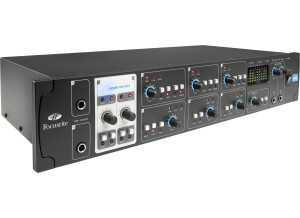
    There comes a time in every audio engineer's life when you just need lots of I/O at a time; recording drums with a variety of mics, a couple of musician's at the same time, or perhaps you're tired of plugging and unplugging your external gear every time you want to change setups. I'm a hardcore pro tools user, and I felt that avid's options back then didn't fit my needs. The 003 rack just had four preamps, and the other high-end options were just way too out of my league. Fortunately, Avid realized they had to let pro tools go out and play with the other children in the park and so, since pro tools 9, we can all look at the plethora of options out there and choose whatever suits us. Good times. This firewire interface caught my eye because it was one of the first to offer eight preamps, either XLR or line. Two of those can be used for direct instrument inputs, wisely located in the front. Each one has individual phantom power and HPF, though just two of them have pad option and only three phase reversal, which is no big deal if you plan your input list ahead. The real beauty of this interface though, is that it has two ADAT I/O, meaning you can add two additional ADAT-capable interfaces (like the underrated, inexpensive Behringer ADA8000) and get 24 analog I/O at the same time at 44.1Khz, which is more than enough to tackle 90% of mixing and recording situations. This without counting that it also has two dedicated outputs for your monitors and the traditional digital SPDIF I/O, which adds 4 I/O and thus, the 56 in the interface's name. "Liquid" comes from Focusrite's own preamp simulation technology, which is available on XLR inputs 1 and 2. These range from the Avalon 737SP, Helios, Neve 1271, Focusrite's own RED 7, UA's 610 and a couple more. The simulation, or 'color' of the preamps can be varied with an "Harmonics" knob, located in the software controller of the interface. Frankly, with the amount of processing we put on today's music, I feel preamp voodoo comes after to musician's performance, instrument quality, a faithful mic and it's placement. That being said, I've been surprised more than once with the timbre changes these simulations give; you can really feel a difference and most of the time for good. I'm particularly fond of the Neve 1071 simulation and I reserve these inputs for lead instruments or vocals. Most of the deeper features of the interface are controlled through Saffire's MixControl software. It's main purpose is for signal routing, say, connecting 'Analog 1' to 'Line Out 8'. This is of little relevance if you're mixing in your DAW since most of the routing should be done there, but some cool things can be done here, like routing two independent monitor mixes from your DAW to the headphone outputs, sparing the need for headphone amps fed through analog outputs in some situations. Oh yeah, it also features a loopback virtual input so that you can record whatever comes out of the interface, just watch out for feedback! UTILIZATION I use this interface everyday, from simply watching a movie at the studio to mixing a ton of tracks while recording another 8. Not once have I waged war against it to get a youtube video to sound through the monitors (hello, avid interfaces) or routing 16 tracks to their destinations. Drivers are very, very stable but mixing can get frisky when there's a ton of tracks with tons of plugins (I'm on a dual quad core intel Mac pro with 2Gb RAM) but I fear most of it is the computer's fault. I'm mixing on pro tools most of the time so latency isn't an issue. But when I do need low latency monitoring I can always monitor directly from the interface (this is when the MixControl software comes really handy, even for multiple inputs) or use some of the other usual workarounds. On Ableton live it runs as smoothly and other apps like skype don't have any troubles recognizing the interface. Syncing it to other interfaces via ADAT has also been easy. I've paired it up with a 003 for 16 channel recording with no issues other than 003's need for attention and MixControl's cumbersome GUI, which is the saffire 56's weak point, but an easy one to overcome. One of the saffire's intended purposes, apparently, is to be used standalone as a live mixer of sorts. All the band can plug into it, get mic/line gain and phantom power and come out of every output you want without the need of a computer connected to it. It's sort of silly if you ask me, since most of live mixing IS riding the faders constantly to make up for all the variables in a live situation. You can however plug it to a cheap laptop just for the sake of loading MixControl software and you got yourself an 8 channel live mixer without EQ, if you must. GETTING STARTED I had no issues getting the interface to work. It is a fireware interface though, so it's wise to remember that you have to install whatever software comes with it first and that you shouldn't plug/unplug it when it's on. It uses a firewire 400 cable, so I expect that it can be somewhat incompatible with newer computers that don't have it, but a quick check to focusrite's site shows that they're giving away thunderbolt-to-firewire adaptors, so perhaps it's not that big an issue. After installing everything and making the proper connections everything went smooth. As I said, all the software recognized every input immediately. Then I popped the rack-ear covers (they're there in case you want to use it outside the safety of a rack, like cavemen) and screwed it in place. Unfortunately, I do have to practice my best yoga poses when I have to change connections on the back until I get a patchbay. OVERALL OPINION I love it, I almost hate it because it has so many features that I just spent 4 hours reviewing it. It's not built like a tank, but it has got me through many audio battles in the studio and out of it in almost 3 years, and it doesn't have a single dent or loose knob. It's not the greatest sounding thing in the gear industry, and I'm sure many pre's out there sound better in hand to hand combat, but then again you shouldn't blindly trust gear that sounds "amazing" just because you plugged something in. This interface is great, amazing if you will because it can adapt to a lot of situations and does it so while sounding nicely, and it even has you covered if you want a more colored sound with the liquid preamps. This is one of those pieces of gear that on hard days, give you the feeling of being of your side and not against you.

  • « It Has Become An Overpriced Volume Knob »

    I chose this expecting it to be a simple input device to go from my analog technics turnatbles and mixer into my computer. I'm running Windows 8.1 on a first generation Intel Pentium i7 2.3 Gigahertz with 24 Gigs of Ram and an Intel Solid State drive for the OS with a secondary 3Gig hard drive for storage. I have never been able to get The Firestudio Mobile or The Presonus Studio One to work with my computer which runs photoshop and other programs of high intensity with no problem. The device just simply never stays synced. I've tried running it with Cubase, fruity loops, Adobe Audition and even the native Presonus Studio One recording software that came with the Firestudio Mobile and none of them work because of the synchronization issue. I talked to someone at Guitar center about it and they stated that some of the earlier models were flawed and did not work properly with window 8. The Presonus website states otherwise and I've tried downloading the latest drivers and firmware for the device but it still acts up and Presonus Studio One Freezes every time on launch and stays there even when trying to force close it through the task manager command prompt. Basically it has turned into a device that only allows me to use it as an overglorified volume control knob for my KRK V8 studio monitors. Absolutely ridiculous! UTILIZATION Loses connection and synchronization often, can;t even get it to work. GETTING STARTED Tons of problems with compatibility. They may eventually fix this but I have had problems since day one that have never been solved no matter how many new downloads I've tried. OVERALL OPINION It has plenty of inputs for the size of the device but the compatibility issues just kill this device for me. It also has really bad distortion if it hits red. No soft clip, just a hard distorted clipping problem so watch your levels carefully.

  • « Used with Cubase and Pro Tools »

    We have the Focusrite Saffire Pro 40 in one of our studios on campus. We are using it with a set of KRK monitors on a Windows PC. The computer that it is installed on is running Vista, and it runs great with Vista. It has not given me any errors while using it and the drivers appear to be very stable on Vista (64) bit. This interface can and should be racked, it will only take up one rack space but it has all of the inputs you need to run a session. UTILIZATION When you use this interface you will also get some very good plug-ins from Focusrite that include some very good compression and reverb plug-ins that you can use as a VST in whichever DAW you have installed or want to use it with. GETTING STARTED The preamps in this interface are great, I did not expect them to be that warm and clean. They are also very quiet and you will not even notice this interface is being used. It is very easy to set up in just about any program you want to use it with. But particularly in that studio we only use Cubase and Pro Tools. So for those two DAWS it works great. OVERALL OPINION As far as the make of this rackable interface, it is built to last. The knobs (there are only about 11 of them) are built well and are very easy to move. The mic inputs or instrument inputs are on the front of this unit which can be a plus depending on how your set up is. But sometimes with these inputs on the front of the unit requires the cords to be in the way sometimes. This would only be an issue at home though because in the studio this sits in a separate rack away from the actual workspace. I do recommend getting this for your home set up because it is not only great quality but it is affordable.

  • « "Beautiful, Classy and Royal!" »

    The Firewire Apogee Duet was something I found and bought after doing a lot of research. This tiny silver looking box comes with 2 Microphone inputs (with Phantom Power) delivering world class Apogee Pre-amps, 2 Line-level inputs and 2 Monitor outputs, all bundled and tied up together in a single breakout cable. Having a Mobile setup, i.e. a Macbook Pro , a Shure - PG27 Condenser Mic and a DT770 Pro BeyerDynamics Headphone, and being someone who always travels, I wanted a device that could integrate all my equipment at one place without cluster-confusion at the same time without compromising the quality for sound. This is where I found the existence of Duet. Duet caught me immediately with its crystal clear AD/DA conversion. The sound is absolutely fantastic. Being a Logic 9 and Logic X user mostly, Apogee already has a place inside the Logic DAW option menus to control the Input levels. The dedicated Headphone input is also commendable. The Giant wheel knob on the Device is easy to use and straight forward giving us several options (Can be used to adjust Input levels and control the main output volume levels etc). Especially found them helpful while switching between Headphone and Monitor Outputs to check the levels individually. The Low Latency Monitoring option provided with the Stand-alone Maestro application provided by Duet is also helpful at times where you can listen to the recording that is coming directly from the Duet and not from the DAW. This goes into your smallest travel bag, your laptop case or your work pouch. The idea of having a device that could accompany you without any hindrance and attend to all your primary recording requirements giving you a unique incomparable quality is something special, and Apogee Duet makes it a reality for me. UTILIZATION The Legacy Duet that I am still using has the updated driver for the latest Mac OS Mavericks, and this shows how consistent and alert Apogee products are when its come to updating. Stability has never been an issue for me with Duet. 2 to 3 crashes have happened until now, but only when the session was overloaded with more than 100 tracks. Can't blame just the Duet. Duet initially became my recording companion on the Leopard OS, recording on Logic Pro 9. Most of my projects usually have almost 20-25 audio tracks with Sample Rate set to 44KHz. With my usual setting of the I/O Buffer set to 256 Samples (only while recording audio) and the Logic Software Monitoring enabled, the Duet provides me with 16.0ms roundtrip latency, which is fairly acceptable. I have to say that in this mode, Duet has never given me any kind of latency, and that is, even with any time or DSP based effects, for e.g., with delays and reverbs etc. Aside from recording, Duet plays back my session like the playhead scrolling without any stops/pops/clicks. Unless your system does not have enough breathing power to play back the sessions. This depends on the amount of free RAM and other requirements etc. For e.g., My sessions are always hybrid modelled, i.e, a session having midi instrument tracks and audio instrument tracks together, and Duet does a good job in handling this, playing back for me realtime multiple midi instruments (usually around 10-15 midi tracks) and all my audio tracks. All in All, Duet has read my biggest session till date having 200 tracks with 150 audio tracks and 50 instrument tracks without any overload warning or stop. (Note that while I playback after recording, the I/O Buffer is always set to 1024 samples giving a roundtrip latency of 50.8ms) GETTING STARTED Setting up the Duet was simple and clean for me. Coming in a Rectangular shaped box, there is nothing that is not clear inside this while unpacking the Duet. 1 Firewire cable, 1 Breakout cable and the Duet itself. As mentioned in the Manual clearly, after connecting it via a Firewire (Gives you a Firewire 800 and 400 free cable each with the case) to my laptop, I had to install the dedicated driver provided on the apogee website and had to install the Maestro, to control Duet on a stand-alone basis. Once opened with Logic Pro 9, it detects for the newly attached duet and then we are ready to adjust the levels and hit record. The functions of Duet are easy to understand. Today I am using the Logic X on the Mavericks 10.9.4. Its been 6 years. There has never been any compatibility issues with me. OVERALL OPINION Pros 1) Amazing AD/DA Conversion giving crisp and clear recording. 2) Strong Outer-body, has withstood a lot of misplaces by me. 3) The cables provided within do not cuddle, clatter or has never been bent, destroying the connectivity. 4) Easy to use and understand. 5) Offers 44Khz to 96KHz recording and playback. Cons 1) Moderate amount of heat exertion while recording and playback. 2) Only XLR Inputs and 2 Stereo Outs. 3) The Led levels sometimes portray peak levels even if the gain level is down. 4) Crashed once while recording in 96Khz. The price I got this for (directly ordered from the website) was for $533. Some might argue that this is a bit overpriced as there are many sound cards out there that gives you more input and monitoring options. But for me, someone going for the perfect quality recording sound, I would say the price is justifiable for this being the main reason. Apogee Duet was my first sound card. My first recording on a DAW was using this device. After being used to this quality, I have never been satisfied with the sound of other sound cards (not naming them), that comes in this same range of price and value. After these many years experience, Apogee only amazes me with the numerous amounts of recordings I have made and it still does. The choice I made was perfect!

  • « Sturdy and reliable »

    The features that motivated my purchase are basically the inputs and outputs: I have the need to connect a bass + mic + sampler and record all this, which this soundcard allows. I t has two high-impedance inputs with two preamps and 48V phantom power, two standard line inputs, 6 outputs, S/PDIF and MIDI In and Out, headphones output. There's also the AC connector (but no power switch) and two Firewire 400 connectors (which is an important detail, since I needed to buy an adapter to go from FW 400 to 800 when I changed computers). I've used it for 8 years in different but recurring setups: audio recording of electric instruments (guitar, bass), digital instruments (sampler, synths) and acoustic sources (didgeridoo, flute, percussions, and vocals). I also use it to arrange and mix my songs. I have never had the need to use the mixing and routing software included with the soundcard. I connect it directly to my computer (a 2011 iMac) via Firewire. UTILIZATION From 2006 to 2011 I used PCs and the stability of the soundcard depends a lot on the system itself. I had incompatibility problems with the DVD player of one of my computers, which was a real pain for months. It worked fine with my other computers. On the Mac I've had no issues. There are no drivers: You just connect the soundcard, it pops up in the audio peripherals and that's that. I use it with Live to make music, but also with VLC when I listen to music or watch a film. It is always connected to the computer. I have never been limited by the number of tracks during recording, but I usually use it alone or with two or three musicians, tops. The total latency I get (input and output) is 14 ms, which is pretty decent. GETTING STARTED See the compatibility problems above and the threads regarding this problem in the forums. On a PC, there's no guarantee of compatibility unless you have a solid chipset and a real Firewire input, I guess. On Mac it's smooth and silky, you don't even need the manual. I give it 6 because I had a hard time with my previous computers. If I were to only consider the time I have used with the Mac, I'd give it a 9. OVERALL OPINION I've used it since autumn 2006. I didn't test any other model before buying this one: I simply identified my needs and an interesting opportunity arose. I love its stability and sturdiness, I know it's not gonna fail me while I'm working on my music, it never crosses my mind. Two details bug me a bit after several years of use: To use MIDI and S/PDIF you need to add a snake cable to the rear of the soundcard. Furthermore, the level knobs (input and output) on the front panel are small and very close to each other, which makes it hard to get to the master volume. But you get used to it. Great value for money, as far as I'm concerned. I bought it secondhand, still under warranty and for a very decent price. Odds are high that I would buy it again... Maybe not if I have a PC.

  • « Not bad for a compact, portable FW drive »

    The feature I was looking for was decent preamps, FW 400, and portability. The Focusrite Saffire 14 has all three. I use this as the main audio interface in my "portable" rig. I have been developing a Drum Suit of sorts and needed a small interface to handle a few inputs and also the rigors of ultra portable performance. Essentially I am street performing and playing small gigs with this rig and I was sick of stripping my main rig all the time only to have to put it back a few days later. In my small rig, the only audio going in are my Vocal Mic (Shure beta 58) into a TC Helicon VoiceLive then into the Pro 14 via spdif, and a stereo mix of my various synths (moog, Korg, roland,yamaha). The Pro 14 has just the right amount of inputs for this and still leaves me two more for the addition of a guitar and bass if the gig allows for it. Having 4 1/4" outputs is perfect for this setup as well because I get the L/R Pa mix and a mono to my guitar amp and mono to my bass amp. I use the Pro 14 in conjunction with a Macbook Pro i7 and Ableton Live 8. UTILIZATION I have the most recent update from Focusrite and everything is working great. The beauty of this unit is the ultra low latency (1.4ms I believe) dsp Mixer built in that allows for near zero latency monitoring. Coupled with the included SaffireControl software, my audio inputs are routed directly to the outputs and Ableton is set to monitor off and simply just takes snapshots of the incoming audio that I can then control in Ableton as "Clips." Being under 2ms, the latency is imperceptible to the human ear. I don't really track much with this unit yet as I also have a RME Fireface 800 for studio stuff. In the live performance stuff I use up to 6 tracks but these are not being simply recorded, but used as sampling pathways so the CPU is not consistently being taxed. In this setup I have very low usage of CPU, no dropouts or glitches and no crashes. GETTING STARTED The manual is very helpful in explaining most everything. The only confusing stuff can be understanding the Software. I have used similar stuff including RME's Totalmix, so I was off and running after a few minutes. The setup of the interface is extremely easy, plug in Firewire cable, load DAW, set up in preferences, and then start recording/listening. The software is a little bit trickier. Basic setups are pretty easy, but the using the routing matrix, or Loop back channels can be confusing at first, but it will become second nature. In fact, I am so use to it from the RME that I decided I could not have an interface that doesn't have a loop back feature. The two main functions that need to be accessible on an interface is the main volume and headphone volume. Unfortunately the RME only really has Headphone output control, but the PRO 14 has both!! This is excellent as I treat the PRO 14 as my main mixer and having the main volume fader makes is a lot easier to control the final volume when I need to. OVERALL OPINION What I like most about this unit is both the pretty solid preamps and the SaffireControl software. The preamps are much better than the Presonus Firebox I first started off with. They are very quiet and not "stale" like I thought the Fireboxes were over time. They aren't as good as my FireFace's nor my Allen and Heath MixWiz but they are definitely good enough for live performance. I got one refurbished off of ebay for $175 which is a fantastic price for this unit. I give the sound quality a 9 out of 10. It's not a high end piece of gear, but in this price range, I don't think you find better. The software allows for internal routing which I think should be standard with the amount of software users these days. Nothing I can say I dislike about this unit. It does it's job well. I used the Presonus Firebox for awhile and thought it was OK, but the Preamps didn't offer enough boost and the sound wasn't that great either. I am happy that I got this unit instead. It's cheap, solid and sounds great.

  • « Avoid it like the plague »

    I wanted to use pro tools. USE You can't really talk about use. OPERATION First test with an old IBM laptop It kind of worked. I blamed the PC for the sloppiness and malfunctioning. I tried with more powerful computers and it never worked. I tried several times during a 3-year period. - On three or four different PCs (XP, Vista) - I bought a firewire card (chipste TI) without success - I actually ended up buying a Macbook specially for it. (OS 10.6 / 2.4GHz 2Gb RAM) it surely must be enough, I thought!!! FAIL, FAIL, FAIL But I remained optimistic. I continued working with other setups, telling myself that someday I would get this machine working. A brand like Digidesign, a reference product like pro tools, the problem certainly had to do with me, because I didn't know what it took. But I gave up. I'm exhausted. Not even the money I paid for it is worth wrecking my head about it. The soundcard can't be used with other software programs. Today, the Digidesign site doesn't exist anymore and it was replaced by AVID. Getting drivers or infos is more complicated every day. Not to mention the hotline, which isn't free anymore. I asked for help: Back when the hotline was still free: The guys at the other end of the phone always managed to come up with something to win some time ("Download the update," "it might be your Firewire," "try Pro Tools 8"). The same happened with the store where I bought it. They tested the soundcard on one of their machines (a Mac) and it worked. However, it never worked on my computers. Besides, I use lots of programs, audio, video, computer music... and everything works fairly well. OVERALL OPINION It's my worst purchase ever. It was supposed to help me be more efficient. The result? A waste of time, energy, money, loss of hair and lots of frustration. I don't think there's anything more to do than to put it back in its box and throw it away. I wouldn't even dare sell it secondhand, it's a hot potato.

  • moosers's review

    The Black Lion Audio 002R Modification is a specialized set of mods that is only done by BLA. It is also only done to the rack versions of the Digidesign audio interfaces. I got mine done on the 002R, but you can also get it on the 003R. An important thing to mention about these mods is that when I got mine modded a few years ago, it was a different mod than what they offer up now. While I believe that they do many of the same things, they now do a whole lot more than they did in the past, so this review won't cover everything that the new mods do. I didn't get the pre-amplifiers upgraded either, only the converter upgrade. The newer mod is also more expensive than the one that I got done, and also comes in two different packages. I had heard great things about these mods and I'm very glad that I got mine done... UTILIZATION Everything about the make up of your 002R will be the same after it is modded - it is the insides that will be affected with the Black Lion Audio 002R Modification, and in turn your overall sound. Everything in your studio hinges on your digital to analog and analog to digital converters, as this is a crucial conversion. How good your converters are truly change the sound you get. A better conversion will give you a more reliable and faithful sound. GETTING STARTED The Black Lion Audio 002R Modification is probably the best bang for your buck in terms of upgrading your interface. It really gives you a whole new studio with the new converters, and if you get the pre-amp mod and the master clock upgrade as well, you're really going to be in business. Purchasing new converters and pre-amps to be used outside your 002R, will cost you an incredible amount more when compared to this mod. OVERALL OPINION If you're looking to upgrade your 002R to sound better without getting a new interface, the Black Lion Audio 002R Modification is the best way that you can do it. Like I said, I don't have the newest modification done to my 002R, but can only imagine that it sounds better than the one I have, which is an incredible upgrade in it's own right. I'd highly recommend this modification and any other Black Lion Audio mods as well.

  • « Pristine quality »

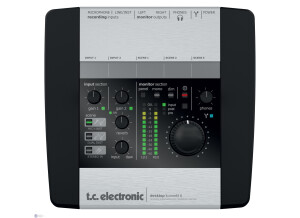
    The TC Electronics Impact Twin is a firewire interface with a total of 14 inputs: 10 of them are digital (the signal comes from either the ADAT or the S/PDIF inputs) and 4 are analog, with line inputs at the back of the unit and two mic/line inputs at the front with phantom power available and two very good preamps. It also has MIDI in/out, four output channels (or two stereo pairs) and a headphone output. On the processing side, the Twin's converters can go up to 24 bits/192kHz of resolution (but only 48kHz for the ADAT channels), and it has an awesome control panel software with built-in eq, compression, reverb, etc. I use it with my mac mini (2011, i5, 8GB RAM), with Logic Pro X and sometimes Reaper, mostly to produce soundtracks for videogames. UTILIZATION I usually record only one or two channels at once, but have used the Twin with all the 8 ADAT channels (audio coming from a yamaha digital mixer) a couple times and it worked flawlessly. Latency is very low, and thanks to the control panel you can use the built in effects to have a nice sounding chain without using any plugins from your DAW - and still record only the dry signal. The patching on this control panel is pretty simple and while some effects have only one knob (like the compressor) you can hear that it affects different parameters at the same time (ratio, attack), which keeps things simple and efficient during a session. The reverb sounds great. The pre amps are really good, transparent and nice sounding. A friend of mine who also has one said once that "it sounds a little too harsh in the upper mids", but honestly I've never really noticed it. I also like the headphone amp a lot, no matter what headphone I plug into the Twin, it always sounds clearer than the same one in another interface. Another good thing are the two phone outputs: one mutes the output to the monitors and the other doesn't, cool resource. GETTING STARTED Never had any issues with drivers stability or compatibility with the mac, I pretty much just installed the Control Panel thingy and was ready to go. The basic stuff is plug and play, and if you want to go into everything that the control panel can do for you, a look at the manual might help. Never needed the customer support, but other people I know had and they say is pretty good. Also I've never dropped the unit, but it looks like it wouldn't suffer much, it looks very well built, sturdy. OVERALL OPINION What I like most about it, in comparison to the equipment that I've had and used a lot in the past: - I can make my regular (two channels) recordings at home and easily plug it into any ADAT (from a mixer in a studio, for example) to get more channels if needed. - The audio quality, both from the pre amps and the headphone output. - The effects in the control panel and the bundled plug ins. What I don't like about it: - In 2014, let's face it: firewire is kind of a problem, we don't know how long this is going to last. It's the only thing that would keep me from buying another one. Overall, if you already have a computer with a firewire connection and don't plan to change it too soon, the Twin is definitely a great choice. In my opinion, the best audio interface in it's price range, probably even better than some other ones $100 or $150 more expensive.

  • « Gotta have it! »

    The M Audio ProFire 610 has 6 by 10 simultaneous analog and digital ins and outs with 2 preamps. The cost of this interface is 500 dollars. If you are just starting out then I don’t suggest purchasing it because that will probably be out of your budget. But if you are a veteran in the music game then this interface will work perfect for your home set up. The reason that I purchased this interface is because of how good everyone said the preamps are. I have used several different microphones and a ton of different synth keyboards with the ProFire 610. All audio is transferred almost immediately and not latency is detected. UTILIZATION I have received an updated for it maybe one time (when they came out with the windows 7 update), but I didn’t even download the update because I didn’t need it. The ProFire was working great on my Dual Core PC and my Mac book at the time. I was using it as my main interface for a while and it was one of the best ones that I have ever used. You will capture some great live performance with the ProFire 610 in stereo too. All 8 of the line outs are great and the interface is very easy to set up and use. It does come with Ableton Lite just in case you need a DAW to record with and don’t own one. But I used it in Cubase and in Logic. It all works perfectly and has never caused me any problems or issues. GETTING STARTED I have had no compatibility issues with the ProFire 610, it has worked great on two different systems and with Cubase and Logic. The manual is a rather small book, but its pretty to the point just in case you need it. OVERALL OPINION I have used several other interfaces by M Audio but none like the ProFire 610, don’t waste your time getting those cheap USB interfaces , if you have the money you mine as well just get the ProFire 610 because you will need it at some point or another. This is definitely one of the best interfaces that M Audio has made.

  • « Comes with Cubase LE »

    The Alesis Master control is an audio interface that can give you up to 192 kHz recording. It does also have low latency with the fire wire connection. It has two microphone inputs and each one of those inputs has phantom power for your condenser microphones. It also comes with a copy of Cubase LE, Cubase is one of my favorite interfaces, so if you are just getting into music or you have been into music for a while , you can appreciate Cubase and it’s a wonder software to have with this interface because everything just works right away and causes no problems. If you don’t want to use it in Cubase that is fine, it will work in almost any DAW that is out today. With its Expandable inputs and 2 banks with assignable buttons, the Alesis Master control is really a no “brainer” if you have the money to buy it. The Alesis Master Control is not a cheap interface though, it will cost you some money! UTILIZATION Very close to zero latency and from my experience or from what I can remember I haven’t had a driver update yet. They did say they were releasing one though but I never got it and haven’t needed it. GETTING STARTED We have experienced 0 compatibility issues while we were using the Alesis Master Control. All of the configuration was very simple and the setup was pretty quick and painless. OVERALL OPINION Bad thing about the Alesis Master control is the price, it is not cheap and if you are just starting out you might not want to get this far in (money wise). There are better interfaces to start with that will cost a lot less. But if you can afford to then by all means go for it! You will love everything about the Alesis Master control. All of the faders are also motorized.

  • « Very well built unit »

    This Fire Wire interface was used to replace our PCI set up that we had. It was a lot easy to use and better for use to use this interface than use the one we were using. The MOTU 896 changed a lot of my views on Fire Wire interfaces, at first I was not really liking them because was use to using the regular PCI interfaces. The MOTU 896 is a pretty big unit and will take up 2 rack spaces. But it does support sample rates up to 96 kHz with 24 Bits. Also you can use your FireWire to “daisy chain” one 896 to another one if you need more inputs for your recordings. The MOTU 896 seems to be a monster when it comes to microphone plug ins and usability. The 896 is the upgraded version of the 828, which came out in the 90’s if I am correct and the 896 came out in around 2001-2002. The unit itself is very well build and is made to take a massive beating. I don’t see this thing every failing on anyone because of its size and well built framing. Keep aware that its not portable at all, so you will need to live it in the rack space. it’s a pretty permanent interface. UTILIZATION I have used the 896 by MOTU on my computer running over 300Mhz and had no problem, syncing and hooking up the interface to your computer couldn’t be any easier. Latency is almost zero and I have used this in almost any software you can think of that was out in the early 2000’s. Most machines just aren't built like this anymore. GETTING STARTED No compatibility issues and it worked great. I wish all gear now a days was as well built as it use to be. When we had this the manual was not our concern. I don’t even remember seeing one now that I look back. OVERALL OPINION Overall, I haven’t seen many interfaces that are as well built as the MOTU 896 was back in 2002. I was very confident that the unit could last a lifetime. We sold ours, but I am sure whoever got it is probably still using it. One of a kind interface!