Log in
EN
FR

Mackie

389 products found

Categories
Series
Filter
Sort by
Evaluation
  • Reviewed or not
  • Editor’s award
  • Reviewed by Audiofanzine
Availability
  • Available or not
  • Sold new or used
  • Sold new
  • Sold used
Must-have products
  • All products
  • Flagship products
  • Best rated products
  • Hot products
  • Popular products
Price
  • Freeware
€
Clear
Sort by
  • Popularity
  • User ratings
  • Price - low to high
  • Price - high to low
  • Used price, increasing
  • Used price, decreasing
  • Name (from A to Z)
  • Name (from Z to A)
  • Added on
Sort results
  • Popularity
  • User ratings
  • Price - low to high
  • Price - high to low
  • Used price, increasing
  • Used price, decreasing
  • Name (from A to Z)
  • Name (from Z to A)
  • Added on
Filter results 389 results found
Evaluation
Availability
Must-have products
Price
  • Freeware
Show results

The best Mackie reviews

The reviews Audiofanzine members found the most helpful.
  • « A little known product - and that's a pity... »

    I only bought it this very week, this is more of a first experience than a real review. I'll edit this post as I get more experienced with it. I'll compare it with the QSC K10 that I own and soon also to a friend's FBT Promaxx 14A. To begin with, the first impression when unpacking is good, quality seems good, Mackie says it is built like a tank and it sure does looks sturdy: a good point! The enclosure is made of wood and the coating seems less fragile than that of my QSC, another good point (QSCs really are really scratch-sensitive). The height and weight are compact for a 12" enclosure: 17kg. This is less cumbersome and heavy than the QSC K12 (whom they are direct competitors). As far as size and weight are concerned, they are in between QSC's K10 and K12. Yet, the Mackie model is deeper due to its 60° inclination for use as a monitor loudspeaker, there is a rather protruding slanted side, the only cloud on the horizon regarding its dimensions. However, due to its inclination, it works wonder as a live monitor. It's also missing notched, easier to set knobs. There's a handle on each side so you don't really feel the 2.3 more kilograms compared with the K10 since you lift it with both hands. Connectingwise, it's just like the QSC: 2 combo XLR/Jack plugs, with independant volume controls and an RCA in. Regarding the outs, a there's a Thru to allow chaining cabs while being able to choose between mixing channel 1 alone or both stereo channels. In addition compared with the QSC, there is a 4-band feedback destroyer, which I haven't had the opportunity to try yet but can sometimes be useful in monitoring use. The DSP includes 4 settings: PA, to be used with a subwoofer ; DJ, for use without a subwoofer (so bass sounds are amplified) ; Monitor for live monitoring use (more neutral, less bassy sound); and finally Solo, to plug directly a guitar and mic in for instance. Unlike the QSC, there is no fan in the back, so it it a little less noisy (even if the K10's noise level is not a real problem anyway). Now, soundwise: It sounds good, and how powerful!! I still compare it to the QSC K10 (which are already very good). More power, a little less distortion and a little mort bass (quite logical, it's a 12"). 3 to 5 more dB with a similar sound diffusion and a great headroom. Mackie announces 800W RMS, I can believe that since the QSC K10 are sold for 1000W in digital (so roughly to be divided by 2) and the Mackie for 1600W. Frequencies are well defined and it's a little less shrilly at high volume as the Mackie goes lower: 49Hz, to be compared with the QSC K10's 60Hz, the K12's 52Hz and the FBT Promaxx 14A's 45Hz (but this one features a 14" speaker). In a nutshell, the QSC K&à and K12 are excellent as everyone says, but these Mackie don't prove unworthy at all and are currently a little cheaper than the K12. EDIT from May 2015: In Europe, the price of Mackie products have started raising dramatically (perhaps due to the evolution of currency exchanges?), now the SRM 550 are €799 (still €899 for the K12). EDIT from October 2015: the SRM 550 are back to €599!? What is Mackie doing exactly!? Now as far as reliability is concerned only time will tell, at a certain given period Mackie suffered (justified) criticisms in that regard. The QSC are very reliable, 4 years of use and still working perfectly... I think Mackie have learnt from the past and are back to the front stage with well-conceived products at more than correct prices. Granted, these are made in China (just like the QSC by the way), but this is also the case of Apple products which quality/reliability are proven. EDIT from May 2015: Still very happy from these speakers and with an additional mono subwoofer that's heavy material! We have tried it with my band (drums, bass, guitar, keyboards, male and female singers) in 2.1 and everything is there! The subwoofer is powerful, quite precise and not -so- heavy (29 kg!). There's largely enough power for an indoor show with 300 in attendance, and no noise unwanted or distortion, it's loud but agreeable. We were driven by a QSC Touchmix 16 mixer (an excellent mixer with no noise by the way...). For outdoor, I believe at least 2 subs and 2 satellites should be considered for more headroom. But indoor, for small rooms with not many people (200 or less) the two satellites should be enough, and just in case xompleting it with an additional SRM 1850 will suffice.

  • « They may be better than the EON by JBL »

    The Mackie SRM450v2 is a 400 watt active live speaker (2 way). It has Class D amplification and it is pretty light/portable. This speaker is pole mountable and floor wedge-able. The main reason that I even came across this speaker was because it was very similar to the JBL EON series of speakers that was actually out before this one. This got recommended to me by a fellow band member once I said that I was thinking about getting rid of my JBL’s because of the weight of them. After I got my hands on these I realized that the sound was much better than the JBL’s which surprised me because I am a huge JBL fan. But the price was also a little more as well. The sound with these live speakers is great, you will get a crystal clear sound with no effort at all and they even have a pass thru connector and microphone input directly on the unit. I have had this speaker for almost 2 years now and I still use it a lot depending on where we are going to be. The LF driver size is 12 inches in this powered speaker and it is great for live and studio applications. When comparing these to the JBL EON’s you will notice that the sound is actually better and they are a little lighter but when it comes to quality I still think the JBL’s are built better and come with a better price tag. The frequency range is 45Hz to 20Hz on the SRM450’s. I have not had any bad experiences with these speakers and I don’t think that I ever will. I have only heard great things about them and I plan on having them in my gear room for years to come without having to purchase new ones. But if I needed to purchase some new ones I would quickly and probably before I would purchase the JBL EON’s.

  • Audiofanzine FR's review

    (Originally written by bassprodukt/translated from Audiofanzine FR) No comments about the well-known features. UTILIZATION Extremely easy to use: my user's manual is rotting somewhere. Pros: Scene editing Display Effects Cons: Perhaps the preamps SOUNDS This mixing desk sounds good. I bought it secondhand and I had heard some negative comments before buying it, but its sound surprised me. I find it punchy and very versatile. The mixer is reliable and sturdy considering its price (please spare me the comparisons with an SSL or a Neve, which are totally different products). I use it with a HDR24/96 and it's a breeze! OVERALL OPINION I've been using it for several months in my home studio. I also have two Yamaha 02-R to compare it to. The mixer seems to be less sturdy than the Yamahas. The sound is very different but pleasant. I don't use the converters because my Motu converters sound better. I use this mixer only to mix. I manage all recordings with my PC and a control surface. The value for money is unbeatable and if the mixer ever gets broken I'll run to the shop to buy a second one. A small turnoff is that the OS upgrades are not free, which I find unacceptable. Mackie has an awful sales policy regarding this.

  • « nice feel »

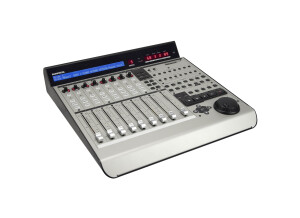
    The Mackie Control Universal Pro gives you smooth fader control with the responsive feel of some very expensive analog boards from years past. The faders are touch sensitive 100mm, and they are motorized. There is a full meter display that will show you the parameters and track names. There are some effects on this unit but nothing that really made me say “wow”. All of your basic functions are also there and easy to use like pan, solo, and mute functions. When you get the Mackie Pro I recommend looking at the manual even if you have used similar boards before, or even if you have used the Mackie C4 because some of the functions are different and this unit has some more features that are really helpful. This console is made well, all of the knobs are solid and the faders are “heavy” with good response. This control surface has over 50 buttons and can even be used via USB. The price point is decent, I think it could be a little cheaper though because there are some other boards made by its competitors that cost a little less but are virtually the exact same board. Also the display screen could be just a little bit bigger on it so that it is easier to read or maybe even a full color display since this unit cost over a grand. But if you do not mind looking at this type of display then it will not be an issue. Or you could always hook up an external display screen and have any size screen that you want. The Mackie Control Pro is a great choice to go with because of the quality and features that it provides. Mackie will also provide you with excellent customer service if you have any troubles with this device. I am happy that I purchased this!

  • moosers's review

    I first purchased the Mackie HUI about three years ago and have found that it is a very powerful machine in terms of controlling a DAW. I have used it both with Steinberg Cubase SX 2.0 and Pro Tools LE 7.4. I got it because I wanted to be able to feel fader and twiddle knobs while I was mixing inside the box of my DAW. There are controls for virtually everything you can think of in your DAW. It has great metering and is overall a good looking unit. While it is easy to follow and learn how to use, there are still a lot of things I don't know about it, simply because there are not enough hours in the day. Since it only merely controls something that you could control inside your software, I use what I find most useful on this and haven't delved into other parts of the machine. For example, while you can control plug-ins with this machine, I decide to control them within in my software because I like the look of it. However, it is there for people who would like to use it. While there have been a few different models that Mackie has made since they made this one, like the Universal Control, I like the overall look and features on the HUI the best. I would also compare it to the Digidesign 002 and the M-Audio Project Mix. I would also favor the HUI over these, but that could just be because I have used the HUI extensively, and haven't used the others as much. Another great feature of this board is the two on board preamps that can prove to come in handy! While they aren't the best pres in the world, they definitley aren't the worst! The fader also have a great feel to them and have LEDs above them indicating which track is which. If you are looking for a board to play with outside of your Digital Audio Workspace, and you can find one of these on eBay (as Mackie no longer makes them), I would recommend giving this a try! While it is really just a big toy and is fun to play with, it can really help sometimes to have some faders to play with when you're mixing.

  • « The price is high, but they are worth it »

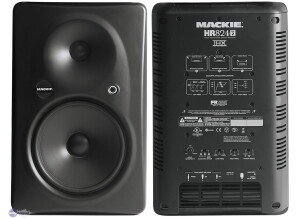
    The HR824mK2 is a high resolution studio monitor that can deliver a very good sound and help with the mix a lot. When I used this monitor I had nothing but positive things being said to me about the mix and how crisp everything sounded. The linear frequency response is great and the low frequency roll off and high frequency controls are great. No matter which studio I used these in the bass was very clean and tight no matter how loud the music was turned up. SOUNDS They have an 8.75 high precision LF transducer and a ferro fluid cooled tweet. The sweet spot is very easy to find in these speakers because it is a big sweet spot (wide). There are balanced XLR, TRS and RCA inputs with the ability to wall mount or ceiling mount. I do prefer using them just at ear level right on my upper shelf (of my work desk). I have not mounted them on the ceiling or wall before. OVERALL OPINION There is a low cutoff frequency at 35 Hz and a high cut off frequency of 22 kHz. When I turn this speaker up to max volume it still delivers a clean and crisp sound. Some of my music has bass that is over exaggerated on purpose but these speakers handle it well. It almost gets too loud and I have to make sure I turn everything down. The build of these monitors is very clean and they look great in the studio. You can also purchase a protection plan which I recommend up to 3 years, being that this cost so much it is best to have them protected in case something happens. This speaker is only about 16 inches tall and 10 inches wide weighing around 35 pounds. They are easy to move and look great. I would not say that they are portable, but if you need to move them you could.

  • « Good but not for me »

    The Mackie HAD is a 12 inch 2 way powered speaker that delivers 600 watts of power and has some onboard limiting. These speakers are pretty portable and easy to move around. It has 1 XLR input and dual compression drivers (1.7”). This speaker is made for live applications and not studio use, using it in the studio will not give you the sound you expect it to have because I have tried it in a studio twice and was not pleased with it. But live it has a very nice sound; it is pretty big if you keep it in a smaller venue. In a medium to larger size club it will have too much space for it to cover and it just is not powerful enough to handle it. The total weight of it is about 60 pounds which makes it very portable, but for that much weight and at this price you would expect to get a bigger sound or more watts. That is the only downside of this speaker. Everything is great with it except the overall power which for me was probably the most important aspect. I do recommend this speaker if you tend to only be around smaller venues. But if not; it really isn’t worth getting this because in a bigger space it will have no value to you anymore. The crossover frequency is 2Hz and the range is 57Hz to 20 kHz but there just isn’t enough power behind it. The overall sound is clean when in a smaller space, the bass is not as expressive as I would have liked it to be but depending on which style of music you are working with it could be just fine the way it is. If your music tends to have a little more thump to it, then I do not recommend the HAD because there isn’t enough low end to give you the sound you might be looking for.

  • « Great Pre Amps »

    The (DL Series) DL1608 is a digital mixer made by Mackie; it has 16 Onyx preamps and 24 bit converters. You can even sync it up with 1 to 10 different iPad through a wireless connection. We have used plenty of different mixers from Studio Live mixers to other Mackie and Allen and Heath mixers. But they preamps on the DL1608 are some of the best that I have ever owned. UTILIZATION The built in DSP on the DL1608 will give you compression and some really good reverb to work with. Using your iPad with the DL1608 (wirelessly) is a great option because it will allow you to control your mixes effortlessly. The DL1608 has 6 different auxiliary sends and you can also use audio from any Apple App that you may use. SOUNDS The DL1608 is easy to use and even easier to set up. One the reason why we chose to use this mixer recently is because how portable and easy it is to work with. It was a huge plus that the preamps where going to be that quiet and good. The sound quality is clean and clear and I have not heard any other mixers sound as good as this one does that has similar specs. OVERALL OPINION You can rack the DL1608 because they make a rack kit for it, but we do are not worried about racking it (at least for now anyways). The DL1608 has 2 main outputs and there is switchable phantom power for each channel. The DL1608 is well made, the knobs have a very nice feel to them and they seem to be of the quality on some really good expensive mixing boards. If you are not looking to use your iPad with this mixer than I would not buy it. You almost have to have an iPad and do a lot of work from your iPad with this mixer so if you don’t have one it is pointless to get the DL1608.

  • « For the solo performer »

    The Pro FX8 is a 8 channel mixer that comes with effects right on the unit. The FX8 is a smaller mixer but packs a powerful punch with all of its features. It allows you to stream and record through USB. This mixer is perfect for performing in a smaller club or for someone who performs solo by themselves. All of the preamps have high headroom and some really good effects and EQ ability. The RMFX are 32 bit effects that add some style to your mixes. UTILIZATION The Pro FX8 is very simple to use, there really is not a set up process and no manual is needed to learn to use the FX8. The unit is very well built like most of the Mackie mixers that they have come out with over the last few years. SOUNDS It has 8 channels with no direct outputs. You will need to connect it to your PC via USB. There are a 3 band channel and 7 band stereo EQ. Being that this is an affordable mixer and doesn’t have all of the great features of expensive boards, it does not have a Talkback option which is why it is more for personal and home use. The unit is pretty light and can be taken with you from place to place without feeling like you are lugging around more heavy gear on top of what you already have to carry. OVERALL OPINION If you are a small club performer or a solo musician, then this mixer will fit you perfectly. It has all of the effects and features you need to add to your sound and your mix. It cost less than 250.00 dollars and it is well built. I have been using this mixer for certain projects since August of 2011 and have not had a single issue with it and don’t think they I every will.

  • « Great for small venues »

    I purchased the Mackie Thmp 15A’s a while ago so I can make the switch to active lightweight speakers instead the heavy passive ones. I currently DJ a small restaurant/lounge with an average of 50-80 people and gave these a run with some hip-hop and dance music. These speakers are light, and the sound quality that comes out of these is quite impressive. I was truly surprised how clean it was for such a low-cost speaker, I will note that the noise people described was there at low volumes, but not as much as I expected. Turn up the volume, and you'll be fine. That's what they're for. Bass response was great, and the highs were clear. They were able to get the party started. The bad- Very little head room. The Thumps run out of gas and redlined at much lower volume than I anticipated. My confidence in them was lower when I saw that they were clipping so early. I don't think they made it past 95db before I noticed the red light blinking. I needed to keep adjusting the EQ on the amps to try and keep them protected. Bottom line is great sound, but not nearly as much to keep me confident in their reliability if I needed more out of them. Needless to say I returned them and upgraded to the Mackie SRM-450v2, which I have pushed far past what I gave the Thumps and have yet to see them break a sweat. After 3 gigs with them I am still amazed an happy with them. The 12" SRM-450v2's seem to have better bass response than the Thump 15". If you are looking to do very small events, house parties, or booth speaker then the Thumps are definitely your speaker. I highly recommend these for djing small venues and or small crowds.

  • moosers's review

    The Mackie Onyx Series 1220i is a 12 channel hybrid analog mixer and firewire based audio interface. The 1220i combines the analog mixer expertise that Mackie has accumulated, and pairs it with the digital audio work of computers. You can use it with just about any software, including Pro Tools M-Powered. The mixer itself has four mono channels with microphone preampilifiers, and then has four stereo channels with only 1/4" connections. Each channel has a fader and a three band parametric equalizer. They also have a pan knob and two auxiliary ones as well. The 1220i also has 1/4" monitor outputs, RCA tape outputs, a talkback section, an auxiliary master control section, and a 1/4" headphone jack and controllers. In the back it has four 1/4" inserts, two auxiliary sends, and two channels of returns. It also has XLR outputs for your main monitors in the back, and two separate firewire ports. Automation isn't supported with the Mackie Onyx Series 1220i as far as I know. UTILIZATION If you have experience with basic analog mixers, the Mackie Onyx Series 1220i won't present any problems for you as everything is standard and straight forward. Even if you're a beginner, I'd recommend having the manual around and doing some research on analog mixers to get yourself familiar with the basic features of analog mixers, and you should be all set... SOUNDS The sound of the Mackie Onyx Series 1220i is overall quite clean sounding. The mic preamps are pretty much what I would expect from a Mackie mixer, which is clean but nothing to scream and shout about. They will definitely get the job done in most situations, especially for those who are using this as an all in one solution for home recording, which is what most people will be doing anyway. The equalizers are actually pretty good sounding, better than older Mackie mixers in my opinion... OVERALL OPINION For those who are looking to get into digital recording, but want an analog mixer to work with, the Mackie Onyx Series 1220i is perfect for you. The 1220i provides a cheap enough solution for just about anyone looking to jump start their home studio. It is also great that you can now use Mackie Onyx mixers with Pro Tools M-Powered. I'd definitely recommend this for anyone who wants to run Pro Tools M-Powered and wants the feel and features that an analog mixer brings to the table.

  • AnimalTracksStudio's review

    Here is a sixteen channel rackable powerhouse featuring 1/4 inch jacks, XLR jacks and jkust about every combination you can think of is available. there are six aux sends to handle any situation you might come on. UTILIZATION THis mixer is well thoguht out and you should be up and running in no time flat. The manual is great IF you should need it. SOUNDS The board is amazingly quiet,. even in the studio. OVERALL OPINION MACKIE 1604-VLZ MIXER While a lot of people use this board as merely a live sound mixer, there is so much more that this board can do that people often over look it’s ability as a studio board. It is a full four buss mixer so you have sub-mix capabilities of sending to four discreet locations which is plenty for a modest home studio. Bur wait, there are also up to six aux outs which can act as sub outputs as well for a total of ten discreet outs. If you have a larger system, you have access to direct outs for channels on through eight (this makes a great direct hook up for live recording, such as to Pro Tools by Digidesign which has eight ins). The coolest way to hook this up is to run the eight sub outs into an analog to digital converter, such as the Behringer ADA-8000, which will give you eight digital outs via ADAT light pipe and then use four assignable subs and four aux sends to feed the analog input of the Digidesign interface (Digi 001, Digi 002 or Digi 003) which gives you an unbelievable 16 inputs and still leaves you two aux sends for effects and the main stereo buss out for control room monitors. This is ALMOST a dream system for a decent studio, and what is really neat about this is that you can have EQ and effects on ALL sixteen channels. There are a couple extra outputs like a mono out that can be used to feed a fold back system for the vocalist. The one minor drawback is that the faders are only sixty millimeters instead of the industry standard one hundred millimeters. But for the several thousand dollars in savings over a “pro” board, I think you can live with the shorter throw faders.