Log in
EN
FR

Surround Sound/Spatialization Software

392 products found

Categories
Filter
Sort by
Brand
Evaluation
  • Reviewed or not
  • Editor’s award
  • Reviewed by Audiofanzine
Availability
  • Available or not
  • Sold new or used
  • Sold new
  • Sold used
Must-have products
  • All products
  • Flagship products
  • Best rated products
  • Hot products
  • Popular products
Price
  • Freeware
  • Low-cost (< $90)
  • Mid-range ($90 - $200)
  • Premium (> $200)
€
Clear
Sort by
  • Popularity
  • User ratings
  • Price - low to high
  • Price - high to low
  • Used price, increasing
  • Used price, decreasing
  • Name (from A to Z)
  • Name (from Z to A)
  • Added on
Choose a category
Selected category: Surround Sound/Spatialization Software
Sort results
  • Popularity
  • User ratings
  • Price - low to high
  • Price - high to low
  • Used price, increasing
  • Used price, decreasing
  • Name (from A to Z)
  • Name (from Z to A)
  • Added on
Filter results 392 results found
Brands
Evaluation
Availability
Must-have products
Price
  • Freeware
  • Low-cost (< $90)
  • Mid-range ($90 - $200)
  • Premium (> $200)
Show results

The best Surround Sound/Spatialization Software reviews

The reviews Audiofanzine members found the most helpful.
  • « It does the trick »

    I use this plug-in with the following configuration : PC w/ Windows Seven, I7-4770k, 16GB, SSD (Samsung 850pro) Berhinger U-PHORIA UMC 1820 sound interface It's better to have a sound interface with at least 6 outputs so as to be able to mix in 5.1. Otherwise, you can also consider using out port emulators... This plug-in is very stable and light on the CPU. Very easy to get used to, it also has a very complete documentation. It is quite efficient, but certainly not the best. It was released at $49, but for its current price (twice as much I believe), there may be better from competitors. An interesting included feature is the possibility to customize the plugin according to your head size. Even if, to complement -or replace- it, the best solution would have been to ba able to choose several hrtf filters... No calibration depending on the headphone used is offered... a real pity! The head-tracking feature is rather toyish and inefficient. For $49, I'd do the same choice again (while still remaining open and attentive to comparable products by competitors), but for its current price... Well, not so sure I would ^^

  • moosers's review

    The Brainworx BX Solo plug-in is a free one that is based around M/S technique. You are supposed to be able to use this plug-in for mixing or mastering, but I've only used it for mixing small projects and messing around. Essentially, the plug-in can give you a wider stereo spread for your mixes. The plug-in can be found as a free download on Brainworx's website and is available for both Mac and PC systems. I'm not sure on all of the different plug-in formats that it's available for, but I'm currently running the RTAS version of it in Pro Tools LE. The whole process of downloading and installing the plug-in won't take you very long, as I had the plug-in going in my DAW quite quickly after downloading it. Using the plug-in isn't too hard at all, as it's pretty self explantory. Basically, you've got a knob for setting the stereo width, and then buttons for listening to different parts of the stereo spread, including for L/R and M/S. I haven't ever seen a manual for this plug-in, nor will I ever have the need to seek one out. SUITABILITY/PERFORMANCE Right now I'm running the Brainworx BX Solo plug-in on a Mac Book Pro that has a 2.2 Ghz Intel Core 2 Duo processor and 4 GB of RAM to work with. As I stated before, I run the RTAS version of this plug-in in Pro Tools LE 8 that I run with a Digi 002R audio interface. I've only ever used this plug-in on the master fader, so I haven't exactly tried to max out the performance on this plug-in. However, if you use it for what it is meant to be used for, you should most likely be using it in the same capacity. I've been running this plug-in for about a year or two. OVERALL OPINION While I don't exactly find myself using the Brainworx BX Solo plug-in everyday, it's still useful to have around for when I might need it. It's definitely great for spreading your stereo width a bit, and it's a nice plus that it allows you to listen to different parts of the spread including M/S. I can't complain at all with this plug-in being that it's free, and even if I could, there wouldn't be many bad things to say. Even though most users out there might not need something like this, my philosophy is that you might as well have it just in case since it costs nothing to you...

  • moosers's review

    QuikQuak's UpStereo v2 is a free piece of software designed as a stereo enhancer. The plug-in is available for Mac systems and in VST and Audio Unit plug-in formats, so unless you've got the FXpansion VST to RTAS converter as I do, you won't be able to use this in Pro Tools. You can download the plug-in straight from QuikQuak's website and can have the plug-in up and running within a few minutes. I got the plug-in straight from a friend so I didn't download it from their site, although I did go back and try some of the other demo plug-ins they have. As far as the interface is concerned, it's not a difficult one to understand. It's got sliders for gain, stereo width (ranging from mono to wide), bass and air control, as well as a loud button and a cool 3D graphic to show your adjustments. No manual should be necessary as this one should be as easy as any plug-in to figure out on your own. SUITABILITY/PERFORMANCE I'm currently running QuikQuak's UpStereo v2 on my system at home, where I've got both Pro Tools 9 and Logic Pro 9. I've used this mostly in Pro Tools, but as I said earlier, since it's not an RTAS plug-in you'll need a VST to RTAS converter like the one made by FXpansion. I've used the plug-in only a handful of times, but I've yet to have any issues at all when it comes to performance. Most will be using it on the master buss anyway, so performance shouldn't be much of an issue in general. OVERALL OPINION Being that it's a free one, it's kind of silly not to add QuikQuak's UpStereo v2 plug-in to your DAW as long as you've got a compatible system. While there are indeed a bunch of free ones out there that serve this same purpose, this will stand it's ground with any of them, as it's one of the best stereo enhancers I've used to date. While this type of plug-in isn't something that I'm going to use very often, when I do I'm definitely going to use UpStereo in the future.

  • moosers's review

    The Flux Stereo Tool is a free piece of software that is available as a free download in a number of different formats straight from Flux's website. The whole process of downloading it and installing it only took a short while, as I didn't encounter any problems at all. You can download it in RTAS, VST, or AU formats, making it compatible with just about any DAW, so this shouldn't be a problem either. The make up of the plug-in contains parameters for left and right channel input gain and panning, and it also has sliders for general pan and width. There is also metering in the form of a large graph and as well as for monitoring your phase and output levels. There isn't all that much that you need to know about this plug-in, so I don't believe that the assistance of a manual will be necessary. SUITABILITY/PERFORMANCE I've only had a need to run a single instance of the Flux Stereo Tool within a single session, as it is the type of plug-in that I use on the master fader channel of a session. I'm running the plug-in on a Mac Book Pro that has a 2.2 Ghz Intel Core 2 Duo processor and 4 GB of RAM. I run Pro Tools LE 8 with a Digi 002 rack and I can't say that I've had any issues running the plug-in within this configuration. It's hard to tell how well a plug-in will run on a certain system until actually trying it, so you've really got nothing to lose in downloading it and trying it out. OVERALL OPINION I don't find myself using the Flux Stereo Tool very often to be honest, but I have used it on more than a few occasions. I like the clean sound quality that it projects, and I find that it does a great job of spreading a stereo sound. I don't think that I would use this on a final mix for a record or anything like that since I usually will leave that to the mastering engineer, but if I'm doing a home mastering job it's definitely something that I'll consider using. Don't let the fact that this is a free plug-in fool you, it's definitely of a high quality and can be very useful. I probably wouldn't buy this plug-in if it wasn't free since I don't use it very much, but since it is free, there's really no reason not to have it!

  • « Larger than life drums! »

    Waves S1 is a software effects plug-in to be used in a DAW. All Waves plug-ins can be installed by downloading them off the Waves website. Authorization is completed using a USB stick as a dongle, or using an authorization manager application if your computer connects to the internet. Waves plug-ins are know for being stable, and rarely have any bugs. The 'S1' plug-in has been around a long time, so you can be sure it works in all popular DAWs. SUITABILITY/PERFORMANCE This plug-in is about as simple as a plug-in can be. There is one main control to change the perceived width of a stereo signal. I don't really have a use for the 'asymmetrical' and 'rotation' controls because I typically want my mix to be symmetrical. I supposed if I use some stereo micing technique, and one mic turned out to be louder than the other, then these controls might come in handy. In practice, I find it best to just add a little bit of width. Taking it to the extreme might be a unique effect to add every once in a while. But to me, it can be a little to much. Typically, I use the S1 on overhead and room drum tracks. Sometimes I will just throw the S1 on the drum bus. However, this can sometimes pull the snare from the 'center' depending on the mic setup while tracking. This is why I typically use it on the overheads and room mics that where recorded as a stereo pair. OVERALL OPINION The Waves S1 is great for getting the wide, large, spacious drum sound. I also like to use it when I track a 'wall' of heavy electric guitars. Don't go overboard with this effect, a little goes a long way. Something really cool about this plug-in is the Mid-Side (M-S) processing. This will really enhance any tracks that use the M-S mic technique. All in all, a simple plug-in with a simple purpose.

  • « Sonalksis StereoTools »

    StereoTools is one of the four plug-ins that comprise Sonalksis’ Mastering Suite Bundle, the other three being MaxLimit, MultiLimit, and Dithering-Q. Created to be a complete tool for stereo manipulation, the StereoTools offer not only processing features but also detailed graphics that help monitor frequency, phase and positioning. StereoTools is currently priced at $219.99. The Mastering Suite Bundle is sold for $599.99. Sonalksis offers 14-day free trails and even software rentals for those on a budget. <a href="http://www.glintonline.com">http://www.glintonline.com</a> There is something I’ve been noticing about every Sonalksis product I tried, which gives the impression that it is a possible company “trademark”; simplicity and powerful results. The StereoTools isn’t any different. At first glance, this plug-in might give the impression of just being a very expensive product with not much to offer. It’s almost funny, but the few faders and knobs featured in its interface can definitely give a completely new character to any musical piece. Some of the features are very simple and useful, such as the precise output fader, a mono switch, panning and phase inversion switches for both left and right and flip for stereo imaging. The power of this tool can be found under the Width fader that can quickly compress your stereo mix to mono, but also can expand it to an even further spread. It can definitely make a mix fuller, richer, and bigger. The Zero Width Below Knob is another highlight of the product, letting you filter lower frequencies out of the stereo widener fader. The graphic screen is the other big plus of this plug-in. First you see the stereo graphic for visual monitoring of the sound spread. Underneath you can activate spectrum, a frequency versus amplitude graphic, and the one I personally liked a lot, a phase graphic that shows phase correlation in real time. This tool also comes with a few very useful presets and many setup customizations. The StereoTool is also of great use for positioning of single tracks in the perfect place in stereo imaging, making the mix cleaner and more professional. I think a price reduction could make this product a little more accessible to everyone. Once again, a solid plug-in. Faders and knobs offers firm precision. Graphics give accurate information. Another great tool for mastering engineers and music producers as well as for the home studio lads who want to take their mixes to the best level possible, without leaving their homes or spending too much money. StereoTools can quickly and easily redefine sonic imaging, while enhancing quality and professionalism of your music. This review was originally published on http://www.musicgearreview.com

  • « Stereo to 5.1 surround plugin »

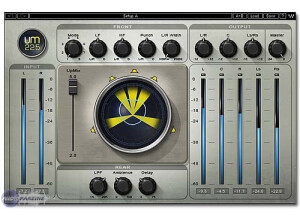
    Stereo to surround is a huge issue that a lot of people face when they start remixing old movies for today's sound systems. There are two different versions of this -- the UM225 and the UM226. They're both almost identical, except that the UM226 has the extra .1 channel for the sub. Why they decided to break these plugins up like they did, I'm not entirely sure. The plugin has adjustments for the various five bands plus the sub, different modes and filters you can adjust, and tons more features that would take quite awhile to describe. To enable this, simply put it on your master buss and start mixing. It's really that simple. I've never really read the manual, so I can't comment on how well written the manual is, but Waves generally has some fairly nice manuals. SUITABILITY/PERFORMANCE Waves is pretty famous when it comes to both compatibility and stability. For one, these plugins are rock solid. I've never experienced any problems using these. There have never been any freezes, glitches or anything bizarre going on, even with a fairly heavy usage of other VSTs in the DAW. This is also cross platform compatible, so anybody on an Apple or Windows computer can easily use this without any problems. There is one problem, however. In OS X, this plugin is 32 bit only. That means that your DAW needs to enable a special bridge application if you want to use your environment in 64 bit while utilizing these 32 bit plugins. It's does it automatically, but I'd like to see the next revision be a 64 bit plugin if possible. I've been using the Mercury bundle for half a year now, and it's been a wonderful experience. OVERALL OPINION I've used this with varying success on different mixes for my own home movies and whatnot. My personal system is a 5.1 system, so I always reach for this over the UM225. I don't really see the point of using the UM225 when the 226 can do everything the 225 does and then some. It's a very solid plugin, and it work as advertised, but don't expect it to start working miracles here. It's still somewhat limited as to what it can do overall. Solid plugin, though.

  • « Stereo to 5.0 surround plugin »

    When mixing movies today, the biggest thing that people seem to be paying attention to, besides the overall remaster of the video, is the sound. Converting stereo to surround sound can be quite a challenge, and it doesn't always work that well. Waves tries to help you with the UM225 and UM226 plugins. The UM225 is the 5.0 version of this, where as the UM226 is the 5.1 version. Both are great, but I don't see the real need for the 225 version considering the 226 version is that much more versatile, and most sound systems today are a minimum of 5.1. Explaining all the controls in here would take awhile, but it's mainly just knobs and sliders per channel. To use this, simply enable it on whatever you want to convert from stereo to surround sound. The master buss is where this usually goes. I've never read the manual, so I can't comment as to how well it written, but Waves is usually pretty good regarding that stuff. SUITABILITY/PERFORMANCE Waves plugins are some of the best out there, bar none. For one, they're cross platform. For a Mac user, that means the world. I'm always trying to support companies that support Mac, and Waves has been pretty good about that since the whole Intel switch. I've used these in Logic without any problems. Although they're 32 bit plugins, Logic will add a bridge to allow you to use them in a 64 bit environment as to not limit you to the amount of ram you can utilize. On top of that, these things are rock solid. I've never had a crash with Waves plugins at all. OVERALL OPINION The main difference between the UM225 and UM226 is that the UM226 has one extra channel for the sub. Why they made these into two different plugins, I'm not entirely sure. Everything I can do on 225 I can do on 226. It's a solid plugin, there's no doubt about that. I just find that if I'm going to do this kind of work, I reach for 226 almost all of the time.

  • « Solid stereo spreader »

    Stereo spreaders used to be all the rage back in the day. Today, they're not utilized nearly as much thanks to you being able to easily do it inside of the DAW with very minimal effort. Most people also agree that two separate panned performances are better, assuming that it's possible. For those who just want to use a plugin to achieve that stereo effect, they have plugins like this here. It has adjustments for input gain, width, rotation, spread, frequency, shape, delay, xfeed, lfspread, fcenter, fdensity, tweak, sweeps, has left and right monitoring and a few other things. To enable this, simply enable it on whatever buss you want to have that stereo effect. I never read the manual, but it shouldn't really be needed. This is a fairly simple plugin to use. SUITABILITY/PERFORMANCE Waves rules for audio plugins. For one, they're always rock solid and super stable. I've never had a single crash while using any Waves plugin, and the same goes for this. The plugin itself doesn't take up much RAM or processing power, which is a big plus for those who tend to have tons of plugins going on inside of their DAWs. The plugin is also cross platform compatible, so just about anybody can use this without any issues at all. There is one issue that I did experience, and that has to do with the actual coding of the plugin and today's recent OSes/DAWs. The plugin is a 32 bit plugin. However, my DAW and OS are 64 bit OSes. For Logic Pro, my go-to DAW, to utilize this, it needs to run a special bridge application. However, I'm not a huge fan of the way Logic implements that feature. I'm hoping that Waves updates these to 64 bit in the future. I've been using the Waves Mercury bundle for the past half a year or so, and it's been absolutely killer. OVERALL OPINION I'm generally not a big user of stereo spreaders like this as my music is almost always at least double tracked, sometimes quad tracked. Vocals tend to have a separate reverb buss with some compression/gain to make them pop. Bass just gets a compressor and maybe a gain plugin. Drums don't really utilize this either. Therefore, I'm only left to using this for very special occasions. When I do use it, it works out nicely. However, half the time, I forget I have it, and I just do it manually inside the DAW since I'm so used to doing it that way.

  • moosers's review

    Dolby Surround Tools is a plug-in suite designed for helping you mix to surround sound. This is the only software of it's kind that I'm aware of, and it's nice that it comes from the real deal in Dolby. The studio I work at now has this installed on all of our systems, although I wasn't involved with installing it. I've only messed around a little bit with the software, as it's definitely designed for a specific use and it isn't something that I'm usually involved with. We do get some post production work happening in our rooms every now and again, and that's why we have this plug-in. There's not too much of a learning curve with the software, which is definitely a nice upside to it as you would think something like this might be harder to learn how to use. I don't believe a manual is necessary for this reason, but it still can't hurt to have it available. SUITABILITY/PERFORMANCE The studio has the Dolby Surround Tools software running on a few of our systems, but I've only used it in one of the rooms. Not all of the rooms are set up for surround sound mixing, as only two of them have the capability to be turned into a room with this ability. The computer we're running it on is an Apple PowerPC G5 that has 8.5 GB of RAM and dual 2.3 Ghz processors. It's a Pro Tools HD system, so I can't say I've ever had a problem running it, although I've only used it on a handful of occasions. OVERALL OPINION Dolby Surround Tools is really a must have for anyone who wants to mix for post production. It's great that Dolby has made a tool like this for those out there using Pro Tools, as I don't believe it would be possible without this. It's not too expensive when you consider what you're getting and what you couldn't do without it. This is definitely more of a necessity thing more than anything else, but if you do need it it's nice to have a great option like Surround Tools has to offer.

  • moosers's review

    Oli Larkin's AutoPan plug-in is a free VST plug-in for Windows operating systems. Oli Larkin has a bunch of free plug-ins in this format, with this being one of the simplest of the bunch. You can download the plug straight from the manufacturer's website, which is an easy enough process. Unfortunately it's not a plug-in that's available for all users, so make sure you're compatible before going any further. The interface of the plug-in is very simple, and everyone should be able to figure out how to use it regardless of experience. It's got controls for waveform, mode, synch rate, panning mode, depth, and frequency rate. Basically you get a few different LFO shapes to choose from here, but you're pretty limited in the amount of sounds possible. It is easy to use, so a manual isn't necessary nor do I think one is available. SUITABILITY/PERFORMANCE I'm not running the Oli Larkin AutoPan plug-in anymore as I don't have a PC for music anymore. When I did have it, I was running it in Cubase SX. I had a Hewlett Packard Pavilion dv8000 notebook with a 3.0 Ghz processor and 2 GB of RAM and ran everything through a MOTU 896HD audio interface. I can't imagine that anyone would have problems running this plug-in as it takes up just about the least amount of processing power possible. OVERALL OPINION While not the most impressive sounding panner, the Oli Larkin AutoPan plug-in is still worth having around since it's free and easy to use. I didn't use this all that much when I did have it on my old system, but it was one of the only auto panning plug-ins I had so it was definitely good to have just in case. It's only going to be available for Windows & VST based DAW's, as is the case with the other free Oli Larkin plug-ins. They're worth having around for those who are able to run them, but they're not the best in general, although definitely useful. I can't complain at all about free plug-ins, so you should definitely try out this AutoPan plug-in for yourself if you're a fan of free plug-ins like I am!

  • moosers's review

    The Oli Larkin Stereo Enhancer is a really simple and free plug-in for Windows operating systems and VST based DAW platforms. It's the simplest of the free plug-ins that Oli Larkin has to offer, which are definitely worth checking it out in general since they're all free. You can get everything straight from the Oli Larkin website. I'm not sure what year these plug-ins were made, but I had them a few years ago on my old PC system. After you download and install the plug-in, which is a quick and easy process, the interface is going to be easy to figure out as well. The only things you can really do with the plug-in is reverse the phase on either the left or right channel as well offset either of them with a bit of delay that ranges up to 50 ms. It really couldn't be simpler to use, and I don't think there's a manual for it anyway. SUITABILITY/PERFORMANCE I'm not running the Oli Larkin Stereo Enhancer plug-in on my current system since it's not compatible on Mac. When I did run it, it was in Cubase SX 2.0 and 3 and on a Hewlett Packard Pavilion dv8000 lap top with a 3.0 Ghz processor and 2 GB of RAM. I never had any problems at all running this plug-in as far as performance goes, as it really takes up the least amount of processing power possible. OVERALL OPINION While not anything too revolutionary, the Oli Larkin Stereo Enhancer is still a free tool worth checking into if you have a compatible system and might need something like this. It's definitely not the most effect stereo enhancer since there isn't all that much that can be done with it, but it's still good at what it's able to to. I probably wouldn't use it for anything professional, but if you had a rough mix and you wanted to have a little more separation on it, this would be an okay way to do so. If you're running a PC that can only run VST plug-ins, chances are you don't have the most professional set up (no offense!), so this plug-in and the other Oli Larkin plugs would be good free tools to have around.