Log in
EN
FR

Alesis Studio & Home Studio

129 products found

Categories
Series
Filter
Sort by
Alesis
Evaluation
  • Reviewed or not
  • Editor’s award
  • Reviewed by Audiofanzine
Availability
  • Available or not
  • Sold new or used
  • Sold new
  • Sold used
Must-have products
  • All products
  • Flagship products
  • Best rated products
  • Hot products
  • Popular products
Price
  • Freeware
€
Clear
Sort by
  • Popularity
  • User ratings
  • Price - low to high
  • Price - high to low
  • Used price, increasing
  • Used price, decreasing
  • Name (from A to Z)
  • Name (from Z to A)
  • Added on
Sort results
  • Popularity
  • User ratings
  • Price - low to high
  • Price - high to low
  • Used price, increasing
  • Used price, decreasing
  • Name (from A to Z)
  • Name (from Z to A)
  • Added on
Filter results 129 results found
Brands
Evaluation
Availability
Must-have products
Price
  • Freeware
Show results

The best Alesis Studio & Home Studio reviews

The reviews Audiofanzine members found the most helpful.
  • « Alesis Nanocompressor »

    I bought the Alesis Nanocompressor for $89.95 from Mars Music. The Nanocompressor is a compact, solidly built unit. The controls are simple and straightforward, but fully adequate. It gives the user a wide range of dynamic control, from soft compression to hard limiting. I use it in many different ways. When I record bass, I run it through the Nanocompressor to round out the sound and also to limit the output so it doesn't exceed the input limit on the computer recording software. I keep it on my computer desk and plug the soundcard's stereo line inputs to the back of the Nanocompressor (using adapters). This gives me an easy interface into which I can plug various recording instruments. If I don't wish to use compression, I simply engage the bypass switch. However, I use compression on most instruments and vocals. At the very least, I use limiting to avoid overloading. Another use for the unit was at our church's annual Drive-Through Nativity. Church members dress up in period costumes around Christmas and stand outside the church in scenes. We set up a legal, local radio broadcast that visitors listen to in their cars as they drive through. Before I suggested using the Nanocompressor, it was a great deal of trouble to watch levels. We play Christmas music from many different sources, so the levels vary widely. That can cause trouble with a broadcast. We've used the Nanocompressor two consecutive years and it makes the broadcast much better. The audio operators just watch the Nanocompressor do its job. The man who sets up the radio broadcast equipment just loves it - this year, he was anxious to know if it would be available. It's truly a versatile unit with many differnt uses. The devices comes in a study metal case. It gives the impression of strong construction. Although I treat it gently, I have confidence that it can take hard knocks. The devices comes in a study metal case. It gives the impression of strong construction. Although I treat it gently, I have confidence that it can take hard knocks. The Nanocompressor is a highly versatile, inexpensive tool for performing musicians, recording musicans and others who deal with audio signals. It's a tremendous value and most any musician should be able to find a use for This review was originally published on http://www.musicgearreview.com

  • jovitu's review

    AD/DA converter in ADAT format, 8 ins/8 outs at 24/48, or 4 ins/4 outs at 24/96. Analog ins and outs via unbalanced jacks or TRS Optical ADAT DIGITAL I/O Daisy-chainable Very easy to install OVERALL OPINION I've had it for one month. With an RME 96/32 card with a dual-processor G4 running Logic, MAc OS X I used to have a DIGI 001 under OSX, ugh! I had the opportunity to work quite some time with Sonic Solution, so I certainly have a good point of comparison... It's great, not expensive. I wouldn't hesitate to buy it again But there's a catch: Don't EVER turn it off, the first day you use it, it sounds somber and lacking definition... The next day it's as good as the RME, with 450€ converters. So, don't turn it off. Even if it doesn't have the prestige of a Lynx or an Apogee, this converter sounds good..... with an RME you get 10 ins and 10 outs for 1000 Euros.

  • « A product without competition in its category »

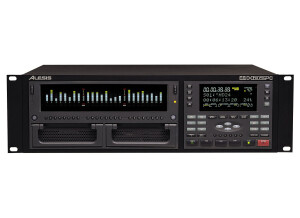
    Digital and analog It records onto hard disks (40, 80 gb or more), 2 hot-swappable caddies. 16 bits and 24 bits / 44.100 and 48.000 Khz (there's a more expensive 96.000 version, too) It can take all sort of mics, but consider a preamp for +48V. 8, 16 and 24 simultaneous tracks in groups of 8 only. UTILIZATION Relatively easy setup but it's better to study it before the session. Nothing replaces your mileage! No effects nor internal sounds, it's a recorder, period. The user's manual is downloadable and clear enough. SOUNDS The converters are good, if you consider their value for money. The same goes for the transparency. Good dynamic response, but not enough because it depends on all the hardware you use with it (microphones, preamps, etc.). For example, a digital recording + Berhinger ADDA 8000 preamp (yes, yes!) + Audio Technica AT 2020 mics (indeed!) + ART wordclock (absolutely!) + good cables and connectors = excellent results to record acoustic sounds. Different strokes for different folks, depending on your budget. OVERALL OPINION I've been using it for about five years. There's simply no equivalent in terms of value for money and the number of tracks-functionalities. Awesome sturdiness and reliability. The Fireport is pretty effective to make relatively fast track transfers. A good competitor to soundcards in terms of reliability. Small capacity hard disks (40 gb) are more reliable. The removable hard disk caddy system us very handy. Consider connecting your gear via the wordclock BNC, it's very stable. In conclusion, it's a good hardware unit that you can optimize choosing adequate hardware. The HD 24 can be rack mounted. Don't skimp on the quality of the cables and connectors (multicore, adat, bnc, etc.).

  • moosers's review

    Alesis' The Wedge is a mini reverb effects device that is designed to sit on top of your desktop. It's an older unit, but still sounds good and is quite easy to use. It's quite compact and features an easy to use interface without too much clutter at all. It's digital reverb here and isn't rackable as it's more or less a portable device. UTILIZATION Using the Alesis The Wedge couldn't be much simpler. You can scroll through the presets with the toggle wheel or make your own. It's got four sliders for the controlling the level of reverbs and also has a series of buttons for programming, storing, and further controlling the effects. I've never had a look at a manual for The Wedge, nor do I think one is really necessary. SOUND QUALITY While not incredible sounding, Alesis' The Wedge still sounds quite good and has some very useful reverb. It's got pretty much the full spectrum of different types of reverbs on here, or at least I didn't notice any major ones missing. The studio I work at has one of these on hand, although I didn't discover it until recently as it was kind of hidden in our back closet. It's definitely not the most up to date piece of gear, but still has worth and sounds good. Perhaps if we didn't have a real plate reverb it would see a bit more use. OVERALL OPINION Alesis' The Wedge is a great way to get some nice sounding reverbs in a compact device at a cheap price. For most, it's probably going to be more efficient and effective to get a nice reverb plug-in, but this is going to be cheaper. I'd check it out if you're able but it's not that readily available, so most will be taking a shot in the dark buying it. More times than not it'll be worth it, but I'd rather have a nice plug-in myself...

  • moosers's review

    The Alesis MasterLink ML-9600 is a two track hard disk recorder designed for a variety of purposes. The studio I work at has one of these in one of our smaller rooms for printing final mixes to CD for the most part. The MasterLink ML-9600 will take up two spaces in a traditional rack casing and consists of connections for both analog and digital inputs and outputs, and has both XLR and RCA jacks for each. The front panel has a good amount going on, as there's a ton you can do with the ML-9600 that I haven't delved into yet, including on board signal processing. You can burn CD's with this at either standard 44.1 kHz/16 bit, or at higher resolutions up to 96 kHz, 24 bit. It's a great mastering tool as you can even do fade in and outs as well as other trimming and cutting for mastering purposes. The signal processing it has on board includes compression, limiting, equalization and normalization. You can also save playlists and store up to 30 hours of stereo tracks right on the internal drive. Basically the Alesis MasterLink ML-9600 is just about the most up to date CD recorder you'll find, combing older methods with the newest technology available. While most home studio owners probably won't have a need for the ML-9600, in professional studios like the one I work it, it can be very useful for getting mixes ready for mastering and beyond. They're no longer making the ML-9600, so I'm not sure exactly what kind of price these command on the used market or how it compares to a newer model if there is one. However, the Alesis MasterLink ML-9600 is a very powerful CD recorder and is one you should know about if you're in the market for something like this.

  • moosers's review

    The Alesis MicroVerb is a compact reverberation box that can be used in the studio or on the stage. I've only used this little reverb box in the recording studio for getting some quick verb, but it's certainly suitable for any sort of use. There are a number of different version of the MicroVerb, but this review is for the original. We have one of these in one of the smaller studios in the studio complex where I work, and it's already hooked up to the patch bay so I don't know the connections in the back since I haven't had a need to hook it up. It isn't rackmountable exactly, as it takes up about a third the size of a single rack mountable space. UTILIZATION The configuration of the Alesis MicroVerb is quite simple. There isn't much to using it at all, as it only has a few different parameters to work with. This simple make up is the reason I like using it for getting a quick reverb sound, as otherwise I don't find it to be incredibly useful. There are a number of modes to choose from, including a variety of large and small reverb room sizes, two gate reverbs, and a reverse reverb mode. It also has parameters for input, mix, and output. A manual isn't needed, although I haven't seen one so I can't speak to how well it's put together or not. SOUND QUALITY While not the most impressive sounding reverb out there, for a small compact box with a good amount of different sounds, the Alesis MicroVerb gets the job done just fine. I don't think that I would use it for printing any reverb, but I use it a lot just for getting a quick sound to listen to in the studio and then later I'll print reverb with the real plate reverb that we have. I like the larger room reverb sounds the best, but the reverse is awesome sounding as well. In general the sounds aren't the most realistic, but are certainly more than useful. OVERALL OPINION The Alesis MicroVerb has become somewhat obsolete, as there are many reverb plug-ins out there that are capable of getting these sort of sounds and better. However, it is a cool little box and I do use it on occasion if I'm looking for this sort of sound. While I must admit that it doesn't make it on too many recordings that I've done, I still enjoy using it as it's nice to have for a quick auxiliary reverb if I don't want to use a plug-in or I'm in a room that doesn't have a plate reverb. All in all, while I can't say I'd recommend buying one, the MicroVerb is a cool little reverb that will still see some use out there...

  • moosers's review

    The Alesis MicroEQ is a simple, single channel parametric equalizer that can be used in any situation where you'd want to use some equalization. The connections that the MicroEQ has are XLR for both your input and output. It does require a wall wart power supply, which is kind of a pain. It isn't really rack mountable, but it takes up a 1/3 of the size of a single space rack, so I guess you could fit three of these within a space in a traditional casing, but I have not done so. UTILIZATION The Alesis MicroEQ is definitely as basic of a parametric equalizer as you'll find. If you know how to use a basic parametric equalizer, you know how to use the MicroEQ. It's got a knob for your overall input level, as well as three bands of equalization. The three bands have double tiered knobs, with frequency and gain parameters for each. Each also has a button for setting the Q (bandwidth), but you've only got two settings to choose from there. Lastly, there's a bypass button. The manual is complete for the MicroEQ, but not necessary. SOUND QUALITY The sound quality of the Alesis MicroEQ is about average. It can certainly equalize your sound if you know how to use it, but definitely doesn't have the cleanest overall quality. While it does the job just fine for most applications, it can be somewhat noisy at times. I can't really complain too much about the overall sound, but at the same time it isn't a piece of gear that blows me away with it's sound. For basic jobs it's adequate, but I'd probably only use during mixing rather than tracking. I can't say that the MicroEQ sounds too much better than some of my EQ plug-ins. OVERALL OPINION This day and age, I'm not sure that home studio owners need an outboard parametric equalizer like the Alesis MicroEQ. I think that nowadays if you're going to have outboard gear that it should sound immaculate and certainly better, or different than plug-ins. I believe that I can get a clean sound from some plug-ins that I have in terms of EQ, which I'd rather use than this, mostly for convenience purposes. This is definitely cheap enough for anyone who wants an outboard EQ, but definitely try it out before you buy it to see if it would work well for you.

  • FP User's review

    One of the cheapest, easiest, and self explanatary effects processors on the market. loaded w/ 48 effects like reverbs, delays, filters, etc. almost perfect grid navagation system but missing up and left buttons. Price paid: $75 USD UTILIZATION Very easy to use, just use the two arrow buttons to select the desired program on the grid, than the A, B, C knobs adjust parameters. SOUND QUALITY Sound quality is very good, high s/n ratio, clean effects that retain smooth and detailed throughout performance. can accept both line level, mic/instrument through the 1/4" inputs. OVERALL OPINION I feel if they were to include two more navagation buttons for left and up that would make use easier and quicker to use. Other than that the construction is solid, (all metal) and the pots feel very smooth and have a nice amount of resistance on them. I absolutely fell in love with it after half-hour of use. this box provides all that i wanted in effects and more. And retailing for $150 or less in many places this may just cut it as the cheap alternative to the Pioneer EFX-500. Originally posted on FutureProducers.com Posted by: Unknown ( 6-, 2003)

  • « amazing rack for the money »

    This rack is wonderful, I would recommend always using an FX loop with this, or a Main In. I run this quadraverb PLUS with my strymon timeline into the fx loop of my AXE FX 2, it sounds amazing. through an amp it'd sound good but it'd be way better with an fx loop ( it could be noisy in front of an amp) I use chorus strings sounds, taj mahal, ballad snare, echo from the left/right, velocity-reverb. Resonator, ring mod, and sampling are super cool too. I use it as a lo-fi slowdive, ride, verve sound. Now I have an PCM 70 rack with the timeline in the fx loop of the axe fx. But now with the timeline I put it on feedback loop/send/return, and hook up the quadraverb on just two flange types, one slow metallic one that sync with the delay repeats on the timeline, and a fast rotary one that syncs fast/sound fluttery/trippy. I also use the sampling and then use my delay loop as well for some really layered tones. the sample is quick so you can make a cool loop that repeats, and then the timeline make more advanced loops over it. then I have my PCM 70 for all the quality reverb/delay sounds. The lexicon is more cocteau twins u2 high fidelity, Pink Floyd from that era. The alesis is more lo fi, the verbs/delays are great, but ultimately, it is not my main go to anymore. But it is a good option in the feedback loop, and as a secondary lo fi unit.

  • « Waiting for it to ship! »

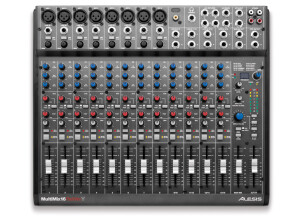
    The MultiMix 16 is a mixer that has 16 channels and built in effects, it connects to a computer via USB connection and is also an audio interface. There are a lot of knobs on this unit and with the price I didn’t expect it to be as good as it was. I had a chance to use this, and see another artist do a demo on it at a music conference in Tennessee not too long ago. It immediately caught my attention from watching him use it. UTILIZATION This is a great interface to have at home and for on the road because it is well built and it has great inputs. The microphone inputs are phantom powered and there are XLR inputs that each of their own gain controls. Each channel also has its own multiband EQ and some of them have sweep-able and parametric midrange. The effects process will allow the user to add some much needed effects to their audio but they are not the main selling point of this unit. So far they have decided that this unit will come with a copy of Cubase LE software to work with and it will be compatible with both Mac and PC computers. They didn’t seem extremely confident though that it was only going to come with Cubase LE. SOUNDS The EQ seemed to be pretty good and the unit did not generate any hissing noises. OVERALL OPINION Unfortunately you cannot purchase this and receive it yet, you can pre order it and you will be among the first to get it when they actually announce a release date but for some reason they have not announced it yet. I have it pre ordered directly through Alesis and I will be patiently waiting for the release o it. So far after having a short amount f time with it, I feel like it is really worth the money. I was able to pre order it for 300 dollars (though I am not sure if that will be the final price of it or not yet).

  • « 250 + effects »

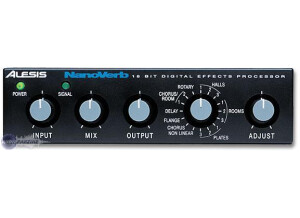
    I have been using the Alesis Nanoverb for a few months now after purchasing it for under 100 dollars. You will get way more than your money’s worth with this unit. It has over 250 effects (reverb, and delay’s). It is a very small unit that can be taken with your from venue to venue or even for home use if you want it to be. There is also a foot switch insert (you will have to buy a foot pedal though because it doesn’t come with it) for a hands free work flow. 2 Analog inputs and 2 Analog outputs all in this little device that ways about a pound or close to it. You can’t rack this unit but it is small enough to fit into almost any small gig bag that you might have. UTILIZATION Everything with the NanoVerb is very easy to use, there wont be any manuals needed and you can start using it right away. SOUND QUALITY I have used the NanoVerb and seen it used on a number of different instruments in a live setting. I love the way it sounds on horn instruments because it adds that little extra bit of color that any musician will hear. I don’t really use it for voice because I don’t feel like its that effective when used for voice. The LED meters could be a little better and more accurate but that’s what I expected when getting a less than 100 dollar device. OVERALL OPINION The value of the Nanoverb for the price that it cost is incredible , you really can ask much more out of it. With all of those presets and a sold colored sound, you will find yourself using the Nanoverb more and more as you become use to how it will sound. I am happy that I spent the 100 dollars on this small device, and I would do it again any day. I was very surprise on how good it sounded and worked. It’s a simple solution if you need some reverb for your set up especially a “live” set up.

  • « Good for vocals »

    The Alesis AM62 is a condenser Microphone that comes in a case. I used this microphone a few times here and there back in 2010 but I am not 100 percent for sure as to when it came out. You get a shock mount and XLR cable with it, it is a large diaphragm microphone that can be used for vocals and even some instruments. I really didn’t like the instrument sound when using it with this microphone. I was more impressed with the vocals range of the microphone rather than the instrument. It has a switch able -10db pad and a low frequency roll off switch as well. All of the specs of the microphone are well rounded and very appealing but as I stated I wasn’t too happy with the instrument recording quality. I have heard much better or out similar microphones. I would keep this microphone for recording, I am not too sure how it would perform in a live setting because I never tried it. OVERALL OPINION Overall, the microphone is pretty good and I only had one complaint with the sound of instrument recording. The vocals recorded pretty good and had a nice warm sound to them. I didn’t purchase this microphone out of my pocket and I don’t think I would have because I didn’t stick out enough for me. But using it for a few recordings was ok as long as I was recording vocals. The price of this microphone is a lot different now then it was when it first came out. So for the price it cost now in 2012 its worth the buy! I have seen them go for dirt cheap online recently and there are still a lot of people getting rid of them for a very low price. But I wont be getting one because I am still in search of a affordable instrument microphone that I can have at home and this wasn’t it.